When you purchase through the links on my site, you support the site at no extra cost to you. Here is how it works.
When it comes to multi-effect plugins, they collapse an entire rack of processing decisions into one window and then hand you modulation, sequencing, or randomization so the processing never sits still. That last part is what actually matters, because a chain of static effects is just a chain of static effects no matter how many of them you stack.
With that being said, I would like to share with you the ones I think genuinely earn the “instant inspiration” label instead of just having a big effect count on the box. Some are built around a visual graph you patch by hand, some around a step sequencer firing effects per sixteenth, and a few around one macro knob that moves twenty parameters at once.
I will talk about these plugins specifically: granular playgrounds, sequenced FX racks, lo-fi mangling suites, multiband modular hosts, and a couple that basically turn into performance instruments once you map them to a controller. At the end of the day, the architecture matters more than the effect list, so that’s what I focused on.
1. Lunacy BEAM 2
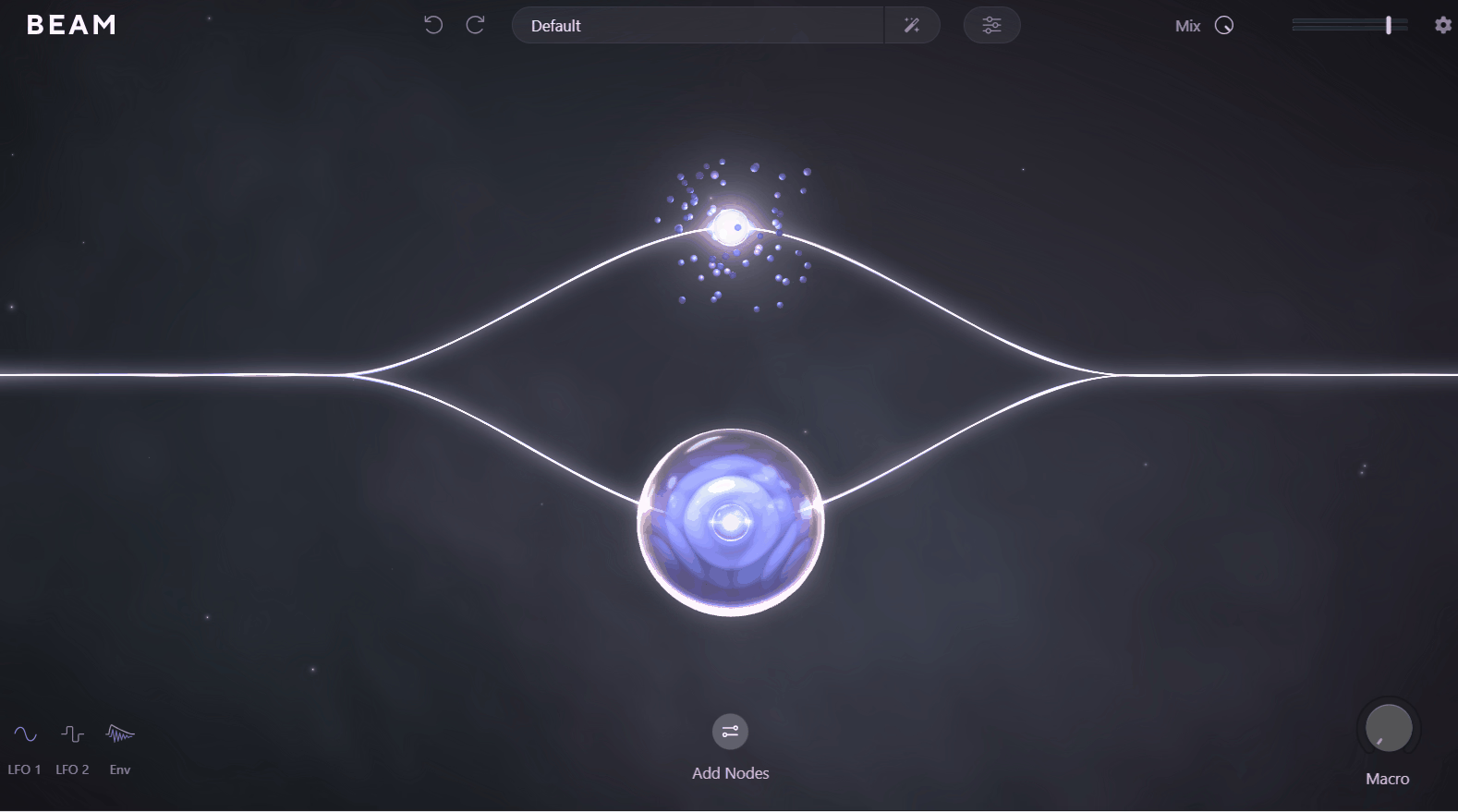
Visual patching used to mean opening a full modular host and committing an afternoon to it, which is why the interactive audio graph at the center of Lunacy BEAM 2 feels like such a shortcut. You drag effect nodes onto a canvas, wire them where you want them, and actually watch the signal split and recombine.
Up to six parallel paths run at once, and serial and parallel arrangements can coexist inside the same patch. To me that’s the real separator from a conventional fixed-slot layout, because a fixed chain forces ordering decisions the graph simply lets you sidestep.
- Dynamic Graph
Effect layouts get built by dragging nodes into an interactive visual audio graph, with endless serial and parallel combinations supported and up to six parallel paths running simultaneously. I like how quickly you can audition a completely different routing without rebuilding anything, since moving a node is one gesture instead of a full chain teardown.
For instance, when you’re working on a pad that needs both a clean granular layer and a heavily filtered parallel path, you wire both from the same source and blend them visually. In a fixed-slot plugin you’d be committing to one order and hoping it was the right call.
What stands out to me is that the graph makes signal flow legible. You can look at a patch you built three weeks ago and immediately understand what it’s doing, which honestly isn’t true of most modulation-heavy plugins.
- Standalone Effects
Every BEAM effect loads on its own outside the modular environment, and I think this is one of the more underrated additions in version 2. When a mix session only calls for one specialized processor, launching a whole patching workspace to reach it is friction you don’t need.
Because of that, the same Grains, Filter, Space and Haze engines end up in sessions where I’d never bother opening the full plugin. I found that this alone changed how often I reach for it, since the barrier to entry dropped to about the same as any single-purpose effect.
- Space Convolution
The Space node handles convolution reverb through a curated impulse library, and 200+ impulse responses ship with it covering everything from conventional halls to synthetic textures. Version 2 contributed 80 new impulses across tonal, dispersion and noise blur categories.
- Preset Generation
Beyond the factory library, there’s a built-in generator that assembles fresh patches using Lunacy’s own probability algorithm.
- Modulation System
LFOs, an envelope follower and a macro control all assign by drag and drop, and version 2 added a third LFO with more than 20 new shapes plus sidechaining. A curve editor lets you draw custom shapes with grid snapping and quick edit tools.
2. Baby Audio Transit 2
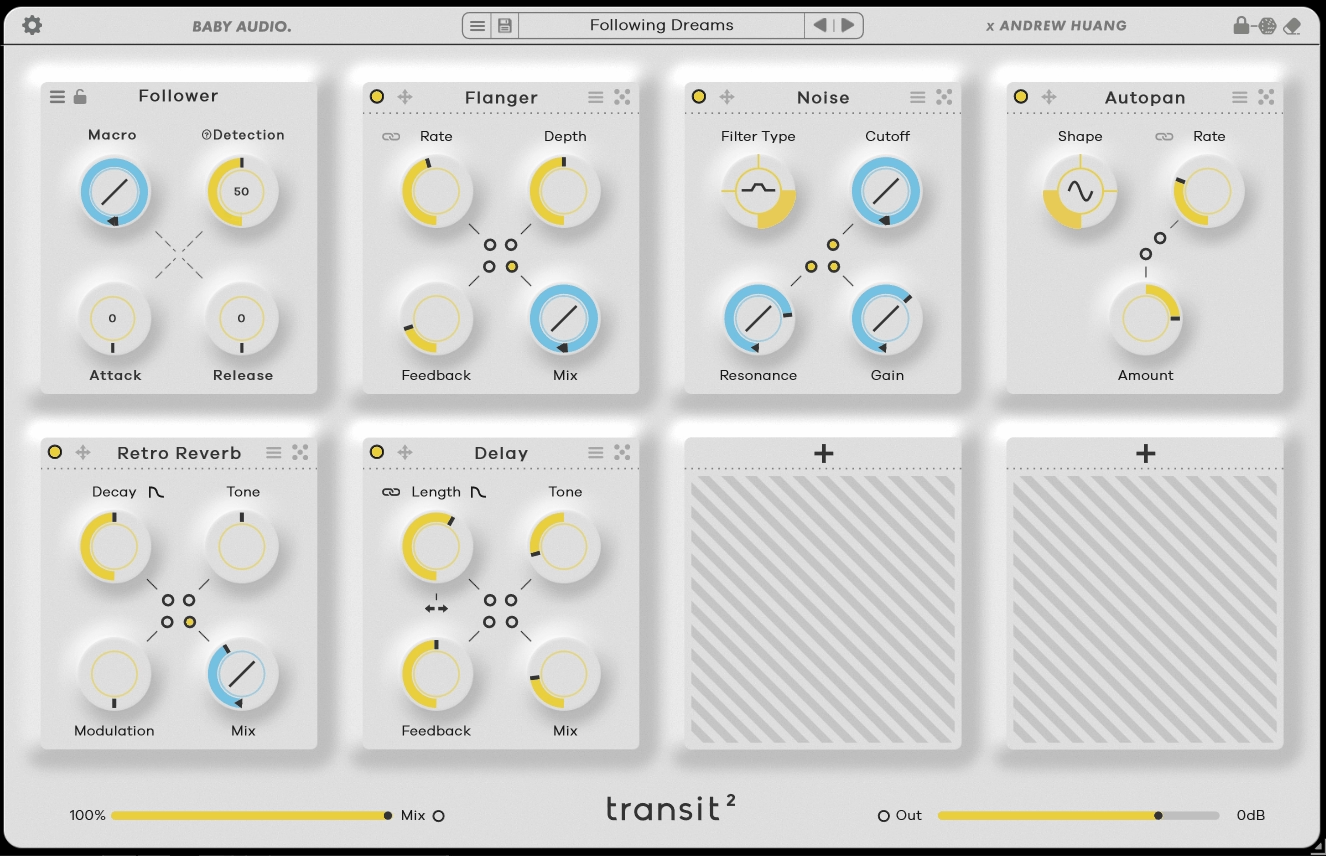
Building a two-bar riser the traditional way means three tracks, four plugins and a stack of automation lanes for maybe six seconds of audio. Collapsing all of it into one plugin and one knob is the original premise of Baby Audio Transit 2, developed with Andrew Huang, and version 2 widened it considerably.
Where the first release focused almost entirely on transitions, this one works as a general mix-motion tool. There are eight slots in the chain, the first holding one of six motion modes and the remaining seven each holding an effect from a pool of 28 modules.
- Six Motion Modes
Macro, LFO, Follower, Sidechain, Gate and Sequencer all live in the same browser, and each one animates the identical effect chain in a completely different way. If you would ask me where the real value sits, it’s that you can build a chain once and then transform its character by swapping the motion source instead of rebuilding anything.
For example, a chain of filter, reverb and degradation reads as a classic transition sweep under Macro, then becomes rhythmic pumping under LFO, then turns into something that breathes with your drums under Follower. Same modules, three different musical results.
I would recommend spending time with Sequencer specifically, since it’s the mode that pushes the plugin furthest from its transition roots. It brings range, pendulum and loop options along with an amount control, which gives you patterned motion instead of a single sweep.
- 28 Effect Modules
The pool spans modulation, degradation, vintage color, reverb, delay and multiple filter types, plus a synth oscillator and a noise generator for building sweeps out of nothing at all. Version 2 contributed ten new ones: Warp, Loop, Reverser, Speaker, EQ, Analog Chorus, Shifter +, Mod Filter, Retroverb and Compressor.
- 838 Presets
The library totals 838 presets including the ones carried over from version 1, built by Andrew Huang alongside designers like Venus Theory and Zardonic, with 469 of them new to this version. That’s a lot of ground covered.
- Range And Slope
Most parameters carry a halo-style Range setting defining a minimum and maximum, so a modulated control travels between values you choose instead of sweeping the full span. Slope controls then give each parameter its own ramp curve.
I think this is the feature that separates Transit 2 from a simple macro plugin. Because the slopes differ per parameter, one macro gesture produces syncopated movement where the filter opens early, the reverb swells late, and the degradation kicks in only at the top of the sweep.
I think this is where most people underuse it. Leaving everything on a linear slope gives you a transition that sounds like a plugin doing a transition, while staggering the curves gives you something that sounds arranged.
3. AIR Music Technology Flavor Pro
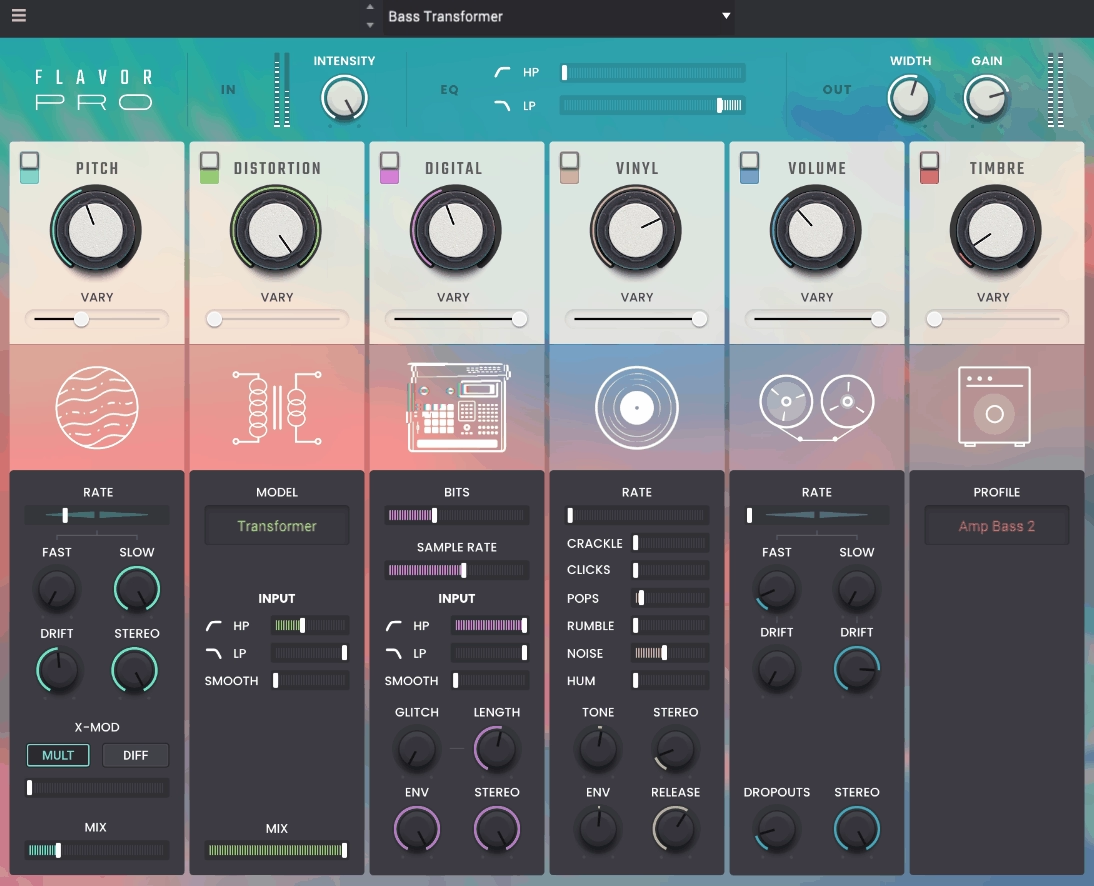
Lo-fi processing gets treated as a single effect far too often, usually a bitcrusher with some noise printed underneath it. Flavor Pro approaches it as six separate modules instead, each one modeling a different reason old gear sounds the way it does.
You’re dealing with pitch flutter, tape saturation, tape dropouts, distortion, drift into 12-bit and 8-bit sampling, and vinyl rumble, hum, pops and crackle. Splitting those apart matters because the wobble of a worn tape machine and the aliasing of an early sampler are unrelated artifacts that people habitually lump together.
- Wobble And Flutter
Pitch instability from degraded tape machines and vinyl players gets modeled with dedicated controls for Rate amount, Fast/Slow speed, Drift, Stereo Width, X Modulation and Mix. The X Modulation parameter is the one I’d single out here.
- Nine Saturation Models
Analog warmth, noise and distortion come from nine models including Tube, Speaker, Vinyl and Synth emulations, each with HP/LP filtering and its own Vary control. I like how the filters are built into the module itself.
- Sampler Emulation
Dedicated bit crushing and sample rate reduction controls handle the 12-bit and 8-bit territory, recreating the character of classic Akai MPC and S Series samplers and extending into VHS and cassette. Smooth, Glitch, Length, Envelope and Stereo parameters sit alongside them.
I would say Glitch and Length are what make this feel like actual sampler behavior instead of generic downsampling. They change how the material breaks up, not just how coarse it gets, which is a distinction most lo-fi plugins never bother with.
- Vinyl Character
Rumble, hum, pops and crackle are all separately controllable, so you can dial in surface noise without the low-frequency rumble, or the exact opposite.
- 100 Presets
The factory library holds 100 presets built by AIR’s engineering team, spread across the vintage sampling spectrum. Right off the bat they work as a map of what each module contributes.
I mean, with six modules that all interact, understanding the plugin by reading the manual is slower than just clicking through presets and watching which controls moved. That’s how I learned it, anyway.
4. iZotope Stutter Edit 2
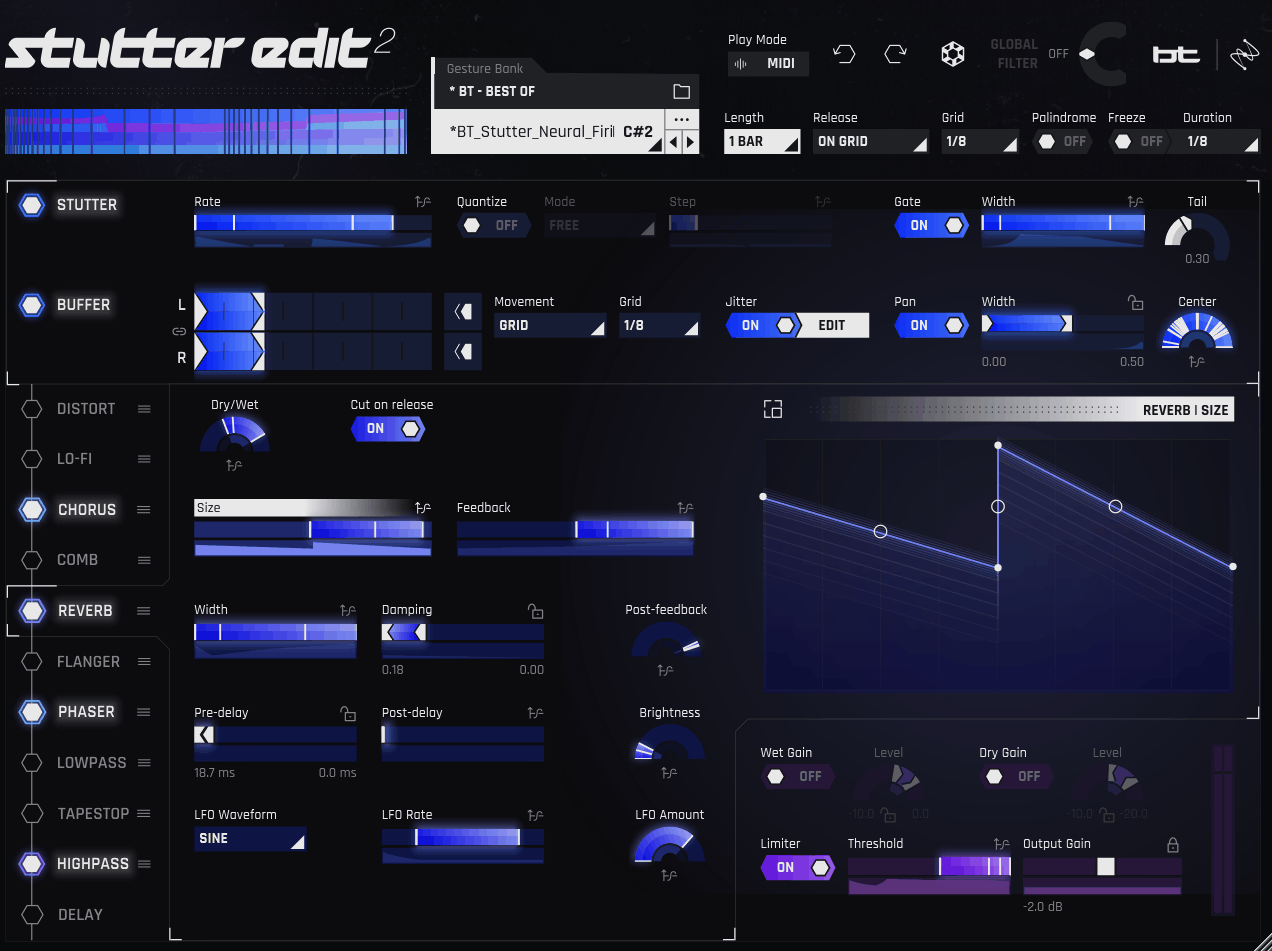
Slicing, nudging and quantizing your way to a convincing stutter by hand costs you the thread of whatever you were actually working on, and Stutter Edit 2 treats stutter editing as something you trigger instead of something you edit.
The plugin is a playable effect, meaning nothing happens until it’s triggered. I think that distinction changes how you work with it entirely, since it responds to performance instead of sitting in the chain processing continuously.
- Auto And MIDI Triggering
Auto mode fires the loaded Gesture with one button and no routing at all, while MIDI mode turns the plugin into something you play from a keyboard. The MIDI path includes a help system that detects your DAW and walks you through setup step by step.
- Time-Variant Modifiers
Every parameter has its own TVM curve, which is a programmable envelope controlling how that effect behaves across the duration of a Gesture. You set a Range with the sliders, and the curve determines where inside that range the parameter travels moment to moment.
- Curve Editor
Any knob or slider opens into the Curve Editor, where motion runs in tempo with your session instead of relying on DAW automation. 12 pre-made curves ship with it when drawing your own isn’t where you want to spend the afternoon.
What I like about it is that everything stays inside the plugin. Drawing filter sweeps, pumping reverbs and lo-fi blends in one place means your DAW automation lanes stay clean and the whole Gesture travels with the preset.
- Effects Suite
11 effects can move in time with the mix, and version 2 introduced Reverb, Comb and Chorus modules alongside a two-band Distort. Combining aggressive distortion with pitch-bent reverb and auto-pan inside one Gesture is where it stops sounding like a stutter tool.
- Stutter And Buffer
The core engine chops audio to the beat or shreds it into pitched material entirely. Percussion turns into pitch, hi-hats stall, and vocals skip, all from the same two control sets.
- Hundreds Of Gestures
The library covers cinematic rises, trap-style rhythmic chops, pop vocal edits, dubstep breakdowns, master-bus fills, sidechains and trance gates, all organized into Banks that auto-map to a MIDI keyboard.
5. Dawesome LOVE 2
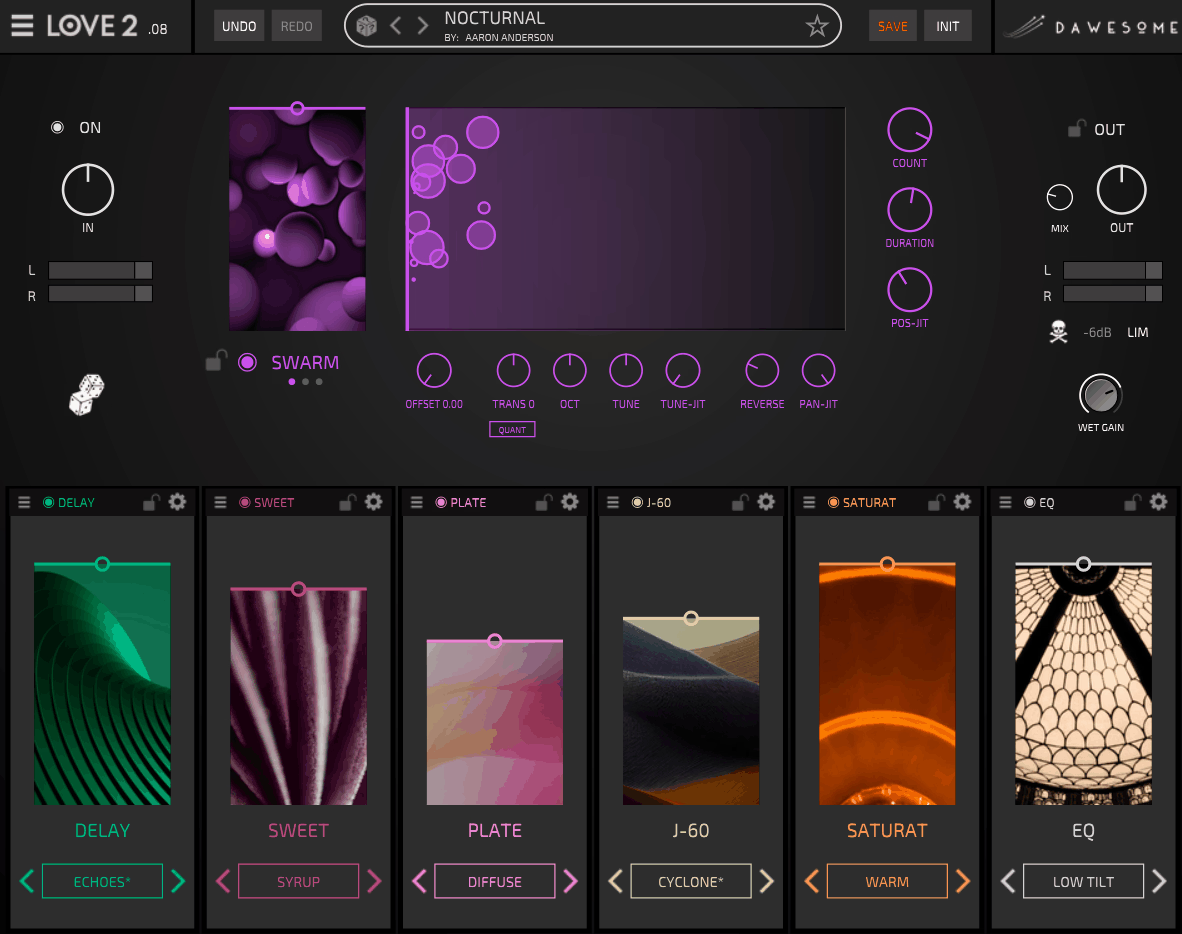
Two sections stacked in sequence describe the entire architecture of Dawesome LOVE 2, and I think that simplicity is deliberate. A musically tuned granular engine sits at the top displaying incoming audio as a scrolling waveform, and six freely configurable effect slots sit underneath it.
The granular section toggles on and off so you can hear exactly what it’s contributing, and its own Mix control blends processed against unprocessed. I like how this makes the granular stage feel optional instead of mandatory, because plenty of the time the effect slots alone get you where you’re going.
- 20+ Curated Modules
The collection covers color, space and nuance, with more than 15 new modules added over the original’s much smaller pool of six. Each module keeps its own wet/dry balance.
Curated is doing real work as a description here. The pool is deliberately smaller than what a fully modular host offers, and the tradeoff is that combinations tend to sound good by default because every effect was tuned to complement the others.
I’d say that’s the right call for a plugin aimed at instant results. You’re not assembling a setup, you’re shaping a result, and the constrained module list is part of why you get there fast.
- 250+ Presets
The factory library runs past 250 presets, and existing LOVE 1 presets import directly if you’re coming from the original. An expansion from Databroth called AROMA adds 70 more across Ambience, Delay, Motion and Character categories.
The AROMA set is worth mentioning because it leans practical rather than extreme. A lot of the factory content shows off what the plugin can do at its most dramatic, and this collection covers the subtler treatments you’d actually put on a vocal in a mix.
- Granular Texture Engine
The engine breaks audio into micro-textures that bloom and swirl, and it’s musically tuned so the resulting particles stay in key with the source material. Vocals thicken into something choir-like, static synths open up, and simple sustained notes start moving on their own.
I find that the difference becomes obvious on material that has nowhere else to go. A single held pad is boring by definition, and running it through the granular stage turns it into something with internal motion that you’d otherwise have to program by hand with LFOs.
6. BEATSURFING CHEat Code
Producer collaborations on plugins usually amount to a preset pack with a name attached, and I’m not gonna lie, that’s what I expected here. This one went further.
The plugin came out of a long exchange between BEATSURFING and Che Pope, whose credits include The Miseducation of Lauryn Hill and work with Dr. Dre, Eminem, A$AP Rocky and The Weeknd.
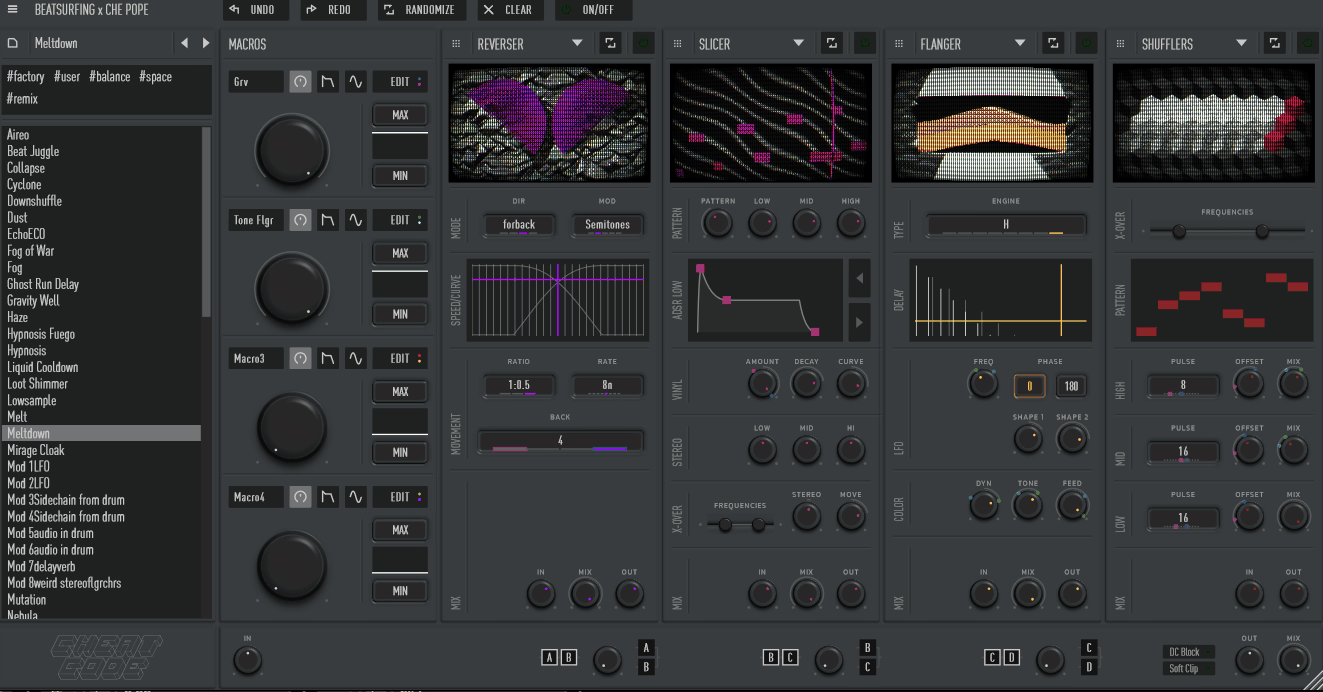
What you actually get in CHEat Code is 16 effect engines feeding four interchangeable module slots.
The routing between those slots is the genuinely unusual part, and it’s the thing I’d point at if someone asked what separates this from every other multi-FX box.
- 16 Effect Engines
Granular synthesis, warped delays, rich modulation, rhythmic slicing and textural processing each carry a distinct signature, with four running concurrently. The delay selection alone runs deeper than most dedicated delay plugins, covering a multitap, two granular variants, a fractal delay and a manual tap delay.
Beyond that you’re getting multiband distortion, reverb, a reverser for instant halftime and backward melodies, a chorus, a flanger, a multiband buffer shuffler, sample rate reduction, a rhythmic pitch shifter and an autopanner called Spin.
- Fluid Routing
Most multi-effects make you choose between series and parallel. This one puts that choice on a continuous control, so a centered knob sits exactly halfway between the two and blends both paths dynamically.
I like how this turns routing itself into a sound design parameter. Blending both configurations at once produces results neither pure setup reaches, and being able to sweep that balance while audio is playing is something I hadn’t seen implemented this way before.
For instance, when you’re running a granular delay into a multiband distortion, the series arrangement gives you distorted grains while parallel gives you clean grains sitting next to distorted source.
- Performance Widget
Momentary effect throws and touch-sensitive automation returns capture live performance behavior inside a DAW session. You hold the effect in, release it, and it springs back.
7. Lunatic Audio Narcotic
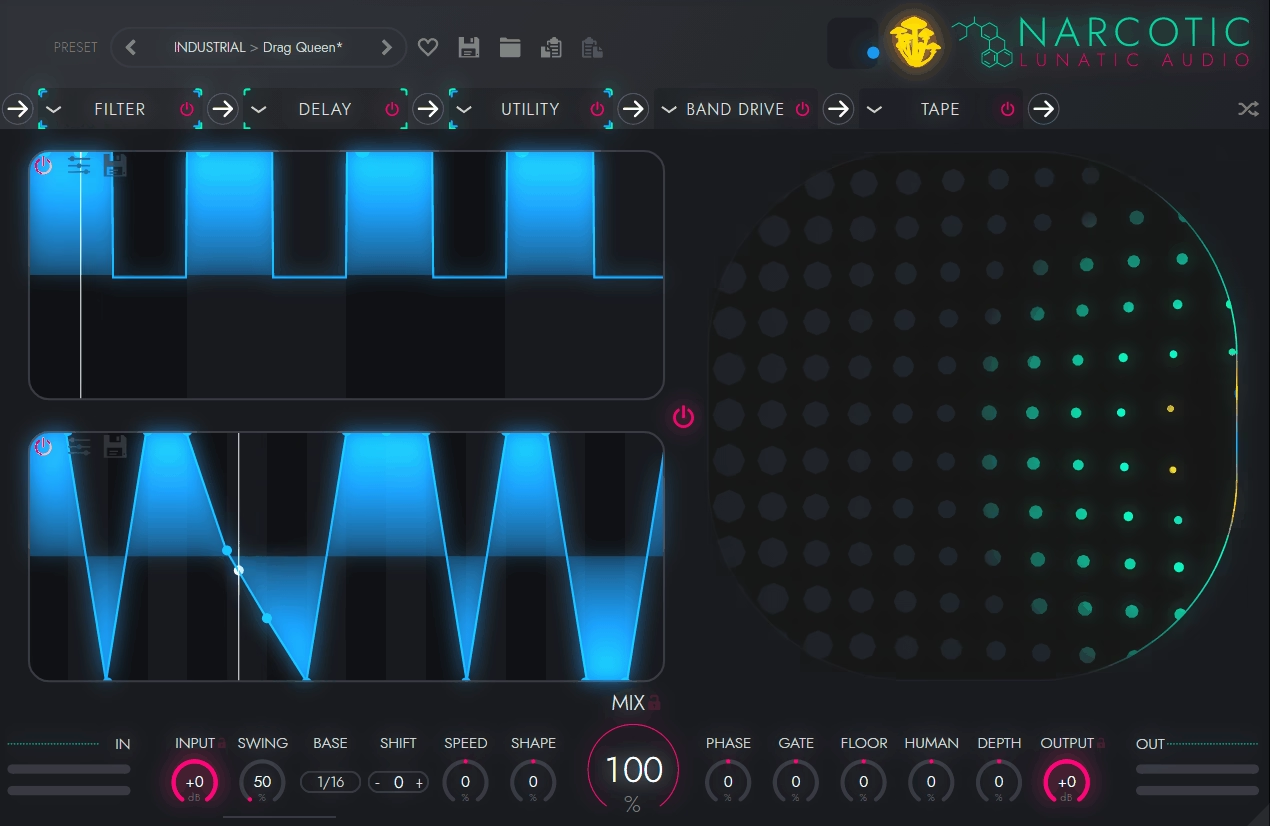
Step sequencers on effect plugins usually get applied globally, gating everything at once, which is about as blunt as modulation gets. 32 effects units and a genuinely different approach to that problem are what put Lunatic Audio Narcotic on this list.
Six of those 32 chain in series at any one time, drawn from filters, distortions, delays, reverbs and a fair number of stranger processors. The part that separates it comes down to how the modulation is scoped.
- Per-Parameter Sequencing
Every individual parameter on every active effect carries its own independent step sequencer, and each one is separately customizable. Not one sequencer driving the plugin, but a dedicated one per parameter.
From my perspective this is the plugin’s whole argument. It lets you build motion where the filter cutoff, the delay feedback and the distortion drive are all moving on different rhythmic patterns simultaneously, instead of pumping together the way a global sequencer forces them to.
I find that the difference becomes obvious after about four bars. Global gating reveals itself quickly because everything breathes in unison, while independent per-parameter patterns keep generating new combinations as the cycles drift against each other. Precise, repeatable modulation is something you can actually program here rather than approximate.
- 32 Effects Units
The collection spans filters, distortions, delays, reverbs and a range of more unusual processors, with six chaining in series at once. Some of them are genuinely odd.
I’d say that’s the point. The conventional entries are there to shape whatever the strange ones produce, and running a bizarre processor into a well-behaved filter and reverb is what turns an experiment into something usable in a track.
8. Output Movement
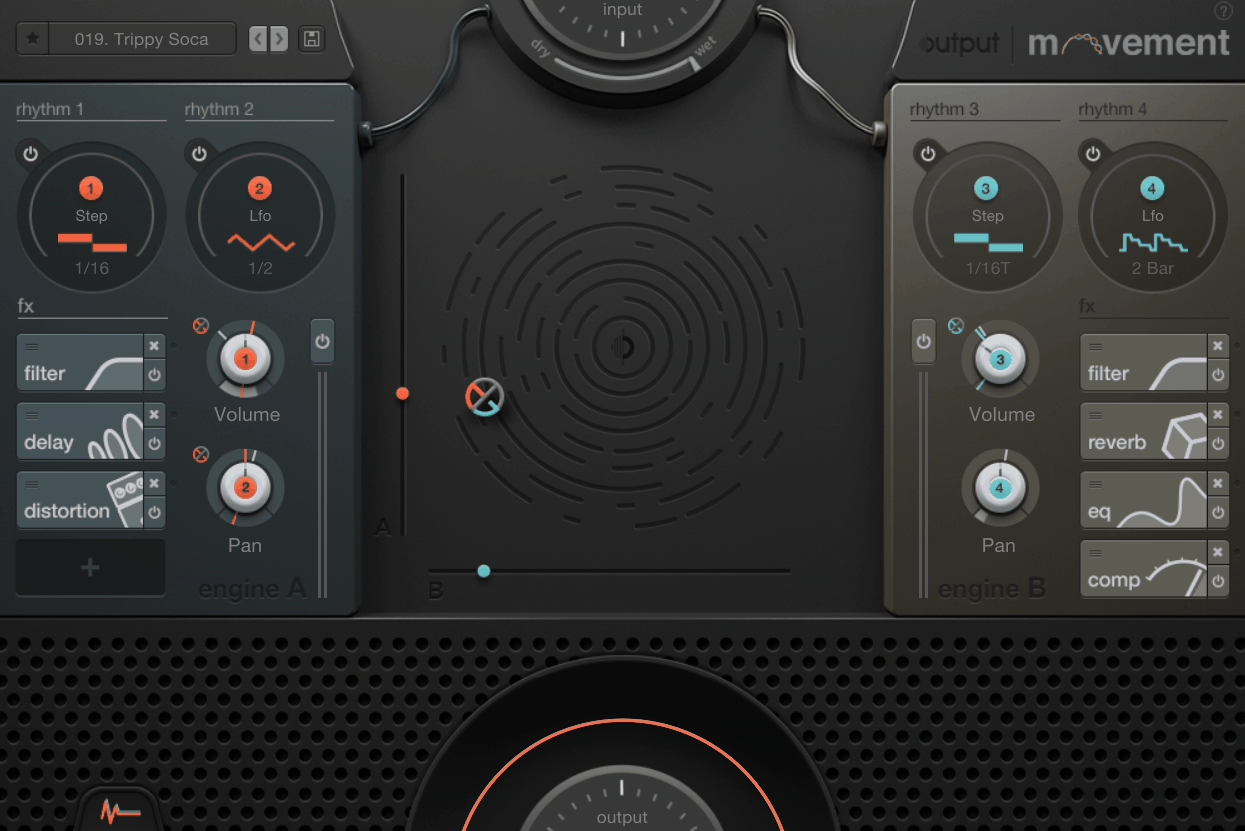
Trance gates, sidechain pumping and LFO-driven filters are three techniques most people rebuild from scratch every single time. Output Movement merges all three into one rhythm processor, then applies them to a full effect chain instead of a single parameter.
The plugin runs two engines, each with its own rhythm modulation source and four effect slots, giving you four rhythm generators total. Each source operates as a step sequencer, an LFO, or a sidechain input.
- 76 Modulatable Knobs
Any of the plugin’s 76 knobs accepts modulation by drag and drop. You can put a random LFO on a filter cutoff, use a drum loop to modulate delay time, or run a 5/8 pattern on a drive knob.
I find that assigning modulation this directly changes how willing you are to experiment. When routing takes one drag instead of opening a matrix and picking from dropdown menus, you end up trying things you’d never bother setting up otherwise.
For instance, modulating delay time with an external drum loop is a technique I’d never program manually because of the setup cost. Here it’s about as much effort as dragging a file, and the pitch artifacts it produces are genuinely useful.
- Step Sequencer Depth
The step sequencer builds up to 32 steps you create manually, generate randomly, or pull from presets, with adjustable shape and swing plus a Rate setting controlling how often steps advance.
What I like about the shape control is that it moves you away from binary gating. Steps can be square and gated or curved and gradual, so the same pattern reads as a hard trance gate or a soft breathing motion depending on how you shape it.
9. Excite Audio Lifeline Expanse
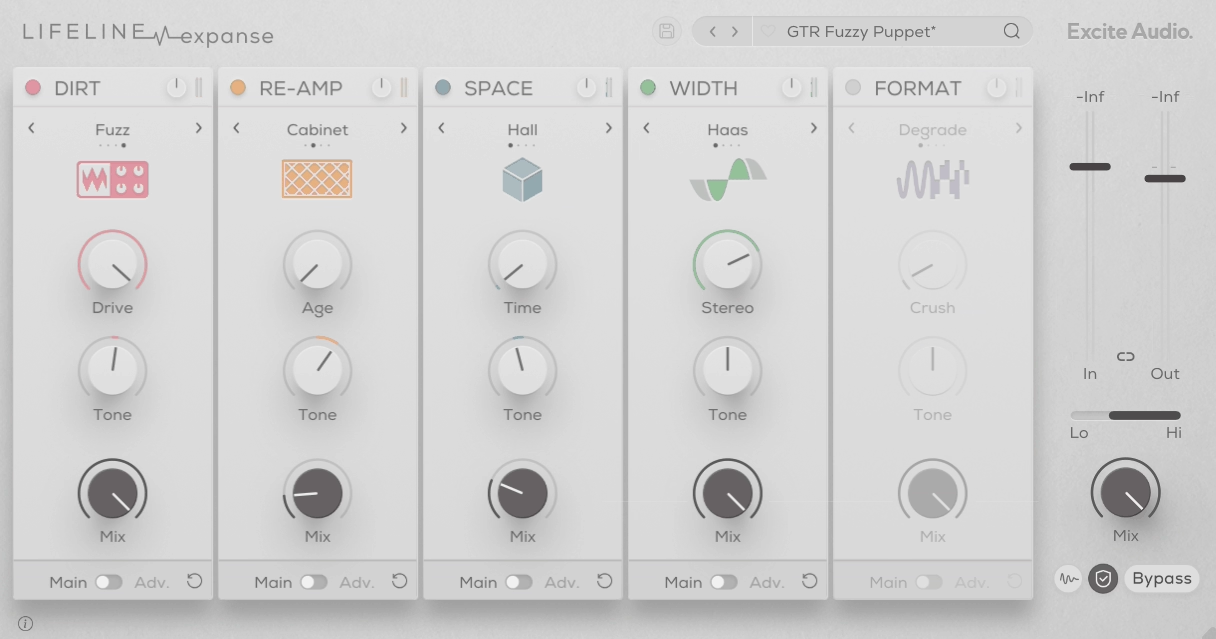
Re-amping has real cost attached, since you need the amp, the mic, the room and the time to record it all back. Simulating that chain in software is a well-trodden idea, but doing it as five rearrangeable modules is much less common.
Excite Audio Lifeline Expanse builds around Re-Amp, Space, Width, Format and Dirt, with the signal chain reordering freely. Each module carries four algorithms for 20 total, with a main page holding three controls and an Advanced page underneath for the deeper settings.
- Five Reorderable Modules
Re-Amp, Space, Width, Format and Dirt arrange in any order, and the order genuinely changes the result. Running Dirt before Space gives you a distorted source sitting in a clean room, while flipping them distorts the reverb itself.
Those are two completely different sounds from the same two modules, and I like how quickly you can compare them. On the other hand, the modules are always connected in series, so there’s no parallel option here, which is worth knowing if that’s how you like to work.
- Multiband Processing
Each module splits into three bands for gain and effect amount, keeping distortion and re-amping off whichever frequencies you want untouched. On a bus this is what makes aggressive settings usable at all.
You can fry the mids while leaving the low end and top intact, and I’d say that’s the feature separating this from a plugin you’d only ever put on individual elements. Without band splitting, this much drive on a full mix turns to mud almost immediately.
If you would ask me when this becomes most valuable, it’s on drum buses. Adding character to the body of a kit while keeping the transients and the sub clean is exactly the kind of thing multiband handling solves.
- 250 Presets
The full version ships 250 presets, and every module is also available as an individual plugin when you only need one piece of the chain.
Overall, I’d describe this as a plugin for applying a general character or gelling a bus, not for movement. There’s little in the way of modulation here, so if you want motion or precise EQ edits you’d look elsewhere. What it does, though, it does very well.
10. Soundtoys Effect Rack
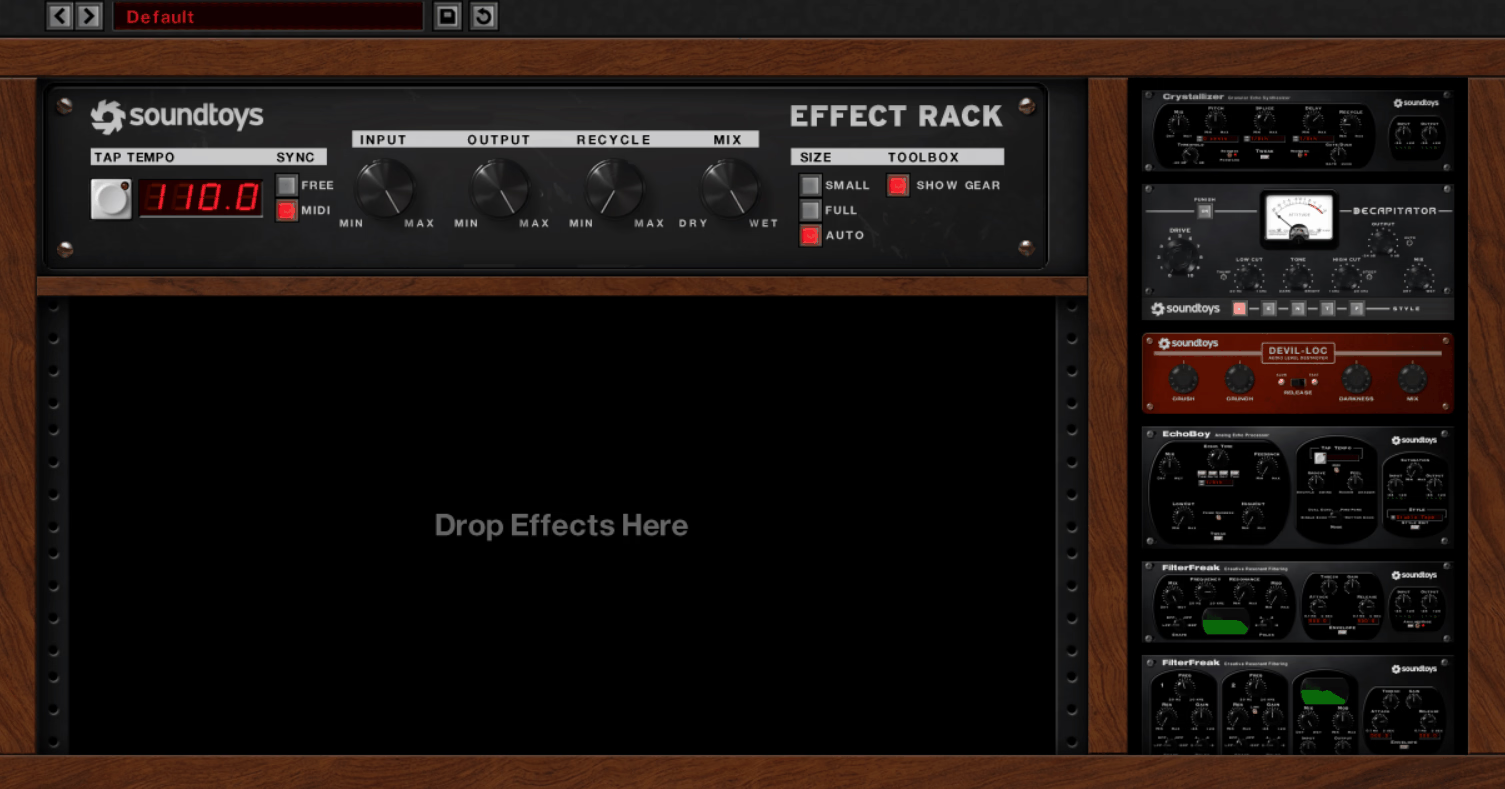
Anyone who owns the Soundtoys bundle knows the workflow problem: five plugin windows open at once, jumping between them to adjust a single chain.
14 plugins live inside Effect Rack, including Decapitator, EchoBoy, Crystallizer, FilterFreak, MicroShift, PanMan, PhaseMistress, PrimalTap, Radiator, Sie-Q, Tremolator, Devil-Loc Deluxe, EchoBoy Jr. and FilterFreak 2. These aren’t filler modules, which is the whole reason it belongs in an inspiration list.
- 14 Included Effects
The lineup spans saturation, echo, filtering, pitch shifting, panning, phasing, compression, EQ and tremolo, all instantiated inside the Rack without separate windows. Building a vocal chain with tube warmth from Decapitator, slap delay doubling from EchoBoy and width from MicroShift takes about as long as describing it does.
What I like about it is that every piece is something people buy on its own merits. Crystallizer for pitch-shifted reverse granular echo and Decapitator for saturation are tools with reputations independent of the Rack, so you’re not trading quality for convenience the way you often do with all-in-one plugins.
- Rhythm Modes
FilterFreak, Tremolator and PanMan each carry rhythm modes that sync to your session, and running all three simultaneously inside one Rack produces remix-style rhythmic movement out of static source material.
This is where the plugin stops being a channel strip and starts being a creative tool, and I’d say it’s the least-explored part of the Rack. Most people load it for tone and never touch the rhythm side, which means they’re missing the half of it that generates ideas rather than polishing them.
For example, running a sustained pad through Tremolator and PanMan on different rhythmic subdivisions, then into FilterFreak on a third, gives you a part that sounds arranged instead of processed.
11. Devious Machines Infiltrator 2
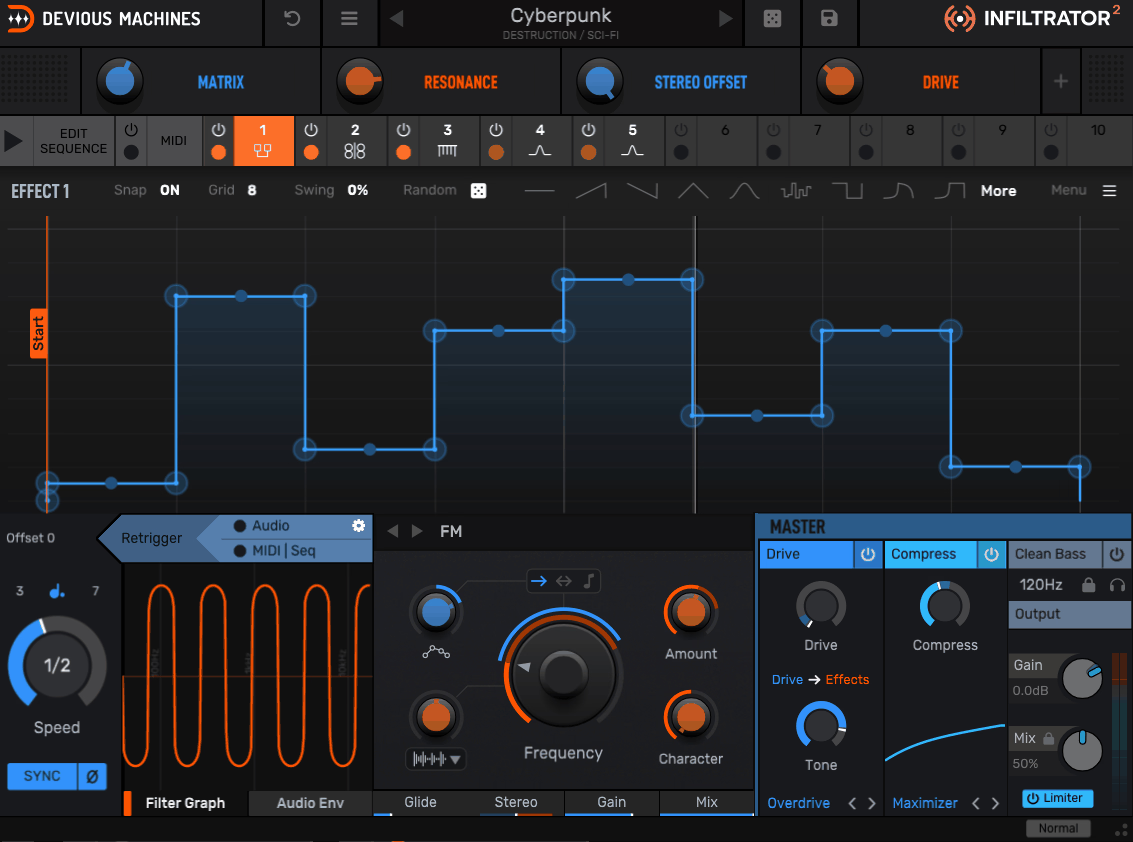
Fifty-four effect modules is a number that should make you suspicious, since breadth like that usually costs you quality. Infiltrator 2 is the exception I’d point to, because several of its modules would genuinely hold up as standalone plugins.
Ten of those 54 load simultaneously, and many carry multiple sub-types inside a single module. Where it separates itself, though, is modulation depth rather than effect count.
- 32-Step Sequencing
Any combination of your ten effects punches in across a 32-step sequencer, with modules activating separately or in groups, and at different speeds if you want. Adding distortion to specific drum hits, applying rhythmic comb or formant filtering, or triggering a looper on individual steps all works from the same grid.
Because modules can run at different speeds, the results avoid the locked-together feel that step-based effects usually have.
- Dual Envelopes Per Effect
Each effect gets two tempo-synced multi-segment envelopes you edit graphically, with eight shape presets, a randomizer, swing and pitch snapping. Curves run in sync with your DAW timeline or trigger as one-shots from audio input level or MIDI notes.
I would say the second envelope is the underrated addition in version 2. Having one curve handling the filter while a second, independently shaped curve handles that same effect’s mix amount gives you behavior that’s difficult to describe and immediately obvious when you hear it.
- Pitch Snapping
Effects with tunable elements, including the pitch shifter and resonant filters, can have their drawn envelope points locked to musical notes. What I like about it is that the constraint survives the randomizer.
So basically you can generate completely chaotic curve shapes, or a Euclidean rhythm, and everything still lands in key.
- Spectral Effects
Fourteen FFT-based effects arrived with version 2, ranging from smooth and beautiful to completely bonkers. FFT processing behaves differently from time-domain effects, and stacking it with the filters produces textures that don’t sound like conventional plugin work.
At first glance the spectral section looks like a side feature next to the filters and distortions. Actually, it’s one of the main reasons to pick this plugin over its competitors, since almost nothing else in this category offers spectral processing at all.
- 1500+ Presets
The library holds more than 1500 presets, categorized and sub-categorized, with macro controls assigned per preset for expressive control. A random button pulls up fresh ideas and dedicated banks come from featured artists.
In my opinion, presets are a vital showcase for a plugin this complex, and a lot of powerful effects plugins ship woefully underserved here. This one doubled an already large library from the first version, and the categorization is what makes that number navigable instead of overwhelming.
12. Sugar Bytes Looperator
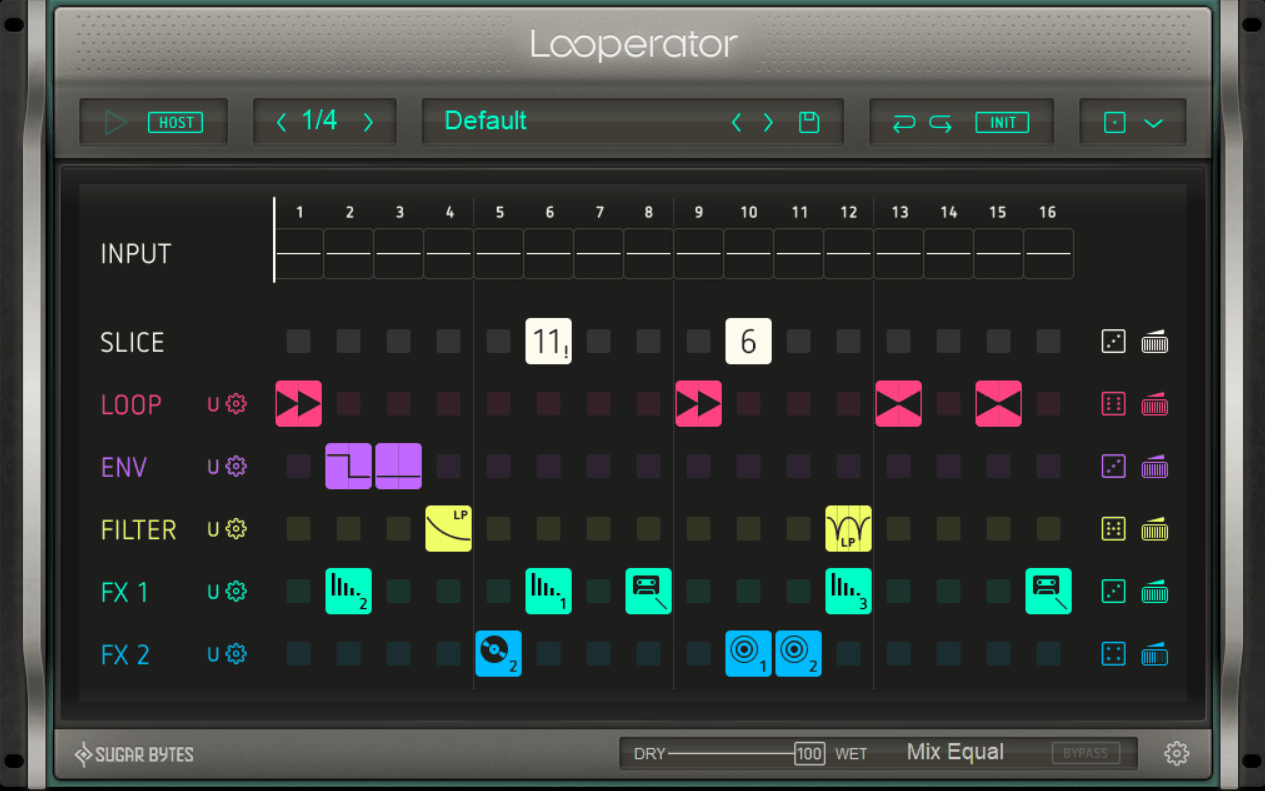
Dropping a flat drum loop into a session and finding it lifeless is a problem Sugar Bytes Looperator solves in roughly thirty seconds, which is a reasonable reason to keep it installed. The concept combines a loop slicer with an effects sequencer, and both halves feed each other.
Incoming audio gets chopped into 16 steps at a resolution of half, quarter or eighth notes, with the sequence running two to eight bars long. Below the slice lane sit five more effect lanes, making six tracks total.
- Six-Lane Sequencing
The Slice, Loop, Filter, Envelope, FX1 and FX2 lanes process top to bottom per column, so each of the 16 steps receives its own stack of treatments. Each step in each lane triggers one of 20 effect or modulation settings, plus four user-configurable slots.
- Per-Step Modulation
Every effect holds five parameters, and each one can be driven by one of 20 selectable envelope shapes, a simple automation-ready dial, an envelope follower, or a randomizer. The user slots let you pick modulation shapes, set start and end values, and constrain them to useful ranges like scale-quantized pitch.
Depth like this inside a single step is what separates it from a plain gate sequencer. I feel like this is the part people don’t realize is there, since the interface looks simple enough that you’d assume the steps are on/off switches.
- Six Randomization Modes
Randomization comes in six distinct modes including Smart, which is algorithmically weighted toward balanced, musically usable output. Combined with MIDI learn it becomes a performance feature rather than just a starting point.
For me, this is one of the most practically useful features in the whole plugin, and Sugar Bytes clearly put thought into it instead of bolting on a random button that fills the grid with nonsense. I’d say it’s the deepest and most controllable randomization I’ve seen from them.
13. Unfiltered Audio BYOME
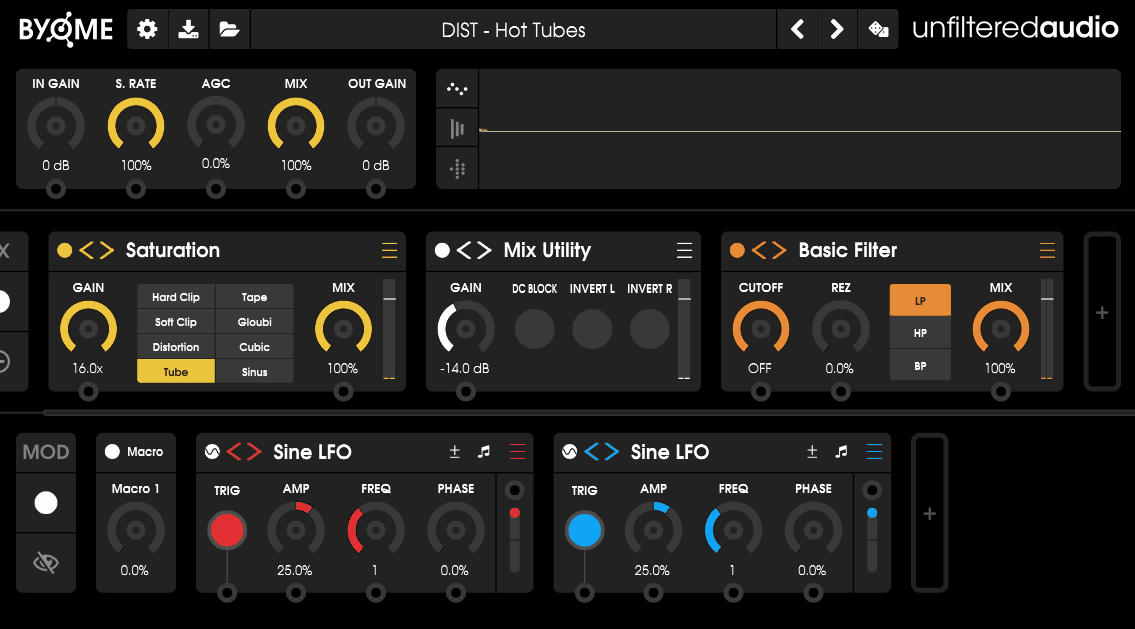
Modular effect environments tend to demand a lot before giving anything back, trading a steep learning curve for depth you can’t get elsewhere. That tradeoff is usually worth it and usually painful.
Unfiltered Audio BYOME, short for Build Your Own Modular Effect, avoids most of the pain by keeping the interface minimal while putting 40+ effect modules behind it. Two lanes structure everything, an effects lane and a modulation lane, and each holds up to 16 modules in any order or combination.
- 16 Module Stacking
Both lanes accept 16 modules each, and duplicates are allowed, which is where things get interesting. Sixteen granular modules stacked together effectively make this Unfiltered Audio’s deepest granular processor, and sixteen randomizers in the modulation lane produce chaos you can actually shape.
I noticed that this “no restrictions” approach is what separates a real modular environment from a plugin with slots. The variety of distortions in particular lets you craft intricate saturation, especially when you apply proper filtering and mixing between the distortion stages.
- Three Reverb Types
Deep Reverb produces massive atmospheric spaces with infinite echoes, Renoun Reverb morphs cleanly between conventional rooms and impossible geometries, and Lofi Reverb carries ten separate algorithms inspired by early electronic music recordings.
Having three genuinely different reverb philosophies inside one modular environment means you can run two at once on separate paths. I love how Renoun handles the transition between plausible and impossible spaces, because sweeping that parameter is a sound design move on its own.
- Modulation Routing
Any modulation source connects to nearly any control, including the controls of other modulators, and the resulting patch cables are visible on screen or hidden with one click.
- Dynamics And EQ
Auto Compressor, Compressor, Limiter and the Noise Gate from G8 all accept external sidechains, and a 3-Band EQ includes a unique Unity Gain feature.
- 400+ Presets
The library passes 400 presets with contributions from Ivo Ivanov of Glitchmachines, including 70+ aimed at futuristic drums and percussion, plus banks from Richard Devine and ignatius. Per-section, per-effect and per-modulator randomization then takes them somewhere else entirely.
I’d recommend starting from a preset and randomizing one section at a time. Starting from an empty patch in a plugin this deep is possible, but it’s a much slower route to something you’d actually use.
14. Kilohearts Multipass
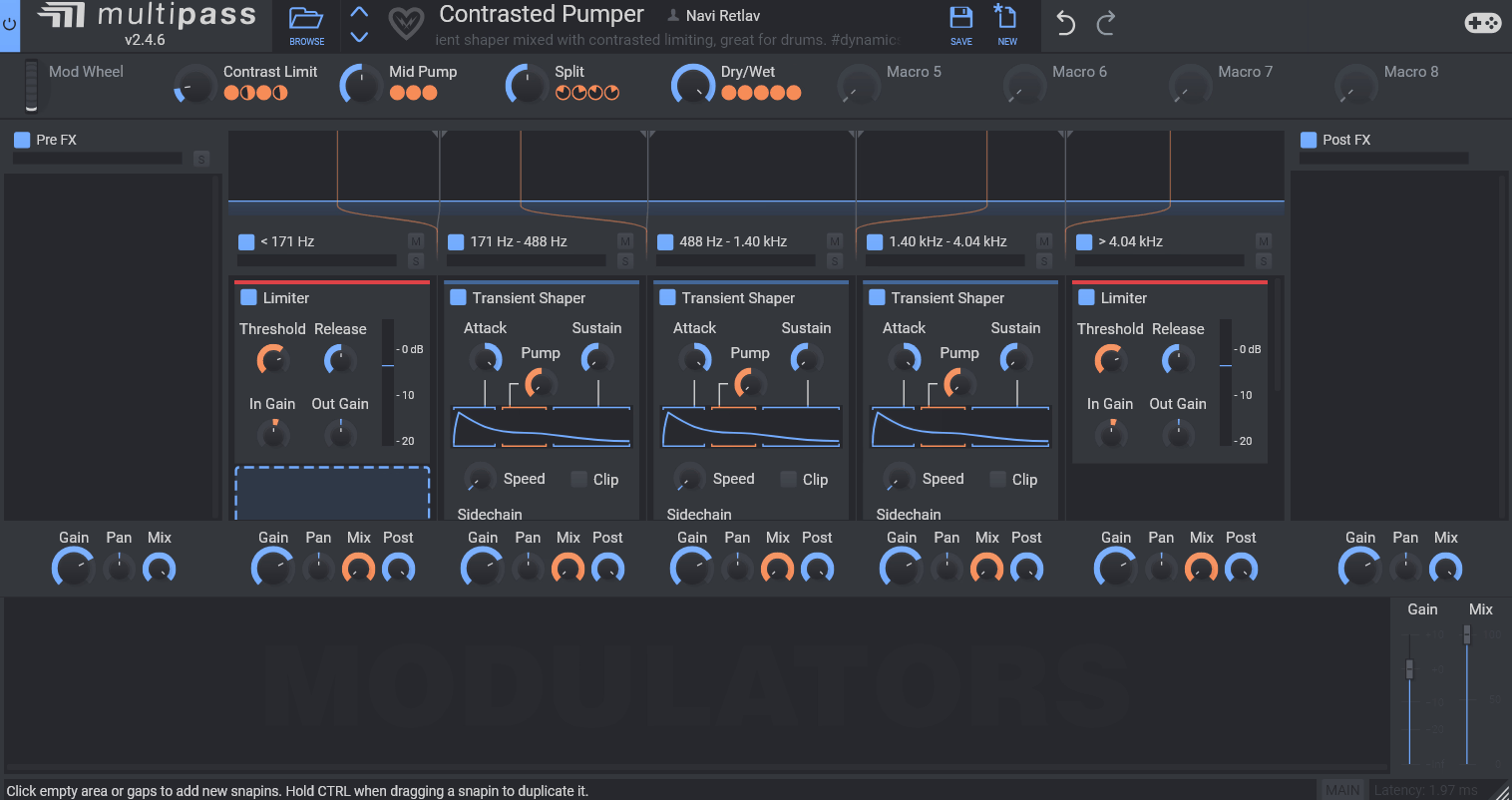
Frequency-dependent processing is where most creative multi-effects stop short, and putting a band splitter at the very front of the signal path is exactly what Kilohearts Multipass does about it. Audio splits into up to five frequency bands, each with its own independent effect chain.
Those chains get built from Snapins, Kilohearts’ modular effect format, and each of the five lanes holds any number of them. A sixth lane on the right applies effects after the bands recombine.
- Five-Band Splitting
The splitter divides audio into as many as five bands, each with Solo and Mute, plus Gain, Pan and wet/dry Mix knobs and a Post control governing how much processed signal continues down the chain.
Wanting distortion on the low end for punch while the highs get gentle compression is a five-minute build here, and every Snapin bypasses individually while you’re auditioning. I like how intuitive the whole layout is, because multiband tools usually look intimidating and this one really doesn’t.
For instance, when you’re working on a bass that needs grit without losing its sub, splitting at around 150Hz and only distorting above that solves the problem in one move. Doing the same thing with separate plugins means duplicating the track and filtering both copies.
- Modular Modulation
Modulators and utilities connect in effectively unlimited combinations along the modulation lane at the bottom of the interface. Precise envelopes and LFOs are available when you need control, and wild randomization is there when you don’t.
The same architecture serves careful multiband dynamics work and deliberate chaos, which I think is unusual. Most plugins pick a side, and this one lets you build a transparent multiband compressor or a rhythmically fluctuating high-end reverb over a distorted, widened midrange using identical tools.

Hey, I’m Vil, I started this site to help you find the best audio plugins covering various categories including synths, pianos, strings, and effect tools of all sorts as well. I pick these plugins based on various criteria so it best matches the actual topic.