When you purchase through the links on my site, you support the site at no extra cost to you. Here is how it works.
Mastering EQ work happens in very small moves, which means the best EQ plugins for mastering are the ones that stay clean and predictable when you barely touch them. What actually matters is fine control over where a band sits, narrow cuts that don’t ring, and consistent stereo behavior so the image stays intact once the curve is in.
Some of these are already sitting on half the mastering screens out there, like FabFilter Pro-Q 4 and AMEK EQ 200, while others such as Tomo Audiolabs LISA and Knif Audio Soma show up far less often outside dedicated mastering circles. I have put all 10 below, plus two free options at the end that genuinely hold up on real masters.
1. FabFilter Pro-Q 4
Pro-Q 4 is nearly identical to Pro-Q 3: 24 bands, mixable filter types per band, and slopes running from 6 dB all the way to 96 dB per octave. I don’t read that as a lack of ambition. If a foundation from 2018 still works this well, redesigning it just to look different would’ve been a worse decision than leaving it alone.
What actually justifies the upgrade sits on top of that foundation, not inside it. Spectral Dynamics is the feature I’d point you toward first, since it’s genuinely the reason to consider moving up from Pro-Q 3 at all, and everything else in the release matters far less by comparison.
- Spectral Dynamics
This extends Pro-Q’s existing dynamic EQ mode by letting you apply expansion or compression to only the frequencies within a band that cross a threshold, leaving everything else in that band untouched. I found this to be more surgical than a normal dynamic band, catching resonances that a static band would smear across the whole range.
That matters a great deal in mastering, where you’re often correcting one narrow problem without touching the rest of the mix.
- Instance List
You can control every Pro-Q 4 instance across your session from a single window, and a later update expanded this to also control any loaded Pro-C 3, Pro-DS, or Pro-G. In a mastering chain built from multiple FabFilter tools, I feel like this turns the whole rack into something closer to one connected channel strip.
- Character Modes
New analog-modeled saturation modes add warmth directly inside the EQ, so you don’t need a separate saturation plugin for everyday coloring. I appreciate how this becomes a genuinely useful shortcut when a master needs a touch of harmonic glue but doesn’t need a full analog EQ swapped in.
- EQ Sketch And Curve Drawing
EQ Sketch lets you draw the exact curve you want directly onto the display, and fractional slope settings, like a 3.3 dB per octave filter, are available for the kind of precision mastering work where a standard whole-number slope doesn’t quite fit. I’d recommend trying this before assuming you need a completely custom filter type.
- Dolby Atmos And Immersive Support
Full immersive and Dolby Atmos functionality is built in with intelligent speaker selection, which matters if any part of your mastering work touches surround or spatial delivery. Not everyone needs this, but I’d say it’s worth knowing it’s there.
2. Pulsar MP-EQ
A parallel passive circuit behaves differently from almost every digital EQ topology out there, mainly because gain doesn’t accumulate the same way when bands are summed instead of stacked in series. That’s the entire design philosophy behind the best passive equalizers built across the last 70 years, tube and transformer stages included.
Pulsar MP-EQ, formerly released as Pulsar Massive, runs its signal through exactly that kind of circuit, complete with custom hand-wound inductors.
Because gains don’t accumulate the way they do in most digital EQs, I noticed boosting several bands at once tends to stay musical instead of turning brittle. That’s the main reason I reach for it specifically on masters that need several small boosts stacked together.
- Fully Parallel Passive Circuit
Every band feeds the output independently rather than in series, so the frequency bands naturally interact and recombine into a more cohesive overall response. To me, this is the mechanism behind why passive EQs like Pulsar MP-EQ rarely sound harsh even at aggressive settings.
- Drive And Dual Transformers
A Drive control adds tube-style saturation, and two optional transformers sit in the signal path, one of them delivering a more pronounced saturation character than the other. Pushing input hard through these stages is, in my opinion, a common mastering move for adding low-end weight without reaching for a separate saturator.
- Mid/Side With Fully Unlinkable Channels
The plugin runs in both left/right and Mid/Side modes, and the channels can be fully unlinked from each other, giving independent control over the mono center and stereo sides. That flexibility is what makes it genuinely useful, if you ask me, for widening a mix’s top end without touching the center image.
- Linear Phase Mode
An optional Linear Phase Correction mode realigns all frequencies after the EQ stage, which is unusual for a passive-style design and preserves transient accuracy that analog phase shift would otherwise smear. I’d say this alone justifies a closer look if phase coherence matters to your workflow.
- Visual Curve Editor And Auto-Gain
A complete on-screen curve editor and spectrum analyzer give you an accurate overview of your changes, and auto-gain compensates output level based on your EQ curve so A/B comparisons stay level-matched. What I like about it is how little manual gain-staging it demands from you.
3. Tomo Audiolabs LISA
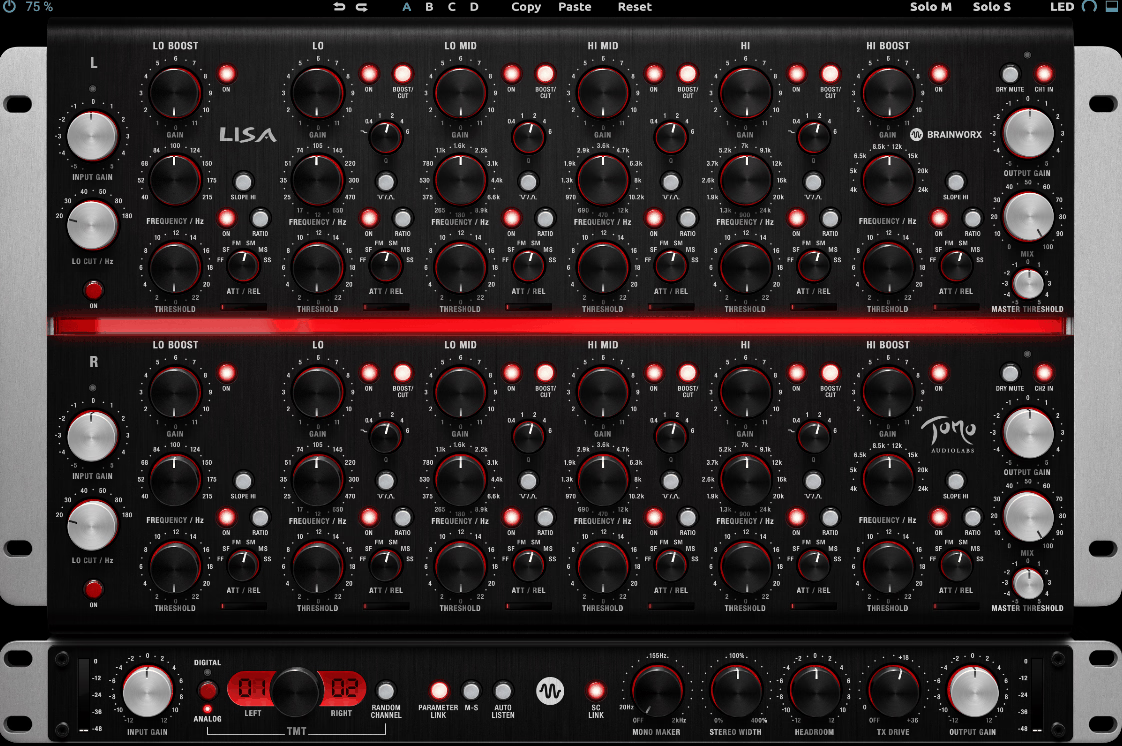
High-end mastering consoles like Sontec and Massenburg get referenced constantly when people describe what a “musical” EQ should feel like, and that’s exactly the territory Tomo Audiolabs LISA is aiming for.
Six dedicated opto-compression cells, one per band, are doing the actual work here, each reacting to the signal instead of holding a static curve. Push a band hard on most dynamic EQs and the shape stays locked regardless of what the audio’s doing; on this one, the amount of cut or boost breathes with the source instead of sitting still.
- Independent Opto Dynamics Per Band
Each of the 6 bands carries its own compression circuit, switchable between compression and expansion, with a program-dependent ratio that averages around 3:1 or a selectable 10:1, both with a soft knee. Because the effect scales with how the audio is behaving, I found extreme settings stay musical in a way a fixed EQ curve simply can’t manage.
- Parallel Circuit Design
Bands are processed in parallel rather than in series, similar to how a mixing console sums channels, which means individual bands can be pushed harder without the cumulative distortion that series-wired EQs build up. This is, in my opinion, part of why LISA is suited to extreme settings that would sound broken on a conventional EQ.
- TX Drive
A digital-only addition, TX Drive lets you dial in more or less transformer saturation and character separately from the rest of the analog modeling. I like how it gives you control over harmonic color without having to touch the EQ curve itself.
- Mono Maker And Stereo Width
Digital-only tools like Mono Maker and Stereo Width sit alongside the analog-modeled sections, letting you fold low frequencies to mono and widen or narrow the stereo image at the output stage. I’d suggest starting with Mono Maker on anything headed for vinyl or club playback.
4. Lurssen Mastering EQ
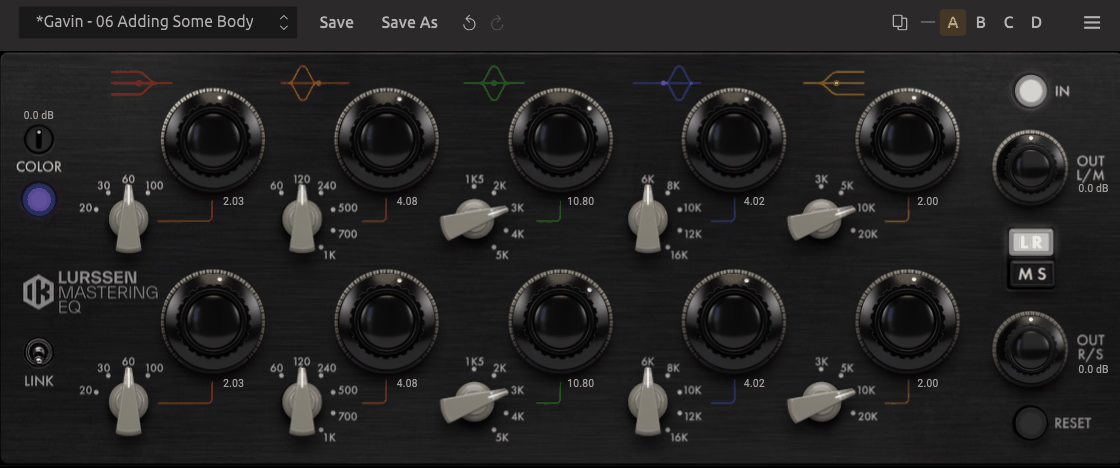
Gavin Lurssen and Reuben Cohen wanted an EQ built entirely around their own sessions, not a general-purpose tool retrofitted for their studio. Lurssen Mastering EQ came out of exactly that request, long before IK Multimedia ever released it to anyone else, which is a genuinely unusual origin story for a plugin you can now buy yourself.
It’s modeled on their own EAR 825Q, a five-band inductor-based valve EQ known in mastering circles for its warmth and unique tonal coloration. That warmth is really the whole reason it built such a strong reputation among mastering engineers long before the plugin existed.
The Lurssen team still uses it on their actual mastering sessions today, and I think that’s worth knowing before you even open the plugin. It tells you the settings inside weren’t guessed at, they’re genuinely what a working studio reaches for.
- Five-Band Inductor-Based Design
The EQ models the interaction between bands the way the original valve hardware behaves, delivering smooth, nuanced curves rather than the more clinical response typical of digital EQs. I found this especially noticeable on the low end.
- Color Control
Here, unique Color knob adjusts harmonic saturation from the modeled preamp section, letting you fine-tune the overall character from cleaner to more harmonically enriched depending on the source. I’d recommend easing into this one, since it can shift the whole personality of a master with a small turn.
- Mid/Side Processing And Parameter Linking
Beyond the original’s left/right controls, the plugin adds Mid/Side processing, adjustable preamp input levels, output controls for each channel, and a parameter linking mode for keeping both channels matched while you adjust. On the flip side, you can unlink everything and go fully independent per channel if a master genuinely needs it.
- Fine Adjustment And Lurssen Presets
Holding Shift before clicking a gain knob lets you make changes as small as 0.01 dB, and the plugin includes seven presets from each of the Lurssen Mastering engineers as practical starting points. I’d say those presets alone are worth exploring even if you end up rebuilding the curve yourself.
5. Knif Audio Soma
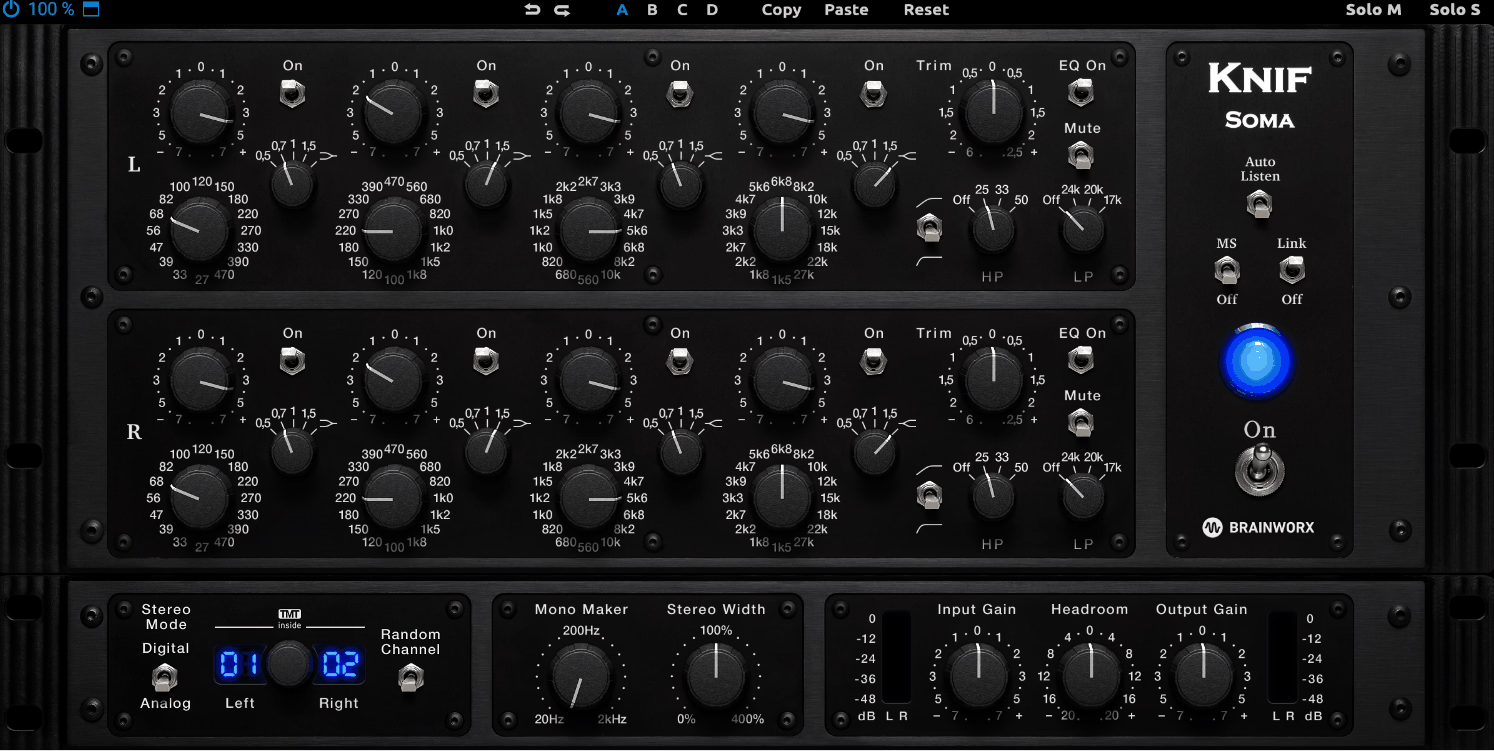
Dial in a bandwidth setting on most passive EQs, and the boost or cut you already committed to quietly drifts as you turn the knob, a limitation baked into the topology itself rather than any single design’s fault. Real Q Adjustment closes that gap entirely, holding bandwidth changes predictable no matter the setting, and it belongs to Knif Audio Soma, the first passive tube EQ built with it.
Designed in cooperation with hardware designer Jonte Knif, Soma offers a cleaner, more restrained tone by default compared to classic passive units like the Pultec. That default cleanliness is really what separates it from most passive designs in this price range.
You can still drive it harder for more color when a track calls for it, and I’m a big fan of that flexibility, honestly. It means Soma doesn’t force you to choose between clean and colored, you get both from the same plugin.
- Real Q Adjustment
This is the plugin’s defining feature, since it lets you change bandwidth without the unpredictable gain shift that plagues conventional passive EQ designs, giving mastering engineers precise, repeatable control that older passive circuits simply can’t offer. I’d say this is the single reason to pick Soma over most other passive-style options.
- Four Stepped EQ Bands
Each channel has four bands with independent bypass and stepped controls for frequency, gain, and bandwidth, using 0.5 dB steps from 0 to plus or minus 3 dB and 1 dB steps beyond that up to plus or minus 8 dB. The stepped design is, from what I can tell, deliberately built for the kind of small, repeatable corrections common in mastering work.
- Independent Headroom And Drive Controls
Separate controls for headroom, input drive, and output drive let you dial in exactly how much of the tube and transformer saturation comes through, from nearly clean to noticeably colored. I like how much range that gives you from one plugin.
- Selectable High-Pass Slopes
The high-pass filter offers a choice between 6 dB and 12 dB per octave slopes, which I think is a small but genuinely useful detail when you need a gentler roll-off than a steep filter would give. It’s the kind of control most passive EQs skip entirely.
6. Brainworx SPL PQ
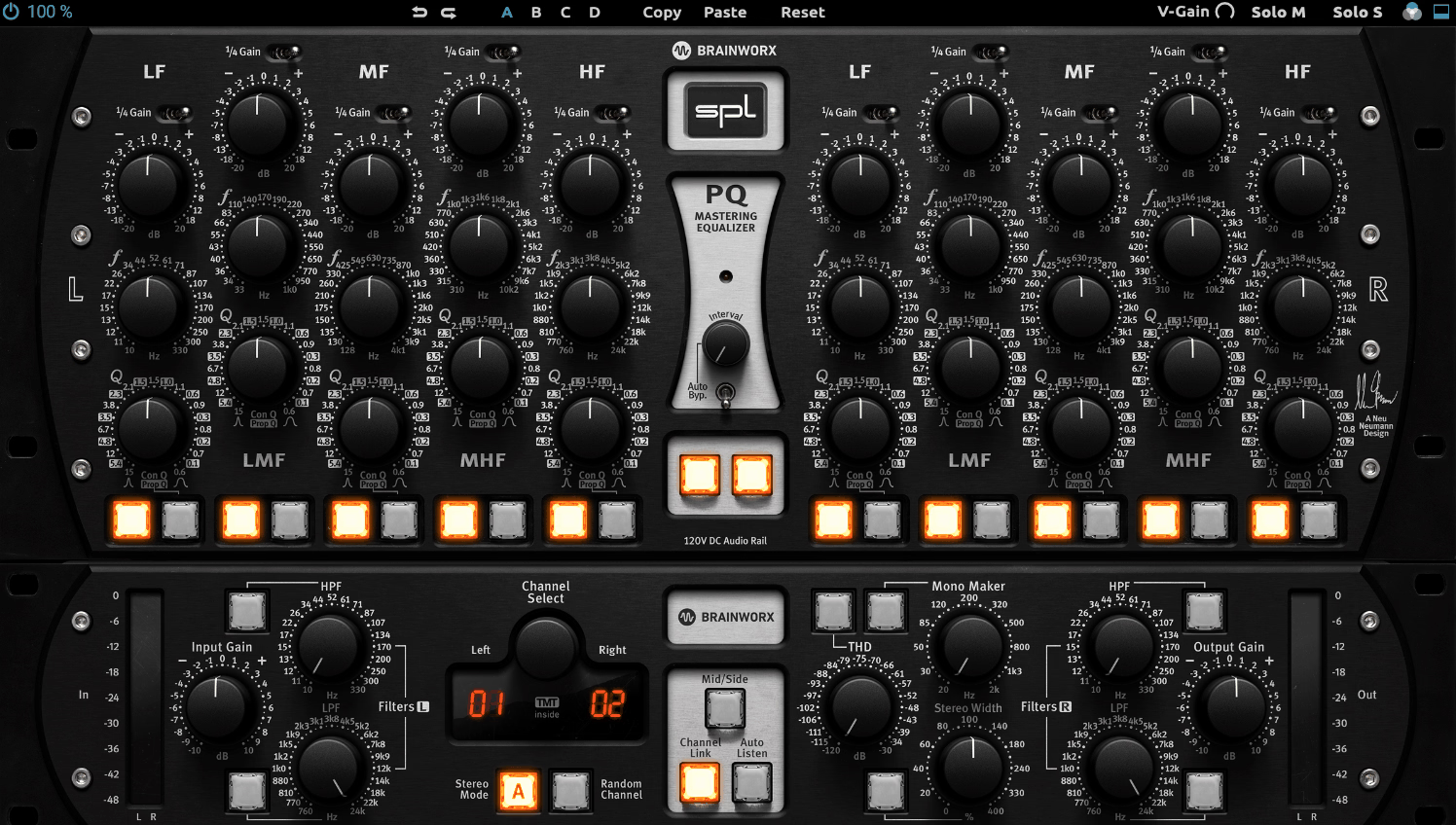
Most analog-modeled parametric EQs lock you into one bandwidth behavior for the life of the session, whichever the designer decided suited the circuit best. Switching between a tight, surgical Q and a wider, more musical one usually means reaching for a completely different plugin.
Brainworx SPL PQ lets you flip between Constant Q and Proportional Q on all five bands with a single button press instead, modeled on SPL’s own 120V rail technology. No other analog equalizer had managed that switch before it.
Proportional Q makes bandwidth scale with how much gain you’re applying, which turns the EQ from a purely analytical tool into something I’d describe as genuinely musical the harder you push it. That musicality is really what earns it a spot in a mastering chain over a purely surgical EQ.
- Switchable Constant And Proportional Q Per Band
Each of the five bands can independently flip between the two modes, giving you a tight, predictable bandwidth for surgical corrections or a wider, more musical curve that opens up as you increase gain. I found myself switching between the two constantly depending on the source.
- 1/4 Gain Switch
This control scales the EQ’s range down from a maximum of plus or minus 20 dB to plus or minus 5 dB, which is exactly the resolution mastering work usually calls for, since most useful moves at this stage are small. I’d recommend leaving this engaged by default.
- Detented Potentiometers
Gain, frequency, and Q can all be adjusted in 41 discrete steps, making settings easy to recall precisely and repeat across sessions, a detail that matters more in mastering than almost anywhere else in a signal chain. To be honest, this is the kind of detail I didn’t appreciate until I needed to match a previous session exactly.
- Auto Listen And TMT
When it comes toAuto Listen function, it solos the effect of whichever band you’re adjusting, and Brainworx’s Tolerance Modeling Technology simulates the natural component variance found in real analog hardware rather than modeling one theoretically perfect unit. I appreciate how that keeps the sound from feeling too sterile.
7. Kiive Audio M5133
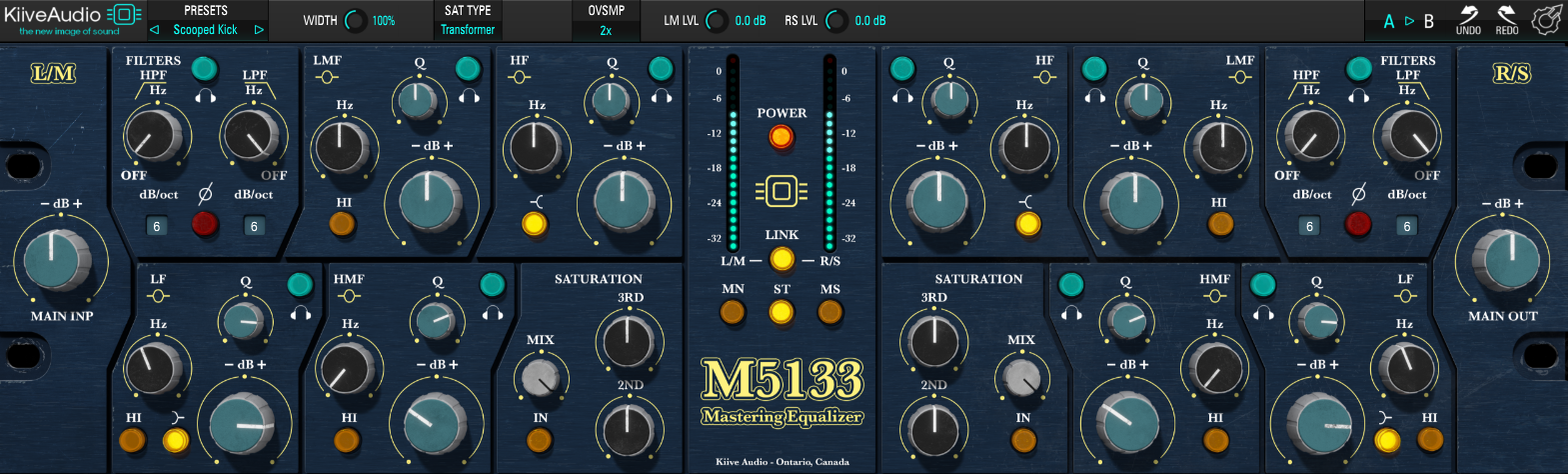
With Kiive Audio M5133, you can dial in a tone that no single vintage unit actually offers, since it blends the best traits from three separate generations of the Focusrite Blue 315 instead of cloning just one revision. Kiive Audio picked those characteristics deliberately, and the payoff shows up in the four-band layout, built strictly for mastering-bus work rather than adapted from something more general-purpose.
- Four Variable Bands With High/Low Filters
Each of the two channel sections carries a four-band parametric EQ with frequency, gain, and Q on every band, plus variable high-pass and low-pass filters that can switch between shelf and peak modes on the outer bands. I found the flexibility here bigger than I expected for a plugin this focused.
- Three Saturation Flavors
A dedicated saturation section offers tape, transformer, and tube modes, each controllable via separate 2nd and 3rd order harmonic knobs plus a mix control, letting you dial in exactly how much and what kind of harmonic content gets added. I like how granular this gets without becoming overwhelming.
- Mono, Stereo, And Mid-Sides Operation
The plugin runs in mono, stereo, or Mid-Sides mode, which covers everything from mastering a full stereo mix to shaping a single element that needs the same EQ character. This versatility is, in my opinion, underrated for a plugin marketed mainly toward mastering.
- Per-Band Listen Function
Every band includes a listen function so you can solo exactly what a given band is doing before committing, which I’d say genuinely speeds up the process of finding the right frequency on a full master. It’s a small addition that saves real time once you’re used to it.
8. AMEK EQ 200
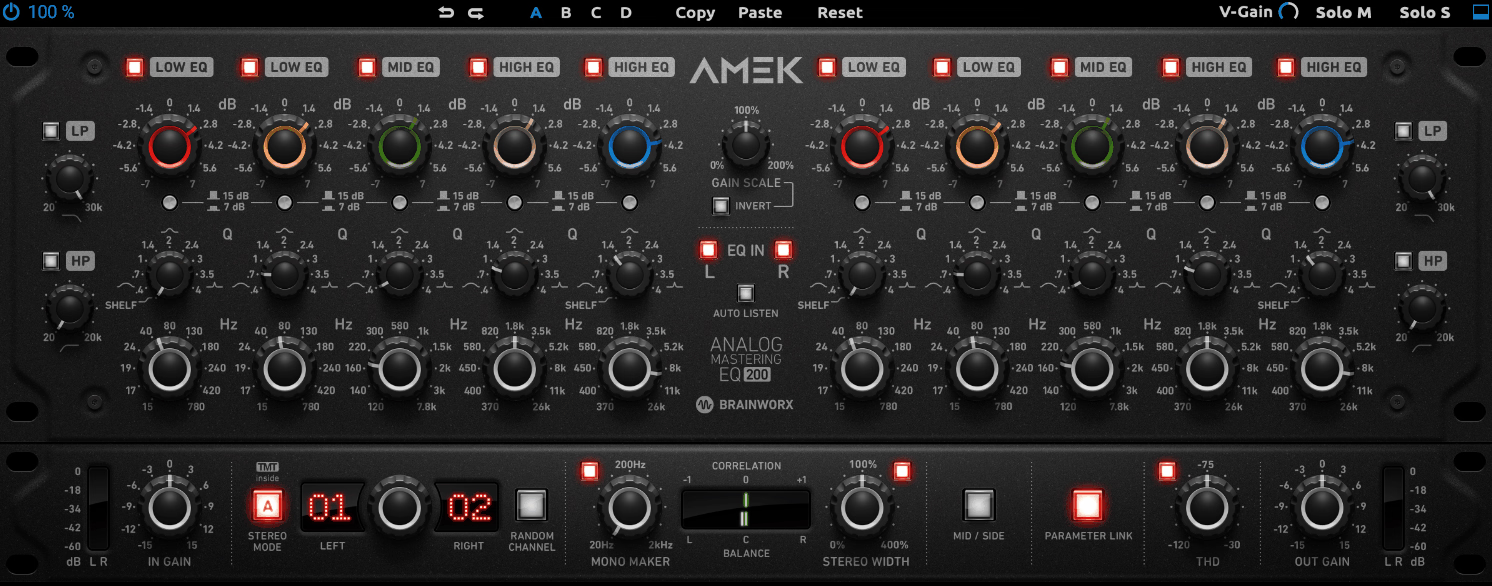
What you’re actually getting with AMEK EQ 200 is a plugin built around an era rather than a single unit, the 1970s and 80s, when engineers George Massenburg and Burgess Macneal effectively invented parametric EQ from scratch.
Brainworx founder Dirk Ulrich drew on his own GML 8200 and vintage Sontec units, personal favorites from his own outboard collection, but the goal was never to clone one specific piece. It’s closer to a family resemblance than a copy, capturing what made parametric control become an industry standard in the first place.
- Five Wide Parametric Bands
Each of the five overlapping bands offers up to 15 dB of boost or cut with adjustable Q from 0.4 to 4.0, and the lowest and highest bands can switch into shelving mode when a broader, gentler curve is what a master needs. From my experience, the shelving option gets used more often than the bell curves in actual mastering work.
- Variable High-Pass And Low-Pass Filters
Continuously variable low and high cut filters run at a 12 dB per octave slope on each channel, giving you control over the extremes of the spectrum separately from the parametric bands. I’d use these before touching the parametric section on anything with real low-end rumble.
- Stereo, Dual-Mono, Mono, And M/S Modes
The plugin operates across all four of these modes, which covers everything from a straightforward stereo master to independent processing of the left and right channels or the mid and side signal. I’d say having all four available in one plugin removes a lot of routing headaches.
- Variable THD
A variable THD control adds a more analog-feeling tone on top of the modeled circuit, useful when a track needs a touch more character than the clean parametric curve provides on its own. I like keeping this subtle unless the source genuinely calls for grit.
9. Lindell Audio EQ825
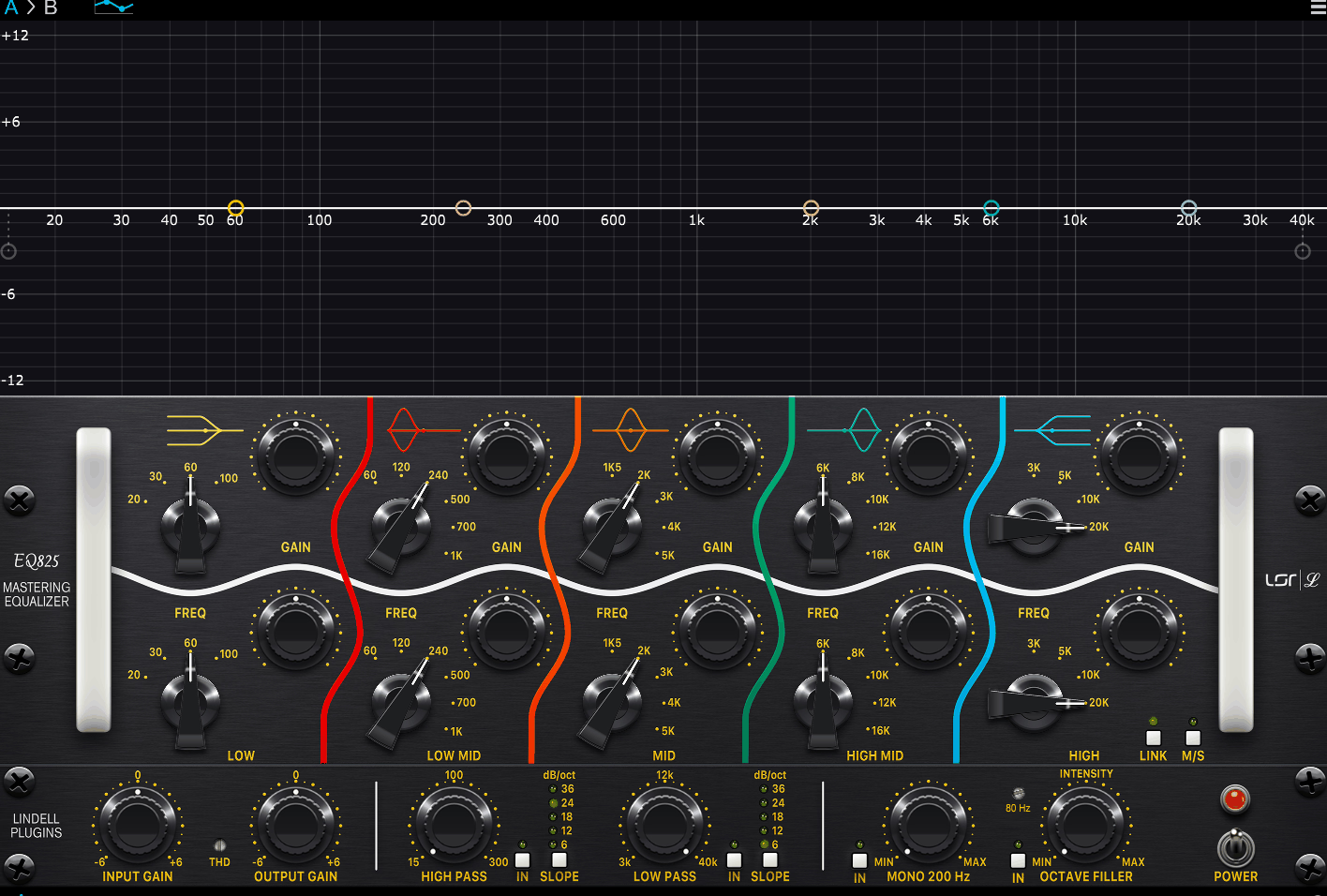
If you need a drum bus with real presence, without losing tight low end or airy top, Lindell Audio EQ825 gives you the plugin version of an extremely rare tube mastering EQ that a small group of audiophiles originally built by hand-picking analog components from multiple manufacturers instead of one supplier. Original units run into the tens of thousands of dollars, and almost no working engineer has ever touched one.
Lindell Audio is the first company to model it faithfully, all five bands included, right down to the custom filter networks, inductors, resistors, and capacitors that gave the original its character.
- Five-Band Transformer-Balanced Tube Design
Built on fully discrete Class A tube technology with transformer-balanced circuitry, the EQ825 delivers airy highs, tight lows, and midrange presence on drums, along with smooth top end and added air on vocals. I found the top end particularly convincing.
- Classic And Modern Voicings
A switch lets you toggle between the original character and a Modern voicing, giving you flexibility between vintage tone and a more contemporary response depending on the source material. I’d recommend A/B-ing both before committing, since the difference is bigger than the name suggests.
- Octave Filler
This adds depth to the bass by reinforcing the octave below the fundamental, a feature aimed squarely at extending low end on masters that need more foundation without simply boosting gain. What stands out to me is that it does this without making the low end feel artificially inflated.
- Proportional-Q Design With Variable THD
The proportional-Q behavior keeps boosts and cuts musical as you increase gain, and variable THD gives you control over how much tube saturation comes through, from nearly transparent to noticeably colored. I’d start conservative with THD and add more only once the tonal balance is already right.
10. LANDR Mastering Plugin Pro
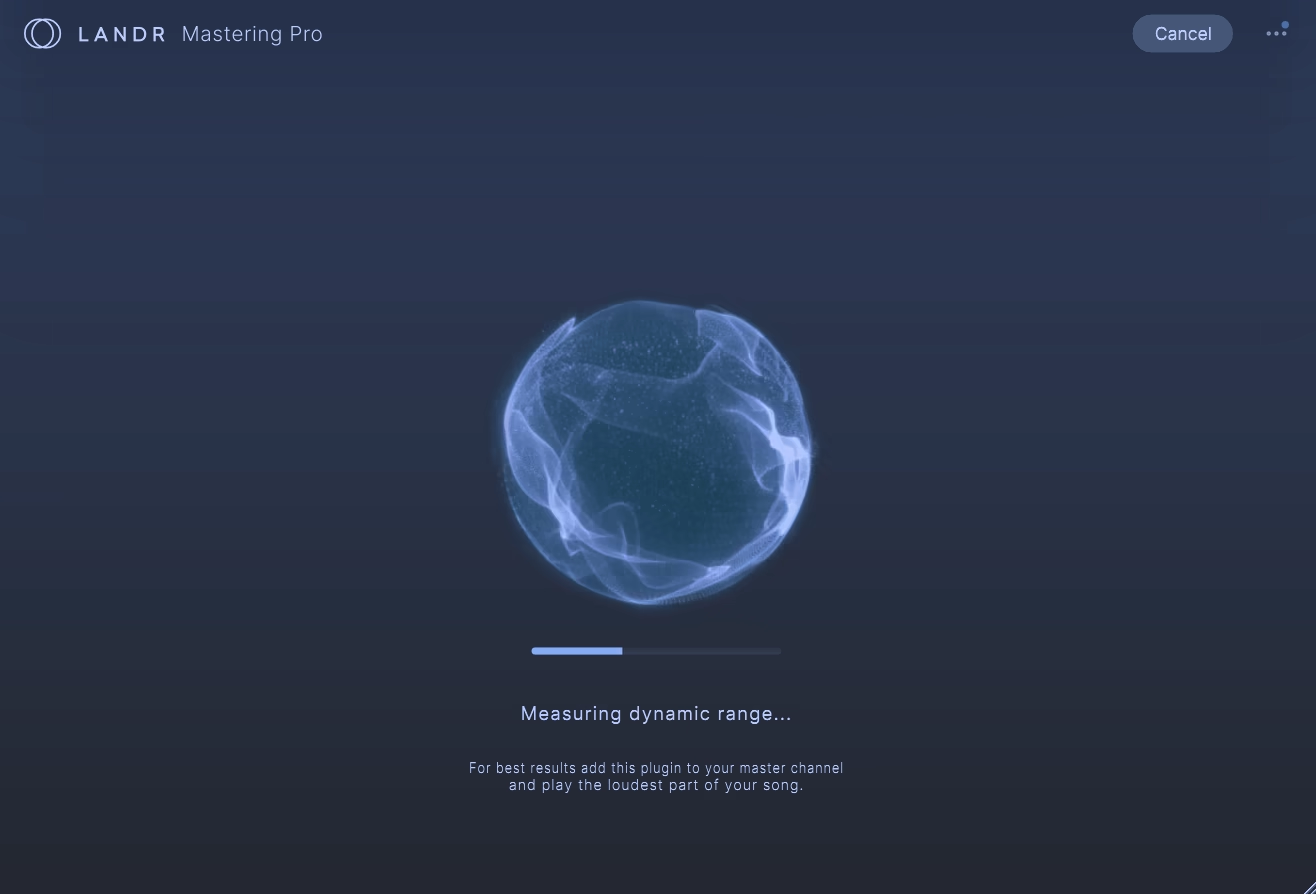
Mastering decisions usually happen after the fact, bounce a mix, upload it, wait to hear the result.
Unlike most plugins in this category, LANDR Mastering Plugin Pro runs entirely on the mix bus in real time, so you hear a decision the instant you make it instead of waiting to find out.
The engine behind it comes from over a decade of AI-driven mastering work, but that’s not really the interesting part. What matters is that engine finally living inside the DAW instead of behind a web upload, which turns mastering from a separate errand into part of the same session you’re already in.
- Three Generated Masters
Analysis produces three distinct masters in Warm, Balanced, and Open styles, each shaped specifically to the track rather than pulled from a fixed preset, giving you a genuine comparison point instead of one automated guess. I found comparing all three often tells you something about your mix that you’d missed.
- Full Revision Controls
You can reshape any of the three results with EQ across high, mid, and low energy, plus Compression, Saturation, Presence, and a De-Esser, so the automated master becomes a starting point rather than a finished file. That’s an important distinction, in my opinion, for anyone worried about losing creative control.
- Loudness With LUFS Metering
A Loudness control paired with a LUFS meter lets you target a specific delivery level, which matters given how much the right loudness target varies by streaming platform. I’d check your platform’s specific target before committing to a final number.
- Gain Match
A gain match function keeps comparisons between the raw mix and the processed master level-matched, which is the only fair way, if you ask me, to judge whether a master is actually better or just louder. Skipping this step is the easiest way to fool yourself into liking a louder, worse master.
Freebies
iZotope Ozone EQ
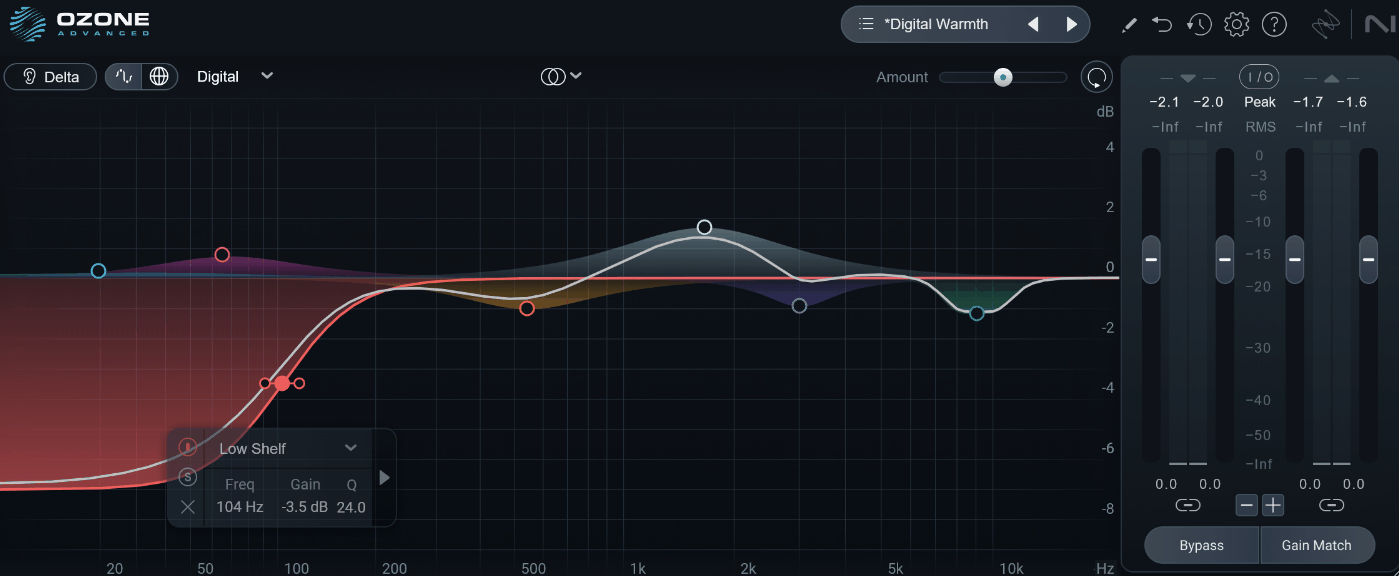
Analog and Digital modes on a lot of EQ plugins amount to a cosmetic coloring layer stacked on top of the same underlying digital curve. iZotope Ozone EQ actually changes the filter behavior itself when you switch between the two, not just the tone on top.
It’s the standalone equalizer module pulled directly from iZotope’s flagship Ozone 12 mastering suite, given away free as part of Native Instruments’ Komplete Start bundle. That’s a genuinely capable piece of software to get at no cost.
Getting something this capable for nothing is unusual enough that I think it’s worth pointing out on its own. Most free EQs feel obviously stripped down by comparison, and this one really doesn’t.
- Analog And Digital Modes
You can switch between a modeled analog character and a cleaner digital precision mode, which changes the underlying filter behavior rather than just adding a coloring layer on top. I’d recommend Digital mode for corrective work and Analog whenever you want the EQ itself to add a bit of warmth.
- Transient/Sustain Processing
This lets you EQ the transient, or attack, portion of a sound completely separately from its sustain, or decay, portion, solving a problem that used to require a much more complicated multiband setup. What I like about it is how specific a problem this actually solves.
- Mid/Side And Delta
Full Mid/Side processing treats the center and sides of your stereo image independently, and the Delta button lets you hear only the frequencies you’re actually boosting or cutting. That’s, in my opinion, the fastest way to avoid over-EQing a master.
TDR Nova
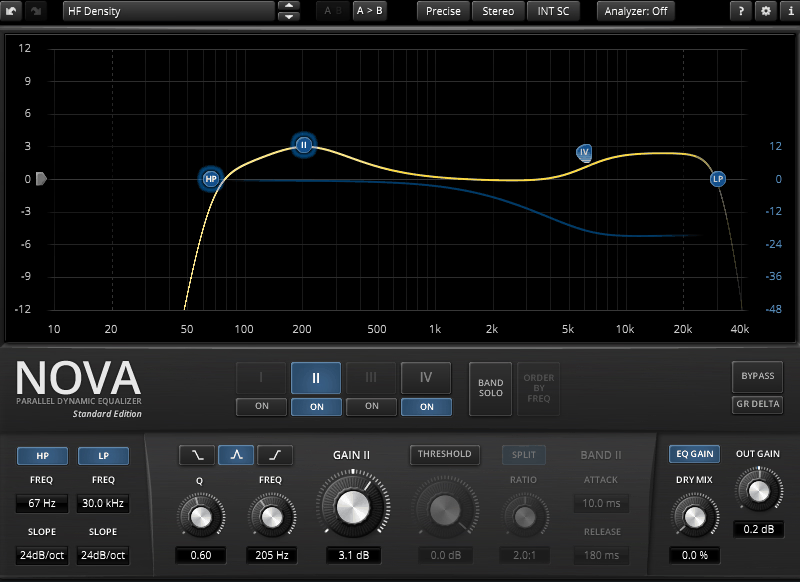
TDR Nova costs nothing and still manages to undercut plugins with real price tags on features alone, a free parallel dynamic equalizer from Tokyo Dawn Records that combines a parametric EQ layout with a full dynamics section on every band. Each band processes independently of the others, which is what makes the parallel design actually matter.
I’m honestly a big fan of how much one free plugin manages to cover here. It genuinely replaces two or three separate tools for a lot of everyday mastering work.
- Four Dynamic EQ Bands With HP/LP Filters
Each of the 4 bands carries a complete dynamics section for compression or expansion, alongside high-pass and low-pass filters, covering parametric EQ, dynamic EQ, frequency-selective compression, and wideband compression all in one plugin. That range of jobs is a lot to ask from something that costs nothing.
- Equal Loudness Function
This compensates for perceived loudness changes as you adjust the EQ, so you’re judging a change on its tonal merit rather than being fooled by it simply being louder. I found this genuinely changes how you evaluate your own EQ moves.
- Per-Band Solo Listening
A solo function on each band lets you isolate exactly what a given band is targeting, which is especially useful, in my experience, for pinpointing a sibilance problem or a resonance before committing to a setting. I use it on nearly every band before finalizing a curve.

Hey, I’m Vil, I started this site to help you find the best audio plugins covering various categories including synths, pianos, strings, and effect tools of all sorts as well. I pick these plugins based on various criteria so it best matches the actual topic.