When you purchase through the links on my site, you support the site at no extra cost to you. Here is how it works.
Tape plugins get lumped together as “warmth” tools, and I think that undersells what the good ones actually do. Real tape compresses transients, rolls off extreme highs, bumps the low end at a frequency that depends on speed, adds harmonic distortion as you push level into it, and introduces small pitch instabilities that keep static sounds from feeling frozen.
A good emulation gives you those behaviors as separate decisions, which is the difference between a plugin that colors a mix and one that just makes it slightly louder and duller.
If you ask me, the ones to know first are UAD Studer A800 and Ampex ATR-102 for the most faithful multitrack and mastering machines, u-he Satin for a tape model you can calibrate down to the bias, and Baby Audio TAIP when you want the result without the engineering,
Then, there is Softube Tape for a fast three-machine workflow, and Slate Digital Virtual Tape Machines for group-linked tape on every track. There’s more further down, including a cassette deck, a flea-market reel-to-reel, and three free options that hold up against paid ones.
1. Tone Empire TM700 v3
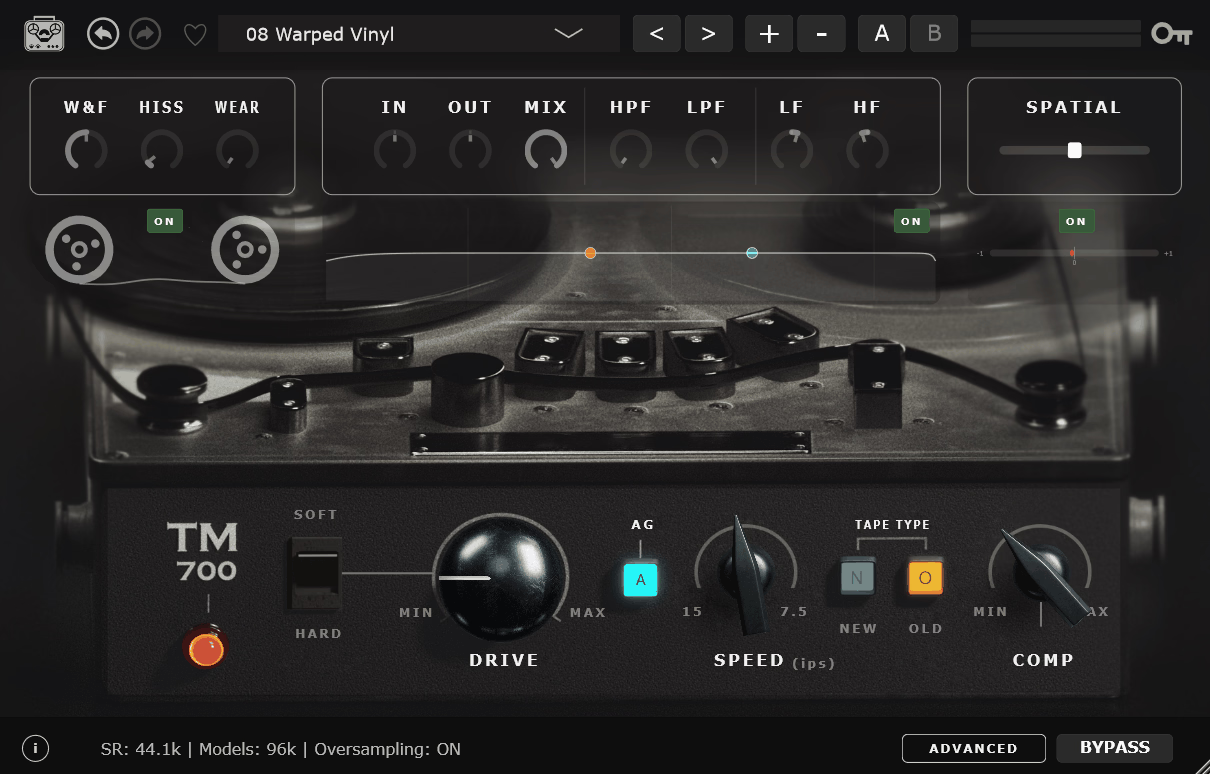
Tone Empire TM700 v3 is a complete rebuild of the developer’s original tape plugin, and the headline is the modeling method.
Instead of a traditional circuit model, it uses Neural Component Modeling, a network trained at 96 kHz on a 1/4-inch American two-track machine loaded with SM9 tape. That approach captures nonlinear behavior that fitted curves tend to smooth over, and the saturation gets more convincing the harder you drive it.
Since it’s a two-track model, I’d treat it as a bus and mastering tool first and think about individual tracks second.
- Independent Tape Compression
Almost every other plugin here ties tape compression to tape saturation, but here the Comp control pulls them apart, so you can have the level-smoothing behavior without the harmonics, or the reverse.
In practice that means you can run the compression up on a mix bus to glue things together while keeping the drive low enough that the top end stays open, which is a combination the real machine couldn’t give you because on hardware the two always arrive together.
I’d say that’s the single most useful thing about the plugin, and it’s the reason I’d keep it around even alongside the more faithful models further down.
- Dropout Simulation
A Dropout control introduces momentary level loss the way a worn or poorly stored reel does, and it’s the only plugin on this list built around a studio two-track that bothers to model this. I’d go easy on it because a little goes a long way, but on a lo-fi bus it’s the detail that sells the age.
2. Ampex ATR-102 M
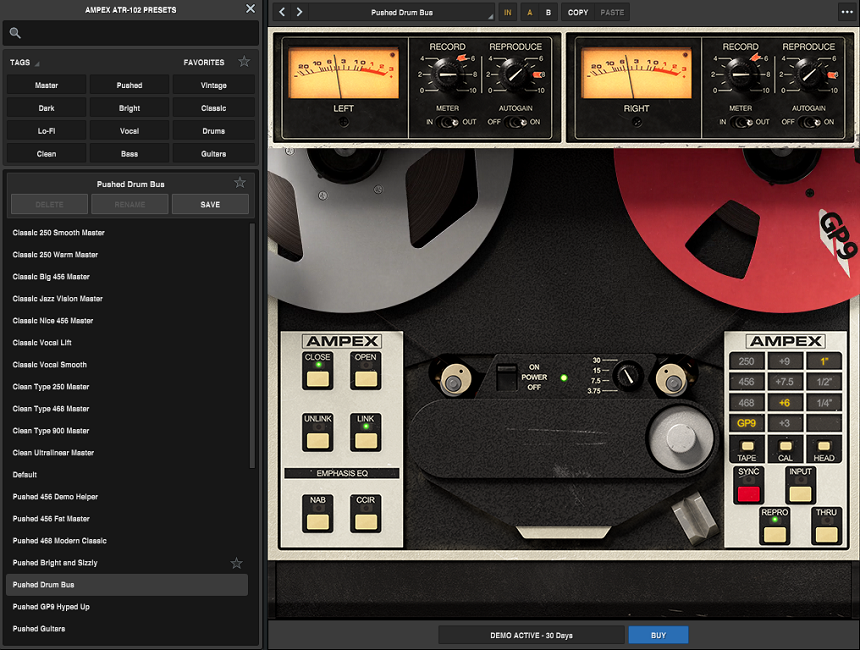
Mastering engineers still argue about which half-inch two-track sounds best, and a lot of them land on this one.
The Ampex ATR-102 was the mixdown deck in most major rooms for two decades, and UAD Ampex ATR-102 M models it end to end: head stack, tape formulas, calibration, and the way the machine’s own electronics color the signal before tape gets involved.
It’s the most detailed mastering tape model available, and it’s the one I’d compare everything else against.
That depth is also the caveat, because the parameters interact, and if you don’t know tape calibration you’ll likely spend time in the presets before the panel makes sense.
- Three Head Stacks
Switching between quarter-inch, half-inch, and one-inch heads changes the low-frequency bump and the noise floor, and the one-inch stack has the deepest, cleanest bottom of the three. I don’t know of another tape plugin that models this distinction, and on a bass-heavy master it’s worth trying all three before you touch anything else.
3. UAD Studer A800
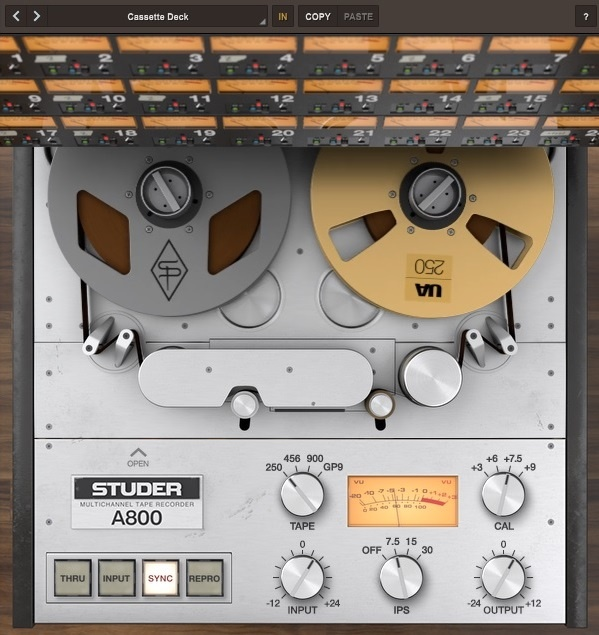
Where the ATR-102 is the mixdown machine, this is the multitrack. The Studer A800 was the 24-track two-inch deck in the rooms where most classic records were tracked, and UAD Studer A800 was built with Studer’s cooperation to model the whole machine, transformers included.
On a full mix it’s fine, but the real use is on individual tracks and groups, where you’d actually have been recording to it.
I feel like I should mention that it’s heavier on CPU than most of what’s here, and running it on every channel of a large session isn’t always practical, which is where Slate’s VTM further down becomes the efficient answer to that problem.
- 3M 250 Formula
Most plugins stop at 456, GP9, and 499, but this one adds 3M 250, the softest and most colored formula in the set, which saturates early and rounds off transients hard. It was the tape a lot of 70s rock was tracked to, and it has a particular way of thickening snare and pulling the hard edge off a kick that the Ampex formulas don’t reproduce.
For anyone chasing 70s drum sounds, that alone justifies the model.
- NAB and CCIR Equalization
Two EQ standards reshape the record and playback curves, and CCIR keeps the top end noticeably more open, which is why I’d recommend it at 30 ips on drums.
4. Arturia Tape J-37
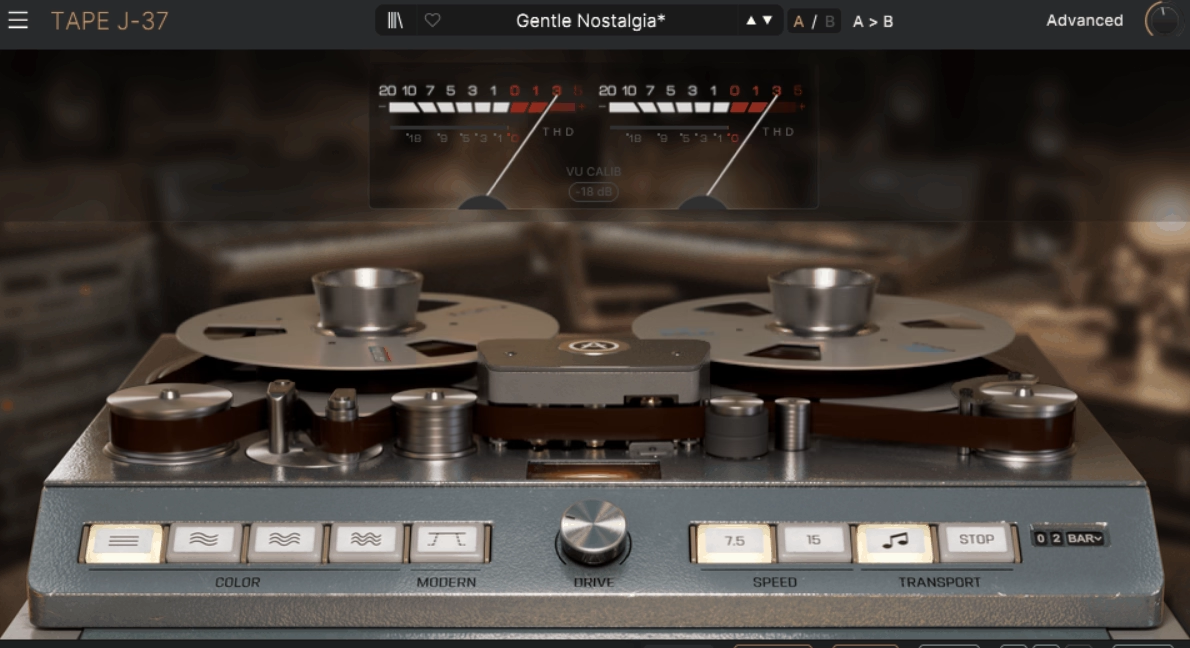
Arturia Tape J-37 models the same EMI-built Studer as the Waves version below, but Arturia treated it as much as a creative effect as a mastering stage. The J37 was Abbey Road’s machine through the mid-60s, with a tube record path and a saturation onset that’s earlier and rounder than the later solid-state Studers.
In general this is the more playable of the two J37s, with the tape delay given as much attention as the saturation, though on the flip side it’s a little less precise as a straight mastering tool than the Waves model.
- Tape Delay with Drifting Repeats
Each repeat degrades and drifts slightly against the last, because the delay mode is built on the J37’s head spacing rather than a clean buffer, and I love how that instability makes it sound like a machine and not a delay line.
- Tube Record Path
The J37’s valve record electronics add harmonic content before the tape stage does, so there’s warmth at low drive that the solid-state machines elsewhere on this list can’t produce, and Arturia’s version leans into it a little harder than Waves does.
5. AIR Tape Saturator
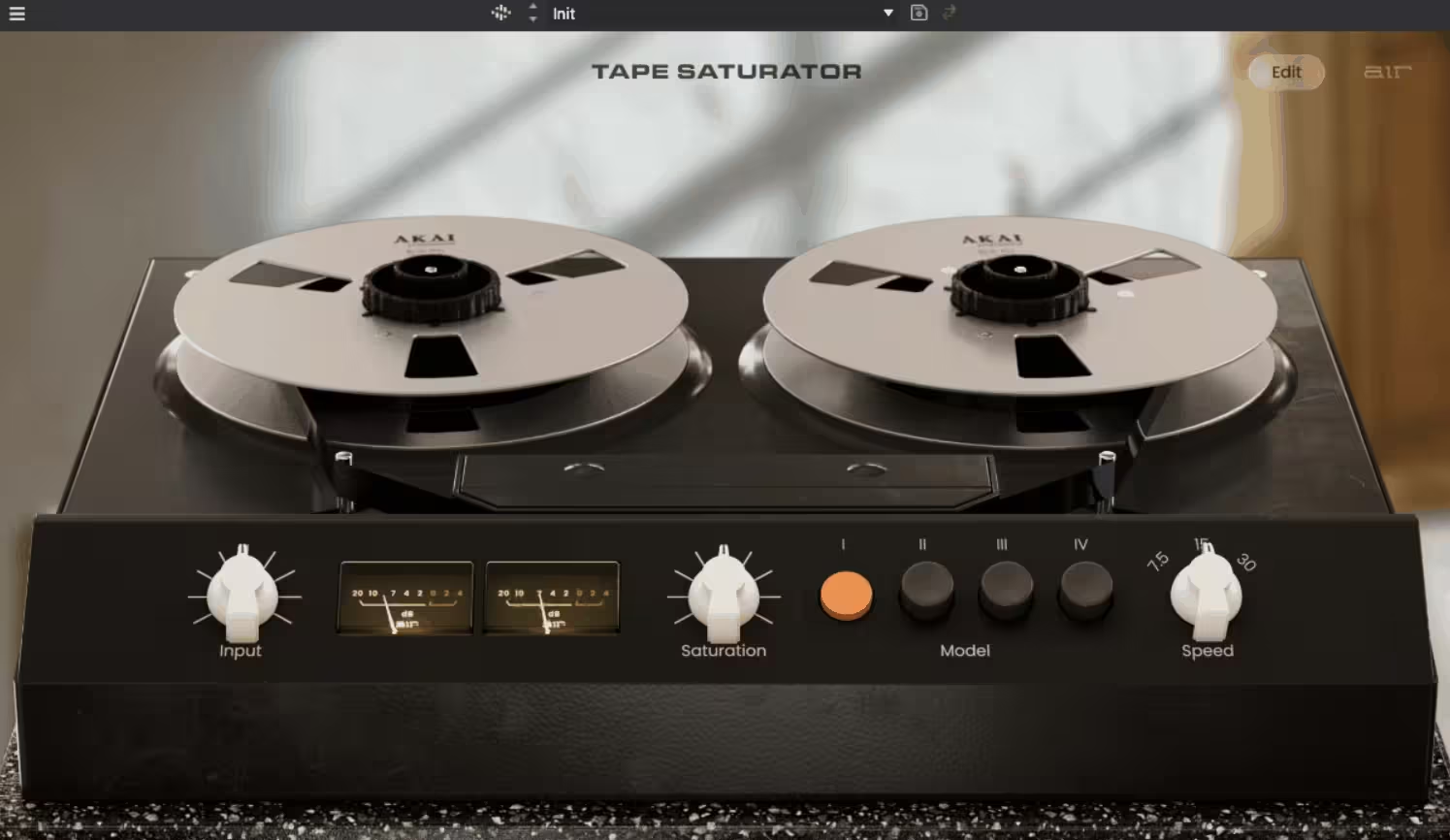
AIR Tape Saturator is the newest plugin here and part of a small tape collection AIR released in 2026. What caught my attention is that it offers four saturation models inspired by different tape responses rather than one emulated machine, and it runs inside MPC hardware as well as a DAW, which tells you who it’s built for.
It’s a simpler tool than most of this list, and that’s fair, but what it has is a condition control that ages the virtual tape convincingly, and the imperfection controls are more musical than I expected.
- Tape Condition
Moving from pristine to worn in one control, softening highs and introducing instability as it goes, I’d say this covers what most people are actually reaching for when they load a tape plugin.
- Clipping Type Selection
Push past tape saturation and you choose how the output clips, which few tape plugins expose, and on drums it’s the difference between round and hard.
6. UAD Oxide
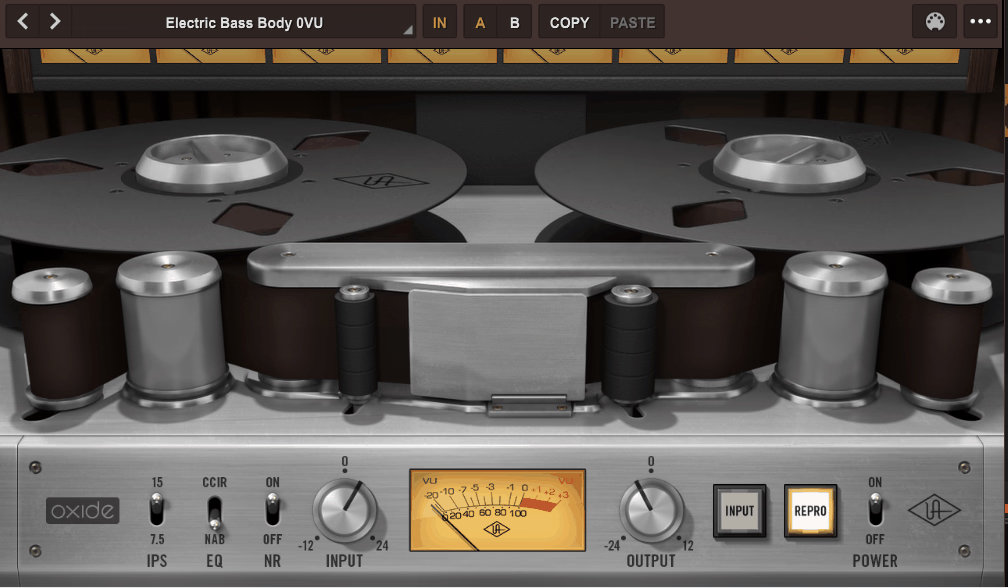
Studer and Ampex hardware informed the circuit models inside this one, but UA deliberately didn’t name a machine. What they built is a tape plugin with a stripped panel running on the same DSP lineage as their flagship models, and UAD Oxide gives you speed, noise, bias, and emphasis and not much else, which I think is exactly right for something meant to sit on a dozen tracks.
The tradeoff is obvious, with no formulas, no calibration, and no head stack, so if you want to learn tape you should look elsewhere, but if you want tape on a session without a learning curve, it’s hard to argue with.
- Emphasis Switch
Boosting highs before the tape stage and cutting them after is how real machines fight high-frequency loss, and that’s what Emphasis does, which is why I appreciate how it lets you push harder without the sound turning to mud.
On vocals in particular it’s the difference between a saturated take that still has air and one that sounds like it’s been wrapped in a blanket.
- Bias Control
UA kept one deep control from the A800 lineage, and it’s this one, shifting the saturation between smooth and gritty, and it’s the reason Oxide is more than a one-knob saturator when nearly every plugin in its class is exactly that.
7. IK Multimedia Tape Machine 24
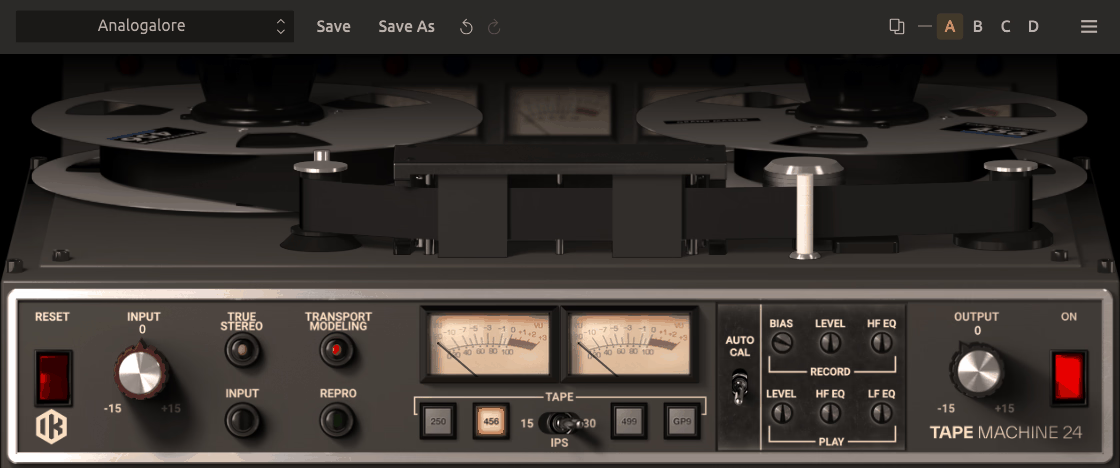
Two-inch 24-track is the format most people mean when they say “recorded to tape,” and this is IK’s model of a classic machine in that category. Tape Machine 24 was built for tracking and bus use, and of the four plugins in IK’s collection I think it’s the one that sounds most like a studio multitrack, with the thick, forgiving low-mid response the format is known for.
- Separate Record and Playback Calibration
Running the record side hot and the playback side conservative is how tape ops shaped saturation without touching input gain, and independent record head and playback head levels let you set that offset here, which changes where the distortion starts.
The reverse works too, and a cool record level with a hot playback gives you a cleaner, brighter result from the same input, which is a useful trick on sources that need the tape glue but not the color.
- 911 Formula
Modeled on BASF SM911, this is the formula TASCAM and IK recommend for the machine, and it’s not one you’ll find in most other tape plugins, which tend to stop at the Ampex and Quantegy stock. It sits between 456 and GP9 in headroom with a slightly drier saturation than either.
8. Gazillion Industries TRIPLE OG
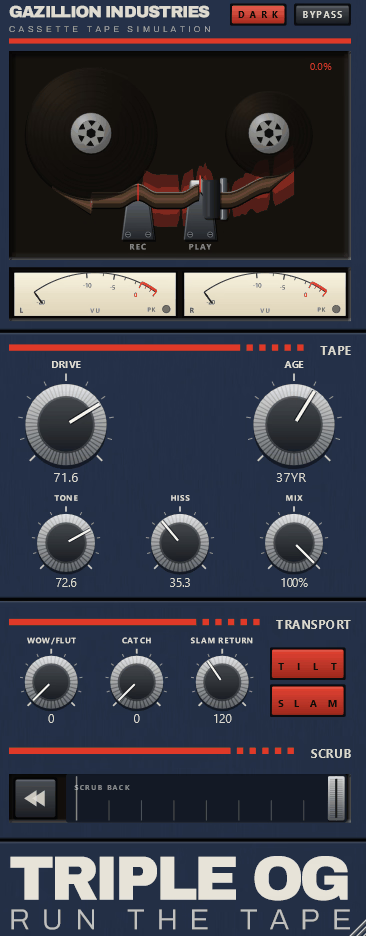
Most tape plugins treat the transport as something to model quietly in the background, but this one hands it to you as an instrument. TRIPLE OG is a cassette tape simulation with a playable transport, meant for anything from a little colour and grit to pushing the tape into unstable, mangled textures.
It’s one of the newest tape tools around, released by Gazillion Industries in September 2026 alongside Skruu.
The developer’s own pitch is that it’s a tape sim built by someone who uses tape sims the way you do, and the panel reflects that, with no calibration or head stacks, just the controls you’d actually reach for. I’d treat it as a creative effect first and a color stage second.
- Tone, Hiss, Drive and Age
These four controls shape the medium itself, adjusting its brightness, noise and saturation, and Age can wear the tape down by up to sixty years.
Much like the Age knob on Tape Cassette 2, this is where most of the plugin’s everyday use lives, and at moderate settings it’s a quick way to push a loop or a vocal back in time without reaching for anything more complicated.
- Catch
This is where TRIPLE OG stops being a normal cassette model. Catch makes the transport drag, jam and recover, and a panel trigger lets you set off interruptions deliberately, so instead of relying on random instability, you can put a stumble exactly where you want it in an arrangement. That makes it useful for transitions and breakdowns as much as for texture.
- Wow Flut
Where Catch gives you event-based chaos, Wow Flut supplies continuous transport instability underneath it, so the two work in layers. A small amount keeps static pads and sustained sounds from feeling frozen, and pushed harder it gets into seasick, warped-cassette territory that suits lo-fi beats.
- Bend
Bend lets you drag the tape back or throw it forward, and when you let go it springs back home. It’s the closest thing to putting your hand on the reel, and automating it gives you scrubs, rewinds and pitch throws that a static tape model simply can’t do.
- Slam
Slam handles tape-stop effects, bringing the transport down the way a machine does when the motor cuts out. It’s the one I’d try first on the last bar before a drop, and because it comes from the same transport engine as Bend and Catch, the slowdown carries the tape’s color and noise with it rather than sounding like a generic pitch ramp.
9. u-he Satin
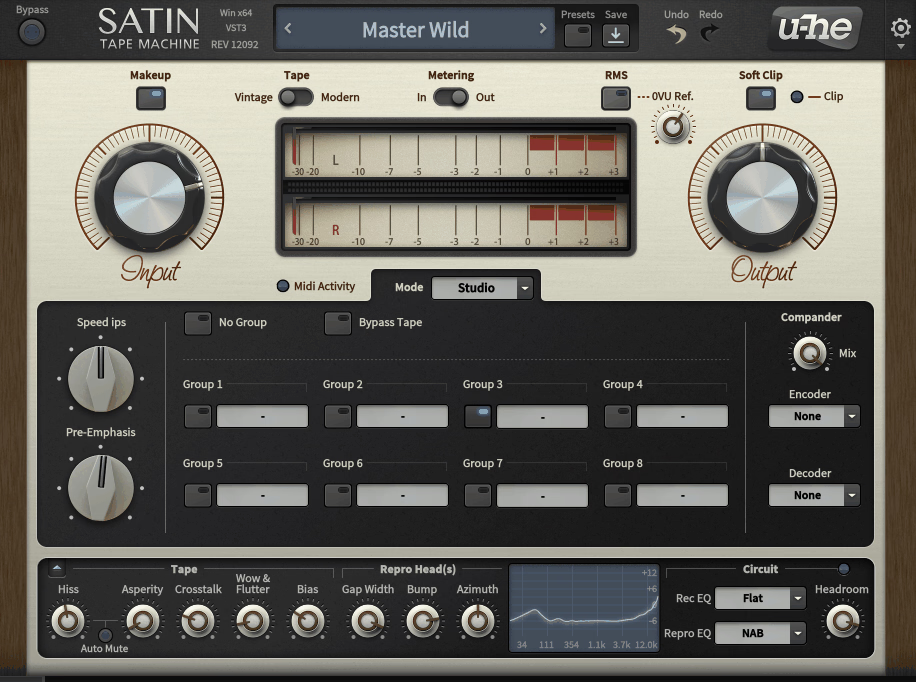
With u-he Satin you get record and playback EQ standards, adjustable bias, pre-emphasis, separate hiss and asperity noise, and a Service panel exposing the calibration an engineer would set with a scope. On top of that, a Tape Delay mode and a Flanger mode run on the same engine.
I have to say, it’s the plugin I’d point to if you want to understand why tape sounds the way it does, because every parameter maps to something real, and it’s also the one I’d warn you about if you want a quick color, since the defaults don’t do much until you start turning things.
- Service Panel Calibration
Overbias and the highs soften while the saturation smooths out, exactly as on a real deck, and that behavior, along with record and repro EQ and level calibration, lives in the Service panel as independent controls.
Because everything here is exposed, you can set up a machine that’s deliberately miscalibrated, with a mismatch between record and repro EQ that no tech would ever leave in place, and that’s where some of the most interesting colors in the plugin come from.
It’s the section that teaches you tape, and it’s worth an afternoon.
- Groups for Multitrack Consistency
If you’re putting Satin on every track, set up a Group first, so instances share settings like channels on one machine while noise and flutter stay independent per instance.
- Flanger Mode
Two transports drifting against each other is the original flanging trick, and this mode reproduces it with the pitch behavior intact, which is why I’m a big fan of it as a real tape effect rather than an add-on.
- Asperity Noise
Where hiss sits on top of the signal, asperity noise rides inside it as a low-level modulation that’s part of why real tape sounds different from digital noise layered on afterward, and Satin is one of very few plugins that bothers with it.
10. Slate Digital Virtual Tape Machines
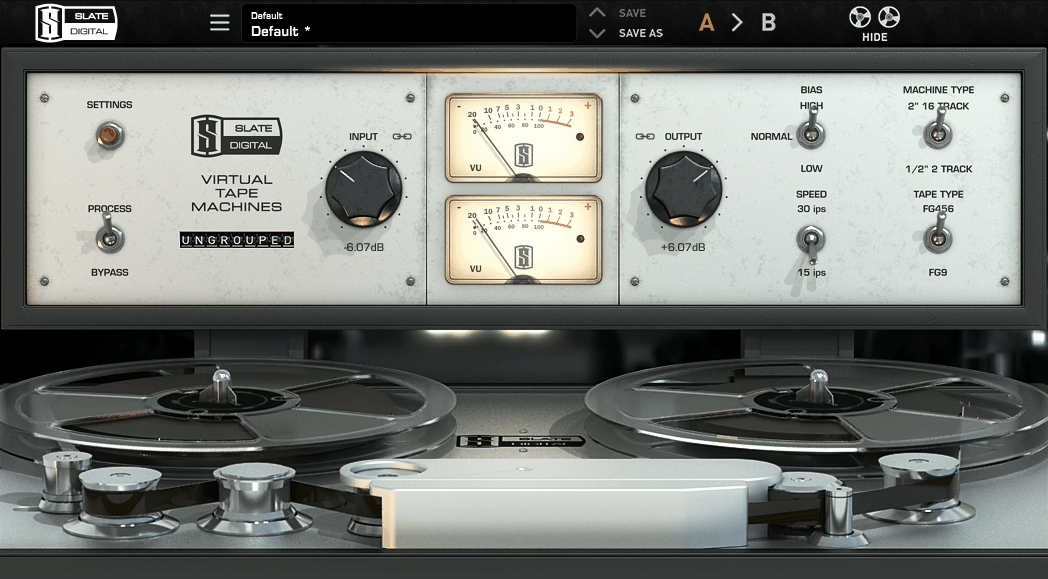
Running tape on every channel of a large session was never practical with the heavy models until Slate built one designed for it.
Slate Digital Virtual Tape Machines gives you two machines, a two-inch 16-track for tracks and buses and a half-inch two-track for the master, and it’s light enough that the intended workflow, one instance per channel, actually works. The two-inch machine on drums is a specific sound a lot of modern rock and pop leans on.
It’s less deep than Satin or the UAD models, with no bias or calibration, but conversely that’s what makes it fast.
- Two-Inch 16-Track Model
Sixteen tracks on two-inch tape means wider track width than a 24-track, and wider tracks mean more low-end weight and a bigger head bump, which I noticed is why VTM’s drums come out thicker than most 24-track models. It also means a better signal-to-noise ratio per track, so you can drive the 16-track model harder before the noise becomes part of the sound.
- Group Linking
Change drive or tape type on one instance and every instance in the group follows, which is the feature that makes per-track tape practical.
- Bass Alignment
Instead of accepting the machine’s default, Bass Alignment lets you set the low-frequency head bump directly and tune where the fattening happens, and on a bass-heavy mix it’s worth pulling down a touch.
11. IK Multimedia Tape Machine 80
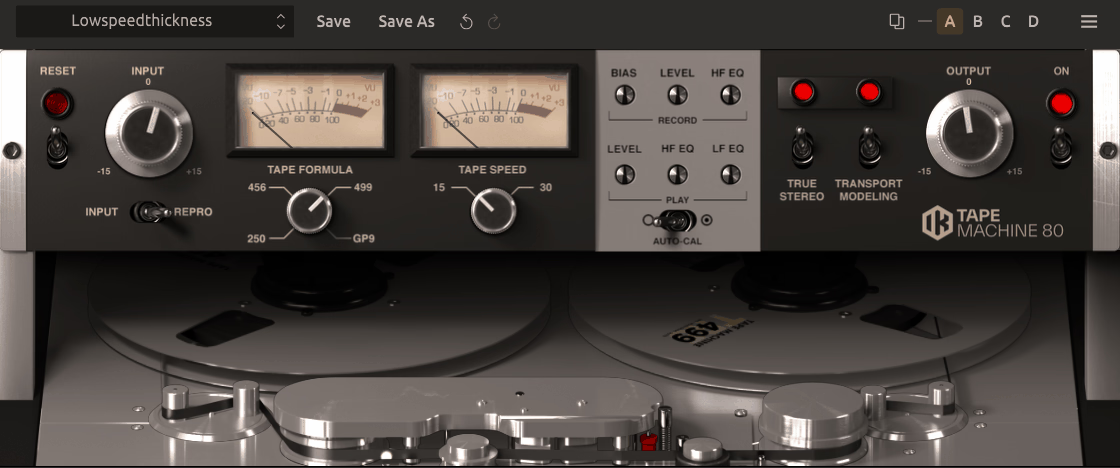
The Studer A80 bridged the tube-era decks and the later A800, with a solid-state path cleaner than the J37 but warmer than what came after. Tape Machine 80 is the mastering and stereo bus machine and I’d describe its quality as polished rather than colored.
When it comes to a tape stage that tightens a mix without obviously changing it, this is the one in the IK set I’d reach for.
- Half-Inch Mastering Character
The half-inch two-track format gives you the cleanest, deepest low end of any tape width and the lowest noise, and it holds together under heavy drive better than the multitrack models, which is why it works on a master.
- 30 ips Transparency
At 30 ips on this machine, tape is about as transparent as it gets, giving you glue without audible saturation, and I’d say it’s the reason to own the 80 over the 24.
Drop to 15 ips and the head bump moves down into the kick and bass range while the top rolls off earlier, so the same plugin covers both a clean modern master and a warmer, more obviously analog one.
12. Baby Audio TAIP
Machine learning built this one, with Baby Audio training a neural network on a 1971 European tape machine and giving the result a panel named for what the controls do rather than what they’d be called on the hardware.
Baby Audio TAIP has Drive, Glue, Presence, Wear, Noise, a Lo-Shape and Hi-Shape tilt, and a Dual mode for independent stereo channels, and that’s the whole plugin.
To be honest, this is the tape plugin for producers who don’t want to think about bias, because it gets you to a warm, glued result in a couple of moves, and the AI model has a rounder saturation than some of the traditional models, with the limitation being that you can’t get underneath it.
- Glue Control
Leveling out the dynamics without adding harmonics is what Glue does, since it’s TAIP’s tape compression kept separate from saturation, and for bus work I’d say it’s the most useful control in the plugin.
Turn Drive down to nothing and Glue up, and you get a clean tape-style compression that most dedicated tape plugins can’t produce because their compression only arrives with the distortion.
- Dual Mode
Two channels of a real machine never behave identically, and Dual reproduces that by running the left and right through independent tape models, which is subtle but on a full mix I appreciate how it opens things up.
13. Impact Soundworks Tape Sculptor
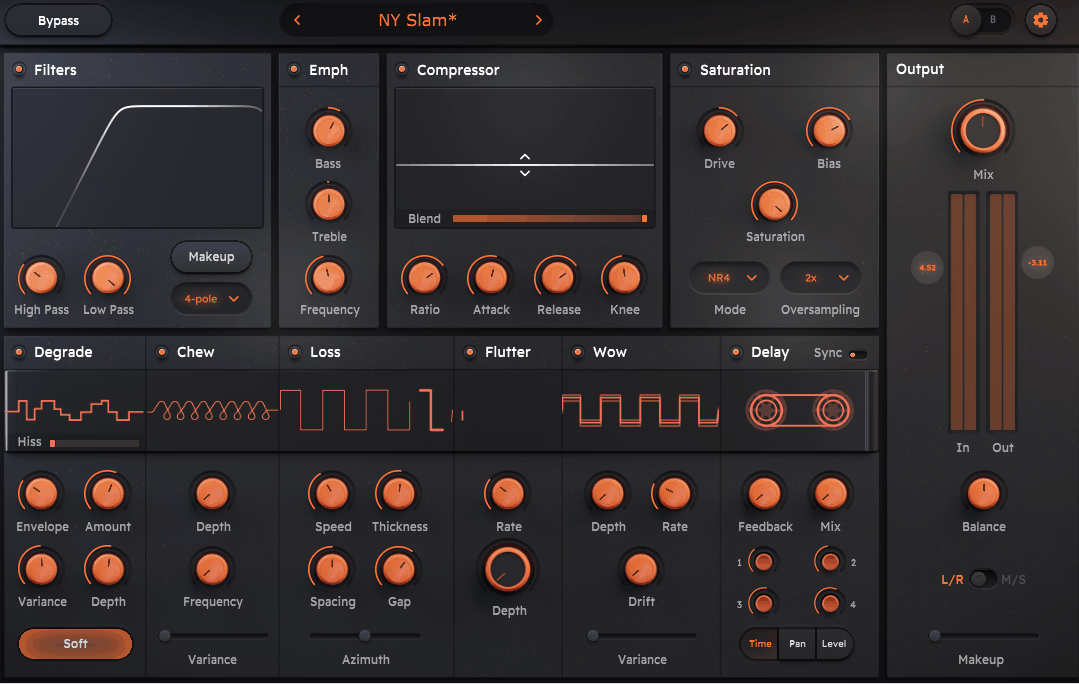
Tape Sculptor was developed by Jatin Chowdhury, the person behind the free Chow Tape further down, and it’s essentially that DSP expanded into ten toggleable modules on one screen: Compressor, Saturation, Filters, Degrade, Loss, Chew, Delay, Flutter, Wow. Every one of them can be pushed well past realistic settings.
It doesn’t pretend to be one machine, and I’d recommend it to anyone who wants Chow Tape’s physical-modeling accuracy with a workflow that doesn’t require the manual first.
- Chew and Degrade
Nothing else on this list does damage this convincingly, because Chew simulates the tape path physically crumpling the tape, with dropouts and artifacts, while Degrade adds generational loss, and in my opinion these two are the reason to buy it over a conventional emulation.
Chew has a frequency and depth so you can set how often the damage occurs and how severe it is, and Degrade stacks multiple generations of copying with adjustable amount, which means you can build anything from a slightly tired reel to something that sounds like a fourth-generation bootleg.
- Loss Filter by Physical Parameters
Instead of moving a cutoff, you adjust head gap, spacing, and thickness, and the roll-off reshapes itself accordingly, which turns out to be a better way to understand why tape sounds dark.
14. Waves Abbey Road J37 Tape
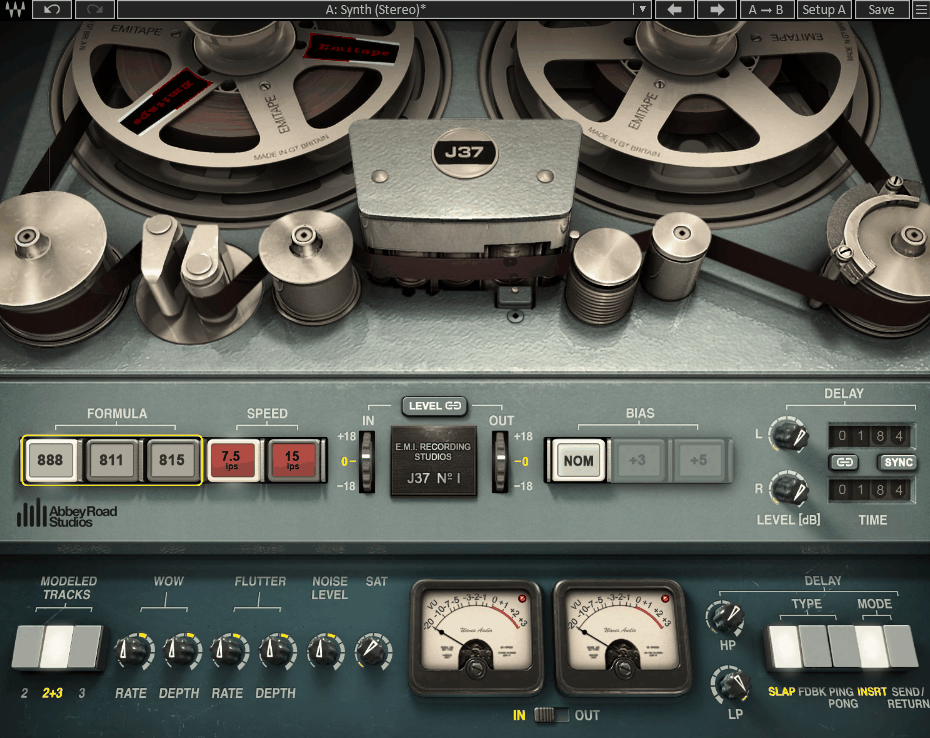
Abbey Road’s own Studer J37 is the source, modeled with the studio’s cooperation. Waves Abbey Road J37 Tape is the more mastering-focused of the two J37 plugins here, with three EMI tape formulas and a tape delay section built on the four-head layout of the original, and the tube record electronics give it a midrange push unlike any of the later solid-state models.
It’s a specialist, so if you want the mid-60s EMI sound this is the only plugin that gets there, while for general-purpose tape the Arturia version is more flexible and the A800 is more neutral.
- Three EMI Tape Formulas
Modeled from the studio’s own stock, EMI 815, 888, and 811 aren’t available anywhere else, with 888 as the balanced one and 811 the older and softer option, which is where I’d say the vintage character concentrates.
The 815 is the brightest of the three and the closest to a modern formulation, so if you want the J37 electronics with less of the era’s darkness, that’s the one to load.
- Tube Record Path
Warmth at low drive is the tell, because the valve record electronics add harmonic content before the tape does, which solid-state models don’t produce, and it shows most on vocals and acoustic instruments.
15. Beatskillz Reelight
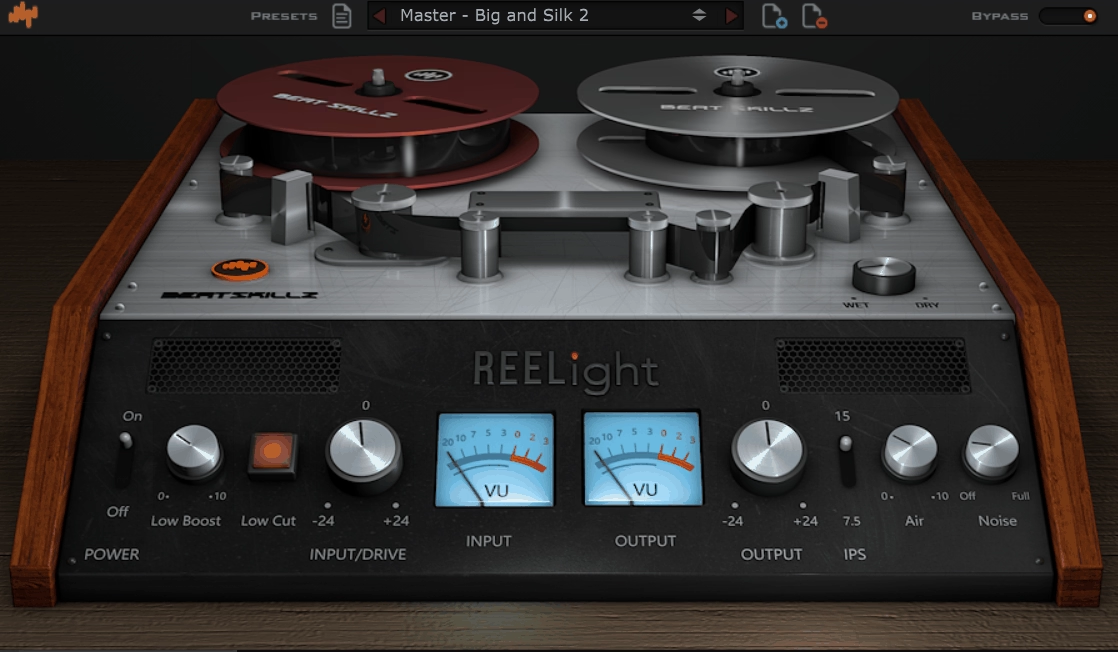
Beatskillz Reelight models a Revox B77 MK II quarter-inch reel-to-reel loaded with an Ampex formulation, and it’s worth knowing about because the B77 is a very different animal from the studio machines that dominate this list.
It was a high-end consumer and semi-pro deck, and its sound is drier and more compact, with saturation that’s more about density than warmth.
I’ll mention that Beatskillz has since discontinued it in favor of newer tape plugins, so it’s one to grab if you find it rather than plan around.
- Revox B77 Model
Tighter and more midrange-forward than the Studer and Ampex decks, the B77 character from my experience suits drum loops and electronic sources better than a full mix.
- Low Cut and Low Boost
With separate controls to either clean up tape’s low-end buildup or lean into it, this covers a practical need the studio-machine emulations tend to leave out.
16. Softube Tape
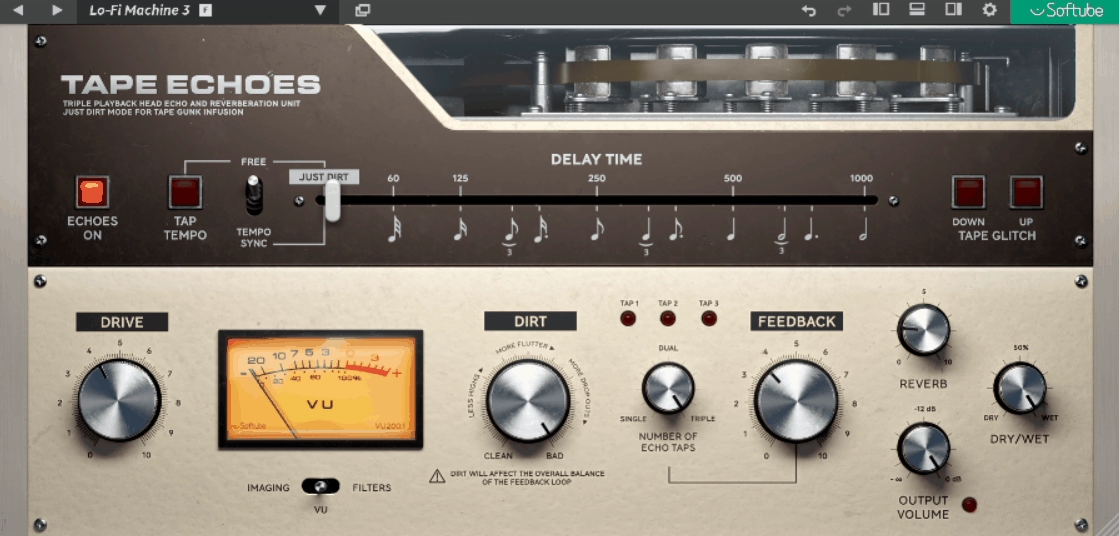
Three machines, one knob each is the whole idea. Softube Tape gives you Type A, a Swiss high-end reel-to-reel, Type B, a transformer-based machine with more color, and Type C, a British tape recorder with vintage character, switched with a single control while Amount sets how hard you hit the tape. Everything else lives in a Remote panel you can ignore most of the time.
I appreciate how honest the design is about what most people want from tape, which is to pick a flavor, set an amount, and move on.
- Three Machine Types
Switch types while a loop plays and you’ll hear how far apart A, B, and C are, since they’re distinct models rather than EQ variations, and Type B’s transformer-driven low-mid thickness is the one I’d point you to for bass and drums.
Type A is the cleanest and works on a master where you want tightening without color, and Type C has the most obvious vintage roll-off, which suits guitars and keys that need to sit back in a mix.
- Crosstalk Control
Signal bleeding between adjacent tracks on the tape is something almost no plugin bothers with, but Crosstalk models it, subtly blurring the stereo image the way a real multitrack does, and it’s what makes a stereo bus feel like it was recorded to one machine.
17. AudioThing Reels
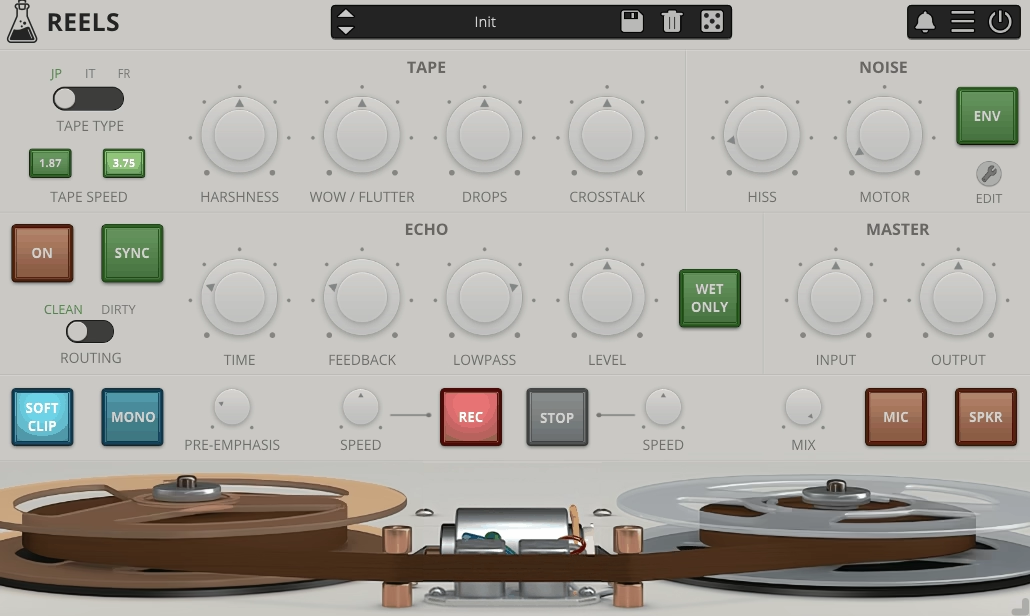
Most tape plugins model machines people wanted, while this one models a machine somebody threw away. AudioThing Reels is built on an old Japanese portable quarter-inch reel-to-reel found at a flea market, complete with motor noise bleeding into the tape and a bandwidth that was limited when it was new, and it’s a tape mangler rather than a tape emulation, which is the point.
If you want warmth and glue, look elsewhere on this list, but if you want a source to sound like it was recorded on cheap gear in 1975 and left in a garage, Reels is the most convincing tool I know for it.
- Motor Noise Bleed
Part of the model rather than an overlay, the motor noise changes with tape speed, and it’s the detail that makes Reels sound like a specific broken machine instead of a generic lo-fi effect.
Slow the transport down and the motor hum drops in pitch along with the program material, which is exactly what happened on the real deck and exactly what a generic noise layer would get wrong.
Extra: IK Multimedia TEAC A-3340S
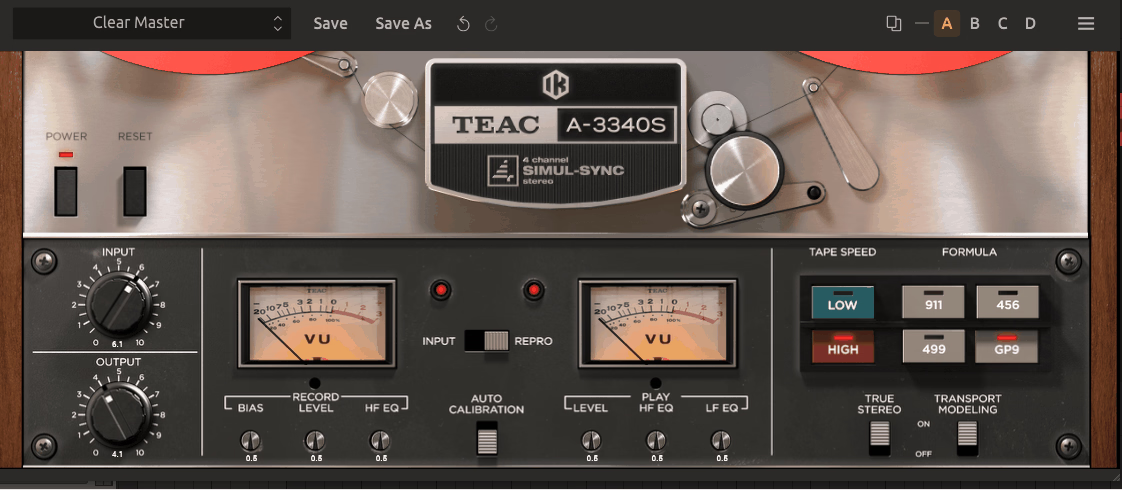
TEAC A-3340S models the four-channel Simul-Sync deck that put multitrack recording within reach of home studios in the 70s.
It’s a semi-pro machine with a semi-pro sound, rounder, softer, and less precise than the Studers, with a charm that lo-fi and indie producers are specifically after, and IK built it with TASCAM’s involvement.
I would say it sits between the studio decks and Reels, because it’s not damaged but it’s not pristine either, and quarter-inch four-track has a specific compression a lot of records from the era carry.
- Quarter-Inch Four-Track Format
Narrow track widths mean more compression per track, which is what four tracks on quarter-inch tape gets you compared to a two-inch machine, and from what I can tell it’s the source of the distinctive squash this deck puts on drums.
- Colored Input Path
With no tape at all it still colors the signal, because Input mode passes through the TEAC’s electronics alone, and on this machine that path is noticeably warmer than on the pro decks, which makes it usable as a preamp coloration on its own.
Freebies
1. Sender Spike SN03
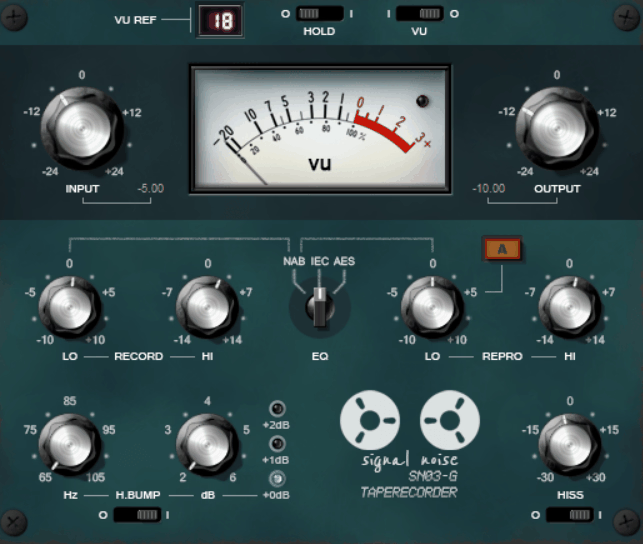
Sender Spike SN03 doesn’t model a machine, and instead it gives you the components of a tape recorder as adjustable parameters and lets you build your own, calibrated to NAB, IEC, or AES equalization and operating from 7.5 to 30 ips. The saturation is deliberately conservative, in the range a real deck would produce, so it won’t do the heavy driven sound some paid plugins do, but what it will do is subtle, accurate tape behavior for almost no CPU, which is exactly what the developer designed it for.
- Adjustable Head Bump
You can place the low-end lift exactly where your kick and bass live, because the head bump runs from 65 to 105 Hz with gain from 1 to 8 dB, and where paid plugins fix this by speed, here you set it directly, which I’d say is the best reason to use SN03.
On a mix where the kick sits at 60 Hz and the bass fundamental at 90 Hz, you can put the bump between them so both benefit, or center it on one and leave the other alone, and that kind of choice simply doesn’t exist on a machine model with a fixed head geometry.
- Separate Record and Repro EQ
Calibrating the way an engineer would with a test tape is possible with independent low and high controls for record and reproduction, and a small offset between them changes where the saturation lands.
2. Chow Tape
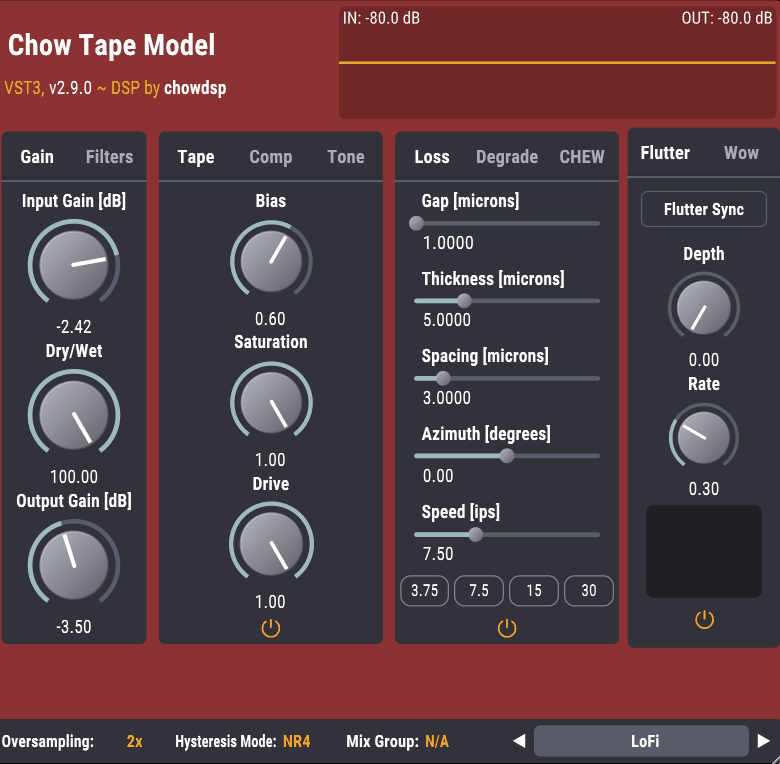
Physical modeling from the ground up is what separates Chow Tape from every other free option and most paid ones. Jatin Chowdhury built it around a hysteresis model of the magnetic tape itself, solved in real time, so the saturation comes from simulated magnetization rather than a fitted curve, and it’s open source, actively updated, and its DSP became the basis for Tape Sculptor above.
- Hysteresis Modeling
Compression and harmonics arrive together, the way they do on tape, because the saturation comes from a real-time magnetic hysteresis model with selectable solver methods, and that’s the whole reason it sounds different from a waveshaper.
The solver choice matters too, since the more accurate methods cost more CPU but track fast transients better, so on drums it’s worth stepping up from the default.
- Loss Filtering by Physical Parameters
The same section Tape Sculptor sells is free here, with gap width, spacing, thickness, and speed defining the high-frequency loss, and changing them reshapes the roll-off rather than moving a cutoff.
3. Caelum Audio Tape Cassette 2
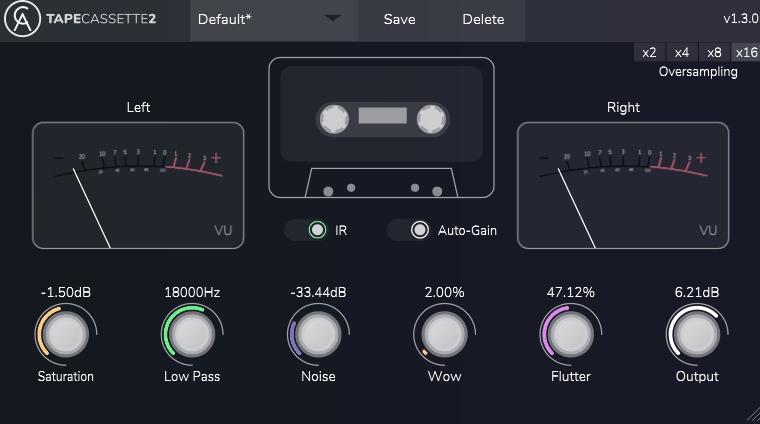
Caelum Audio Tape Cassette 2 is the only cassette model on this list, and that’s a meaningful distinction, because cassette behaves differently from reel-to-reel: narrower, slower, noisier, and quicker to lose highs.
The plugin captures that with a handful of controls, and at moderate settings it adds a soft, compressed cassette warmth without turning into an obvious effect.
- Age Control
High-frequency loss and instability arrive together from one knob, because Age simulates a worn cassette, and it turns out this alone gets you most of the way to a convincing old-tape sound.
- Cassette-Specific Noise
Higher and more present than reel-to-reel hiss because it’s modeled on cassette, the noise here is the right noise for a lo-fi beat, and I’ve found that matters more than you’d think.

Hey, I’m Vil, I started this site to help you find the best audio plugins covering various categories including synths, pianos, strings, and effect tools of all sorts as well. I pick these plugins based on various criteria so it best matches the actual topic.