When you purchase through the links on my site, you support the site at no extra cost to you. Here is how it works.
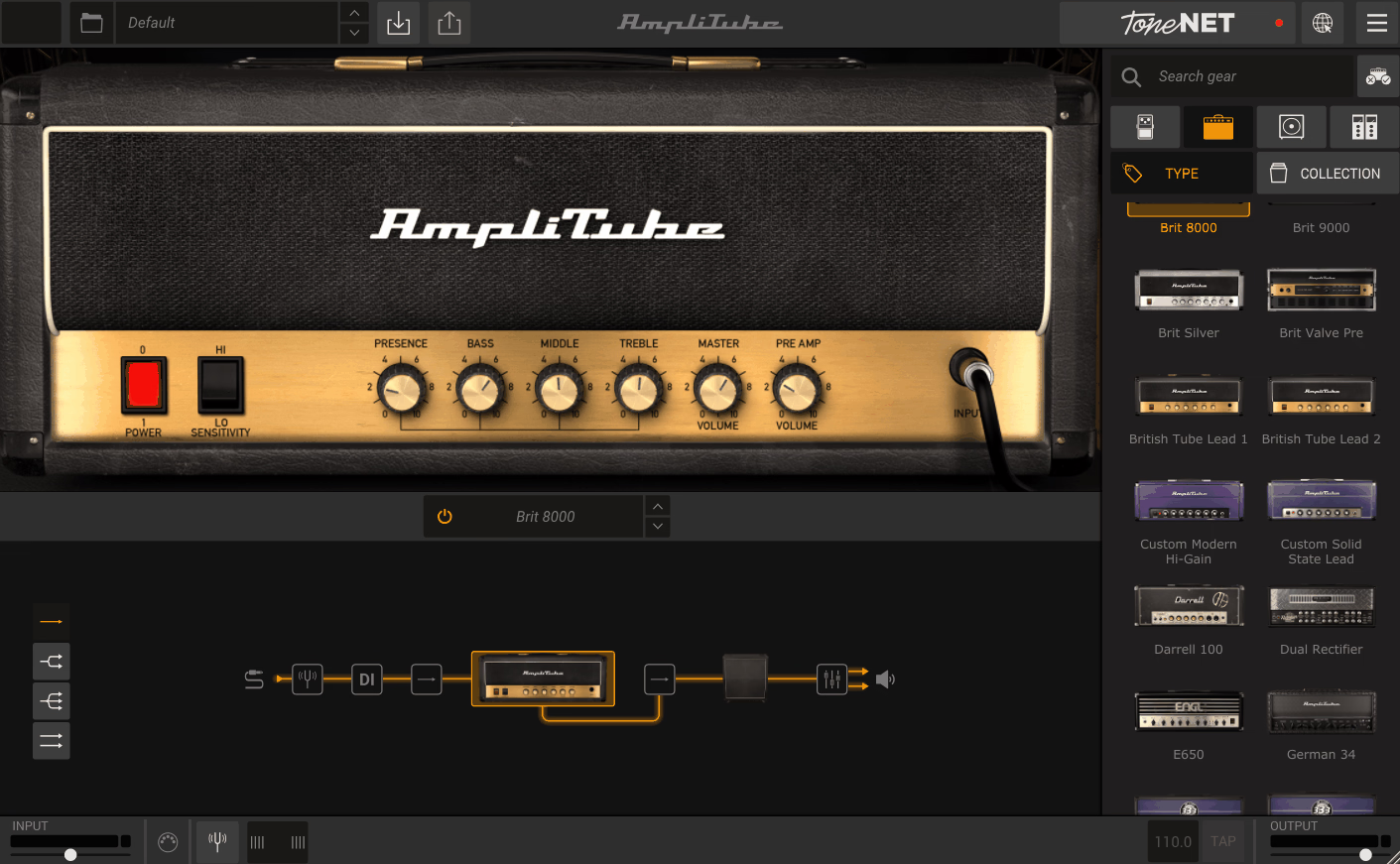
AmpliTube 5 is the kind of guitar software where the sheer amount of gear can make the buying decision harder, not easier. You get a very large collection of amps, cabinets, speakers, microphones, pedals, rack effects, routing options, and recording tools, but having hundreds of models available does not mean you will like hundreds of models.
I’ve spent some time with it for guitar, bass, recording, and sound design, and from what I can see, some sections are genuinely strong, while others are more useful as extra options than as replacements for dedicated plugins.
Now, let’s talk about what you actually get. The MAX edition currently includes more than 400 gear models, while the standard editions contain smaller selections. The system covers amps, cabinets, speakers, microphones, stomp effects, rack effects, rooms, and a flexible signal chain that can run series and parallel configurations.
With IK AmpliTube 5 also get an 8-track recorder and DAW in standalone mode, a looper, tuner, practice tools, and Live Mode, so you can use the software for more than inserting an amp simulation on a DAW track.
- Large gear library
The full version gives you hundreds of amps, cabinets, effects, speakers, microphones, and rack processors, which is useful when you regularly move between different guitar and bass styles.
- Flexible signal chain
You can build series, parallel, wet/dry/wet, and blended DI setups, so you are not locked into the traditional pedalboard → amp → cabinet workflow.
- Built-in recording
The standalone version includes an 8-track recorder, looper, tuner, and practice tools, making it practical for sketching ideas without opening a separate DAW.
Amp Modeling
The amp section is where I would spend most of my time when evaluating the software. The stronger models respond convincingly to playing dynamics and gain changes, and the clean and edge-of-breakup sounds are particularly useful when you want an amp to react to your playing instead of simply adding an EQ curve and distortion.
I would not assume that every model has the same quality, though. The library has grown over several generations, so some amps feel more convincing and mix-ready than others, and I think auditioning the individual models matters more than the headline model count.
For clean and moderately driven guitar, I tend to prefer the more established Fender- and British-style sounds. High-gain users have good options as well, but if your entire workflow revolves around modern metal tones, you will probably compare these more closely against dedicated high-gain suites.
Cabinet and Mic Room
The cabinet section is one of the most useful parts of the current system because you get much more control than simply choosing a cabinet from a menu. The VIR cabinet engine is built from extensive impulse-response measurements, and the current system supports movable cabinet microphones, ambient microphones, speaker selection on supported cabinets, and custom IR loading.
That flexibility matters because the cabinet and microphone choice can change the perceived amp far more than another pedal in front of it. I usually start with the amp I like, then spend time moving the mic position before changing the amp model itself.
Custom IR support is particularly valuable if you already have a cabinet library you trust. You can keep an amp model you like while replacing the modeled cabinet with your own impulse response, which makes the platform considerably more useful for serious recording work.
- VIR cabinet system
The cabinet section gives you detailed speaker and microphone positioning, so you can shape the recorded sound without relying entirely on the factory cabinet choices.
- Custom IR loading
You can load your own cabinet impulse responses, which gives you an easy way to pair the amp models with third-party cabinet captures you already prefer.
- Multiple signal sources
The mixer can combine cabinet, microphone, ambient, and DI signals, giving you more flexibility when the standard single-mic approach is too restrictive.
Effects and Pedals
The pedal library covers the usual categories well enough for general guitar production: overdrive, distortion, modulation, delay, reverb, filtering, and more. I find the modulation, delay, and spatial effects particularly easy to work into real sessions because they can be shaped as part of the complete rig rather than added after the fact.
Overdrive and distortion are more dependent on the particular model. Some work perfectly well for shaping an amp, but I would not assume the included pedals will replace your favorite specialist pedal emulations, especially when the pedal itself is a major part of the sound.
The rack section is also useful because it gives you processing after the amp and cabinet. You can place processors at different points in the signal flow, which lets you build more deliberate chains instead of treating the plugin like a fixed amp simulator.
Routing and Mixer
For me, this is one of the areas that makes the platform more useful than a simple amp plugin. You can run multiple amps and cabinets, blend DI with processed signals, and build parallel paths, which gives you more control over the final sound before it reaches the DAW.
A practical example is blending a direct bass signal with an amp and cabinet chain. I can keep the DI for low-end control while using the amp path for midrange character, rather than trying to make one amp setting do everything.
Such a routing also can help when you’re working with stereo guitar rigs or more experimental chains. You have enough flexibility to create a fairly complete guitar production environment without immediately bouncing between several plugins.
Recording and Live Tools
Standalone operation is more useful than it may seem. The built-in 8-track studio, looper, tuner, practice tools, and Live Mode let you use the software for rehearsing, capturing ideas, or playing without opening a full DAW.
I’ve found that especially handy for quick recording. You can load a backing track, play along, record a part, and move on without building a complete session just to test a tone.
Live Mode is designed around quick access to presets and controls, with integration for IK controllers and interfaces. If you are using the software on stage, that is a more relevant feature than the enormous gear list.
Where I Use It
I get the most value from the platform when I need variety across several projects rather than one perfect amp sound. Guitarists working across clean pop parts, crunchy rhythm tracks, ambient textures, and heavier sounds can benefit from having many approaches in one environment.
Bass is another strong use case because the amp, cabinet, and DI routing can be combined before the signal reaches the DAW. I also use the effects and routing creatively when a guitar part needs to become more than a conventional recorded amp tone.
- Guitar recording
I use it when I need several amp characters in one project, particularly when switching between clean, crunch, and higher-gain parts.
- Bass
Blending DI and amp signals gives me a practical way to keep low-end definition while adding the character of the modeled rig.
- Sound design
Parallel routing, unusual effects, and multiple signal paths make it useful for processed guitars, drones, textures, and less conventional instrument sounds.
A Practical Workflow
I would not start by browsing hundreds of models. Pick the amp category you actually need, choose one cabinet, and spend a few minutes getting the input gain and cabinet sound right before touching the effects.
Once the amp works, adjust the microphone position. This often makes a bigger difference than swapping between several nearly identical amp models.
From there, build the rest of the chain around the arrangement. Keep some DI signal when you need clarity, add effects only where they solve a specific problem, and save the complete rig as a preset once the sound is working.
- Start with the amp
Choose the broad character first, clean, crunch, or high gain, before worrying about pedals or rack effects.
- Dial in the cabinet
Spend time on speaker and microphone placement, because this can change the recorded tone dramatically.
- Blend when necessary
Keep a little DI alongside the processed signal when you want more control over attack and low-end definition.
- Save useful rigs
Once you have a combination that works, save it as a complete setup so you can recall the whole signal path rather than rebuilding it later.
Where It Falls Short
The biggest problem is consistency across the library. You get a lot of gear, but the quality is not perfectly uniform, so I would rather have ten models I trust than choose an amp simply because the software happens to include it.
The sheer amount of choice can also slow you down. When I only need one clean amp sound, having dozens of alternatives can become a distraction rather than an advantage.
And while the effects section is broad, specialist pedals and processors can still sound more convincing when a particular effect is central to the tone. The same applies to some of the high-gain amp choices if you already have a dedicated suite you know well.
Pros and Cons
Pros
- Huge selection
The large collection gives you a lot of amp, cabinet, pedal, microphone, and rack options in one environment.
- Strong cabinet workflow
VIR processing, microphone positioning, multiple signal sources, and custom IR loading give you serious control over the final recorded tone.
- Flexible routing
Series, parallel, DI, and multi-cab configurations make it possible to build more complex rigs without leaving the plugin.
- Useful standalone tools
The 8-track recorder, looper, tuner, practice functions, and Live Mode make it useful outside a conventional DAW session.
Cons
- Uneven model quality
Some amps and effects are considerably more convincing than others, so you need to audition the individual models rather than judging the platform by its size.
- Too much choice for simple jobs
The large library can make it easier to browse than to actually make a decision when you only need one straightforward sound.
- Specialist alternatives can win
Dedicated amp and pedal plugins can still be preferable when one particular style or circuit is central to your sound.
Verdict
I would not judge AmpliTube 5 by how many models it contains. Its real strength is giving you a complete guitar and bass signal chain with enough routing, cabinet control, and recording functionality to handle very different jobs from one setup.
For me, it makes the most sense when you need variety. If you record different styles, work on both guitar and bass, or regularly build sounds that combine amps, cabinets, DI, and effects, the flexibility can save you from keeping several separate amp suites open just to cover different sessions.
On the flip side, a huge library is not automatically better. If you already have a favorite amp suite and only need a few specific tones, you may get better results from a more focused tool with a smaller but more consistent set of models.
In the end, I would try it with three real sources: a clean guitar, a driven guitar, and a bass, and spend most of the time on the amp, cabinet, microphone, and routing sections. If those core sounds work for you before you even touch the larger effects library, the broader platform is probably worth adding to your setup.

Hey, I’m Vil, I started this site to help you find the best audio plugins covering various categories including synths, pianos, strings, and effect tools of all sorts as well. I pick these plugins based on various criteria so it best matches the actual topic.