When you purchase through the links on my site, you support the site at no extra cost to you. Here is how it works.
Some multi-effects plugins are basically a pile of familiar processors in one window. Devious Machines Infiltrator 2 is more interesting because the effects themselves can become part of the sequence, so a sound can move from filtering to distortion, pitch processing, delay, reverb, and spectral effects as the pattern plays.
That changes how I approach it. Instead of asking which effect should sit on a track, I can build a short sequence of effects around the source and let that sequence become part of the rhythm, which is especially useful for electronic production, transitions, sound design, and experimental arrangement work.
54 Effects in One Chain
The current version gives you 54 effect modules, including filters, distortion, pitch processing, delay, reverb, spectral effects, modulation, time manipulation, compression, gating, and a vocoder.
You can run up to 10 effect modules at once, so there is plenty of room to build a complete transformation without immediately reaching for another plugin.
I spend most of my time with the filters, distortion, time effects, and spectral processors because they can make a familiar source behave very differently. The reverb and modulation sections are useful too, although I would still reach for a dedicated processor when the reverb itself needs to carry the mix.
- Filters
You get analog-style, digital, formant, comb, dual, and notch filtering, giving you much more than the usual low-pass and high-pass sweeps.
- Distortion
There are 12 distortion models, so you can move from mild harmonic coloration into much harsher processing without changing plugins.
- Time manipulation
Reverse, Varispeed, Slowdown, and granular Time Stretch let you reshape the timing and pitch relationship of the source, which is particularly useful for transitions and sound design.
- Spectral processing
The FFT-based effects can shift, smear, scatter, stretch, corrupt, and spread different parts of the frequency spectrum, opening up processing that conventional effects do not easily reproduce.
The Sequencer Is the Big Deal
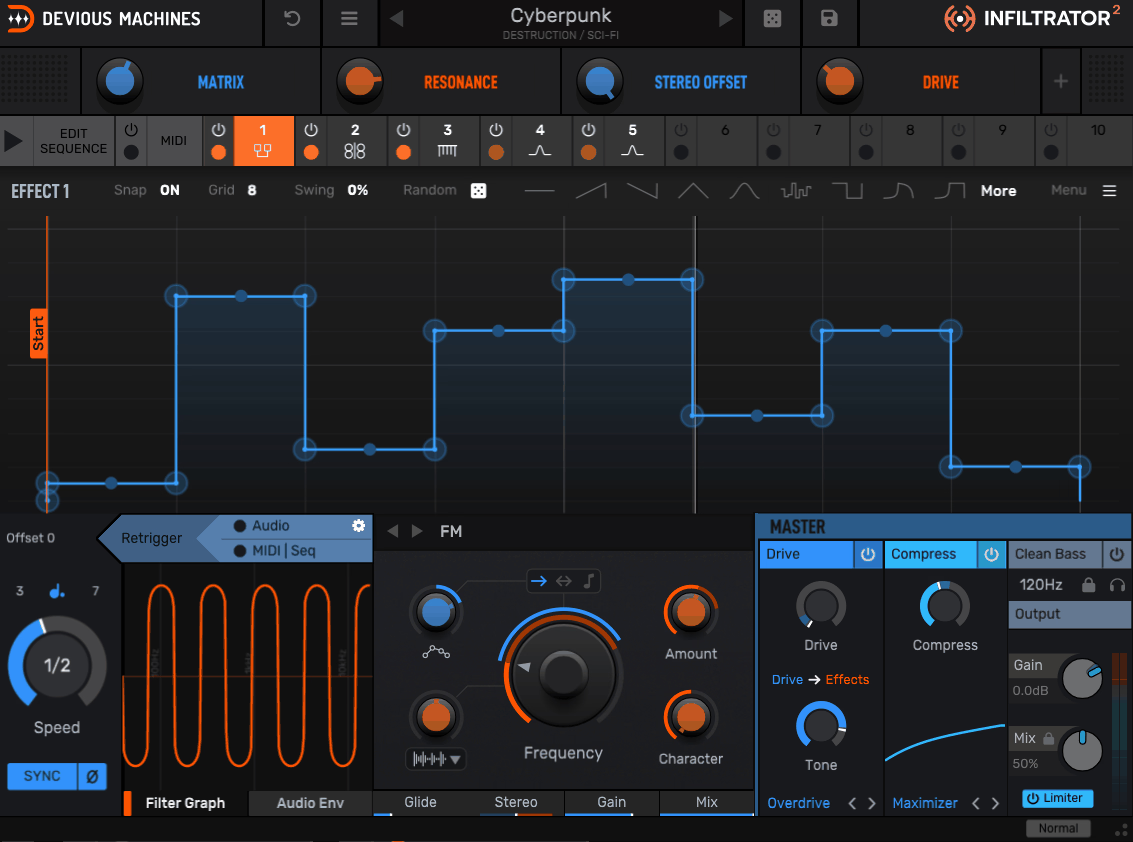
The feature I would spend the most time with is the 32-step sequencer. Each of the 10 effect slots can be switched on or off from the sequence, so the pattern controls not just parameter movement but which effects are active at each step.
That creates a very different workflow from automating a static chain. I can have a filter active on one step, distortion and delay on the next, then bring in a pitch or spectral effect later, making the processing behave like another rhythmic layer.
Effects can also run at different speeds, so the movement does not have to reset in one uniform cycle. That is useful when you want a loop to keep changing without adding more notes or percussion to the arrangement.
- 32-step sequencing
Use the sequencer to activate different effect combinations rhythmically, rather than simply automating one parameter.
- Different effect speeds
Effects can move at different rates, creating overlapping rhythmic cycles instead of one rigid repeating pattern.
- Crossfade
Adjustable crossfading between effect states helps smooth transitions between steps when abrupt switching is not what you want.
Envelopes, Modulation and Swing
Each effect has two tempo-synced, multi-segment envelopes, and those envelopes can be assigned to key parameters within the effect. You can draw curves, use preset shapes, generate random movement, create Euclidean patterns, and apply swing to the modulation.
I like this because the sequencer does not have to do all the work. One effect can follow a drawn filter curve while another follows a different rhythmic envelope, giving you more internal movement without adding DAW automation.
Pitch snapping is useful when you’re working with pitch-based effects or resonant filters. You can constrain movement to notes or scales, which helps keep heavily modulated patches musical.
Swing is handy when perfectly straight timing feels stiff. You can keep the rhythm structured while giving the modulation a more natural groove.
Eight Macros and Performance Control
Current versions provide eight assignable Macro controls, and each macro can move multiple parameters at once. I find them most useful once a patch already works and I want to make that movement easier to perform or automate.
One macro might raise distortion and delay together, another can open the filter while shifting pitch, and a third can push the whole effect chain toward a more extreme setting. You get broader movement from a few controls instead of managing every parameter separately.
MIDI control can also trigger effects and envelopes from notes, while MIDI CC output lets the modulation interact with other compatible software or hardware. That makes the plugin more useful in setups where it needs to influence more than the track it is inserted on.
Pitch Snapping and Randomization
Randomization is more useful when it stays within musical boundaries. You can generate random curves, stepped patterns, and Euclidean shapes, while pitch snapping and swing help keep that movement tied to the musical context.
I normally randomize after the core patch is working. If the filter and distortion already sound right, I can change an envelope, audition the variation, and keep only what improves the part.
The random envelope start position adds another layer of variation when a patch is triggered repeatedly. Each trigger can begin from a different point, so the effect does not have to repeat in exactly the same way every time.
Presets and Workflow
The current library contains more than 1,500 presets, including artist banks and categories aimed at electronic and experimental production. I would still use those patches as starting points rather than judging the plugin by the preset count.
A useful approach is to find a patch with the right rhythmic idea and then strip it back. Remove an effect, change one envelope, or alter the step pattern so you can hear which part of the preset is actually creating the movement.
The plugin also includes Eco, Normal, and High quality modes, giving you a way to trade processing load against quality when a session gets heavier. That matters once you’re running several complex instances rather than one simple patch.
Where I Use It Most
Electronic music is an obvious fit because the sequencer can become part of the groove. I like it on synths, percussion loops, basses, and transition sounds where the processing rhythm can create movement without adding another musical part.
Sound design is where the larger effect library becomes especially useful. A vocal can move through formant filtering, granular time manipulation, spectral processing, and delay, while a simple drum loop can become a completely different rhythmic texture.
- Electronic production
Use the sequencer and modulation to create rhythmic filter, distortion, delay, and spectral movement around synths and loops.
- Transitions
Reverse, Varispeed, Slowdown, pitch effects, and spectral processing can turn short material into risers, drops, fills, and breakdown textures.
- Sound design
The unusual processors give you ways to create textures that would otherwise require several plugins and complicated routing.
- Live performance
MIDI triggering and the Macro system let you perform changes rather than rely entirely on pre-programmed automation.
A Practical Workflow
I would start with one or two effects and the sequencer, rather than building a huge chain immediately. Get the rhythmic behavior working first, because that is what makes the plugin different from a normal multi-effect.
Once the pattern works, add an envelope to one important parameter, such as a filter, pitch, delay, or distortion control, and listen to whether the extra movement actually improves the part. I also keep pitch-based modulation inside a musical scale when random movement starts producing notes that do not fit, and I use the available quality settings to manage CPU and latency when running multiple instances in a larger arrangement or live setup.
Only after that would I bring in the more destructive processors. Spectral effects, time manipulation, and heavy distortion are easier to control once the basic rhythm already works, so I treat them as finishing layers rather than the foundation.
Pros
- Effect sequencing goes beyond automation
You can sequence which effects are active at each step, not just move parameters on a static chain. That makes the processing itself part of the groove.
- Large creative effects library
With 54 modules covering filters, distortion, spectral processing, time manipulation, modulation, delay, reverb, compression, and more, you can take one source in many directions without rebuilding the entire chain.
- Deep modulation
Two envelopes per effect, randomization, Euclidean patterns, swing, and pitch snapping give you enough control to create movement that stays structured rather than simply repeating an LFO.
- Eight macros and MIDI control
The eight-macro system makes complex patches easier to perform, while MIDI triggering and CC output let the modulation interact with the rest of your setup.
- Large preset library
More than 1,500 presets, artist banks, search, favorites, and multiple quality modes give you plenty of material to study, modify, and adapt to your own workflow.
Cons
- Too much depth for simple jobs
If you only need a filter sweep, delay throw, or mild distortion, Infiltrator 2 can be more setup than the job requires.
- Complex patches take time to understand
Once several effects and envelopes are moving together, tracking the modulation relationships takes concentration, particularly when you are building a patch from scratch.
- CPU can become a consideration
Heavy effect chains, modulation, and high-quality processing can add up across multiple instances, so I would use complex patches selectively.
- Individual effects are not always specialist replacements
The library is broad and creative, but a dedicated reverb, mastering compressor, or other specialist processor may still give you more control for critical mixing work.
Verdict
The most useful way to think about Infiltrator 2 is not as a collection of effects but as a sequencer for the behavior of those effects. You can decide when a filter appears, when distortion takes over, when a delay enters, and how those changes interact with the rhythm of the source.
That makes it particularly strong for electronic production, transitions, rhythmic sound design, experimental textures, and performance, while the modulation and macro systems give you enough control to move beyond presets. I like that you can start simple and add complexity only when the track actually needs it.
On the flip side, that depth is unnecessary for routine processing. If you mainly need conventional EQ, compression, delay, and reverb, specialist plugins will usually be quicker; if you want effects that behave like another rhythmic layer in the arrangement, Infiltrator 2 has a much stronger reason to be in your setup.

Hey, I’m Vil, I started this site to help you find the best audio plugins covering various categories including synths, pianos, strings, and effect tools of all sorts as well. I pick these plugins based on various criteria so it best matches the actual topic.