When you purchase through the links on my site, you support the site at no extra cost to you. Here is how it works.
Released in May 2026 as the Bristol-based developer’s debut plugin, Phonon focuses on precision and control. The full price is $89 USD, and there’s a 30-day full-featured trial available directly from the PolyFreq website. No watermarks, no noise injections.
For me, the main appeal is how much control you get without having to dig through a complicated interface.
Graintable Synthesis
When it comes to granular synthesis, most plugins default to one of two approaches: throw everything at randomization and hope something beautiful falls out, or go so deep into modular territory that you need a manual just to get started.
Phonon sits between those two extremes as it’s built around synchronous granular synthesis, sometimes called graintable synthesis, where the granulation process is tied to deliberate, controllable parameters rather than stochastic chaos.
You load a sample, and Phonon rebuilds it grain by grain with sub-sample precision, giving you control over how those grains behave.
The engine runs 8 voices of polyphony with up to 256 grains per voice, along with root note detection, four keyboard follow modes, and legato.
That means you can play it like an actual instrument rather than just triggering one-shots. I find that especially useful when I want to use a granular sound as part of an actual musical phrase.
The Grain Engine: Where Phonon Does Its Best Work
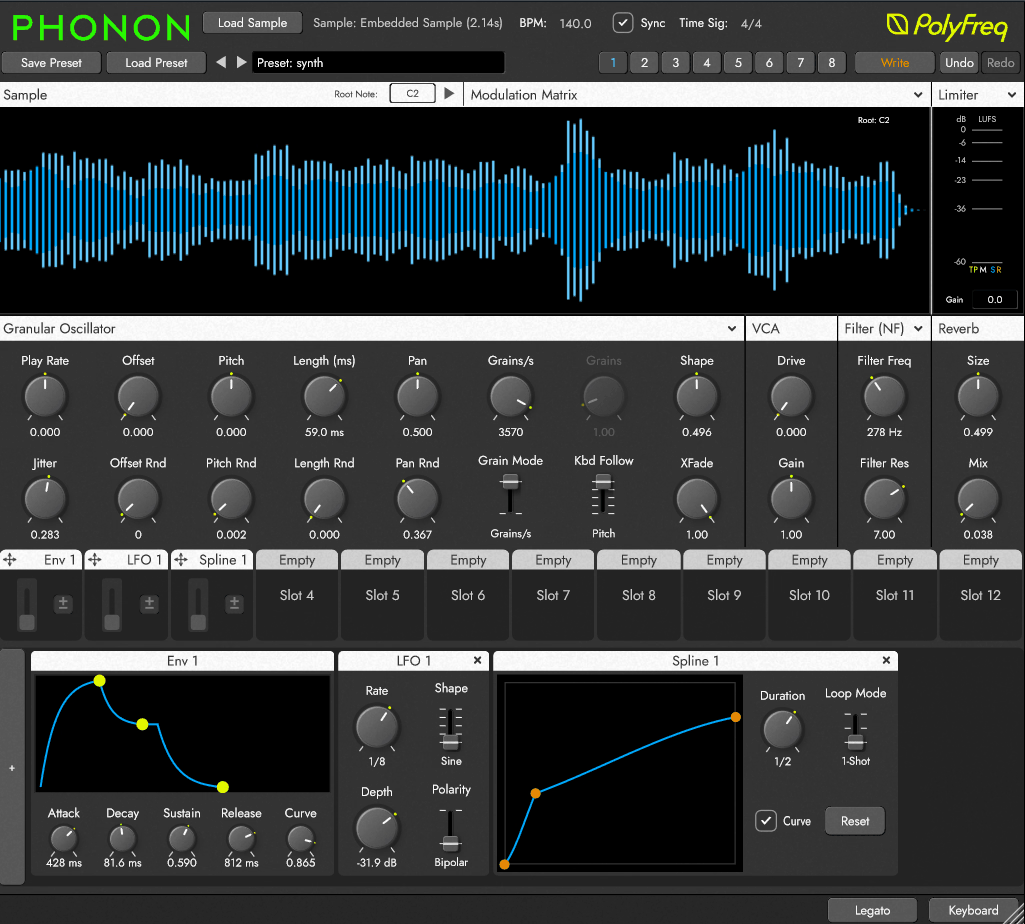
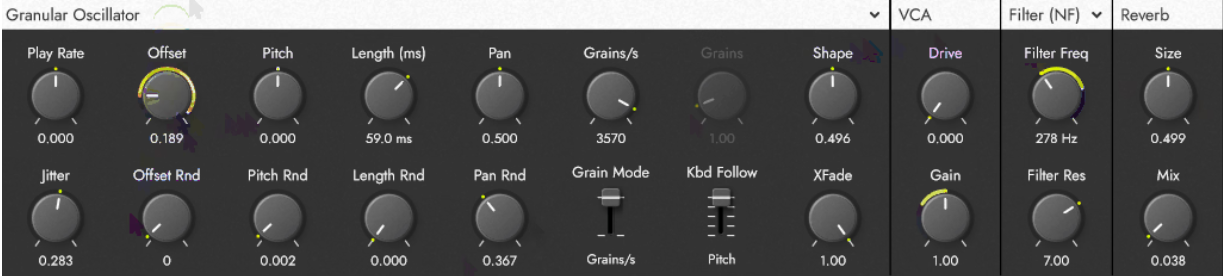
The grain oscillator module is the core of the plugin. All the granular controls live in one clearly organized section, which makes the workflow faster than plugins that scatter parameters across multiple pages.
- Playback and Shaping Controls
The grain section gives you playback rate, offset, pitch, grain length, stereo pan, density, jitter, and shape all in one place. The grain shape morphing lets you move between smooth curves and sharp rectangular windows, giving you the graintable behavior. Per-parameter randomization for offset, pitch, length, and pan also has its own amount knob, so you can add movement selectively.
Separate grain rate and density controls let you manipulate tempo and texture independently. I like being able to adjust those separately because changing one doesn’t force me to change the other.
- Granular and Classic Crossfade
Phonon also has a crossfade between granular and classic sample playback modes. Most granular synths stay granular throughout the sound. Here, you can morph between the two within a single voice, which lets you build hybrid patches. A pad can sound like a normal sample in the body and dissolve into granular texture on the release.
I also think this gives you a better starting point if you’re newer to granular synthesis. You can begin with something familiar and gradually push it into granular territory instead of changing several parameters at once.
- Repeatable, Reliable Results
The grain engine’s biggest strength for me is its repeatable results. You can find a sound, save it, come back a week later, and it sounds the same. For production work, that matters when you’re trying to recreate a sound later. I’ve run into the opposite problem with other granular tools, where a sound was difficult to reproduce, so I appreciate having that consistency here.
A Modulation System That Actually Makes Sense
Phonon includes 12 modulator slots per patch with 9 modulator types, all running at audio rate or grain rate. The routing uses a drag-and-drop system: drag a modulator onto a parameter target, set the amount, and you’re done. No menus, subpages, or connection matrices.
I was able to set up basic modulation pretty quickly, which makes it easier to experiment without constantly stopping to figure out the routing.
The modulator types cover LFOs with multiple shapes, envelopes, spline curves for custom modulation shapes, step sequencers, sample and hold, an XY pad, multiple noise flavors, MIDI control data, and sample metadata modulation.
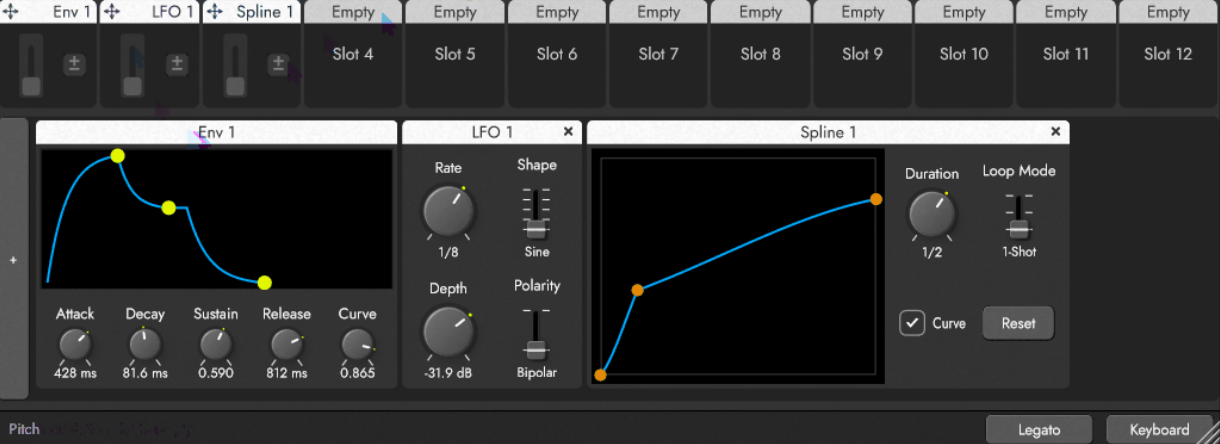
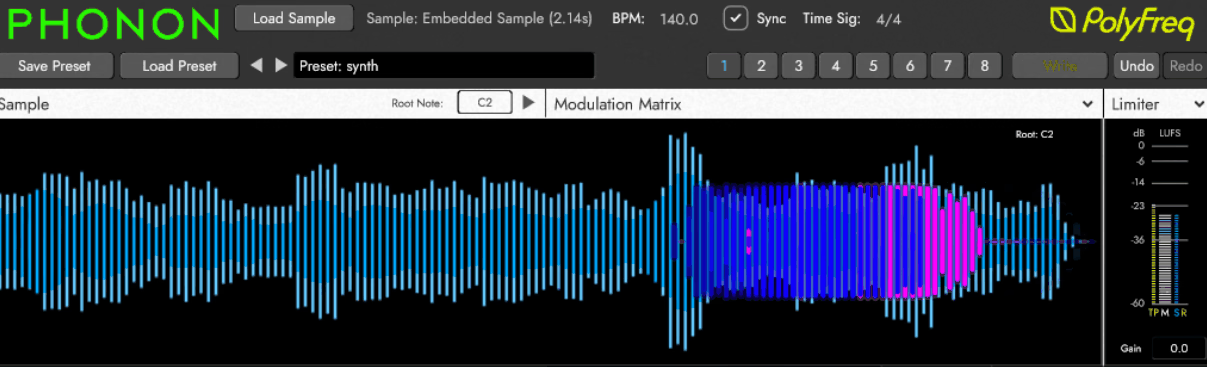
The sample metadata modulator lets you use embedded information from the sample itself, such as amplitude and spectral data, as a modulation source. That means the sample can modulate its own processing based on its own content, creating organic, self-referential movement. It takes a little time to understand, but once you do, you can use the sample itself to drive changes in the sound.
The 12 slots per patch give you room to build simple or deeply reactive patches. A simple pad with a slow LFO on grain position can take under a minute, while more complex sounds have enough modulation infrastructure to grow into. You can keep things simple when you want to, but there’s plenty there once you start combining sources.
Effects Chain and Output Stage
The built-in effects section includes saturating drive, a resonant filter, and a utility reverb, followed by a limiter or saturator at the output stage, plus true peak and LUFS metering.
Honestly, the effects are not going to replace your go-to reverb or multiband processor. I wouldn’t buy Phonon expecting it to. They’re mainly for shaping and gluing the sound before it leaves the plugin, so you’ll likely want your own effects chain for more complex processing.
The resonant filter works well with the grain engine because filtering after the granulation process affects the character of the grains rather than the original sample. I notice the difference more when working with dense clouds, where the filter starts shaping the granular texture itself.
Preset System and Workflow
Phonon launched with a relatively small preset library, but the preset system supports sample embedding, which means presets carry the source sample with them. Share a preset with a collaborator and they get the same sound without needing the original file separately.
That’s a practical feature because you don’t have to send the preset and the source sample as separate files.
The eight-way snapshot system lets you save up to eight different parameter states within a single patch and morph between them. This works well for live performance or for evolving sounds across a track without automating dozens of individual parameters. I’ve been using this for arrangement variation because I can move between different versions of a sound without setting up a pile of automation lanes.
When it comes to workflow, Phonon keeps most things visible on a single screen. The resizable interface and drag-and-drop modulation routing also reduce the amount of menu navigation, which makes the learning curve gentler than many granular synths at this level.
Is $89 Worth It? Here’s My Honest Take
There are a few things worth knowing before you buy. The plugin is VST3 only right now, with no AU or AAX support at launch, so Pro Tools users and some Logic workflows are currently out of the picture. The effects section is limited if you want everything in one plugin. The preset count is also modest, so if you rely heavily on presets to get started, you may want more options.
The 30-day full-featured trial lets you use the plugin without paying first. I’d recommend spending at least a week with it before deciding because the deeper modulation and granular controls take some time to explore.
- Value Compared to the Competition
At $89 full price, Phonon sits alongside instruments like Dawesome Novum, Audio Damage Quanta 2 or Grainferno from Baby Audio. It isn’t the cheapest option in the granular space, but it combines precision, audio-rate modulation with unusual sources, proper polyphony, keyboard follow modes, and legato.
For me, those features make a difference because I can use Phonon as an instrument in a track instead of treating it only as a source of unusual textures.
Perhaps the fairest way to look at it is this: if you want a granular synth that behaves like a musical instrument, gives you repeatable results, and has a modulation system deep enough to grow into, Phonon justifies the price. If you mainly want a texture randomizer with a huge preset library, it’s probably not your first choice.
Last words
I’d especially recommend trying Phonon if you’ve been frustrated by granular synths that sound great in isolation but are difficult to control or recreate in a production.
At the end of the day, download the trial, spend a week with it, and you’ll know. For me, the combination of precise grain control, playable polyphony, and the modulation system is what makes Phonon worth taking seriously. It’s a capable debut plugin for producers who want precise, repeatable granular sounds without dealing with an unnecessarily complicated workflow.

Hey, I’m Vil, I started this site to help you find the best audio plugins covering various categories including synths, pianos, strings, and effect tools of all sorts as well. I pick these plugins based on various criteria so it best matches the actual topic.