When you purchase through the links on my site, you support the site at no extra cost to you. Here is how it works.
Software synthesizers cover an enormous range of technology right now, from circuit-modeled recreations of decades-old hardware to granular and spectral engines that only exist because of modern processing power.
This list mixes both ends of that spectrum on purpose. Some of these plugins model actual vacuum tubes and analog voltage paths down to the component level, while others build sound from scratch using wavetables, grains, or six-way hybrid engines that never existed in any hardware form.
I will talk about these plugins specifically because each one represents a distinct approach to synthesis instead of a slight variation on the same idea.
You’ll find classic subtractive design, granular sampling, physical modeling, and modern wavetable synthesis all represented here, and I’ve tried to pick instruments that are genuinely useful across genres instead of one-trick novelties. Whether you’re after warm analog pads, glassy plucks, or textures that barely sound like music at all, there’s something in this list built for that job.
1. Native Instruments Absynth 6
Some instruments get discontinued and stay that way. Native Instruments pulled Absynth from its lineup back in 2022, then brought it back in December 2025 as a complete rebuild, developed with original creator Brian Clevinger.
Absynth 6 keeps the same semi-modular architecture that made the original special, blending subtractive, FM, wavetable, and granular synthesis into one instrument.
I think that combination is still pretty rare at this price point, and it’s part of why Absynth built such a devoted following in the first place..
What you get in detail:
- Semi-Modular Engine
The core of Absynth 6 combines subtractive, FM, wavetable, and granular synthesis in one semi-modular signal path, so you can route and layer synthesis types that most other instruments keep separate. Building a patch this way lets you stack fundamentally different textures on top of each other, which is exactly what gives Absynth its signature otherworldly character.
- MPE and Aftertouch
Full MPE support and polyphonic aftertouch mean each note you play can carry its own pitch, timbre, and pressure information. For instance, when you’re playing an evolving pad on an MPE controller, you can shape individual notes independently instead of applying one blanket modulation across the whole chord.
- MTS-ESP Microtuning
Built-in MTS-ESP support opens up global microtuning and alternate harmonic systems across the whole instrument. I’d recommend this to anyone working outside standard 12-tone equal temperament, since it lets you explore just intonation or custom scales without fighting the plugin.
- Preset Explorer
Instead of a flat list, the 2,000+ factory presets are laid out as a visual, browsable map organized by timbral quality. What stands out to me is how much faster this makes sound discovery, especially when you’re chasing a vague mood instead of a specific patch name.
- Aetherizer and Cloud Filter
These two signature effects remain central to Absynth’s identity, spatially bending and smearing sound into evolving textures. I love how both effects now support per-effect surround control, since it lets you spatialize them independently within a multichannel mix instead of treating the whole patch as one block.
- Sixteen Macros Per Patch
Each preset can carry up to 16 assignable macros, giving you deep hands-on control without digging through the full semi-modular signal path. I find this depth valuable when I want to tweak a preset quickly during a session without rebuilding it from scratch.
2. Xfer Serum 2
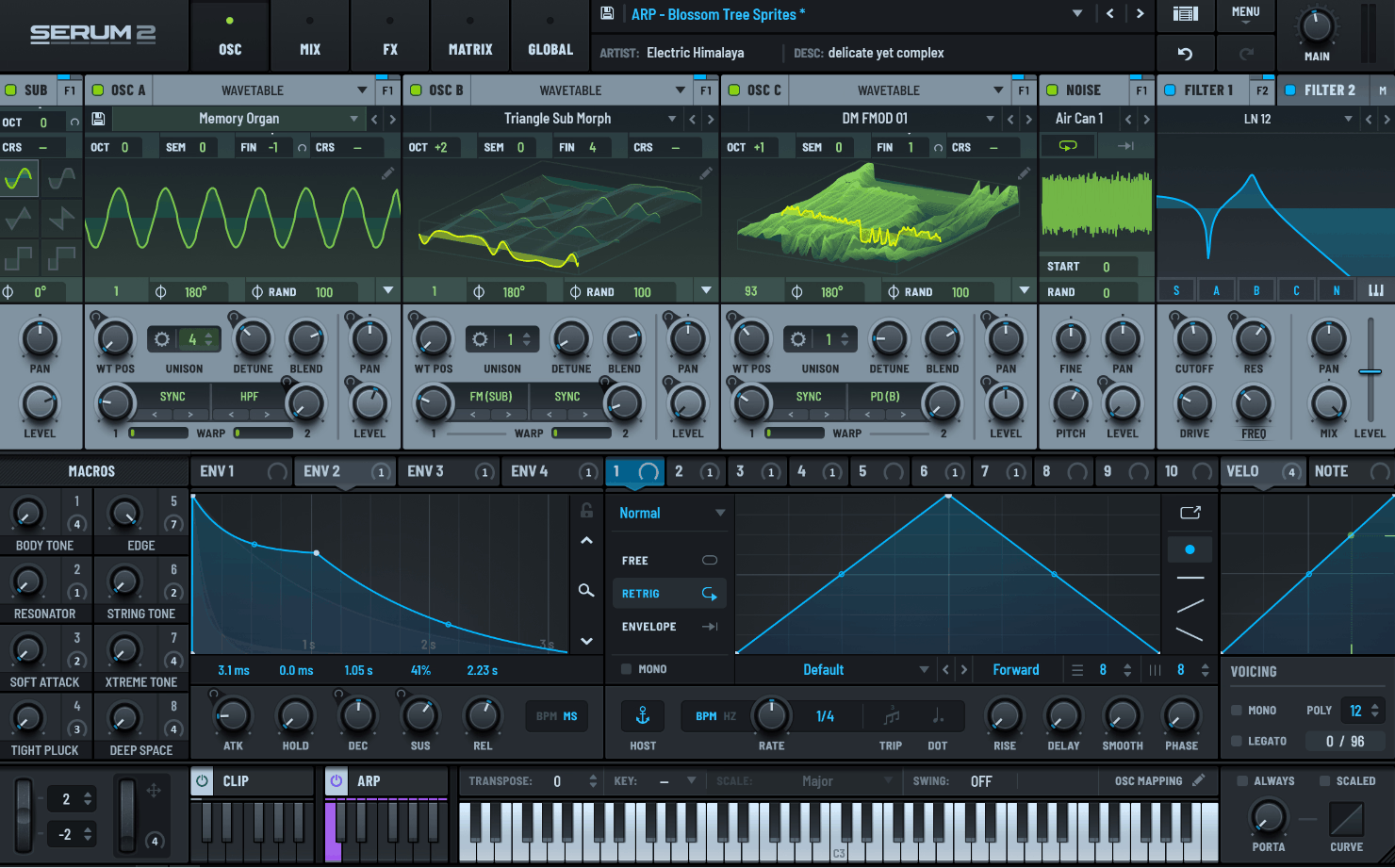
Picture opening a preset with five independent sound sources stacked together, each running its own synthesis type. That’s the reality now with Serum 2.
The original wavetable engine is still here and it’s been meaningfully upgraded, with smoother interpolation, new warp modes, and true FM and phase distortion processing built in.
But the real shift is the new oscillator lineup sitting alongside it: multisample, sample, granular, and spectral engines that let you build sounds no pure wavetable synth could touch.
Because of that expanded oscillator section, Serum 2 stopped being just a wavetable synth and became something closer to a full synthesis workstation. I feel like that shift alone justifies the free upgrade for anyone who already owns the original.
- Five Independent Oscillators
Serum 2 pairs its refined wavetable engine with new multisample, sample, granular, and spectral oscillators, plus dedicated noise and sub sources.
You can combine any of these within a single patch, which opens up sound design territory the original Serum simply couldn’t reach.
- Sixteen-Voice Unison
Each oscillator supports up to 16-voice unison, letting you thicken a single sound source into a dense, detuned stack before it even hits the filter section. I like how this approach gives you massive width without needing to layer multiple instances of the plugin.
- Multisample Engine
This oscillator loads SFZ-format multisampled instruments, including the pianos, orchestral sounds, and choirs Serum 2 ships with, or your own imported libraries. I have to say it effectively turns Serum into a credible rompler alongside its synthesis tools, which comes in handy when you need realistic instrument textures inside the same plugin.
- Arpeggiator and Clip Sequencer
A built-in arpeggiator sits next to a new clip sequencer that behaves like a compact piano roll with automation. If you would ask me when this becomes valuable, it’s when you want rhythmic movement baked into a patch without routing MIDI through a separate DAW track.
- Expanded Filter Section
New filter types including Wsp, DJ Filter, and MG Ladder join Serum’s existing analog-style options. I appreciate how these additions push the tonal range further into gritty, characterful territory instead of just adding more clean, clinical filter shapes.
- New Effects Routing
A Bode frequency shifter and convolution effect join the redesigned FX chain, with 288 new wavetables and over 600 new presets to explore them with. To me, this is a practical strength because it means you’re not stuck relying on third-party wavetable packs to get fresh sonic starting points.
3. u-he Zebra 3
Modular synthesis inside a plugin usually means a maze of tiny modules and cryptic patch cables. Zebra 3 rebuilds that idea from the ground up, replacing u-he’s old static grid with a dynamic Generator Rack where modules only appear once you’ve actually dragged them into a patch.
It’s a complete technical rewrite, not an incremental update, and that shows in the CPU load as much as the sound. I mean, a Zebra 3 module tends to use roughly double the processing power of its Zebra 2 equivalent, which is a real tradeoff for the added depth.
That depth is considerable, though. Two distinct oscillator engines, a physical modeling section, and an overhauled FM implementation give Zebra 3 a synthesis range that few modular-style plugins can match.
- Hundreds of Presets!
Zebra 3 delivers with more than 1,200 factory presets covering everything from cinematic textures to functional bass and lead sounds. I’d say that’s a solid starting library given how deep and unfamiliar the new modular workflow can feel at first.
- Generator Rack Interface
Instead of a fixed grid of empty module slots, Zebra 3 uses a dynamic rack where modules appear only when you drag them in. This keeps the interface uncluttered even on deep, complex patches, which matters because Zebra 2’s static layout could get visually overwhelming fast.
- Wavetable and Additive Engines
The Wavetable engine uses spline-based waveform editing and supports up to 16-voice unison per oscillator, while the separate Additive engine manages as many as 1,024 partials, including inharmonic spectra. Because of this split, you can build anything from smooth evolving pads to metallic, bell-like tones within the same patch.
- FM Vector Mixing
The redesigned FM oscillators include a Vector mixing module that blends between four sound sources positioned on an X/Y grid. I’m a big fan of this because it gives you a genuinely playable way to morph between timbres in real time instead of just automating a static ratio.
- Physical Modeling Section
A modal resonator and comb filter work together off a dedicated exciter module to recreate the organic behavior of struck, plucked, or bowed physical objects.
What I like about it is how convincingly it handles material and mallet character, something that’s historically been hard to fake with subtractive synthesis alone.
4. Arturia Pigments
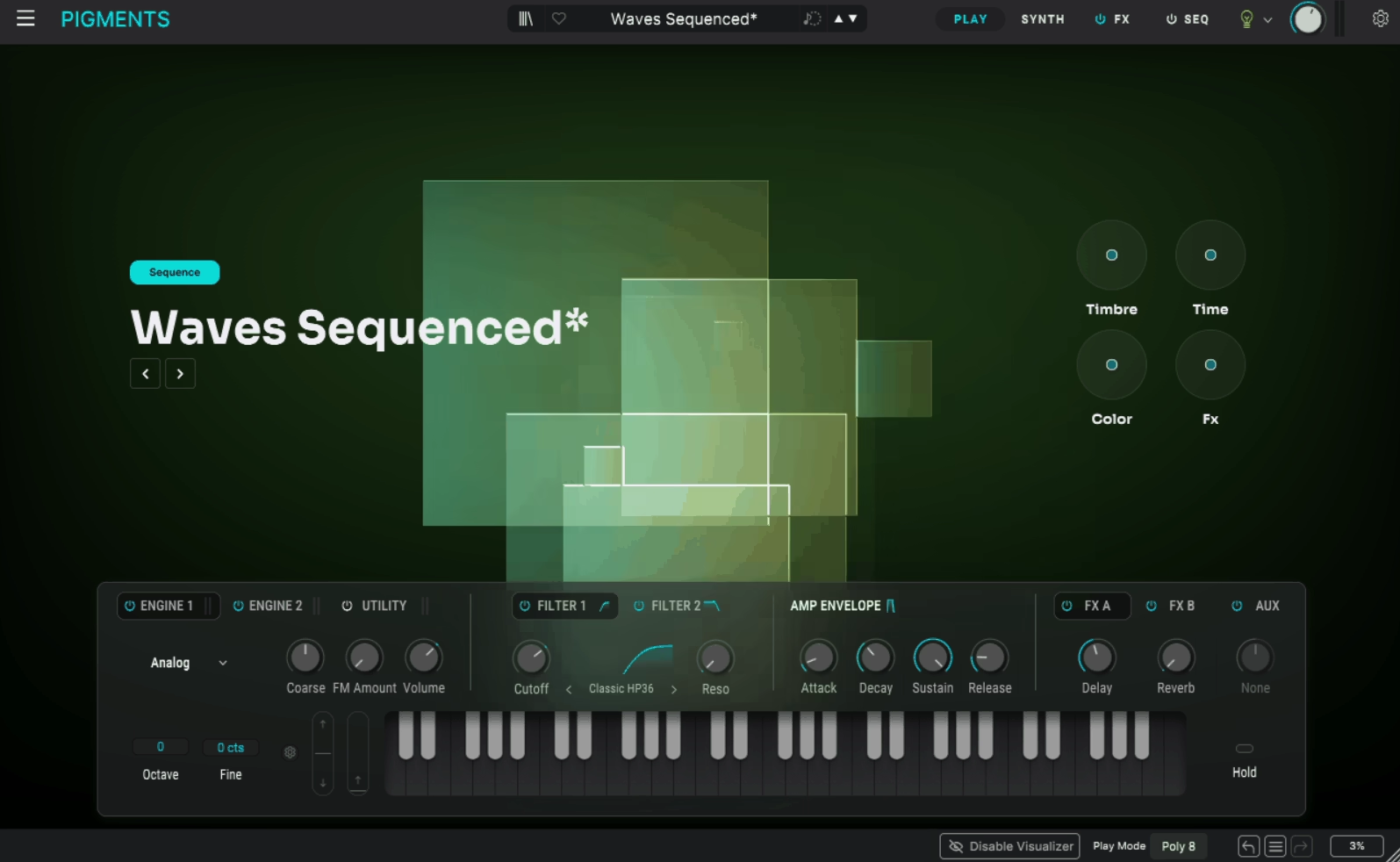
What happens when you give one synth six genuinely different ways to generate sound instead of picking just one? Arturia answered that question years ago with Pigments, and the latest version pushes the idea even further with a new Modal Engine built around physical modeling.
That engine handles collision and friction-based tones, the kind of plucked strings and resonant pads you’d normally need a dedicated physical modeling synth to get. Actually, it’s just one addition among several in this update, alongside new filter types, a vocoder, and deeper per-voice modulation.
On the flip side, none of this complexity gets in the way of Pigments’ visual, color-coded workflow. I think that balance between raw power and approachability is what’s kept Pigments relevant since its original release.
- Six Synthesis Engines
Pigments combines Modal, Granular, Wavetable, Sample, Harmonic, and Virtual Analog engines, plus a separate Utility engine, all inside one instrument. You can cross-modulate between these engines directly, which means a wavetable oscillator can drive a granular parameter without any external routing.
- Modal Engine
The newest addition generates physically-inspired tones through simulated collisions and friction, covering everything from plucked strings to metallic, resonant pads. I noticed that this engine alone makes Pigments a legitimate alternative to dedicated physical modeling plugins, not just a bonus feature bolted onto an existing synth.
- Expanded Filter Options
New filter types include the analog-flavored Multimode V2, a stacked Cluster filter for swirling movement, and a crunchy LoFi mode for bit-crushed coloration.
These sit alongside Pigments’ existing filter roster, so you’re choosing from an unusually wide palette before effects even come into play.
- Vocoder Effect
A built-in vocoder can process external audio input or route Pigments’ own internal engines through it, covering everything from classic vocal textures to more avant-garde color-bass sound design. I’d recommend experimenting with the internal-engine routing specifically, since it produces results you won’t get from a typical audio-input vocoder.
- Per-Voice Modulation
Modulation values can now be assigned per individual voice instead of uniformly across a patch, alongside deeper randomness controls and an improved Function V2 editor for sculpting custom curves. This makes chords and layered sounds feel less static, since every note can carry slightly different modulation behavior.
- Generative Sequencer
A built-in sequencer generates musical patterns with a single click, and it stays fully tempo-synced across arpeggios and time-based modulation. I’ve found that when you need a quick rhythmic idea to build a patch around, this saves you from programming a sequence manually before you’ve even settled on a sound.
- MPE and Microtuning
Full MPE support and built-in microtuning mean Pigments handles both expressive performance controllers and alternate tuning systems without needing outside tools. At the very least, this makes it a genuinely global instrument instead of one locked to standard Western tuning.
5. KORG ARP ODYSSEY
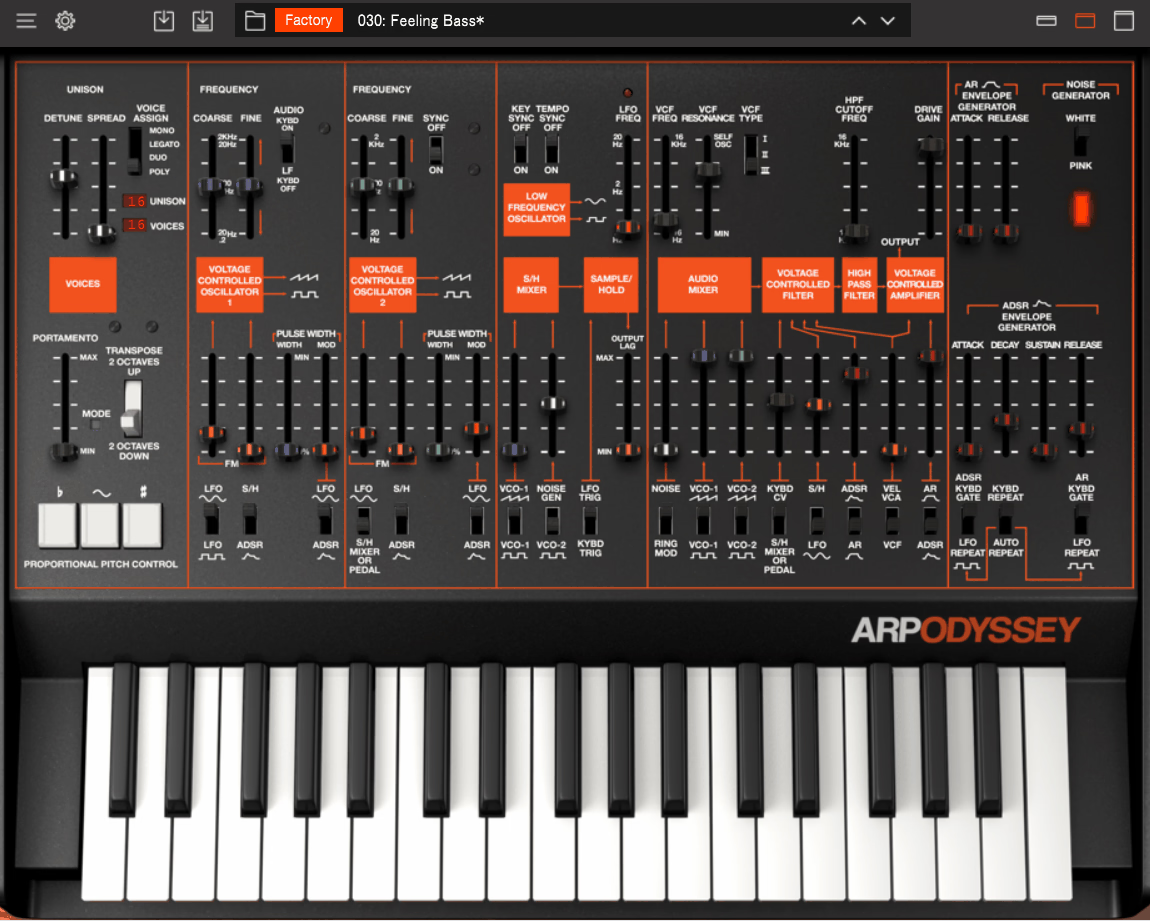
ARP Odyssey doesn’t just imitate its sound from the outside. Working under the advisory guidance of ARP co-founder David Friend, KORG digitized the actual transistors, capacitors, and resistors from the hardware circuit using its proprietary Component Modeling Technology.
That’s a meaningfully different approach from typical synth emulation, which usually just tries to match the output sound without modeling the circuit that produced it. I feel like that distinction matters here, since the Odyssey’s character comes from very specific analog quirks that are hard to fake through generic modeling.
On top of the vintage accuracy, KORG also added features the original hardware never had, including a fully programmable arpeggiator and an onboard effects unit.
- Component Modeling Technology
Instead of simulating the Odyssey’s output sound, KORG’s CMT reconstructs the original hardware’s signal path at the component level, digitizing the transistors and resistors from the actual circuit. I have to say this is one of the more convincing hardware recreations available in plugin form, precisely because of how it was built.
- Duophonic and Polyphonic Modes
The original hardware was duophonic, letting two different pitches sound at once when you played two notes. The plugin keeps that classic behavior available but also adds a new Voice Assign Mode capable of playing up to 16 notes simultaneously, something the hardware could never do.
- Three Original Filter Types
You get all three low-pass filters from the Odyssey’s production history in one plugin: Type I, a sharp 12dB/octave filter from Rev1; Type II, a thick 24dB/octave filter from Rev2; and Type III, which stays stable even at high resonance. I suggest paying attention to this detail because switching between them genuinely changes the character of a patch, not just its brightness.
- Three Panel Designs
The plugin lets you switch between the Rev1 white panel, the Rev2 black-and-gold panel, and the classic Rev3 black-and-orange panel, each modeled after a real production era. I’m not gonna lie, it’s a small touch, but it’s a genuinely nice one if you care about matching the visual mood of a session to the sound you’re chasing.
6. Roland JUPITER-8
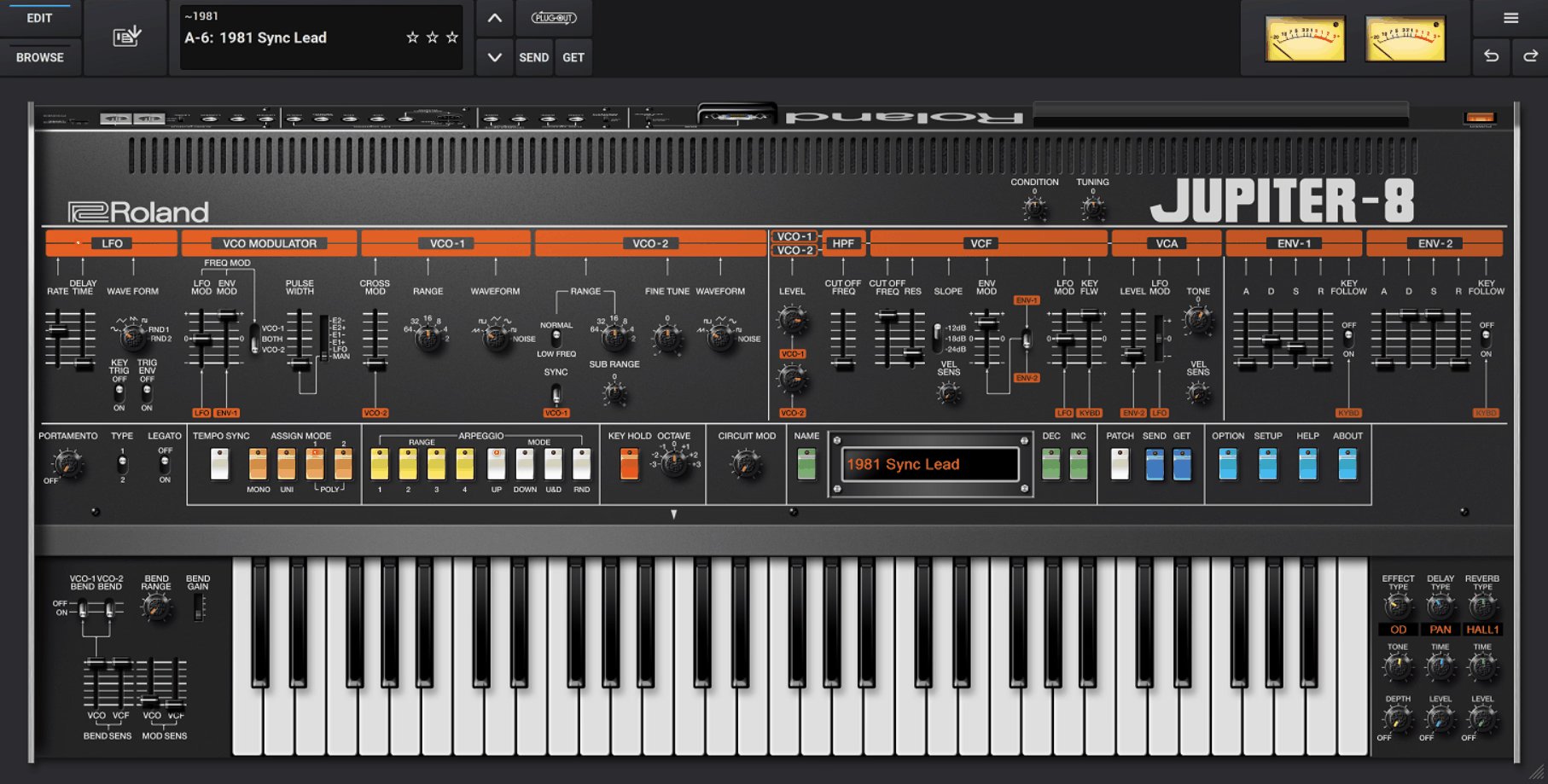
Roland JUPITER-8 was first released in 1981, gets recreated here through the company’s own ACB (Analog Circuit Behavior) modeling technology, which simulates the original analog circuitry instead of just its sound.
Each of its eight voices carries two individually modeled oscillators, adding up to 16 analog oscillators total across the full instrument. That architecture is a big part of why the original JUPITER-8 earned its reputation as one of the lushest-sounding polysynths ever built.
I must say the plugin captures that thickness convincingly, and Roland has added modern conveniences like velocity sensitivity that the 1981 hardware simply didn’t have.
- ACB Modeling
Roland’s Analog Circuit Behavior technology models the JUPITER-8’s original circuitry component by component, instead of approximating its output through conventional digital emulation. From what I can tell, this is exactly why the plugin holds up so well against real hardware in side-by-side comparisons.
- Eight-Voice, Sixteen-Oscillator Architecture
Each of the eight voices runs two discrete VCOs, giving you 16 individually modeled analog oscillators working together across the full instrument. This is the foundation of the JUPITER-8’s signature thickness, and it’s fully intact here.
- Dual Filter Types
Both two-pole and four-pole resonant filters are available, letting you dial in anything from a gentle analog warmth to a steeper, more aggressive cut. In addition, cross-modulation between oscillators is supported, which opens the door to more aggressive sync and FM-style textures.
7. Baby Audio Grainferno
Feed a single vocal one-shot into this plugin and something strange starts happening once you push the grain rate high enough. Grainferno, released by Baby Audio in March 2026, generates grains fast enough to cross into audio-rate territory, where they stop behaving like texture and start acting like oscillators.
That’s the core trick behind turning any sampled sound into a genuinely playable synth voice, and it’s built around a dual sample engine that loads two independent source files at once. You can morph between them across seven different modes, from a simple crossfade to glitchy, bit-crushed transitions.
I noticed that combination of audio-rate granular synthesis and real-time morphing is fairly unique among current granular instruments. Most competitors treat granular processing purely as a textural effect, not as the basis for tonal, pitch-tracked synthesis.
- Dual Sample Engine
Grainferno loads two independent audio sources simultaneously and lets you morph between them in real time across seven modes, including Crossfade, Follow, Weave, and Random. What I like about it is how differently each mode behaves, since some produce smooth blends while others create glitchy, stepped transitions between the two sources.
- Audio-Rate Grain Generation
Push the grain rate high enough and the plugin crosses into audio-rate territory, where grains stop reading as texture and start functioning like an oscillator’s raw waveform. This is exactly what turns a loaded sample, even a warped or detuned one, into a playable, tonal synth voice.
- Scan and Scatter Movement
The Scan control determines the direction grains are pulled from the source audio, moving forward, backward, or staying static, while Scatter adds positional randomness across the whole sample. One thing I’ve noticed is that pushing Scatter all the way to 100 percent pulls grains from random points across the entire file, creating a swarming, cloud-like texture.
- Grain Effects Processing
Individual grains get shaped at the moment they’re generated through a multimode filter, compressor, and a feedback-based Blur effect that routes processed audio back into the granular engine. Because this happens per-grain instead of on the overall output, the resulting textures carry a more organic, evolving character than typical post-processing would give you.
- Deep Modulation System
A drag-and-drop modulation engine built around three envelopes and three tempo-syncable LFOs lets you route modulation to nearly any parameter, including cross-modulation between the two sample sources. I’d recommend exploring the cross-modulation routing specifically, since it’s where Grainferno starts producing sounds that feel genuinely alive instead of static.
8. Knif Audio Knifonium
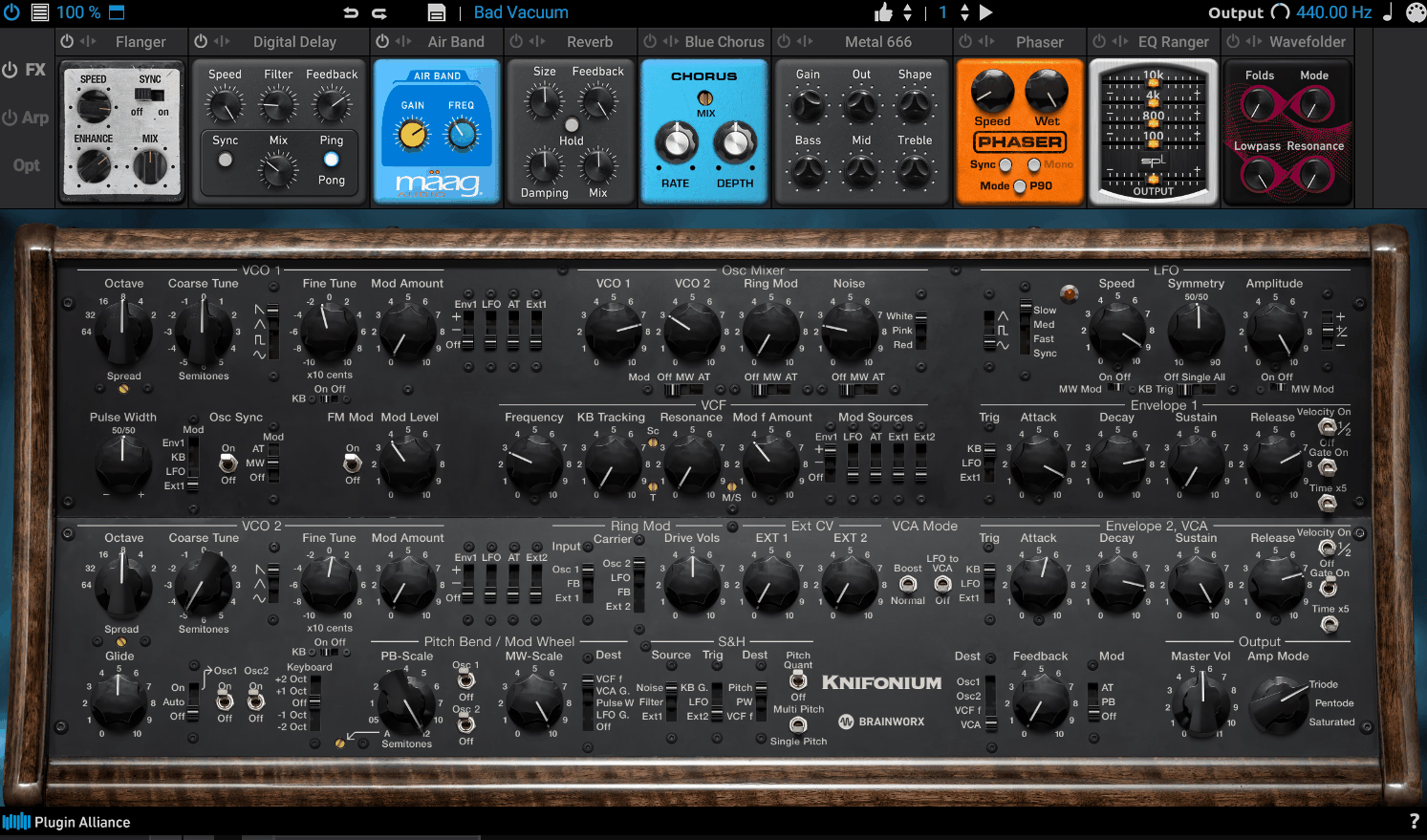
Twenty-six vacuum tubes and a steampunk faceplate don’t sound like the recipe for a practical plugin. But that’s exactly what the original Knifonium hardware is, a rare, handmade monophonic synth from Finnish designer Jonte Knif, and I’d say Brainworx turned it into something far more accessible without losing what made it strange.
Every one of those 26 tubes got individually modeled using Brainworx’s patented Tolerance Modeling Technology, which recreates the natural component drift you’d get from real analog hardware. Basically, the plugin doesn’t just sound tube-driven, it behaves like genuinely inconsistent analog circuitry in the way its pitch and envelope timing subtly shift.
The plugin version also does things the hardware simply can’t. Where the original is strictly monophonic, the plugin adds full polyphony on top of everything else.
- Modeled Vacuum Tube Circuitry
Brainworx modeled all 26 tubes from the original hardware, which multiplies out to as many as 208 individually modeled tubes once you factor in the plugin’s polyphonic voices. That’s a huge amount of analog character packed into a single instance, and it’s audible in how warm and slightly unstable the tone feels.
- Oscillators and Ladder Filter
Two tube-driven oscillators feed into a 4th-order ladder filter, joined by a ring modulator and a classic sample and hold circuit for stepped, random modulation. Not to mention, there’s a dedicated noise source too, which rounds out a genuinely deep subtractive signal path for a synth this focused.
- Tolerance Modeling Technology
Brainworx’s patented TMT recreates the natural variation you’d find across real analog components, applying subtle drift to envelope timing, pitch, and LFO speed
- Mid-Side and Unison Modes
Built-in mid-side processing and stereo spreading widen the signal in ways the mono hardware never could, and a dedicated unison mode thickens individual voices even further
9. UAD Opal
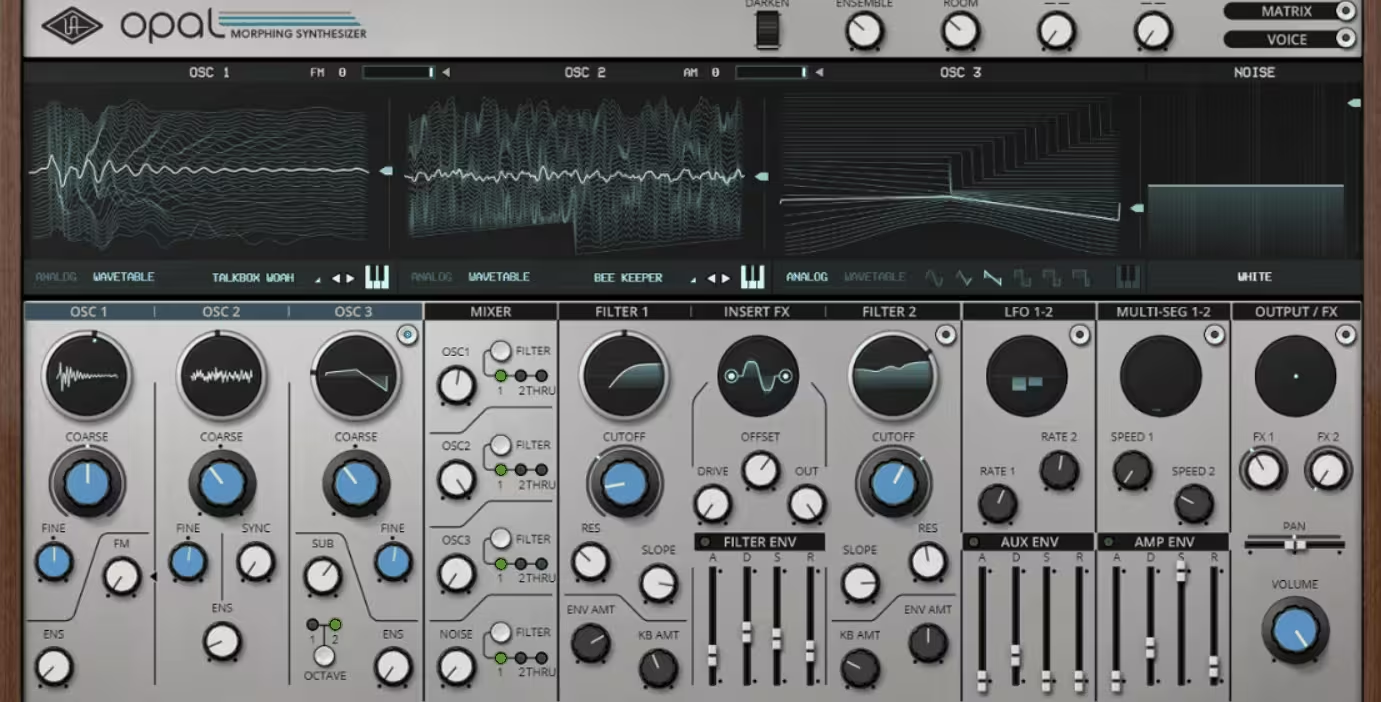
Analog modeling and wavetable synthesis rarely get built into the same oscillator. UAD Opal letting each of its sound sources switch between analog-modeled and wavetable behavior depending on the tone you’re chasing.
Four sound sources make up the core engine: three switchable oscillators plus a dedicated noise generator, all routed through a Mixer Module that handles level and routing for each one. From my experience, that flexibility is what makes Opal feel less like a themed synth and more like a genuinely open-ended sound design tool.
On the effects side, UA leaned hard into its studio pedigree, and it shows. You get authentic 1176-style compression alongside a full suite of UA-modeled processing built directly into the instrument.
- Four Switchable Sound Sources
Three oscillators and a dedicated noise generator can each be set independently to analog modeling or wavetable mode, letting you blend fundamentally different synthesis types within a single patch. I like how this approach avoids forcing you into one synthesis philosophy the way most hybrid synths do.
- Dual Multi-Seg Generators
Two Multi-Seg modulators, short for multi-segment function generators, can act as complex envelopes, LFOs, or custom modulation shapes depending on how you configure their segments. Because they’re this flexible, you often don’t need to reach for a separate modulation source once you’ve set one up correctly.
- Morphing Filters
Opal’s filter section supports smooth, real-time morphing between filter types and characters instead of locking you into a single fixed shape. This gives patches a sense of motion that a static filter simply can’t produce on its own, especially on slower-evolving pad sounds.
- Authentic UA Studio Effects
Onboard processing includes genuine 1176-style compression, EQ, tape and digital delays, overdrive, distortion, phaser, flanger, an ensemble effect, and seven distinct studio reverbs including a vintage spring model. Honestly, I’d say these effects alone would be worth using outside the synth, which says a lot about how UA approached this instrument.
- Mixer Module
A dedicated mixer handles the level and routing of all four sound sources before they hit the filter and effects stages. I think this kind of visible, hands-on gain staging makes it much easier to balance complex patches than digging through a hidden signal flow diagram would.
10. Dawesome Novum
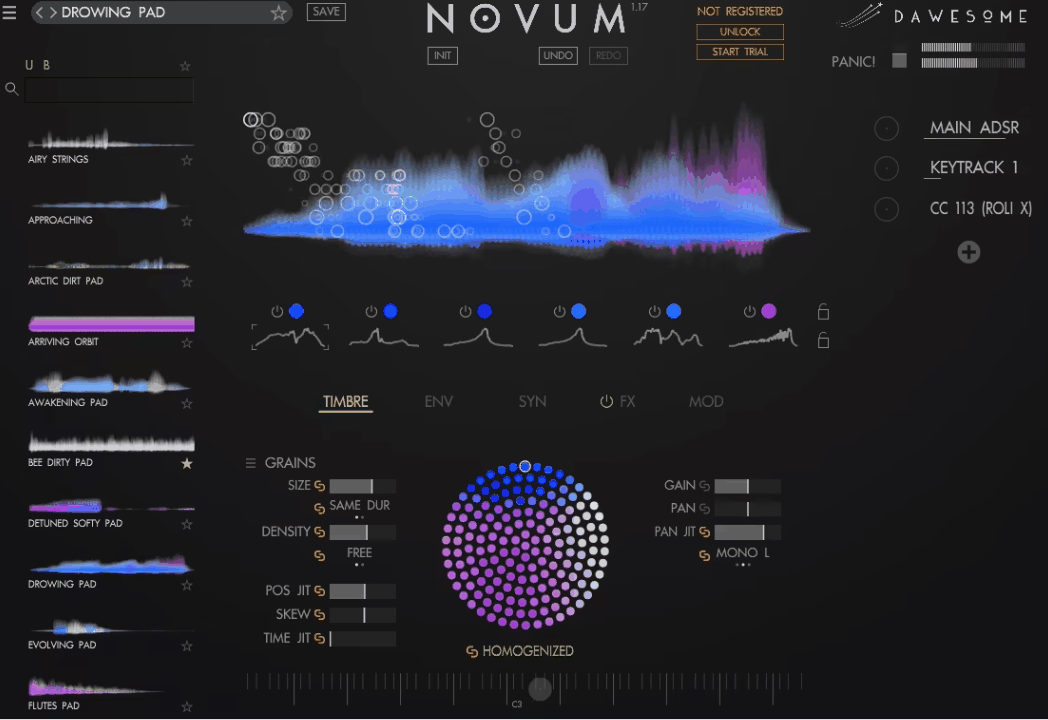
Dawesome Novum‘s core algorithm breaks a single imported sample into up to six independent layers, giving you granular control over both timbral character and temporal behavior for each one. I found that this is what genuinely separates Novum from typical granular samplers, which usually just chop one sound into grains without isolating its underlying tonal colors.
- Timbre Flower
Extracted tone colors can be spectrally reshaped through the timbre flower, a visual tool for exploring variations on the original sound’s harmonic content. What stands out to me is how musical the results stay even when you push this pretty far from the source material.
- Drag-and-Drop Cross-Synthesis
You can drag timbres and envelopes from one sample directly onto another, blending characteristics like the texture of a flute with the rhythmic behavior of a percussive hit. As a result, building genuinely hybrid instruments takes a fraction of the time it would in a synth without this kind of direct layer swapping.
- SYNTIFY and Subtractive Filtering
Advanced subtractive tools include the proprietary SYNTIFY filter, which adds harmonic overtones instead of stripping them away, alongside a standard analog filter and a comb filter. I’d recommend starting with SYNTIFY specifically if you want a granular sample to feel more like a synthesized tone than a processed recording.
- Full MPE Support
Complete MPE implementation means Novum responds to per-note pitch, pressure, and timbral expression on compatible controllers. I’d say this makes it a genuinely expressive performance instrument, not just a sound design tool you program once and leave static.
- Homogenization and Tempo Sync
The Homogenize feature smooths grains into a velvet-like texture that’s difficult to achieve with classical granular synthesis, and grain speed and pitch can run independently or lock to your DAW’s tempo.
On the other hand, if you want pulsing, rhythmic granular textures instead of smooth pads, syncing grain speed to tempo gets you there almost instantly.

Hey, I’m Vil, I started this site to help you find the best audio plugins covering various categories including synths, pianos, strings, and effect tools of all sorts as well. I pick these plugins based on various criteria so it best matches the actual topic.