When you purchase through the links on my site, you support the site at no extra cost to you. Here is how it works.
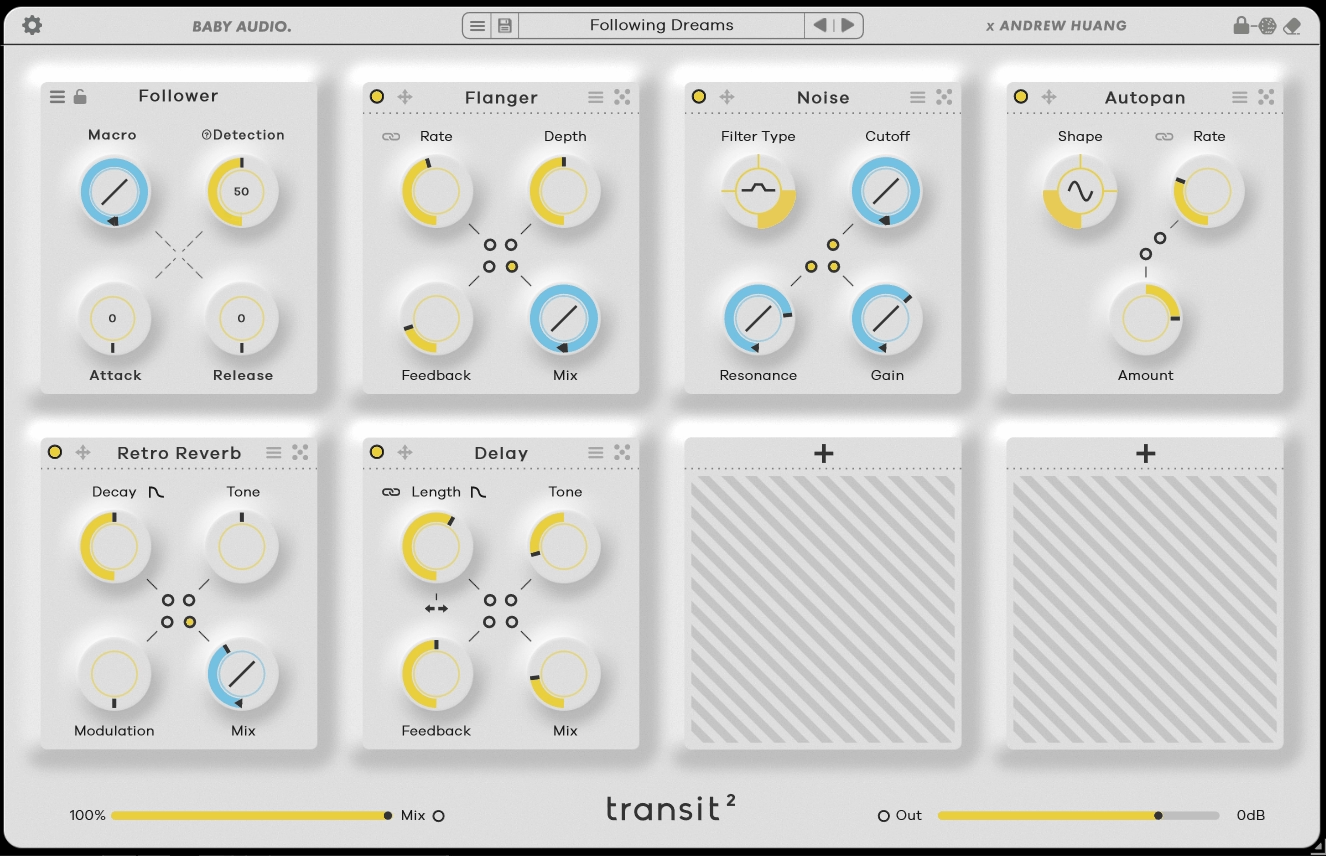
When it comes to transitions, I usually find that the hard part is not adding a filter or throwing some reverb on a track. The real challenge is making several effects move together so the transition feels like one musical idea instead of a pile of automation. Baby Audio Transit 2 is built around that problem, combining 28 effect modules with six motion modes in one workflow.
I’ve found it most useful when I need a transition quickly and still want enough control to shape it around the track. You can build something in seconds, but the plugin becomes much more valuable once you start deciding which parameters should move, when they should move, and how much.
- One control, many moving parts
Instead of automating several plugins independently, you can link multiple parameters to Transit’s motion controls and move them together. I find this especially useful when filter, reverb, distortion, pitch, and stereo changes need to develop as one coordinated gesture.
- 28 effect modules
Transit 2 gives you 28 effects modules covering filters, delay, reverb, distortion, modulation, pitch effects, noise, an oscillator, and more. You get enough range for straightforward builds without being locked into a single transition style.
- Six motion modes
You can create movement with Macro, LFO, Follower, Sidechain, Gate, and Sequencer, so you are not limited to drawing automation. Depending on the mode, the movement can follow your DAW, the source, another track, or a trigger.
The Motion Engine
At a first glance, Transit 2 looks like a multi-effect built around a macro control, but the useful part is how that control interacts with individual parameters. You choose what moves and define how each parameter responds, then shape the overall gesture from one place.
For a buildup, I might connect a filter cutoff, reverb, delay, and noise level to the same movement. Instead of managing several automation lanes, I can edit the transition as one idea and keep the different effects working together.
You also do not have to make everything move at the same rate. One effect can arrive early while another builds more gradually, which gives the transition a stronger sense of progression.
Six Motion Modes
Macro is where I start for classic builds, drops, sweeps, and one-shot transitions. It is simple, predictable, and easy to automate when I know exactly where I want the movement to begin and end.
For ongoing movement, LFO is more useful. You can use it to add rhythmic motion to pads, synths, percussion, or other parts that feel too static without turning the entire sound into an obvious transition effect.
Follower and Sidechain make the movement respond to audio. You can let the source itself drive the effect or use another track as the trigger, which is useful when I want the processing to react naturally to the groove.
Gate and Sequencer are better when timing or performance matters. Gate gives you a more immediate trigger-based approach, while Sequencer keeps the movement organized around the musical grid.
- Macro
Use it for risers, drops, filter sweeps, washouts, and one-shot transitions when you want a clear movement from one state to another.
- LFO
A good choice for continuous rhythmic movement when you want a sound to keep evolving rather than stopping after one transition.
- Follower and Sidechain
These options let audio drive the movement, which I like when I want effects to react to the performance instead of following a fixed automation curve.
- Gate and Sequencer
Both are useful for timing-sensitive work. Gate feels more immediate and performance-oriented, while Sequencer gives you tighter rhythmic structure.
The Effects
The 28-module library gives you most of the basic ingredients I would reach for when building a transition. Filters handle the broad tonal movement, while delay, reverb, modulation, distortion, pitch effects, and noise let you add depth, rhythm, and character.
I usually start with a filter because it gives the transition an obvious direction. A low-pass sweep can build tension before a drop, while a high-pass sweep can clear low-end information and make the next section feel larger.
Reverb and delay are my next stops when I want space to develop around the source. A growing reverb tail combined with filtering or pitch movement usually feels more complete than relying on one effect alone.
The more destructive effects are useful when you want the transition to become part of the sound design. Distortion, bitcrushing, pitch manipulation, and noise can push a clean source into more aggressive territory.
- Filters and modulation
These are useful for frequency, stereo, and rhythmic movement without necessarily making the transition sound extreme.
- Delay and reverb
I use them when I want space and depth to expand around a vocal, synth, or hit, particularly at the end of a phrase.
- Distortion and degradation
Bitcrushing and distortion add grit, density, and energy when a cleaner transition is not enough.
- Pitch, noise, and oscillator
These can create risers, tonal movement, and dedicated transition sounds, especially when you need something beyond processing the original source.
Where I Use It Most
Electronic production is the obvious fit because risers, drops, filter sweeps, reverb throws, and rhythmic transitions often need several effects to move together. Transit 2 lets me build that movement without spending half the session maintaining automation lanes.
I also like it on vocals. A final word or syllable can gradually move into delay, reverb, filtering, and pitch processing, giving the phrase somewhere to go instead of simply cutting it off.
For less dramatic work, you can use Transit 2 as a movement tool rather than a transition generator. LFO, Follower, and Sidechain can keep pads, guitars, keys, and synths evolving without making the processing sound like an obvious EDM riser.
- Electronic transitions
Risers, drops, filter sweeps, and washouts are the strongest use case, especially when several effects need to change together.
- Vocal transitions
A short vocal phrase can move into delay, reverb, pitch, and filtering as it leaves a section, creating a smoother handoff into the next part.
- Ongoing movement
You can also use Transit 2 away from transition points, with LFO, Follower, or Sidechain adding movement to otherwise static sounds across an arrangement.
A Practical Workflow
I usually start by deciding what the transition actually needs to accomplish. If I know whether I am building tension, clearing space, creating a washout, or simply adding movement, I can choose the effects with a purpose instead of stacking whatever sounds impressive.
From there, I keep the first version simple. A filter, reverb, and one character effect are often enough to establish the direction before I decide whether anything else is needed.
The most important step for me is making the effects arrive at different times. Letting the filter move early while reverb or pitch arrives later creates more depth than making every parameter peak simultaneously.
- Start with a real problem
Put Transit 2 on the part that actually needs to change, whether that is a synth, vocal, percussion, or another track element. That makes it much easier to judge whether the processing is helping the arrangement.
- Use fewer modules first
I usually begin with two or three effects and add more only when the transition genuinely needs them. This keeps the result easier to mix and prevents the effect from becoming the arrangement.
- Stagger the movement
Give different parameters different timing or response shapes. A transition feels more natural when its elements arrive progressively instead of reaching full intensity together.
- Listen in context
A huge transition can sound great in solo and completely overwhelm the track. I always make the final decision with the full arrangement playing.
Presets and Learning the Plugin
Transit 2’s presets are useful for learning the workflow because they show how different motion modes and effect combinations interact. I get more value from them when I use them as starting points rather than treating them as finished sounds.
When I find a preset I like, I usually turn modules off, change the motion mode, and try the same setup on another source. That quickly shows me which part of the patch is doing the important work and helps me recreate the idea myself.
In fact, some of the most useful results are surprisingly restrained. A little filter movement, a controlled reverb swell, or subtle sidechain-driven modulation can be enough to make a static part feel more alive.
Where It Falls Short
Transit 2 is focused on movement, so its effect library cannot replace every specialist processor you may already use. The 28 modules cover a lot of ground, but you will eventually run into a specific delay, filter, modulation, or distortion sound that is easier to build elsewhere.
There is also a real temptation to overdo it. Because you can make several effects move simultaneously, it is easy to turn a simple transition into a wall of processing.
That said, I think the learning curve is manageable. Once you understand how the motion system works, the same approach transfers easily between vocals, synths, drums, and other sources, which is where the workflow starts saving meaningful time.
Pros and Cons
Pros
- Fast multi-effect automation
Linking multiple parameters to shared movement makes complex transitions much easier to build and edit than managing several independent automation lanes.
- Six motion modes
Macro, LFO, Follower, Sidechain, Gate, and Sequencer give you different ways to create one-shot, rhythmic, dynamic, and performance-based movement.
- 28 effect modules
The library covers filters, modulation, delay, reverb, distortion, pitch, noise, and other sound-design tools, giving you plenty to work with before reaching for additional plugins.
- Useful beyond transitions
I can use Transit 2 for vocal throws, evolving pads, rhythmic effects, risers, drops, and general movement, which makes it more useful than a plugin designed only for one-shot effects.
Cons
- Focused effects library
The 28 modules are versatile, but they cannot replace every specialist effect. You may still need your existing plugins for highly specific sounds.
- Easy to overdo
Because several parameters can move together, it is tempting to keep adding more. I usually get better results from a few deliberate effects than from a fully loaded chain.
- Takes some practice
The basic workflow is quick, but precise results require understanding what should move, when it should move, and how strongly.
Verdict
What I find most useful about Transit 2 is the way it brings several moving parts into one workflow. Instead of building a transition with separate automation lanes for filters, reverb, delay, pitch, and modulation, you can shape those changes together and make them behave like one musical event.
For me, the combination of 28 effect modules and six motion modes gives the plugin more value than a simple riser generator. I can use Macro for a conventional buildup, LFO for continuous rhythmic movement, Follower or Sidechain when I want the audio to drive the effect, and Gate or Sequencer when the timing needs to be more performance-oriented.
That said, Transit 2 is not going to replace a collection of dedicated effects, and you may not need it if you already enjoy creating transitions manually. Its real advantage shows up when you find yourself repeatedly building the same kind of multi-effect automation and want a faster way to shape it, revise it, and keep the individual movements working together.
I’d test that workflow on a real problem in one of your tracks rather than judging it from presets alone. Put it on a synth, vocal, or drum part that needs to move into the next section, build the transition with two or three effects, and see whether Transit 2 gives you better control with less automation work; that will tell you much more about whether it belongs in your setup.

Hey, I’m Vil, I started this site to help you find the best audio plugins covering various categories including synths, pianos, strings, and effect tools of all sorts as well. I pick these plugins based on various criteria so it best matches the actual topic.