
When you purchase through the links on my site, you support the site at no extra cost to you. Here is how it works.
Several of the most capable digital audio workstations available on Windows right now carry no time limit, no export watermark, and no restriction on selling the music you make.
Some started as paid flagship software before going free, others were built as open source projects from the beginning, and a few are free tiers of commercial products where the company withholds one or two features instead of gutting the whole thing.
With that being said, I would like to share with you eight options worth installing. I will talk about these specifically: UAD LUNA, Tracktion Waveform Free, AKAI Pro MPC Beats, LMMS, Endlesss Studio, Ardour, Pro Tools Intro, and Audacity.
Which one fits depends less on feature counts and more on the kind of work you do. A pad-based beat maker and a multitrack recording environment solve completely different problems even when both are free.
That said, let’s discuss some of the best best free DAWs for Windows Users:
1. UAD LUNA (Free Version)
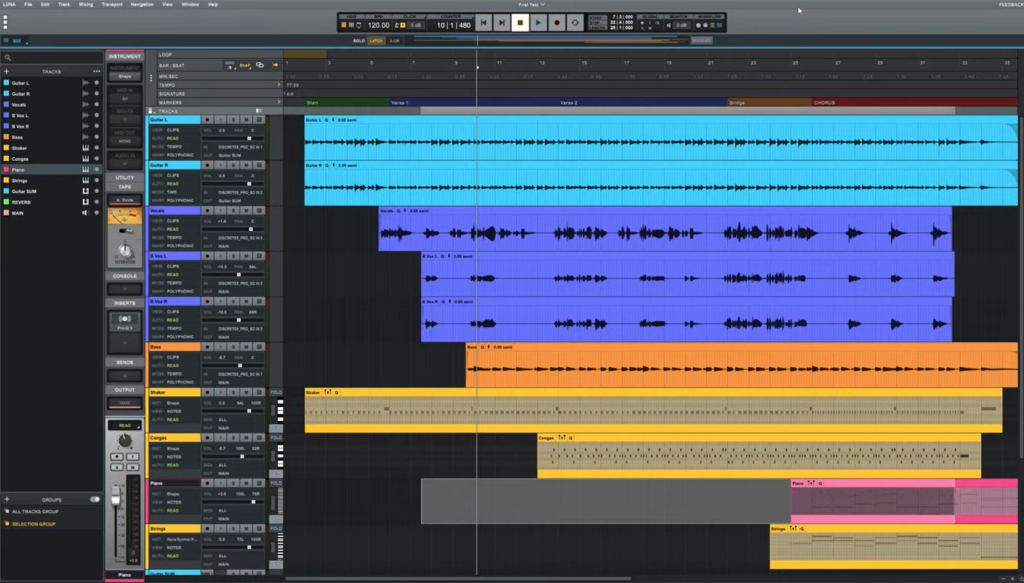
UAD LUNA is an unusual proposition for a free DAW because it does not feel like a smaller program built to push you toward an upgrade.
When I look at a free version of a commercial DAW, one of the first things I check is whether the missing features would actually affect a normal session, and LUNA gets that balance mostly right.
The free version keeps the core recording, editing, arranging, and mixing environment intact, with Hardware Inserts being the main feature reserved for LUNA Pro.
If you work entirely inside the computer, that is an easy limitation to live with, while producers using external compressors, EQs, preamps, or other studio hardware have a more obvious reason to consider the paid version.
You get:
- Unlimited Tracks
There’s no track cap in the free version, so your session size is limited by CPU and RAM instead of a number written into the license.
- Instrument Detection
LUNA analyzes incoming audio as you record and identifies whether the source is a guitar, vocal, or drum part, then applies a track name, color code, and icon automatically.
It can be useful in larger sessions where 20 or more tracks need labeling. Handling that manually is the kind of housekeeping that quietly eats into a tracking session, and having it done as you go keeps your attention on the take instead of the track list.
- Smart Tempo Tools
Tempo Detection and Tempo Extraction read the timing of a performance you’ve already recorded and map tempo changes to the session afterward. For instance, when you’re working on a guitar part that naturally pushes and pulls instead of sitting rigidly on a click, you can play it the way it feels and still have loops and MIDI parts line up correctly later.
- Oxide Tape Extension
Tape saturation comes built in through the Oxide Tape Extension, usable on individual tracks or across the mix bus.
I like that this sits in the free tier instead of behind the Pro upgrade, since analog-style coloration is usually the first thing companies move into a paid bundle.
- ARA Support
With ARA supported, compatible pitch and time correction tools read your recorded audio directly and analyze it in context.
2. Tracktion Waveform Free
Waveform Free give you the main production environment without putting a basic track-count ceiling in the way.
You can work with audio, MIDI, instruments, effects, recording, and arrangement in the same program, which makes it easier to treat as your main DAW rather than something you only open for simple sketches. That makes it one of the more practical choices here if you want to start free and keep the same setup as your projects become more ambitious.
The free version also gives you enough built-in tools to get started without immediately filling the project with third-party downloads.
- Four Instruments
Here, the stock instrument set covers four bases: a 4OSC synth for subtractive and layered sounds, a Micro Drum Sampler and Micro Sampler for chopping and triggering samples, and a Rompler for sample-based playback.
For instance, when you need a drum part and a bass line sketched before you lose the idea, having a dedicated drum sampler already loaded saves you from opening a plugin folder first.
- Effects Included
Here, you basically get 14 audio effects, 8 MIDI effects, and 11 utility plugins in the free version. The utility set is where I noticed the most practical value, since an AB switch, mono conversion tool, mid/side splitter, and spectrum analyzer cover the small gaps you’d otherwise fill with third-party downloads.
- Unlimited Track Count
Audio and MIDI tracks are uncapped, meaning you can layer vocals, double synth lines, and stack drum groups without planning around a limit. Your hardware sets the practical boundary here, which I’d argue is the right place for it.
- Retrospective Record
Retrospective Record captures audio and MIDI you’ve already played even when you never pressed record.
- Tag-Based Browser
Here, searching happens through tags, favorites, and smart lists, with filtering by plugins, presets, racks, samples, clips, or tracks.
3. AKAI Pro MPC Beats
I would pick MPC Beats over a traditional DAW when I wanted to get a beat moving quickly, especially if I already liked the feel of the MPC workflow.
The software is built around the familiar MPC pad-and-pattern concept, so you are encouraged to get a beat moving first and worry about the rest afterward.
Its relatively small track allowance makes much more sense in that context, because you are getting access to a workflow that can lead naturally toward the wider MPC hardware and software ecosystem.
Once you start turning those ideas into larger arrangements with several recorded instruments and vocal layers, the limits become much harder to ignore.
- 2GB Sound Library
Drum kits, loops, and one-shots across multiple genres come to about 2GB of included content.
Alongside it, genre templates for Trap, Dance, and Pop give you working starting points, which I’d say is the fastest way to understand how the software expects you to work.
- Three AIR Synths
Three instruments from AIR Music Technology ship with it: TubeSynth for vintage analog poly-synth tones, Bassline for classic mono synth sounds, and Electric for electric piano timbres.
Bassline alone includes over 150 presets spanning pads, plucks, basses, and leads, plus two distortion algorithms and a flexible oscillator with variable waveshape.
- Pad-Based Sequencing
Loading a kit, tapping out a pattern, and hearing a loop back takes seconds, and the grid layout keeps the focus on rhythm and groove instead of menu navigation.
I feel like this is exactly why it works for hip-hop, lo-fi, and trap, where the pattern is the foundation and everything else gets built on top of it.
- Sample Chopping
The sample editor handles chopping loops, rearranging slices, and rebuilding patterns out of existing audio.
This is where MPC Beats genuinely earns its place. Working directly on the waveform keeps flipping samples feeling immediate, and the whole process stays closer to playing than to editing.
4. LMMS
The biggest reason to choose LMMS is not that it tries to imitate every part of a traditional studio DAW, but that it gives electronic producers a focused environment for building music from patterns, MIDI, samples, and synths.
I like it because it lets you judge LMMS on what it is actually trying to do instead of expecting it to behave like Cubase, Ableton Live, or Pro Tools.
Its interface and sequencing model revolve around that kind of workflow, which can feel comfortable when your tracks are assembled from programmed parts rather than recorded performances.
Here is what you get:
- 15+ Synth Plugins
More than 15 synthesizer plugins come installed, covering subtractive synths, sample playback through SoundFont support, and chip-style instruments for retro game textures.
- Beat and Bassline Editor
Drum patterns and basslines get built in a dedicated Beat and Bassline Editor that sits separately from the Piano Roll.
I found the split takes some adjusting to if you’re used to programming everything in one view, but it does keep rhythmic sketching from tangling with melodic writing.
- Song Editor
Individual patterns, samples, and automation tracks get assembled into finished arrangements in the Song Editor. The logic is build patterns first, arrange second, which is worth internalizing early because working linearly from bar one fights how the software is designed.
5. Endlesss Studio (Semi DAW)
This DAW makes the most sense when the process of making music matters as much as the finished arrangement. I would not choose it as a replacement for a conventional DAW, but I would absolutely consider it when the goal is to jam, capture ideas, and build something with other musicians in real time.
Endlesss Studio is built around loops, live performance, and collaboration, letting musicians add layers to the same musical idea as they go. That also gives it a natural place alongside a main DAW rather than forcing it into a role it was never really designed to fill.
That makes it difficult to compare directly with LUNA or Pro Tools. It also gives Endlesss a purpose the more traditional DAWs on this list simply do not have.
- Built-In Sounds
Drum kits, synth presets, a sampler, and performance effects including reverb, delay, distortion, and low/high-pass filters are all included. Mic input, a guitar, or a hardware synth can be sampled straight into a session.
- Custom Sampler Presets
A newer sampler instrument lets you build presets on desktop, then play them on either desktop or iOS once you’re logged into your account, with one-shot and clip launch modes mixable inside a single preset and start and end points settable per sample.
- Retrospective Looper
The 8-layer looper captures what you just played without requiring you to press record first, with capture lengths of 1, 2, 4, or 8 bars depending on how the looper is set.
This basically removes the pressure of nailing a part on the first committed attempt, since you decide whether a loop is worth keeping after you’ve already heard it.
6. Ardour
For deep routing, recording, editing, and mixing control, few free options take the same approach as Ardour. I tend to recommend it when someone has already outgrown simplified DAWs and wants to understand exactly where signals are going and how a session is structured.
It gives you a large amount of control over how signals, tracks, busses, automation, and sessions are handled which can appeal to more demanding setups, especially when the usual limitations of simpler DAWs start getting in the way.
The downside is part of the same equation: Ardour takes more time to learn. For users willing to spend that time, though, it can provide a much deeper environment without locking the software itself behind a conventional feature-tier model.
- Unlimited Tracks and Busses
Any number of tracks and busses can exist in a session, with non-destructive and destructive recording both supported at any bit depth and any sample rate.
- Cue Slot Recording
Recording directly into cue slots turns Ardour into a clip-launching environment closer to Ableton Live or Bitwig than to a purely linear DAW.
Both MIDI and audio cues stay fully editable, with a dedicated pianoroll available either as a separate window or a docked pane.
- Chord Editing
Chord editing and quantization live inside the pianoroll, alongside a cross cursor for MIDI editing and the ability to open multiple MIDI windows at once.
When you’re tightening a sloppy MIDI take or roughing out a progression, keeping that work inside the core editor saves a round trip to another app.
- Anything-To-Anywhere Routing
When it comes to Signal routing in Ardour, it’s genuinely open, covering bus sends, side-chain setups, multichannel audio, and external hardware or network audio sources.
7. Pro Tools Intro
Pro Tools Intro is interesting because it gives you a way to work inside the Pro Tools ecosystem without paying for the full version. If you expect to move into professional Pro Tools sessions later, learning the environment here can make that transition more familiar.
The software follows the same general workflow used throughout the Pro Tools range, but the deliberately limited track and routing allocation means you need to think about project size before choosing it as your main DAW.
For smaller productions, demos, recording sessions, and learning the platform, that may be a worthwhile compromise.
- 35 Core Plugins
35 Avid plugins ship with it, covering EQ, dynamics, reverb, and delay. Third-party AAX plugins run without restriction too, so your toolkit isn’t confined to what Avid included.
- Track Allocation
The session limit covers 8 audio tracks, 8 instrument tracks, 8 MIDI tracks, 4 aux tracks, 1 master track, and 4 routing folders, with 4 simultaneous inputs and outputs.
Aux tracks and routing folders share the same allocation of 4, which is a detail worth remembering when you plan a session’s routing in advance.
- Xpand!2 Instrument
Xpand!2 comes bundled with over 2,500 presets spanning pianos, synth pads, basses, and arpeggiated textures, plus the Avid Loopmasters Sample Pack for loop-based starting points.
One instrument this deep goes a long way, and covers most sketching needs before you’d think about sourcing outside virtual instruments.
- 32-Bit Float Processing
That’s a higher ceiling than most free DAWs bother with, and it gives you real headroom to work with before mixdown.
8. Audacity
If what you really need is a fast way to record, clean up, edit, and export audio, Audacity remains one of the simplest tools to keep around.
It does not try to compete with full DAWs on MIDI sequencing or virtual instruments, and that is actually part of its appeal.
The program is centered on working with recorded audio rather than managing an entire production environment, which makes it quite useful for voice recordings, restoration, waveform editing, quick repairs, and audio preparation.
That also gives it a useful place in a broader studio setup rather than making it a direct competitor to everything else on this list.
For quick editing jobs, basic cleanup, and audio work that does not justify opening a full DAW I’d say.
- Noise Reduction
Sampling a section of background hum or hiss gives Audacity a noise print it can then remove from the rest of a recording.
- AI Processing Tools
Music separation, noise suppression, music generation, transcription, and audio super resolution are handled through AI-driven plugins built on OpenVINO.
This is the area where Audacity has changed most, moving well past the trim-and-export reputation it carried for years.
- Pitch and Speed
In addition, Pitch and tempo adjust independently or together through separate pitch changer and speed changer tools.
- Vocal Remover
When it comes to vocal remover, it isolates/strips vocals from a mixed track. Results depend heavily on how the original was mixed.

Hey, I’m Vil, I started this site to help you find the best audio plugins covering various categories including synths, pianos, strings, and effect tools of all sorts as well. I pick these plugins based on various criteria so it best matches the actual topic.