When you purchase through the links on my site, you support the site at no extra cost to you. Here is how it works.
When it comes to drum instruments, I usually want two things: good sounds out of the box and enough control to make those sounds my own. Wave Alchemy Triaz on the flip side combines sampling with analog modeling, FM, and physical modeling across 12 independent drum channels, so you can build a sound from several sources rather than starting with a single sample and processing it afterward.
I’ve used it for electronic production, hybrid scoring, and sound design, and that combination is what stands out to me most. You can keep a sound mostly sample-based, build it entirely from synthesis, or blend both approaches when a conventional drum sampler starts feeling too limited.
- Hybrid drum design
Each channel can combine sampling, analog modeling, FM, and physical modeling, giving you more ways to shape a kick, snare, percussion hit, or texture without switching instruments.
- 12-channel workflow
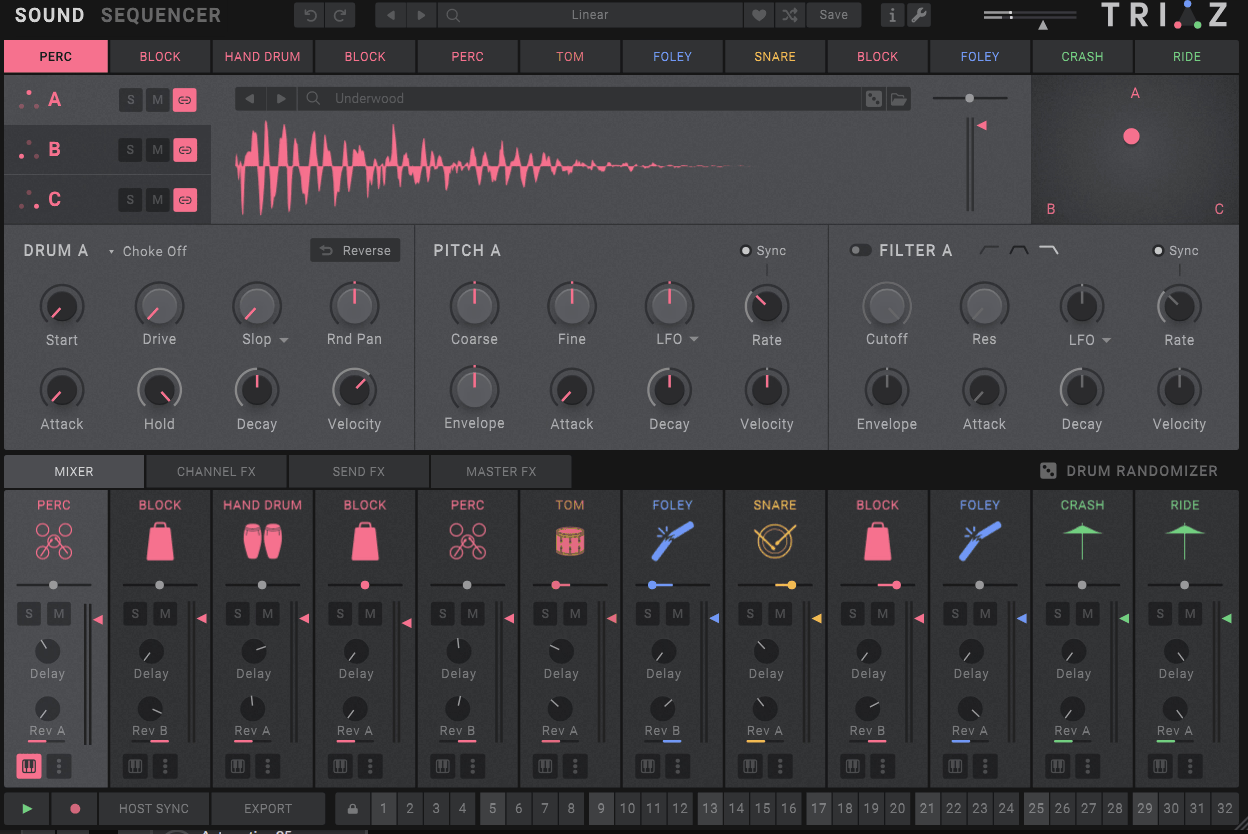
Every channel has its own sound generation, effects, and mixer controls, so you can build and finish a complete kit inside the instrument.
- Expressive sequencing
The 16-step sequencer adds velocity, probability, flam, and roll per step, giving you practical ways to make programmed grooves less rigid.
The Sound
A big part of Triaz’s appeal is how easily you can combine different synthesis methods inside one drum sound. Analog modeling works well for punch and body, FM is useful for metallic or sharply defined transients, and physical modeling adds resonant character that can push percussion toward a more acoustic feel.
I like using those engines together rather than treating them as separate alternatives. A kick might get its low-end weight from analog modeling, a sharper attack from FM, and a little physical-modeling resonance to make the result feel less sterile.
Sampling fits into the same workflow. You can layer a recorded hit with synthesized material, which is useful when you want the natural imperfections of a real drum alongside the control of synthesis.
That flexibility is particularly useful for modern electronic production because I don’t have to choose between “sampled” and “synthesized” drums. I can use whichever part of each approach solves the problem.
Per-Channel Processing
Every channel includes its own effects and mixer section, so you can shape the drum before it reaches the master processing. I tend to use transient shaping for attack, saturation for weight, and filtering to control the frequency range rather than immediately reaching for external plugins.
The advantage is not just convenience. Because the sound generation and processing happen in the same channel, I can build and save a finished drum sound as one patch, which makes the instrument easier to reuse across projects.
You still have plenty of reasons to use external processing, especially when you want a very specific compressor, clipper, or bus chain. For the most part, though, the internal tools are good enough to get a drum most of the way there before I leave the instrument.
The Sequencer
The built-in 16-step sequencer gives you per-step velocity, probability, flam, and roll controls across all 12 channels. Probability is one of the features I use most because it lets you keep the main groove intact while introducing occasional variation.
For example, putting around 60-80 percent probability on selected hi-hat or snare hits can stop a loop from repeating exactly the same way every time. I prefer this to completely random sequencing because you still control the underlying groove.
Flam and roll are useful for a different reason. Flam adds timing variation to a hit, while roll creates repeated subdivisions inside a step, so you can add movement without rewriting the basic pattern.
- Probability
I use it to introduce controlled variation into repeated grooves, especially on hats and percussion where small changes can make a pattern feel less mechanical.
- Flam
Useful for adding a more physical, played quality to snares and other hits without manually programming a second note.
- Roll
Lets you create rapid repeated hits inside a single step, which is handy for fills and rhythmic accents without changing the main grid.
- MIDI output
Individual channels can send MIDI separately, so you can route sounds to your DAW or external gear when the internal processing is not enough.
Presets and Sampling
Triaz comes with a large library of drum kits and individual sounds, and I think the hybrid kits are the best place to start. You can hear how sampling and synthesis are being combined before you start building your own sounds.
The channel browser also makes it practical to replace individual elements without rebuilding the whole kit. I can keep the groove and processing intact while swapping only the kick, snare, or percussion layer, which speeds up experimentation considerably.
Over time, I’ve found that this becomes more useful than the sheer preset count. Once you save your own combinations, you stop browsing and start building from a personal library of sounds that already fit how you work.
Where it’s useful
For electronic production, Triaz works particularly well when the drums need to sit somewhere between sample realism and designed synthesis. I can keep a familiar acoustic character while adding synthetic layers that make the sound fit a more modern arrangement.
Hybrid scoring is another strong use case. Physical-modeling and sampled percussion can provide a more believable acoustic foundation, while FM and analog layers let me push the sound toward something more cinematic or stylized.
- Electronic drums
I use the synthesis engines when a standard sample feels too static, especially for kicks, snares, hats, and percussion that need more tonal movement.
- Hybrid percussion
Combining samples with synthesis lets me keep realistic detail while adding the control needed for modern sound design.
- Sound design
The three synthesis approaches can be pushed beyond conventional drums, making Triaz useful for short impacts, metallic hits, tuned percussion, and unusual rhythmic textures.
Workflow
I would start with one channel rather than browsing the entire library. Build the basic hit, decide whether it needs a sample, synthesis, or both, and then use the internal processing to finish the sound before moving on.
For programming, keep the core groove simple first. Add probability to a few steps, then use flam or roll only where they improve the rhythm, rather than making every channel move constantly.
Once the kit works, save individual sounds as well as complete kits. That way, you build a reusable collection instead of having to rediscover the same combinations on every project.
Limitations
The biggest issue is resource use. Running 12 channels with multiple synthesis engines and individual processing can become noticeably heavier than a basic drum sampler, especially when you start using several instances in one project.
There is also a real learning curve if you want to design everything from scratch. The depth is useful, but the combination of three synthesis approaches, sampling, effects, and sequencing means you have more decisions to make than you would with a straightforward drum machine.
On the flip side, you do not need to use every feature. If you mostly work from samples, Triaz can still function as a capable drum workstation, but you are paying for synthesis depth that may sit unused.
Pros and Cons
Pros
- Hybrid sound design
Combining samples, analog modeling, FM, and physical modeling gives you much more control over the character of individual drum sounds.
- Expressive sequencing
Per-step probability, flam, roll, and velocity make it easier to add variation and phrasing without complicated automation.
- Complete channel workflow
Each channel combines sound generation, effects, and mixing, so you can finish and save a drum sound without relying on several external plugins.
- Useful MIDI routing
Independent MIDI outputs give you the option to send individual parts to your DAW or external hardware when you need more control.
Cons
- Can be CPU-heavy
A full 12-channel setup with multiple synthesis engines and processing can use significantly more resources than a basic sample-based drum instrument.
- More to learn
The synthesis depth is useful, but designing sounds from scratch takes more time than working with a conventional drum sampler.
- May be excessive for sample-only workflows
If you rarely design your own drums, the extra synthesis architecture may offer more depth than you actually need.
Verdict
What matters most to me with Triaz is not the size of the feature list, but whether the hybrid workflow changes how I build drums. Being able to combine samples with analog, FM, and physical-modeling layers inside the same channel gives me more control over the final character without forcing me to move between several instruments.
I get the most from it when I’m building drums that need some combination of sample realism, synthesis, and controlled rhythmic variation. The sequencer adds useful movement, while the per-channel processing means I can often finish a sound before it ever reaches the DAW. You probably do not need it if you mainly drag in finished samples and rarely edit them beyond basic mixing. For producers who want to design kicks, snares, percussion, and hybrid kits while keeping sequencing and processing in the same environment, Triaz is much easier to justify.
That said, I’d judge it on one practical task: build a kick or snare from scratch, then create another version using a sample plus synthesis layer. If having both approaches available changes how you work, the depth is worth paying for; if you keep choosing the sample and moving on, a simpler drum sampler may suit you better.

Hey, I’m Vil, I started this site to help you find the best audio plugins covering various categories including synths, pianos, strings, and effect tools of all sorts as well. I pick these plugins based on various criteria so it best matches the actual topic.