When you purchase through the links on my site, you support the site at no extra cost to you. Here is how it works.
A lot of MIDI sequencers fall into one of two camps: they either give you a straightforward pattern grid or bury you under enough options to make simple ideas feel complicated. 510k SEQUND sits somewhere in the middle, focusing on polyrhythmic melodic sequencing, probability, and hands-on pattern manipulation rather than trying to become an entire DAW inside a plugin.
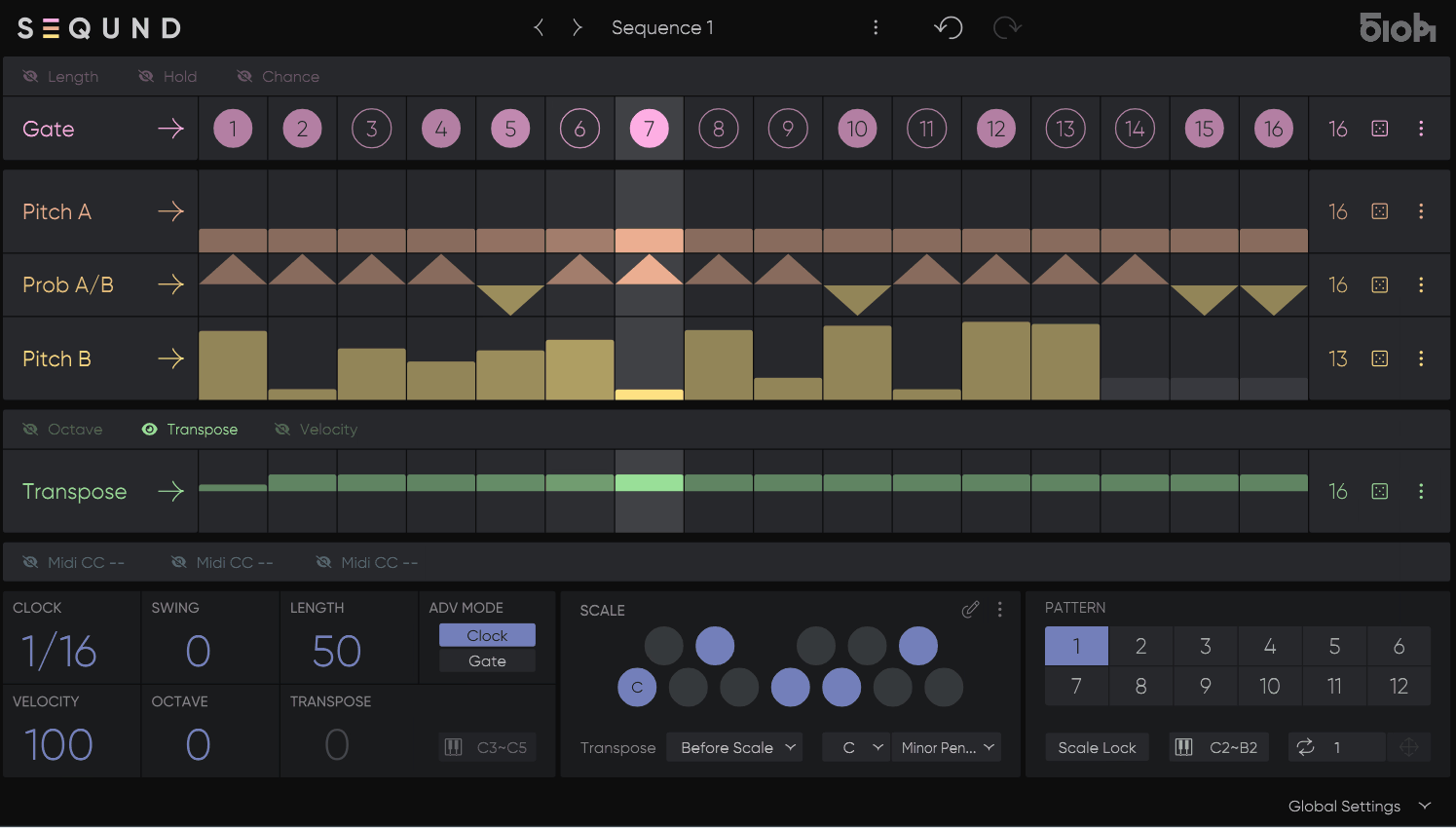
I’ve tried this sequencer for electronic music and evolving melodic parts, and what matters to me is how quickly I can turn a basic idea into something that keeps changing. You get two independent melodic lanes, a probability lane, per-step controls, three MIDI CC lanes, scale quantization, randomization, and pattern switching, giving you plenty of room to build movement without programming every variation manually.
- Polyrhythmic sequencing
Two melodic lanes can run at different lengths, so a short bass pattern can cycle against a longer melodic phrase and gradually shift their relationship over time. I use this when a normal four- or eight-bar loop starts feeling too predictable.
- Probability and variation
The probability system can switch between the two melodic lanes, while Chance, Ratchet, Hold, Length, Octave, and Transpose provide additional ways to alter the sequence without rebuilding it from scratch.
- MIDI control
Three dedicated MIDI CC lanes let you sequence external parameters alongside the notes, so I can make a filter, envelope, or other MIDI-controlled parameter evolve with the melody.
Polyrhythmic Sequencing
The main reason I would reach for SEQUND is the relationship between its melodic lanes. Each lane has its own length, so two patterns playing together do not have to line up on every cycle. That creates evolving rhythmic relationships without requiring me to manually move clips around in the DAW.
A useful starting point is to keep one lane short and familiar while making the second slightly longer. For example, I might use a compact bass pattern on one lane and a longer melodic phrase on the other, then let them gradually phase against each other.
The probability lane adds another layer by deciding when the two melodic lanes are selected. This is a practical way to create variation while keeping the underlying musical material under my control rather than generating completely unrelated notes.
Pitch, Scale and Transpose
SEQUND is particularly useful when you want to experiment with melodies without constantly checking whether every variation fits the track. Scale quantization keeps the pitch material inside the selected harmonic framework, while Transpose gives you another way to move the sequence between musical contexts.
I like this when I’m working on basslines or repeating synth patterns. You can program a basic idea, introduce variation, and still keep the result in key instead of fixing every generated change afterward.
Transpose can also be controlled through MIDI, which means you can play the sequencer from a keyboard rather than treating it as a completely fixed pattern. That makes the instrument more useful in live situations and when sketching harmony directly from the keyboard.
- Scale quantization
Keeps generated or transposed notes inside your chosen scale, which makes experimentation much safer when you’re working with probability and randomization.
- Transpose
Lets you move the sequence into a different key without rebuilding the programmed notes, while MIDI control makes that practical during performance.
- Independent lane lengths
Because the melodic lanes can have different step counts, you can create movement from the interaction between patterns instead of adding more notes.
Variation and Randomization
Randomization is most useful when you treat it as a controlled editing tool rather than a button you hit whenever a pattern feels boring. SEQUND combines randomization with Step Lock, so you can generate changes while protecting individual cells you want to keep exactly as programmed.
That is a much better workflow for me than randomizing an entire pattern and hoping something useful survives. I might lock the root notes and an important rhythmic accent, then randomize other values to create variations around those fixed points.
Chance and Ratchet provide another layer of variation. Chance can introduce conditional behavior, while Ratchet subdivides a step into repeated hits, which is useful for adding movement to basslines and melodic sequences without expanding the basic pattern.
MIDI CC and External Control
SEQUND is more useful than a simple note generator because three MIDI CC lanes can run alongside the melodic sequencing. You can send those values to compatible synth parameters or external MIDI devices, allowing the tonal behavior of a patch to evolve with the sequence.
I use this most naturally for filter cutoff, modulation depth, or another parameter that benefits from rhythmic movement. The important part is that the CC pattern can have its own behavior, so the melody does not have to repeat exactly when the sound itself changes.
MIDI input also lets you transpose the sequence in real time, which is particularly useful when you’re performing or recording ideas from a keyboard. Rather than programming every chord change into the sequence, you can interact with the pattern while it is running.
Pattern Switching and Live Use
Each preset can store up to 12 patterns, and those patterns can be recalled via MIDI notes. That is enough to turn a few related patterns into a small performance system rather than relying on one static loop.
For me, this becomes useful once the patterns have different roles. One can establish the main groove, another can introduce a variation, and a third can simplify the part for a breakdown. You can then move between them without opening another sequencer instance.
SEQUND also includes MIDI Advance Mode, which lets the step advance be controlled from the DAW or in real time from a keyboard. That gives you more freedom over the rhythmic behavior, particularly when standard clocked playback feels too restrictive.
- Pattern changes
Storing up to 12 patterns per preset gives you enough variation for different sections of a track without building separate sequencer instances.
- MIDI performance
You can use incoming MIDI for transposition and step advancement, making the sequence something you can interact with rather than simply play back.
- Step Lock
Lock important cells before randomizing so the parts you already like stay intact while the rest of the pattern changes.
Where It Fits Best
I get the most out of SEQUND when the basic musical idea is already working but starts feeling too repetitive after a few bars. The combination of independent lane lengths, probability, and pattern variation lets me keep the recognizable part of a bassline or melody while changing how it develops from cycle to cycle, which is especially useful in electronic tracks where a small amount of movement can make a loop feel much more alive.
The MIDI CC lanes are useful when I want the sound itself to evolve rather than simply adding more notes. I can keep a bass pattern relatively simple while a filter, wavetable position, or another MIDI-controllable parameter follows its own sequence, giving the part a second layer of movement that stays rhythmically connected to the melody.
For live use, I like having MIDI control over transposition, pattern changes, and sequence behavior because it lets me treat the sequencer as something I can play rather than something that simply runs in the background. You can build a few complementary patterns, switch between them during a performance, and keep the harmonic relationship intact without having to stop and rewrite the sequence.
A Practical Workflow
I would start with a simple melodic idea and resist the urge to randomize it immediately. Once the groove works, give the second melodic lane a different length and listen to how the two phrases interact before introducing Chance, Ratchet, or other variation.
From there, I usually add one form of controlled variation at a time. Lock the important notes, introduce probability or randomization elsewhere, and use scale quantization to keep the result musically usable.
Finally, add a MIDI CC lane if the sequence still feels too static. A filter or modulation change that follows a different cycle from the notes can add considerably more movement without making the pattern busier.
- Start with two melodies
Use one lane for the main idea and the other for a variation. Different lengths will create movement naturally without requiring a more complicated musical pattern.
- Protect the important notes
Use Step Lock before randomization so the structural parts of your sequence survive while less important values change.
- Add modulation last
A single MIDI CC lane controlling filter cutoff or another useful synth parameter can add more life than several extra notes.
Where It Falls Short
The current design is focused rather tightly on polyrhythmic melodic sequencing, and that is both its strength and its limitation. If you need a full arrangement environment, extensive multi-lane orchestration, or onboard sound generation, you will still be relying heavily on your DAW and other instruments.
I also would not buy it expecting an enormous pattern sequencer. Each preset stores up to 12 patterns, and while that is useful for performance and variation, it is not intended to replace a full song arranger.
There is also a learning curve once you start combining independent lengths, probability, Step Lock, Ratchet, CC sequencing, and MIDI performance controls. The basics are approachable, but getting deliberately complex results takes some time, especially if you are used to a conventional step grid.
Pros and Cons
Pros
- Polyrhythmic melodic sequencing
Two independent melodic lanes with separate lengths make it easy to create evolving patterns without manually constructing every variation.
- Controlled variation
Probability switching, Chance, Ratchet, randomization, and Step Lock let you introduce change without giving up control over the core pattern.
- MIDI CC sequencing
Three CC lanes let you sequence synth and hardware parameters alongside the melody, extending the plugin beyond note generation.
- Useful for performance
MIDI transpose, pattern switching, and MIDI Advance Mode give you practical ways to interact with the sequence during recording or live use.
Cons
- Focused rather than all-purpose
It is designed around melodic and polyrhythmic sequencing, so you still need your DAW for full arrangement work.
- Limited pattern storage per preset
Twelve patterns are useful for variations and performance, but heavy arrangement work will still belong in the DAW.
- Takes time to master
The deeper workflow becomes more involved once you combine probability, independent lengths, randomization, CC lanes, and MIDI performance controls.
Verdict
Rather than asking whether SEQUND is a better sequencer than the one already in your DAW, I’d ask whether you actually need patterns that can evolve without being constantly rewritten. That is where its design starts to make sense for me: two melodic lanes can interact at different lengths, probability can switch between ideas, and MIDI CC lanes can make the sound evolve alongside the notes.
If you mainly program straightforward eight- or 16-step patterns, the extra functionality may not change much for you. But if you work with electronic music, evolving basslines, generative melodies, or live sequencing, SEQUND gives you a compact way to introduce controlled variation while keeping the musical structure in your hands.
I’d test it with one bassline rather than browsing presets. Build two short melodies, give them different lengths, lock a few important steps, and then introduce probability and one CC lane; if that produces movement you would normally have to create through several layers of DAW automation, you’ve found the part of SEQUND that is actually worth having.

Hey, I’m Vil, I started this site to help you find the best audio plugins covering various categories including synths, pianos, strings, and effect tools of all sorts as well. I pick these plugins based on various criteria so it best matches the actual topic.