When you purchase through the links on my site, you support the site at no extra cost to you. Here is how it works.
I don’t always want to know exactly what the next drum hit is going to be when I’m writing. Sometimes I have the kick and snare figured out, but the hats, percussion, and small rhythmic details need something that can generate ideas without turning the groove into complete chaos.
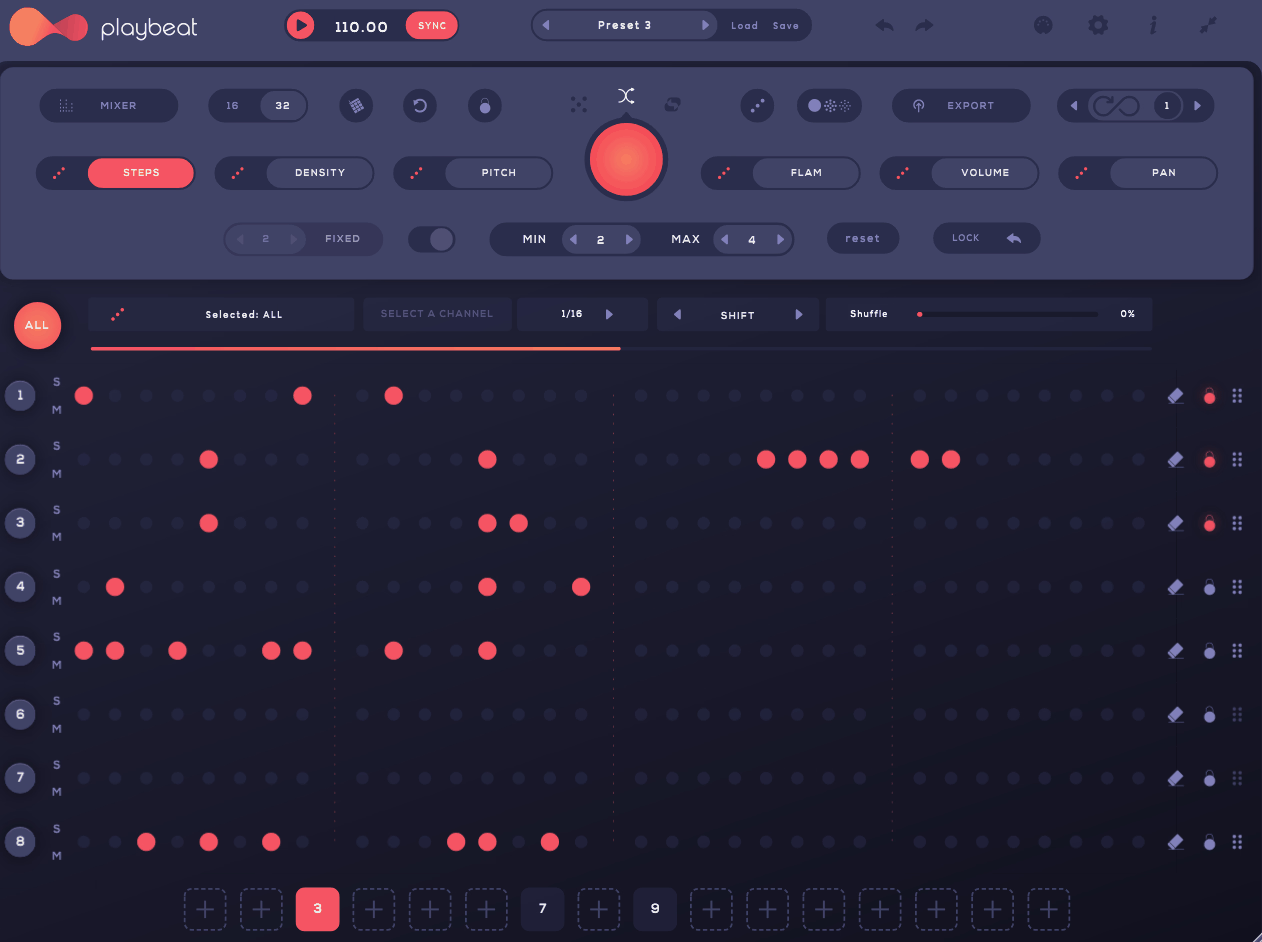
That is where Audiomodern Playbeat 4 makes sense to me. It is a generative drum sequencer built around samples, probability, density, variation, and pattern generation, so you can start with a few sounds, generate a groove, and then decide which parts are worth keeping. I’ve used it mostly when I don’t have a solid drum pattern yet and want to get a few ideas on the table quickly. It gives me something I can edit and build on, rather than asking me to start with an empty grid.
- Generative drum design
Playbeat 4 can create patterns from your selected sounds while giving you control over density, variation, pattern length, and probability, so you can decide how much freedom the generator gets.
- Eight independent channels
Each channel can use its own sound and sequencing settings, allowing different rhythmic behavior across the kit rather than forcing every part into the same pattern.
- MIDI and custom samples
You can work with your own samples and route the generated patterns as MIDI, which makes the sequencer useful even when you prefer other drum instruments for the final sounds.
Generative Engine
The quickest way I use Playbeat 4 is to generate a few starting grooves and then edit the one that gets closest to the track. Density controls how active a channel becomes, while variation changes how much the pattern develops between cycles, so you can move from a restrained groove to something much busier without rebuilding every step.
I usually keep the kick fairly stable and let hats and percussion carry more of the variation. That keeps the rhythmic foundation intact while giving the generated material enough freedom to produce useful surprises.
The Euclidean rhythm system is another option when you want evenly distributed hits rather than conventional straight patterns. It can be handy on percussion and hats because it gives you a structured rhythmic starting point before you introduce additional variation.
Samples and Sound
Playbeat 4 works with its factory material as well as your own audio samples, so you are not locked into a particular sonic palette. You can also use more unusual material such as short synth hits, effects, or found sounds when you want the generator to behave more like a rhythmic sound-design tool.
I tend to choose the sounds first because the same pattern can feel completely different depending on the source. A sparse pattern with an unusual percussion sample can be far more useful than a dense pattern built from sounds that already feel familiar.
- Factory sounds
The included library gives you ready-made kits and sounds so you can start generating patterns without spending the first part of a session organizing samples..
- Custom samples
Loading your own material lets you build the generator around the sounds already used in your track, which makes the resulting patterns easier to fit into the arrangement.
- Unusual sources
Short effects, bass hits, and found sounds can work surprisingly well when you want experimental rhythmic textures instead of conventional drums.
Pattern Control
Once I get a groove that is close, I would rather reshape it than keep pressing generate. Playbeat 4 lets you randomize and vary patterns while keeping control over the underlying density and rhythmic character, which makes the generation process more useful as a writing tool.
Channel locking is especially practical here. You can keep the kick and snare that already work while regenerating the hats or percussion, so you are changing one part of the groove without throwing away the entire pattern.
The current version also includes remix-style variation, which is useful when you like the basic rhythm but want a few alternatives for different sections of the track.
- Generate
Use it when you need a starting groove quickly or want to escape a repetitive programming routine.
- Remix
Create variations around an existing idea so the groove can develop without losing its basic identity.
- Channel locking
Keep the parts you already like and regenerate everything else, which gives you controlled experimentation instead of full-pattern randomization.
Sample Layering and Probability
One of the more useful creative options is combining multiple samples within a channel and using probability to determine how often they appear. That lets you introduce small changes in tone without changing the programmed rhythm itself, which can be particularly effective on snares, hats, and percussion.
I prefer this approach when I want variation that is noticeable but not distracting. For example, a main snare can carry most of the hits while a second roomier or more unusual sample appears less often, giving repeated sections a little more character.
You can also keep the primary pattern simple and use variation at the sound level rather than the note level, which is often easier to mix because the rhythmic structure stays consistent while the timbre shifts.
Live Performance
Playbeat 4 includes performance controls for mute, solo, pattern changes, and MIDI mapping, so you can treat the sequencer as something you interact with rather than simply leave running.
I find channel muting particularly useful during live playback. You can remove the hats, percussion, or other layers for a few bars, then bring them back to create an arrangement change without stopping the pattern.
The fill function is useful for a similar reason. A short fill can add movement at the end of a phrase without forcing you to program a separate pattern in the DAW, which is handy when you want transitions to happen quickly.
Where It Fits Best
I get the most from Playbeat 4 when I am writing electronic music and want the drums to contribute ideas rather than simply follow a fixed pattern. The combination of generated rhythms, sample variation, and independent channel behavior can turn a basic loop into several usable directions without a lot of manual editing.
Experimental production benefits for a different reason: you can feed the sequencer sounds that were never intended to be drums and see how they behave rhythmically. That is where I tend to get the most unexpected results.
For live use, the performance controls make sense when you want to manipulate the groove while it is playing rather than preparing every variation in the arrangement beforehand.
- Electronic production
Use generated patterns for quick grooves, variations, fills, and rhythmic ideas when you want more options without programming everything manually.
- Experimental sound design
Feed it unusual samples and short sound effects when you want rhythmic material that moves beyond a conventional drum-kit sound.
- Live performance
Mute, pattern switching, and fills give you ways to reshape the groove during playback, which can make a static loop feel more like a performance.
A Practical Workflow
I usually start with only a few core sounds: kick, snare, hat, and one or two percussion elements. Once the basic kit works, I generate variations around it instead of asking the plugin to invent the entire groove from nothing.
From there, I protect the important elements and let the secondary parts change. Keeping the kick and main backbeat stable while allowing hats and percussion to vary gives you movement without sacrificing the groove.
Finally, I use the generated pattern as raw material. Delete anything that does not improve the track, adjust the strongest hits manually, and keep only the variation that actually helps the arrangement.
- Start small
Build around a few useful sounds first, then expand only when the groove needs another layer.
- Protect the foundation
Keep important kick and snare events stable while allowing secondary percussion to generate variation.
- Edit the result
Treat generated patterns as starting material, not finished arrangements; remove weak hits and keep the parts that fit your track.
- Try non-drum samples
Unusual one-shots can produce rhythmic textures and sound-design material that would be difficult to think of manually.
Where It Falls Short
The generator is not going to replace a precision-focused step sequencer for everyone. If you already know exactly where every hit should go, manual programming can be faster, especially when the rhythm depends on very specific micro-edits.
Eight channels can also feel restrictive once you build a dense percussion arrangement. You can work around that with another instance, but the simplicity of the original setup starts to disappear.
Sound design is another limitation. The per-channel controls are useful for basic shaping, but this is primarily a sequencing and generation tool rather than a deep drum-synthesis environment, so more detailed tonal work will usually happen elsewhere.
Pros and Cons
Pros
- Fast pattern generation
You can create usable rhythmic starting points quickly instead of programming every hit from scratch.
- Controlled variation
Density, variation, probability, channel locking, and pattern remixing let you change a groove without completely losing its identity.
- Works with your own sounds
Custom samples give you the freedom to build patterns around the actual sounds in your project rather than relying entirely on a factory library.
- Useful performance tools
Mute, fills, pattern switching, and MIDI control make it practical for live arrangements as well as studio writing.
Cons
- Eight-channel limit
Eight sequencer tracks can be enough for a compact groove, but complex percussion arrangements may require another instance.
- Not a deep sound-design instrument
You get useful sample shaping, but serious drum synthesis and detailed processing still belong in other tools.
- Less suited to exact programming
When a pattern needs precise, deterministic editing from the beginning, a conventional step sequencer or DAW piano roll may be faster.
Verdict
What matters to me with Playbeat 4 is how quickly it can get a drum track moving. I would not use it because I want another traditional step sequencer; I would use it when I want several workable rhythmic ideas before deciding which groove deserves more detailed programming.
That approach makes the plugin particularly useful for electronic and experimental production, while the MIDI output means you can take the generated rhythm into other instruments if the internal sounds are not what you want. You also have enough editing control to turn a generated pattern into something that fits the track instead of leaving it untouched.
For a producer who prefers precise, fully manual drum programming, much of the generative side may be unnecessary. If you regularly get stuck staring at an empty drum grid, though, Playbeat 4 gives you a faster way into the arrangement.

Hey, I’m Vil, I started this site to help you find the best audio plugins covering various categories including synths, pianos, strings, and effect tools of all sorts as well. I pick these plugins based on various criteria so it best matches the actual topic.