When you purchase through the links on my site, you support the site at no extra cost to you. Here is how it works.
When I open an amp sim, I want the guitar to feel responsive before I start worrying about pedals or cabinet tweaks. Neural DSP Mantra is built around three distinctly voiced amp channels, a flexible cabinet and microphone section, and a full set of pre- and post-amp effects, so you can cover clean, crunch, and modern high-gain tones without constantly switching between different plugins.
Having several guitar tones available in one setup is where the design starts to make practical sense. You can move from clean parts to crunch rhythms and high-gain leads without rebuilding the entire signal chain, which helps keep different sections of the same track connected while still giving each guitar its own character.
Here is what matters most:
- Three amp voices
The clean, crunch, and lead channels cover three genuinely different playing and production roles, rather than giving you slightly altered versions of the same amp.
- Flexible cabinet section
You can work with the included cabinets or load your own IRs, giving you more control over the recorded character than the amp section alone provides.
- Useful effects chain
Pre-amp drives and post-amp modulation, delay, and reverb let you build a complete guitar chain inside the plugin without treating the effects as an afterthought.
Three Amp Channels
The clean channel is where I notice the dynamic response most. It cleans up and breaks up with changes in playing intensity, so you can use your picking strength as part of the tone instead of relying entirely on automation or a gain control.
For crunch parts, I usually want enough saturation for palm mutes and rhythm work without losing the notes inside a chord. The crunch channel is particularly useful when you need a focused midrange that can sit alongside a dense arrangement without becoming overly bright or congested.
The lead channel takes the gain considerably further. I use it when I need tight low-end response, sustain, and enough note separation for fast single-note playing, particularly in progressive and modern rock sessions.
- Clean
Useful for dynamic rhythm, edge-of-breakup parts, and brighter guitar tones where the playing itself should control how much the amp responds.
- Crunch
A practical middle ground for rock and alternative rhythm work, with enough gain to add weight while retaining chord definition.
- Lead
Designed for higher-gain playing, particularly when you need sustain and articulation without the low end becoming loose.
Cabinet and Mic Section
Getting the amp right is only half of the job. The cabinet and microphone choices have a major influence on what actually reaches the mix, and I usually spend more time adjusting them than swapping between amp models.
The included cabinet models give you a solid place to start, while the microphone section lets you shape the balance between midrange focus and high-frequency detail. I often pair a dynamic mic for definition with a condenser or ribbon for additional body, then adjust the blend according to the guitar part.
The built-in IR loader is particularly useful when you already have cabinet captures you trust. You can keep the amp character while changing the speaker response, which gives you a much easier way to adapt the sound to different mixes.
- Microphone choice
A close dynamic can give you focused mids and attack, while condenser and ribbon options can add body or soften the top end.
- Mic positioning
Small placement changes can alter presence, brightness, and low-mid weight, so I usually adjust the microphone before changing the amp.
- Third-party IRs
Loading your own impulse responses gives you more cabinet options without changing the amp model, which is useful when the included cabinet does not quite fit the mix.
Pre and Post Effects
The effects section covers both sides of the amp, which is important because a drive pedal before the amp behaves very differently from delay or reverb after the cabinet. I use the pre-amp section mainly to tighten or shape the way the amplifier responds, rather than relying on it simply for more distortion.
A Tube Screamer-style overdrive is useful here when the lead channel needs tighter low end and more midrange focus. You can use the drive to change the way the amp reacts, not just to make the guitar more distorted.
After the amp and cabinet, you get modulation, delay, and reverb. I find the post-amp effects perfectly suitable for standard session work, although I still reach for dedicated plugins when an effect becomes a major part of the creative sound.
- Drive and distortion
Use these before the amp when you need more focus, tighter low end, or a different gain response, rather than simply turning up the amplifier.
- Delay and reverb
These work best after the cabinet when you want space around the guitar without changing the fundamental amp character.
- Modulation
Chorus, phaser, flanger, tremolo, and vibrato give you practical options for clean, ambient, and more stylized guitar parts.
Tuner, Gate, and Utility Controls
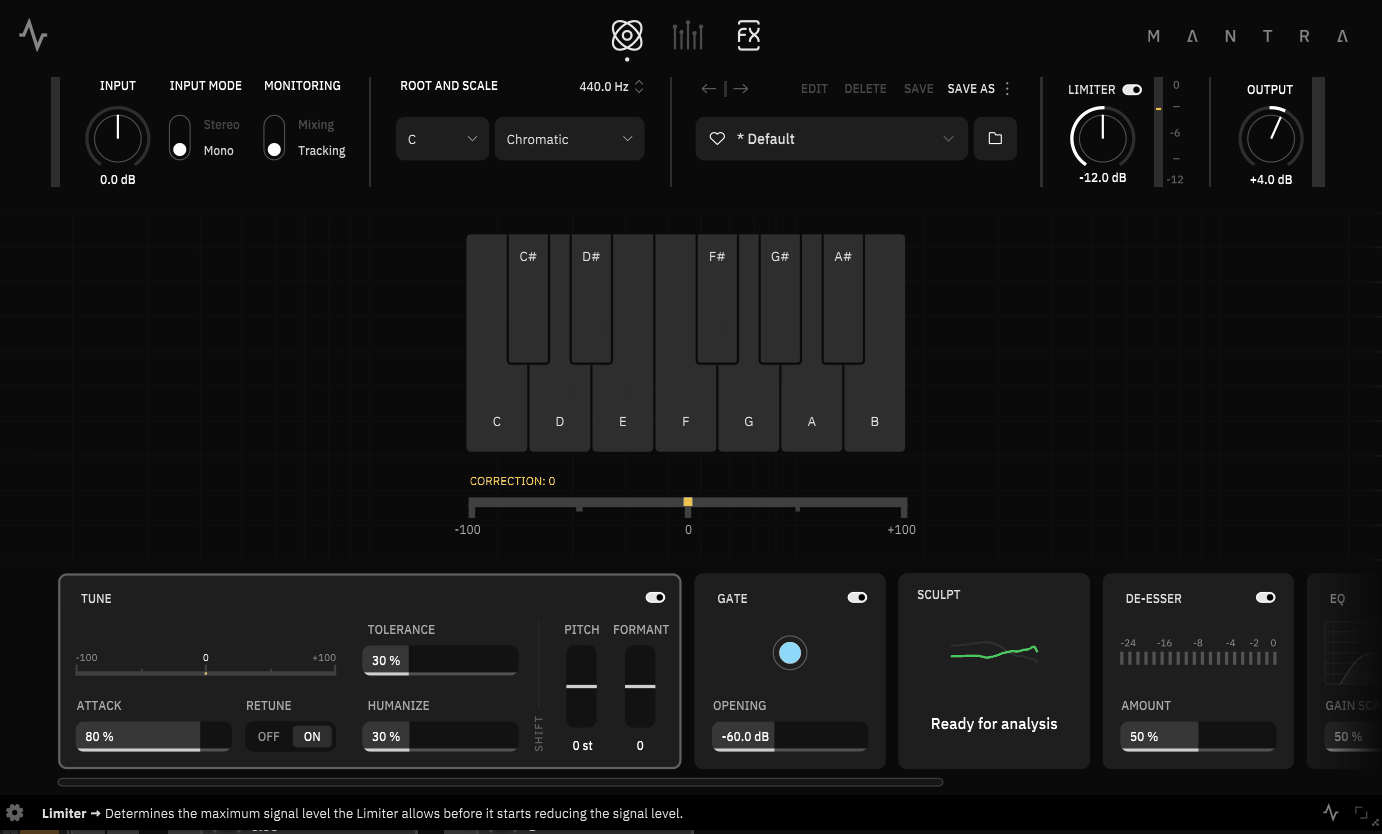
The utility section is easy to overlook, but I like having the basic tools in the same window. A chromatic tuner handles quick tuning checks, while the noise gate helps keep high-gain parts quiet between phrases.
The gate is particularly useful with heavily driven sounds where pickup or cable noise becomes obvious. I prefer using enough reduction to clean up the gaps without cutting off sustained notes or making the performance sound unnaturally chopped.
A global output section also lets you handle broad level and tonal adjustments before the signal reaches your DAW. That keeps simple finishing tasks inside the plugin instead of adding another processor for every small correction.
Standalone and MIDI Control
You do not need to open a DAW to use the plugin. Standalone operation makes it practical for practice, testing tones, and live setups, particularly when you want to control the amp from a MIDI foot controller.
MIDI mapping lets you assign channel changes, bypass functions, and other controls to external hardware. I find that especially useful when a song moves from clean to crunch to lead and I want those changes to happen from one controller rather than through DAW automation.
For recording, the plugin is available in common DAW formats and supports modern Mac systems. That makes it straightforward to keep the same rig available whether I’m practicing, tracking, or mixing.
Practical Use
I would recommend reaching for Mantra when one project needs several guitar tones. Having clean, crunch, and lead voices in one setup keeps the workflow simple when different sections of the arrangement need different gain levels.
For rhythm guitars, I would spend more time on the crunch channel and cabinet than on the effects. With leads, the tighter high-gain response gives me enough articulation to avoid immediately reaching for another amp sim.
- Rock and alternative
The crunch channel works well for tight rhythm parts that need midrange presence without excessive fizz or low-end buildup.
- Metal and progressive
I would use the lead channel when note definition, tight low end, and sustain matter more than vintage-style breakup.
- Clean and ambient parts
The clean channel combined with post-amp modulation, delay, and reverb gives you enough flexibility for cleaner arrangements without changing to another amp plugin.
A Practical Workflow
I would start with the amp channel that matches the role of the guitar part and leave the effects off for a moment. Get the gain, EQ, and cabinet working with the full mix first, because a great solo tone can easily become the wrong tone once the drums and bass are playing.
Next, move the microphone or try a different cabinet before adding more processing. I’ve found that cabinet and mic changes often solve problems that I would otherwise try to fix with EQ.
Once the core tone sits correctly, add one pre-amp effect if the amp needs tightening and one or two post-amp effects for space or movement. Keep the clean DI available when you want to blend more attack or low-end control into the final sound.
- Set the amp first
Choose clean, crunch, or lead based on what the guitar needs to do in the arrangement.
- Fix the cabinet before EQ
Try different mic positions and cabinet choices before reaching for corrective processing.
- Use the drive as tone shaping
A modest overdrive can tighten the amp and change its response without turning the guitar into a heavily distorted signal.
- Judge it in the mix
A tone that works beautifully on solo guitar can disappear once the bass and drums arrive, so make the final decision with the arrangement playing.
Pros
- Three useful amp channels
The clean, crunch, and lead voices cover three practical production roles, making it easier to handle different guitar parts without changing plugins.
- Strong cabinet workflow
Microphone positioning and third-party IR loading give you meaningful control over the final recorded tone.
- Good pre-amp drive options
The overdrive section can tighten the amp and reshape its response, which is particularly useful for high-gain rhythm and lead sounds.
- Complete basic rig
Amp, cabinet, effects, tuner, gate, MIDI control, and standalone operation give you a practical setup for recording, practice, and performance.
Where It Falls Short
The biggest limitation is that you are buying into a fairly specific three-channel concept. That gives you useful range, but it does not mean every amp style or gain structure you might want is covered equally well, particularly if your sound depends on very specialized vintage or extreme high-gain hardware.
The clean channel can also be less forgiving with high-output pickups. If your guitar has particularly hot pickups or active electronics, you may need to manage the input level carefully to keep the clean response where you want it.
I also would not rely on the built-in effects when a particular delay, reverb, or modulation effect is central to the production. They are useful for normal guitar chains, but dedicated effects will usually give you more control and a deeper sound-design palette.
Verdict
What matters in practice is how quickly the three channels cover the different guitar parts in your sessions. Clean, crunch, and high-gain voices can live within the same setup, so you can keep a consistent cabinet, microphone, and effects workflow instead of rebuilding the rig whenever the arrangement changes.
Across rock, alternative, progressive, and metal, that range is enough for me to treat Mantra as a serious everyday amp option rather than a plugin reserved for one particular sound. You can keep the same basic setup and make smaller changes to gain, cabinet, or drive depending on what each section needs.
There are still reasons to keep another amp sim around. If you regularly chase very specific vintage circuits or specialized high-gain tones, a more focused plugin may give you a better match, while the built-in effects also won’t replace dedicated processors when those effects become a major part of the sound.

Hey, I’m Vil, I started this site to help you find the best audio plugins covering various categories including synths, pianos, strings, and effect tools of all sorts as well. I pick these plugins based on various criteria so it best matches the actual topic.