When you purchase through the links on my site, you support the site at no extra cost to you. Here is how it works.
Sequencer plugins do far more than tell notes when to play. They can trigger, time, repeat, randomize, and reshape musical events over time, whether you’re sending MIDI notes into a synth, turning a sustained pad into a rhythmic pulse, building a drum pattern, or generating movement that would be tedious to program by hand.
A conventional piano roll gives you precise control over every note, but a dedicated sequencer becomes more interesting when it can introduce variation for you through polyrhythms, probability, randomization, pattern chaining, or generative rules. That’s where these plugins earn their place: they don’t just store a pattern, they help determine what happens next.
For this roundup, I’ve focused on the 14 best sequencer plugins covering MIDI generators, polymetric and Euclidean engines, sequencers with built-in synthesis, sample-based grooveboxes, and gate effects, followed by seven free or free-to-use picks and one bonus entry.
I’m looking at them from a practical angle too, because I want this list to answer not just what each plugin does, but why you would actually use it.
1. 510k POLYLLOP
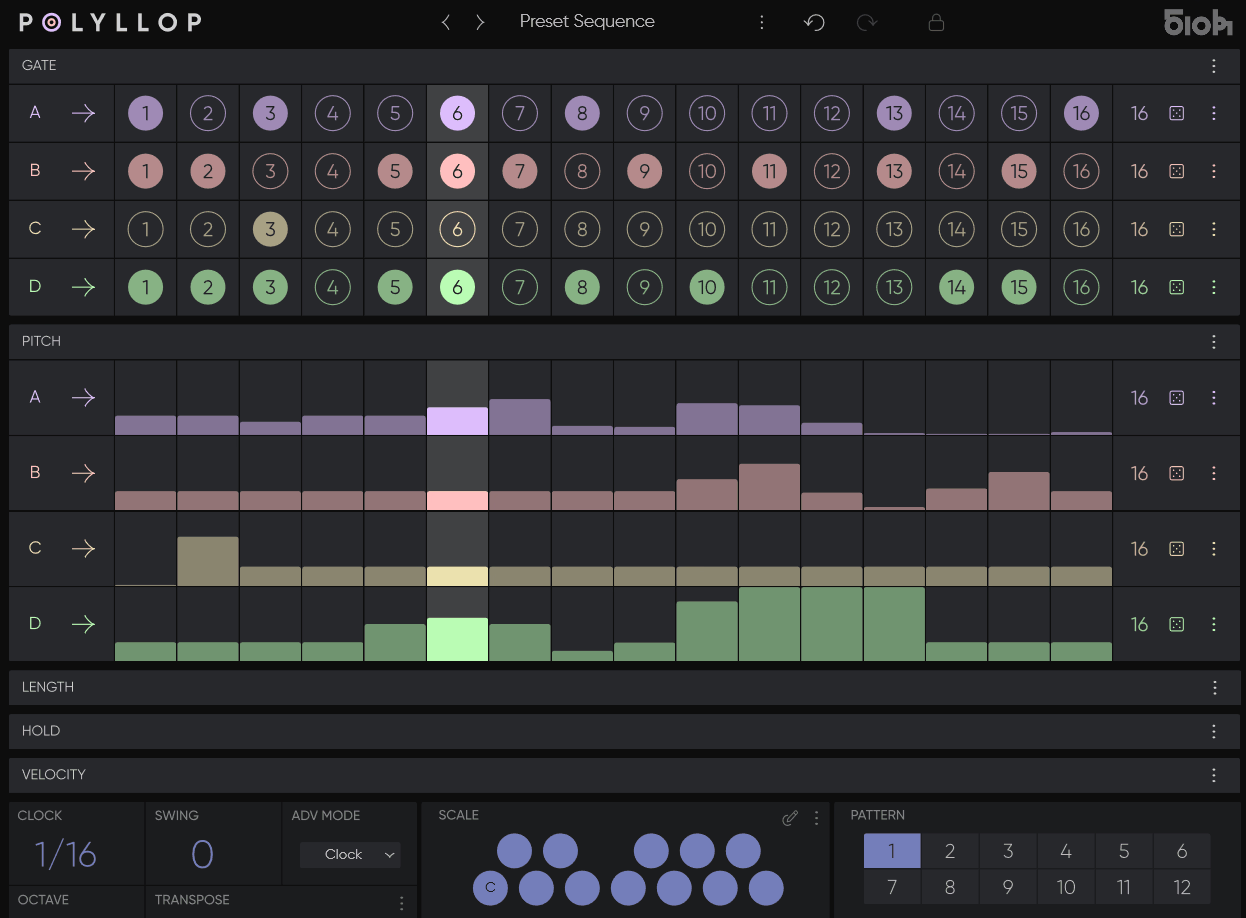
510k POLYLLOP caught my attention because it treats a polyphonic sequence less like one arrangement and more like several independent timing systems happening at once. Most polyphonic sequencers give every voice the same basic timeline and ask you to work within it. POLYLLOP instead gives you up to four independent voices, each with separate sequencing lanes for rhythm, melody, duration, and velocity.
What makes that more than a specification on paper is the fact that those lanes don’t have to share the same cycle length. I find that this creates the kind of constantly shifting relationships that are difficult to reproduce manually without spending far too much time calculating where every pattern should realign.
The plugin is MIDI-only, so you’ll still need a synth, sampler, or hardware instrument on the receiving end, but that focus actually works in its favor.
- Five Independent Lanes Per Voice
Each of the four voices gets dedicated Gate, Pitch, Length, Hold, and Velocity lanes, and every lane has its own adjustable length and playback mode, meaning nothing is forced to stay synchronized to the others unless you want it to.
I like how this means two voices can share the same root rhythm while drifting apart melodically, since pitch and gate don’t have to stay locked to the same cycle length. Over sixteen or thirty-two bars, that drift compounds into genuinely unpredictable, evolving harmonic movement.
- Polymeter Sequencing
Setting different step counts across lanes generates rich, evolving polyrhythms automatically, without you having to manually calculate where the patterns will realign. A four-step gate lane against a seven-step pitch lane, for example, won’t repeat identically for nearly two full bars.
- MIDI Advance Mode
You can drive the step progression directly from your MIDI keyboard or a MIDI clip, which turns the sequencer into a free-form rhythmic performance tool rather than something locked to the host tempo grid.
For instance, when you want a pattern to advance only when you physically play a note, this mode gives you that kind of hands-on control over timing, which is especially useful for building tension before a drop rather than letting a pattern run on autopilot.
2. ADSR Orbit
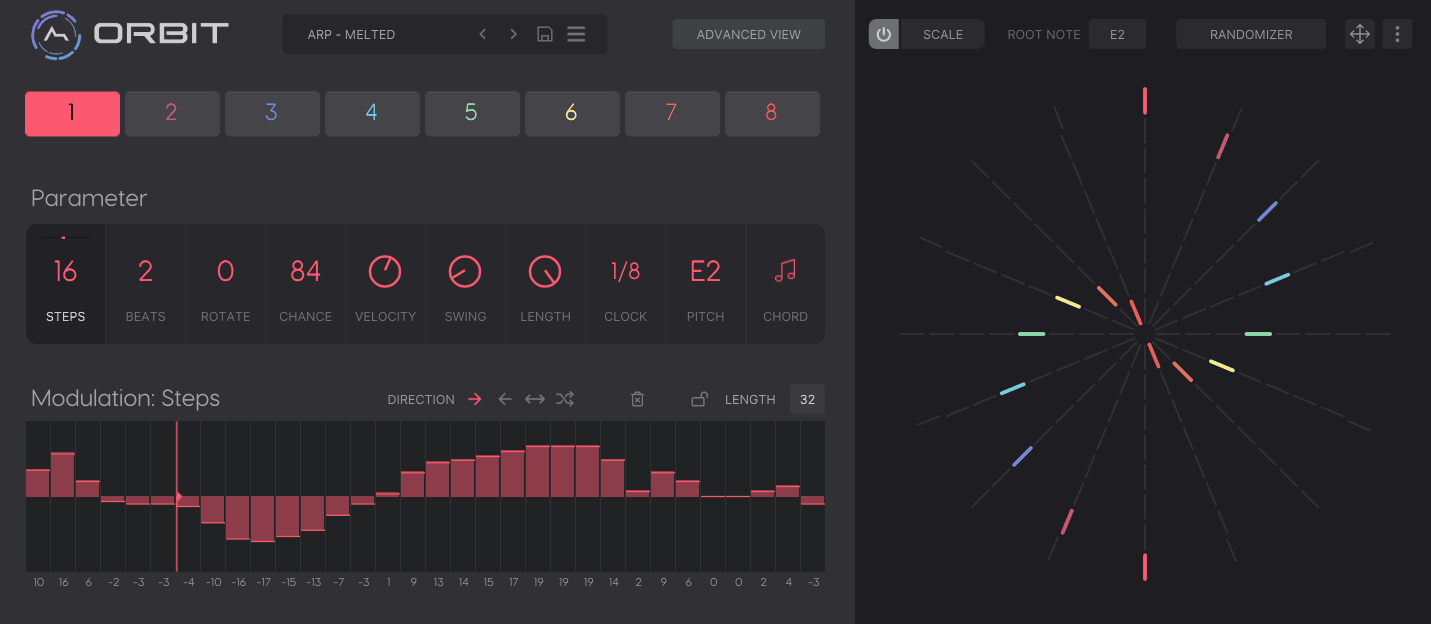
A Euclidean sequencer can be useful for much more than percussion when you give it enough control over what happens after the rhythm is generated. That broader idea is what makes ADSR Orbit interesting to me: it uses a mathematical distribution system to place pulses across a defined number of steps, then turns that foundation into a tool for melodies, chord progressions, and drum patterns.
What I like most is that you’re not locked into a single Euclidean rhythm. Eight independent lanes mean the rhythmic relationships themselves can become part of the composition, while probability, velocity, swing, and modulation determine how those layers behave over time.
That puts Orbit somewhere between a conventional step sequencer and a generative composition tool. I’d reach for it when I want structured unpredictability rather than completely uncontrolled randomization.
- Eight Independent Rhythm Lanes
Every lane gets its own controls for steps, beats, rotation, probability, velocity, and swing, which means you can build a full polyrhythmic arrangement entirely within the plugin before anything even reaches your DAW. Because each lane is independent, you can dedicate one purely to percussion and another to a slow, evolving melodic line without them interfering.
- Modulation Panel Per Lane
You can draw in modulation for any parameter on any lane, and Orbit’s internal modulation system lets you either shape those changes deliberately or add an element of randomization to the whole process.
I appreciate how this turns a static Euclidean pattern into something that shifts gradually over a section instead of repeating identically bar after bar. Drawing a slow rise in probability over sixteen bars, for instance, can build a pattern from sparse to dense without ever touching the step count itself.
- Scale Selector With Circle Of Fifths
The scale selector lets you lock a key quickly, and key changes are facilitated using the circle of fifths, so modulating between related keys mid-arrangement stays musically sensible rather than arbitrary.
3. Devicemeister Stepic
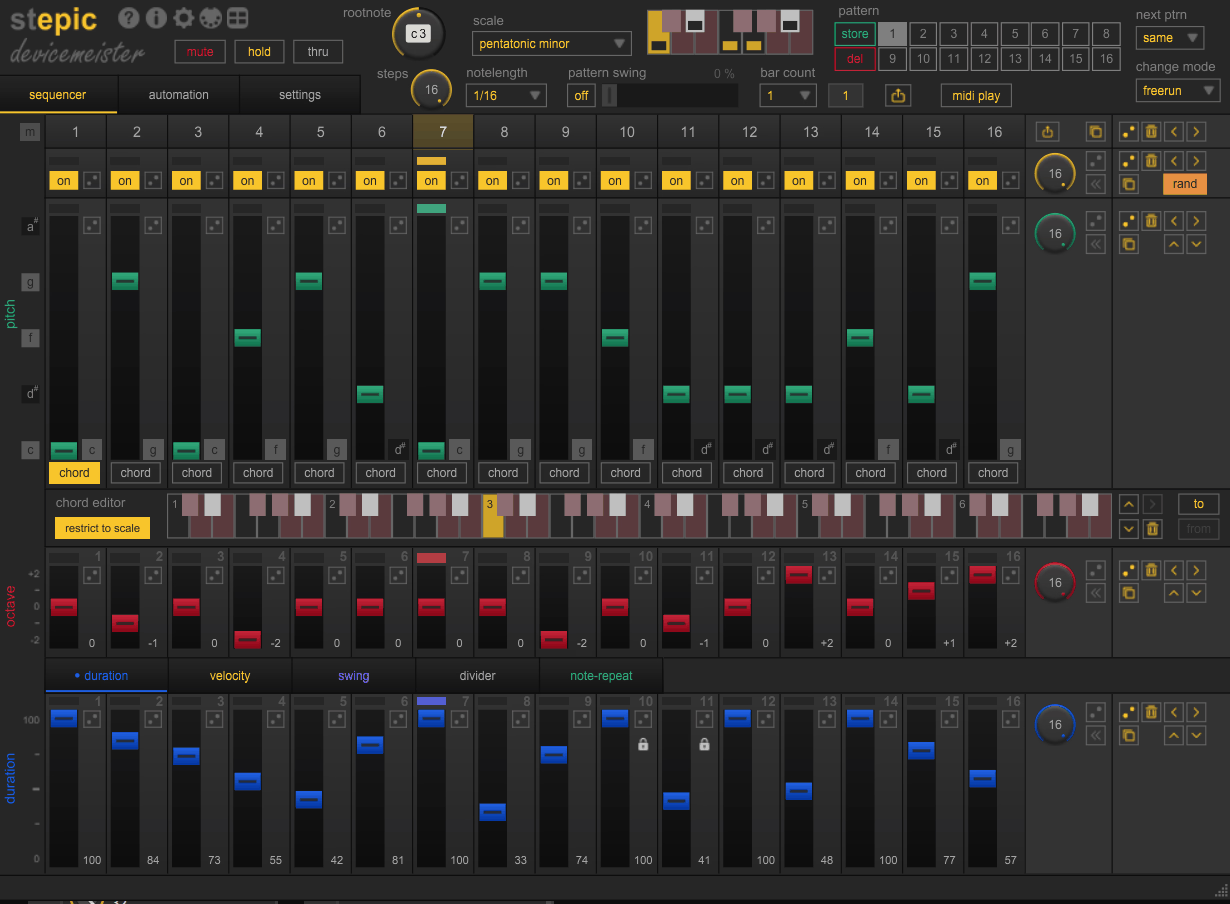
The moment a sequencer starts controlling notes and synth parameters at the same time, it becomes much more interesting as a production tool. That’s the angle I think best explains Stepic. Devicemeister Stepic gives you a 16-step note sequencer with patterns extending to 16 bars, while eight independent modulation sequencers can automate parameters on other plugins or hardware.
I find the modulation side particularly useful because it keeps the timing relationship between a note pattern and its sound-design movement inside the same environment. Instead of drawing a melody in one place and then building several DAW automation lanes underneath it, you can make those elements evolve together.
Stepic therefore feels less like a simple note generator and more like a sequencing hub for synth-heavy workflows, especially when you want every part of a patch to keep moving rather than repeating identically.
- Six-Octave Chord Editor
Stepic is polyphonic, and each step gets its own dedicated chord editor spanning six octaves, which means an entire chord voicing can live on a single step without splitting it across multiple tracks.
- Massive Sequence Length
With a maximum sequence length of 4096 steps, calculated from 16 steps across 16 bars across 16 stored patterns, you have room to build arrangements that evolve over an entire section without looping back on themselves too early.
Pattern storage holds up to 16 patterns per session, and you can chain them using Same, Next, Random, or Fixed modes, which opens the door to semi-generative song structures rather than a single repeating loop. Setting a run of patterns to Random chaining, for example, means the arrangement itself becomes a performance you can trigger and let evolve on its own.
- Note Repeat, Probability, and Ratcheting
Individual steps can repeat, trigger probabilistically, or subdivide using the Note Divider ratcheting function, and Parameter Lock lets you tie a specific parameter value to a specific step.
- MIDI Play Performance Modes
Toggling MIDI Play gives you access to Arpeggiator, Transpose, Chord Play, and Pitch Bend Transpose modes, which turns the plugin from a programmed sequencer into something you can actually perform live from a keyboard, layering real-time playing on top of whatever pattern is already running.
4. XLN Audio XO
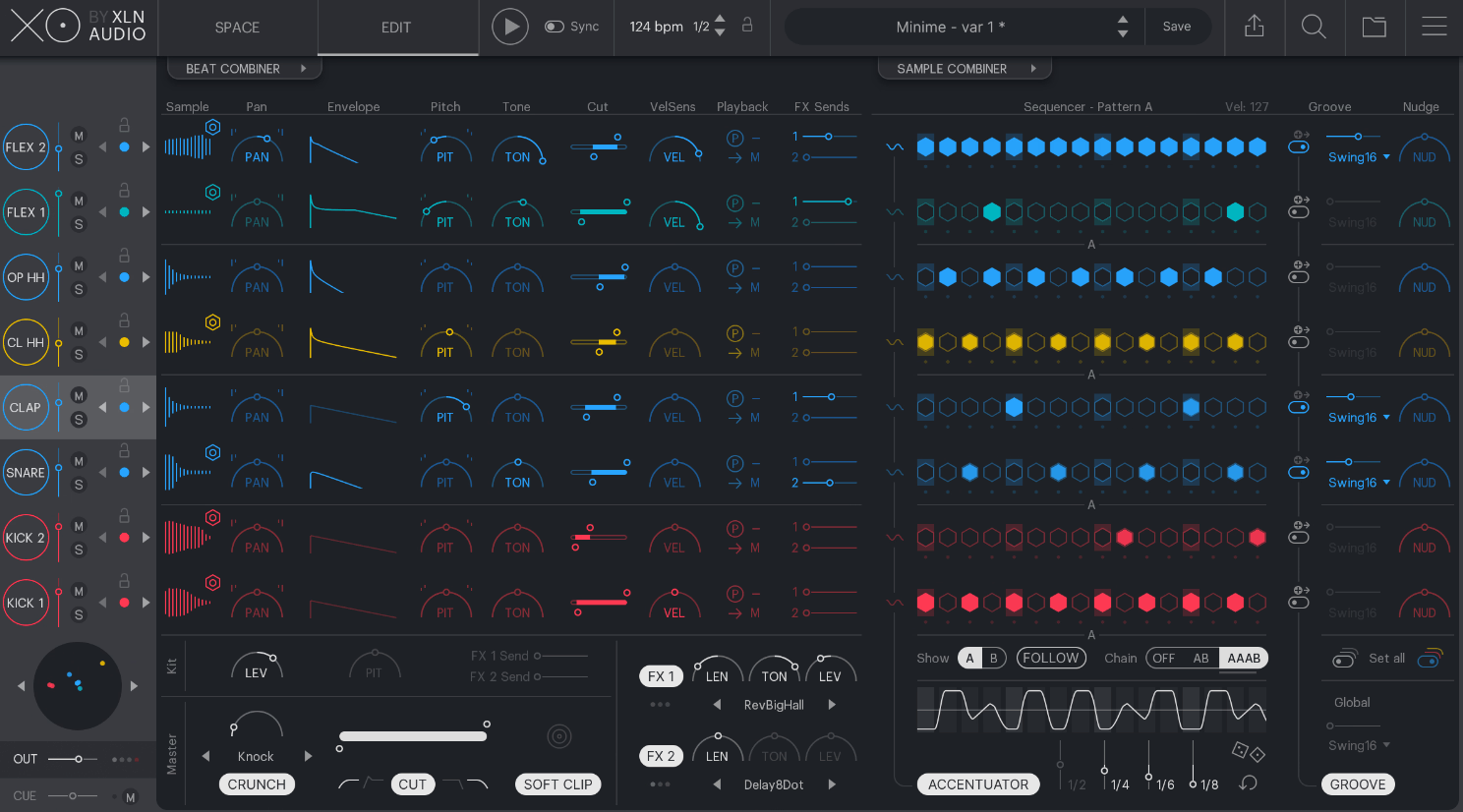
Sample selection can be one of the slowest parts of building a drum groove, particularly when you have thousands of sounds and no real memory of where the useful ones are. That’s the problem XO solves first. XLN Audio XO turns your drum library into a visual map where samples are positioned by sonic similarity, so you can browse by sound rather than by folder structure.
I like that the sequencing side feels connected to that discovery process rather than bolted onto it afterward. Once you find a kit, the built-in eight-lane, 16-step sequencer gives you everything needed to turn those sounds into a finished drum idea.
That makes XO particularly compelling if you spend as much time searching for the right kick or snare as you do programming the pattern itself.
- XO Space Sample Browsing
Every dot in the Space view represents a drum sound, arranged by tone and character rather than alphabetically or by folder, and XO ships with 8,000-plus curated factory samples to explore right out of the box.
I find that the difference becomes obvious the moment you’re hunting for a specific kind of snare. Instead of scrolling through endless folders, you’re browsing a cluster of tonally similar sounds and can just click around until something clicks. Sounds sitting close together on the map tend to share sonic character, so exploring nearby dots often turns up exactly the variation you were looking for.
- Groove Templates and Nudge
Curated Groove Templates let you sculpt the overall feel of a pattern instantly, while the Nudge function pushes the whole groove toward either raw urgency or a looser, funkier sluggishness, all applied globally without needing to touch individual steps.
- Playground Mode
Playground Mode randomizes both the beat pattern and the kit sounds, one element at a time or all at once, which I’d treat as a genuine idea generator rather than just a novelty randomizer. Locking the elements you like while randomizing everything else is where this mode really earns its keep.
5. Sugar Bytes Consequence
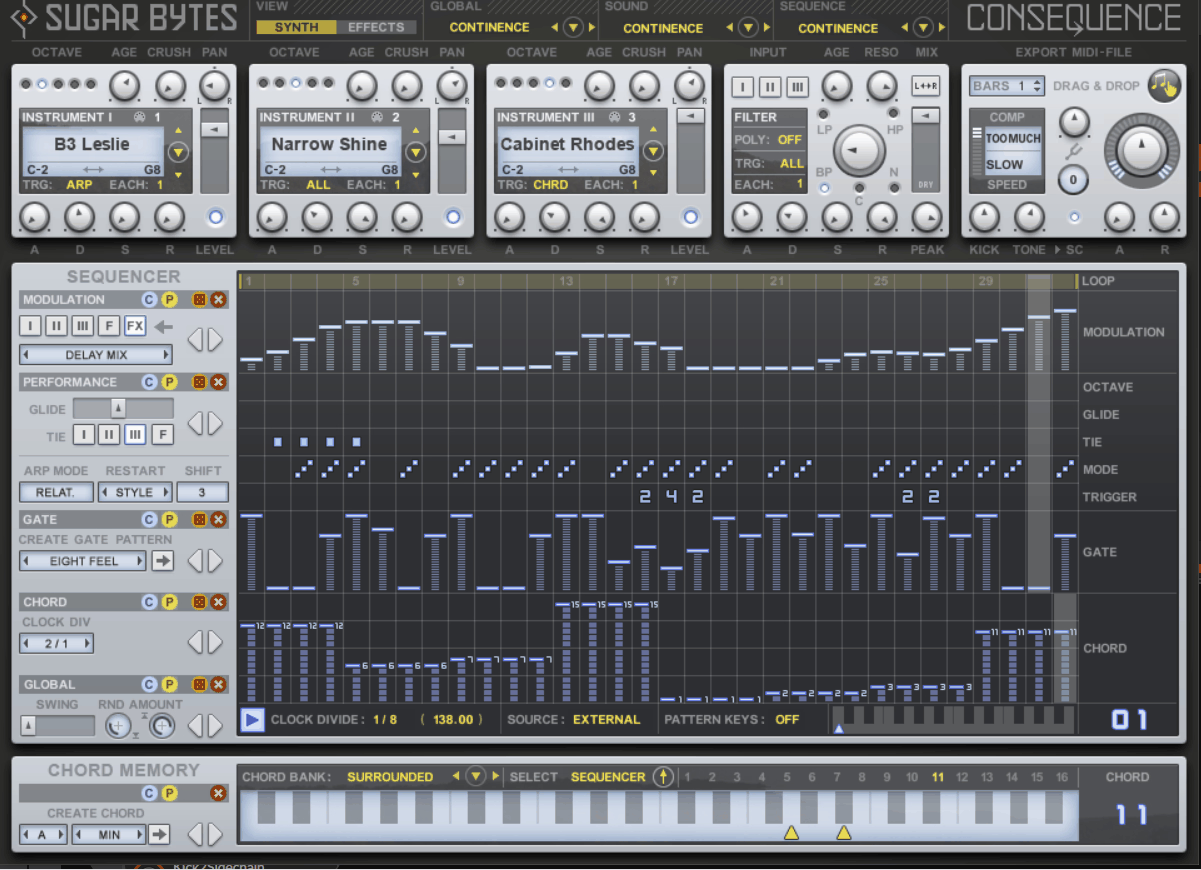
Some sequencers begin with rhythm, but Consequence starts with harmony. I think that’s the easiest way to understand why Sugar Bytes Consequence feels different from a typical arpeggiator. It takes chord material and interprets it through five separate sequencers, shaping the resulting groove across up to three loaded instruments.
The 16 chord snapshots are the heart of that workflow. Rather than thinking about every note individually, you define the harmonic vocabulary first and then let the sequencers turn those chord shapes into rhythmic and melodic movement.
I find that approach much more inspiring when I’m starting from a progression and want the sequencing engine to help me discover a groove, rather than starting with a blank piano roll and programming every event myself.
- Three Oscillators In A 32-Step Sequencer
The instrument section runs three oscillators through a 32-step sequencer, which is where the rhythmic and melodic complexity actually gets built, with each oscillator capable of running an entirely independent pattern shape.
- Per-Step Arp And Chord Control
You can define, step by step, whether a given hit plays as Arp or Chord, Octave or Tie, with detailed control over arp direction on top. That level of granularity is what lets you create melodies with a genuinely narrow, deliberate focus rather than a generic arpeggiated blur, since every single step can behave completely differently from the one before it.
- A Purpose-Built Sample Library
Consequence draws from a sample library made exclusively for the plugin, containing 237 sounds recorded from natural instruments and analog synthesizers, everything from strings and percussion to classic synth voices, each offering its own Octave, Pan, Level, and Crush controls.
6. Wave Alchemy Triaz
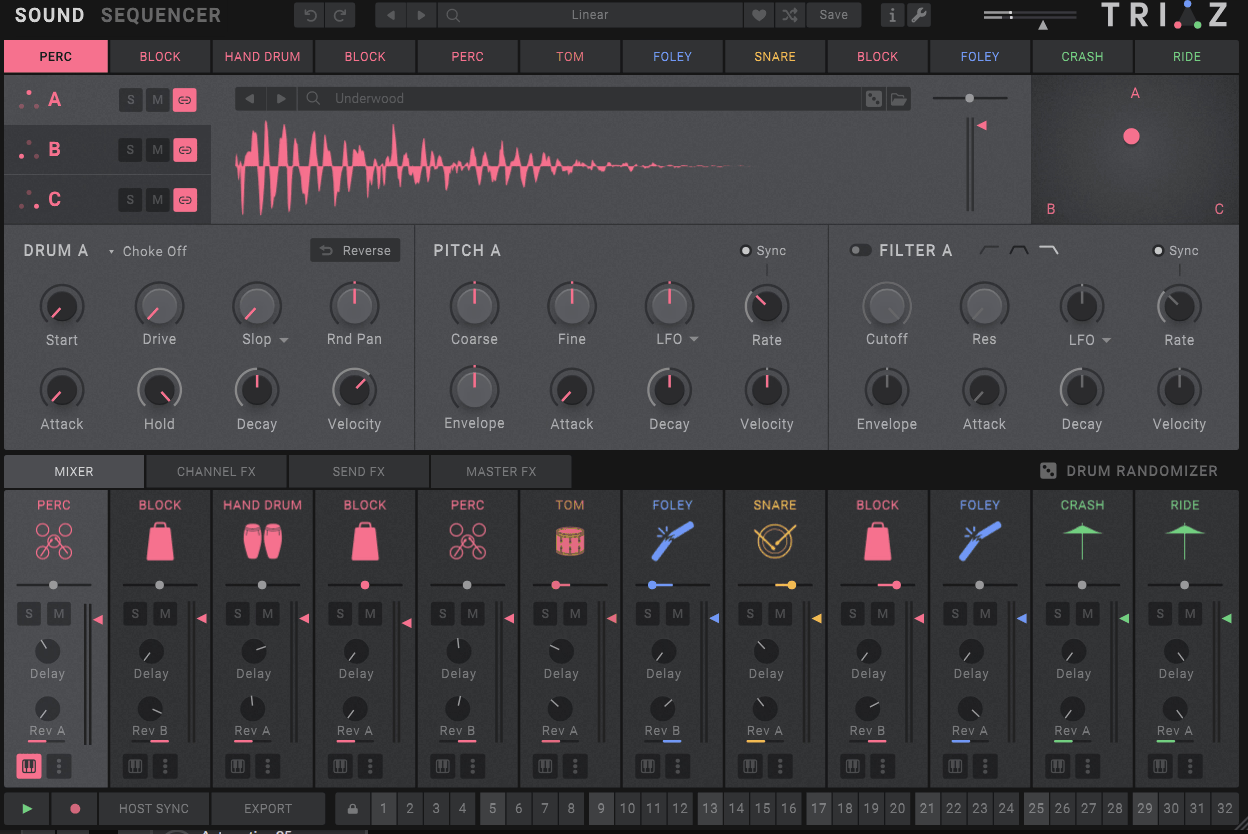
A drum sequencer becomes genuinely interesting to me when the individual channels stop behaving like one shared clock. That’s exactly where Wave Alchemy Triaz shines, with 12 channels, each running its own timing relationship, alongside a very large sample library and extensive drum-sound shaping.
You can keep a conventional kick running at one rate while a hi-hat pattern uses a completely different length and timing relationship. The resulting groove can feel complex without requiring you to manually build every cross-rhythm in the DAW.
I think that makes Triaz one of the strongest picks here for producers who specifically want polyrhythmic drum programming rather than a general-purpose MIDI sequencer.
- Per-Step Sound Shaping
Beyond basic triggers, individual steps support their own tuning, start position, filter setting, and panning, so a single drum channel can sound noticeably different from hit to hit across a pattern rather than triggering the exact same tone every time.
- Slop Humanization
The Slop control subtly randomizes volume, tuning, start position, and filter cutoff on each hit, which is exactly what you need when a pattern feels too mechanically perfect and needs some human looseness back in it. Dialing Slop in gradually rather than all at once tends to produce the most convincing result.
- Up To 36 Sample Layers Per Channel
Each drum channel can stack as many as 36 sample layers, letting you build genuinely complex, evolving hits instead of a single static sample triggering identically every time. That’s enough headroom to layer multiple transient sources, tonal bodies, and texture layers onto a single kick or snare.
- A Genuinely Deep Effects Suite
Triaz includes an algorithmic reverb, an analog-style delay, and a convolution reverb built from 350 impulses captured from hardware reverbs and real acoustic spaces, plus a full master chain with a four-band mid and side EQ, an analog-inspired bus compressor, and a maximizer combining saturation, noise layering, multiband excitement, and a transparent hard clipper tuned specifically for drums.
7. HY-RPE2
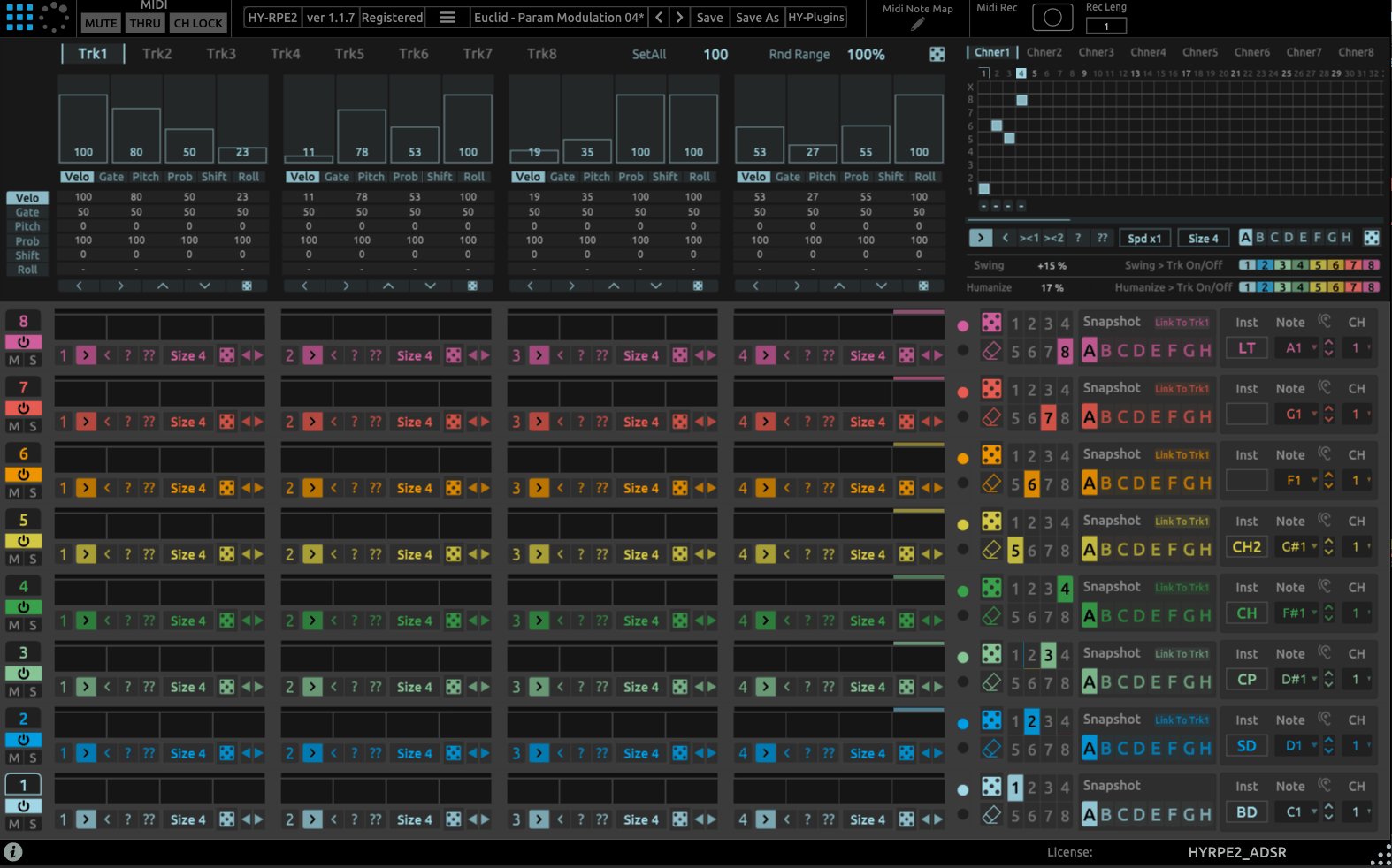
There are times when I want the familiar logic of a step grid, and other times when I want the pattern to generate itself from a mathematical rhythm. HY-RPE2 is interesting because it gives me both approaches in one eight-track MIDI sequencer, switching between Grid and Euclidean engines.
The Euclidean side is where the design really opens up. Modulation assignment, LFO and Sample-and-Hold sources, macro controls, chord triggering, and pattern chaining mean the plugin can move well beyond basic rhythmic triggering.
I’d look at HY-RPE2 when I want one sequencer that can cover both conventional programming and experimental rhythmic construction without committing to either style from the start.
- Grid Engine Flexibility
Each bar in the Grid sequencer can hold between one and eight steps, and playback direction can be changed or randomized on the fly. Patterns can also be shifted left or right, which is a small feature that makes rhythmic variation feel effortless across long sessions.
- 32-Step Pattern Chainer
Above the individual tracks sits a chainer where you paint out patterns across a 32-step grid, similar in feel to a classic tracker-style workflow, letting you arrange how the eight tracks’ patterns play back in sequence over an extended arrangement.
- Chord Notes Trigger
The Euclidean engine can trigger full chords rather than single notes, which turns a rhythm generator into something that can also carry harmonic content, useful if you want the Euclidean logic driving pad or synth parts rather than just percussion.
- MIDI Recorder and Learn
A built-in MIDI recorder captures your generated sequences for export, and MIDI Learn makes mapping hardware controllers to any parameter straightforward, which matters given how many parameters the Euclidean engine alone exposes.
- Resizable Interface
The plugin window scales freely, which matters more than it sounds like it should when you’re working with eight tracks of dense sequencing data on a smaller screen.
8. ADSR Hexcel
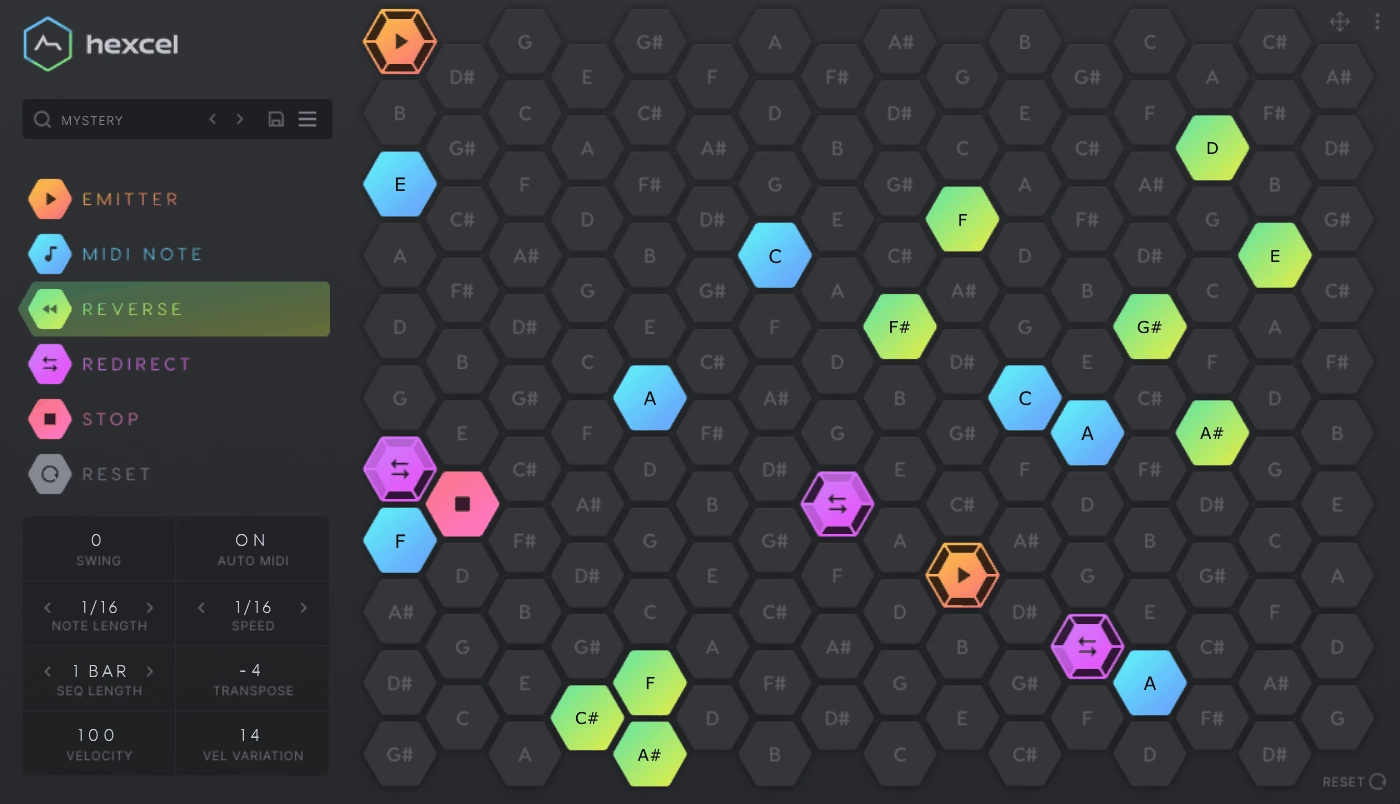
Instead of looking at notes as a line, Hexcel asks you to think of them as a network of connected positions. That conceptual shift is what made ADSR Hexcel stand out to me: its generative system is built around a harmonic table, with emitters moving through a hexagonal note layout rather than simply advancing from left to right.
You can place up to six emitters on the grid and then influence how their traveling nodes behave using special cells. I like that this gives you a way to shape the rules of the generation without having to prescribe every note.
The result feels particularly useful when I want generative patterns that remain visibly understandable, because I can see the pathways rather than simply reacting to a stream of random notes.
- Directional Cell Types
Three special cell types steer the traveling nodes: Reverse cells bounce a node back the way it came, Redirect cells send it off in a random new direction, and Stop cells remove it from the grid entirely. Combining all three across a single grid is what turns a simple straight-line path into something genuinely unpredictable.
I like how you can restrict which directions a Redirect cell is allowed to choose from, using buttons along its outer rim. That single control is the difference between chaotic-feeling patterns and ones that stay musically coherent. Locking a Redirect cell to only two of its six possible directions, for instance, keeps a melody moving broadly in one direction even while it’s technically randomized.
- Higher Octaves At The Top
The grid layout places higher octaves toward the top of the screen and lower octaves toward the bottom, which mirrors how most people already think about pitch spatially. Placing an emitter near the top versus the bottom immediately tells you what register it’s going to occupy before a single note plays.
For instance, when you’re sketching a bassline versus a lead melody, you can visually separate the two ranges on the grid rather than hunting through a flat note list. That spatial logic makes building multi-emitter arrangements considerably faster once it clicks.
9. Audio Damage Replicant 3
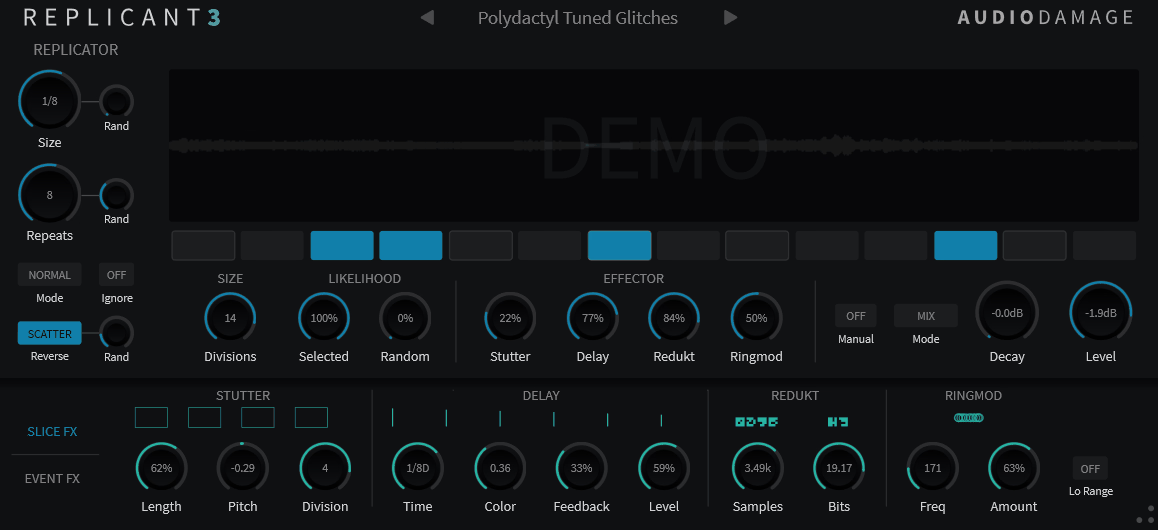
Sometimes the most interesting sequencer isn’t the one generating new MIDI notes at all; it’s the one reorganizing audio that’s already playing. That’s the role Audio Damage Replicant 3 takes, using real-time slicing, looping, reversing, and effect processing to turn incoming material into something rhythmically new.
I think of it almost as a performance sequencer for audio. Instead of asking “what note should happen next?”, you’re deciding which slice should play, how it should be processed, and how that fragment should interact with the ones around it.
Version 3 is a ground-up rebuild, and that matters because the updated REPLICATOR engine expands the rhythmic possibilities considerably beyond a simple stutter effect.
- Flexible Step Counts
REPLICATOR now supports anywhere from 3 to 16 steps per measure, and the SIZE control offers multiple step-size modes, ranging from dotted notes through to nontuplets, which opens up rhythmic subdivisions well beyond standard binary slicing.
- Four Slice Effects
Alongside the original STUTTER effect, this version adds DELAY, REDUKT, and RINGMOD as additional slice-processing options, giving each individual slice a distinct character rather than treating every chopped fragment identically.
- Envelope Crossfading Between Slices
A new ENVELOPE feature inside Event FX handles cross-fading between slices, smoothing out what would otherwise be an abrupt jump between two very different-sounding fragments of audio, which makes the chopped result feel considerably more intentional.
- Manual and MIDI Triggering
Beyond the sequenced mode, you get manual triggering built for touchscreens, along with full MIDI trigger support, letting you take the slicing engine out of automatic playback and control it as a performance instrument instead, chopping audio live in response to whatever’s happening in the arrangement.
- Cross-Platform Preset Format
The new preset manager uses an XML-based format that’s consistent across platforms and plugin formats, so a preset built on one system behaves the same way wherever you load it next.
10. Sugar Bytes DrumComputer
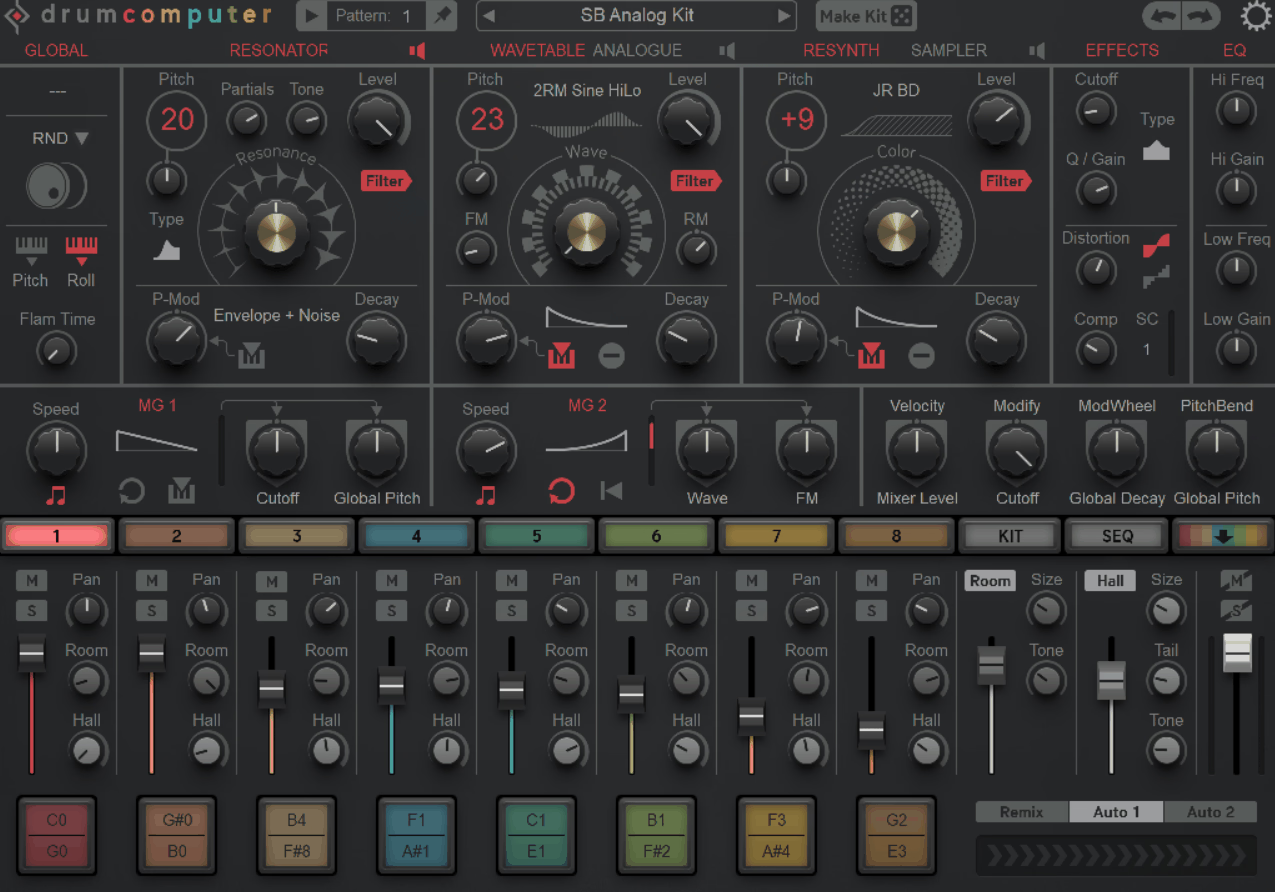
I tend to think of DrumComputer as the point where a drum sequencer stops being just a pattern player and becomes part of the sound-design process itself. The plugin uses eight sound engines, with each one combining multiple synthesis approaches, so the sequence and the drum sound can evolve together rather than being treated as separate jobs.
That is especially useful when I want percussion that develops over time rather than a sample that sounds identical on every trigger. Its 16-step, 16-pattern sequencer can control probability, rolls, delay, pitch, decay, and other modulation-related behavior, giving the pattern itself plenty of room to become expressive.
The result is a tool that feels much closer to a synthesizer-groovebox hybrid than a simple drum sequencer.
- Deep Preset Library
DrumComputer ships with over 400 global presets and more than 450 engine-specific presets, and since all eight sound engines share the same underlying DSP, you can freely swap sounds between engines without losing the modulation and sequencing work built around them.
- Built-In Processing Chain
Each engine has access to a filter, compressor, and overdrive, plus two send reverbs, Room and Hall, alongside a modulation setup combining two envelope and LFO pairs with dedicated synth-engine and sequencer modulators feeding into a full mod matrix.
- Live Performance Mapping
Eight keys are permanently reserved for mute functions, ideal for re-arranging a beat live, and 16 pattern keys plus pattern chaining make jumping between sections feel instant rather than clunky.
- Full MIDI Drag and Drop Export
A complete MIDI file, including triggers, modulation sequences, auto-fills, and their associated CC data, can be dragged straight out of the plugin and into your DAW timeline, capturing essentially everything the engine generated in one export.
11. Splice Beatmaker
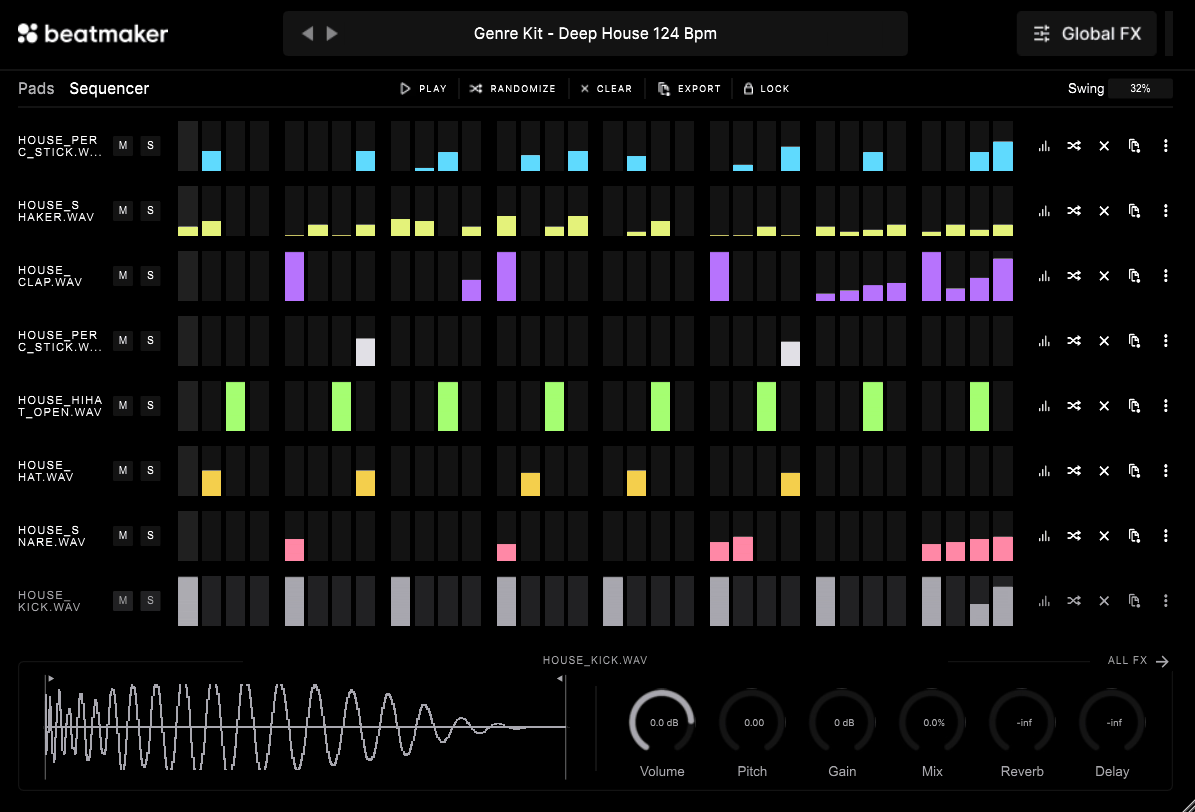
Not every sequencer needs to be a deep technical instrument. Sometimes I just want to get a beat moving immediately, and that is where Splice Beatmaker makes its case. It comes with Creator and Creator+ plans and keeps the workflow centered on two views: Pads, with eight sound slots, and Sequencer, with a familiar 16-step grid.
The strongest part for me is the relationship with the wider Splice ecosystem. When I already have a Splice library available, I can move from sound discovery into pattern building without having to reinvent the workflow inside another plugin.
That makes Beatmaker better understood as a fast sketching environment than as a rival to the most advanced generative sequencers here.
- Deep Splice Sound Library Integration
Since Beatmaker is built around Splice Sounds, you’re not limited to a fixed factory library. The plugin’s entire sample pool grows alongside whatever you have access to through your Splice account, meaning the kit options effectively expand over time without any update to the plugin itself.
- One-Click Autofill Patterns
Every sequencer lane ships with preset sequences you can drop in instantly, and a single click autofills a four-to-the-floor kick or a triplet hi-hat pattern to get your drums moving before you’ve made a single manual edit.
- Drag-and-Drop Sequence Export
Individual drum lanes or entire sequences can be dragged directly out of Beatmaker and into your DAW, which keeps the plugin feeling like a sketchpad rather than a place where finished ideas get stuck.
12. Audiomodern Playbeat 4
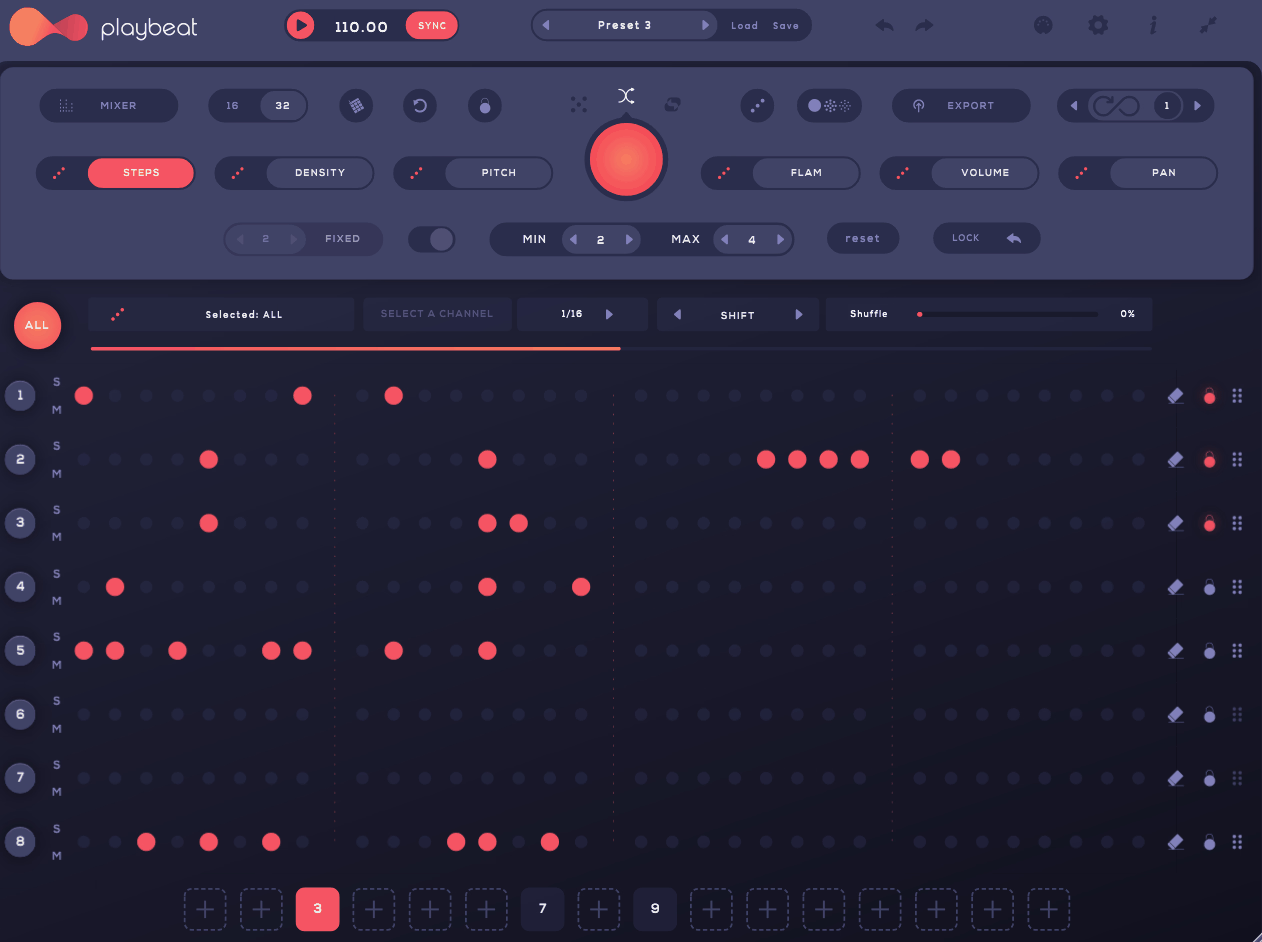
A good generative drum tool shouldn’t simply press a random button and hope for the best. What I like about Playbeat 4 is that it gives that variation some direction, while Audiomodern Playbeat 4 combines eight independent sequencers, pitch and tuning control, density, timing, volume, and panning.
The most useful part of the concept, to me, is the ability to preserve some of the musical identity of a pattern while changing enough of it to make each pass feel fresh. The genre-based randomization pushes that further by giving the generation a stylistic target rather than making every result equally arbitrary.
I would therefore treat Playbeat 4 as a tool for continuous variation, particularly when a groove is already working and I want it to keep evolving without programming every new bar myself.
- Four Randomization Modes
You get four distinct approaches to pattern generation: Random, Remix, Smart, and Instant, each producing a noticeably different flavor of variation depending on how much of the existing pattern you want preserved.
- Infinity Mode
Enabling Infinity Mode means the plugin generates an entirely new pattern on every loop, which I’d recommend specifically for live performance, since it keeps a set feeling unpredictable without you touching a single control for the entire duration of a set.
- A Massive Factory Library
Playbeat 4 ships with over 1,500 factory kits, and you can import your own WAV or AIFF samples alongside them, so the generative engine is never limited to just the stock content, no matter how genre-specific your own sample collection gets.
- Full Sample Editing Tools
Beyond triggering, imported and factory samples alike run through a proper sample editor with a dedicated filter section, letting you reshape sounds before they even reach the sequencer rather than fixing them afterward.
- Multi-Functional Performance Keyboard
A single acclaimed keyboard interface lets you trigger individual sounds, full pattern sequences, or entire drum grooves, which means it can shift from a generative tool into a genuine performance instrument without switching modes mid-set.
13. 510k SEQUND
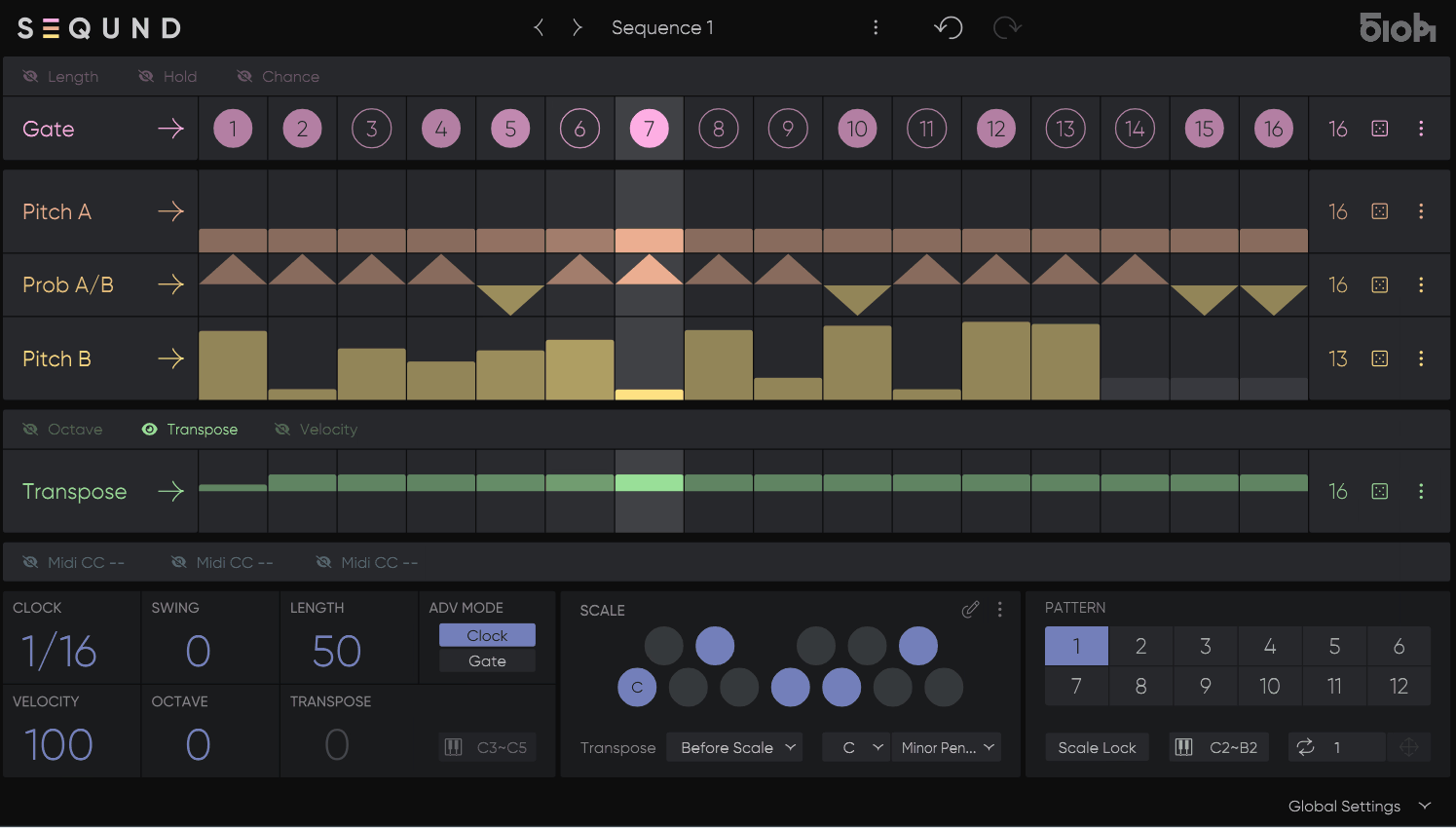
What interests me about SEQUND is how much complexity it gets from relatively simple building blocks. 510k SEQUND uses 13 independent lanes, each of which can have its own length, allowing simple gates, pitches, probabilities, and note-length controls to interact in ways that create much larger repeating cycles.
The two melodic lanes are especially important because Pitch A and Pitch B can alternate according to a probability lane instead of forcing you into one static melodic line.
That gives the plugin a very particular character: the patterns are carefully programmed, but they don’t necessarily sound as though they are repeating the exact same way every time.
- Gate, Length, Hold, and Chance Lanes
Beyond pitch, dedicated lanes control Gate, Length, Hold, and Chance independently, each with its own step count, which is exactly how the plugin’s polyrhythmic character emerges from otherwise simple building blocks stacked on top of one another.
- Ratchet For Note Repetition
The Ratchet feature repeats a note within a single step, adding rhythmic density in specific spots without needing to shorten the overall step length across the whole pattern, which keeps the underlying groove intact while still allowing for bursts of detail.
- Twelve Patterns Per Preset
Each preset holds up to 12 patterns that recall instantly via MIDI notes, meaning you can switch between them live with seamless timing rather than waiting for a pattern to finish looping first, which makes it genuinely viable as a performance instrument.
14. Excite Audio Bloom Mura Masa
The sequencing concept here starts with performance rather than abstraction. Bloom Mura Masa is a sample-based instrument developed with Mura Masa, using material from his session archives and a production aesthetic connected to Curve 1.
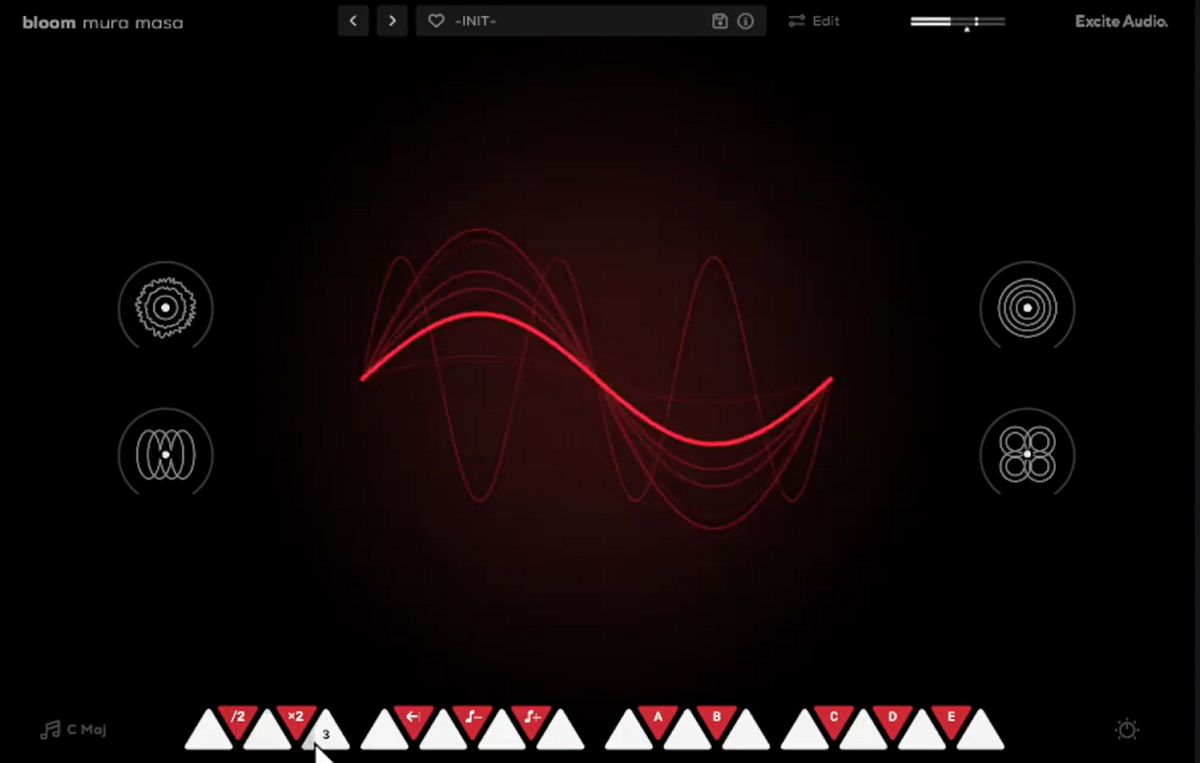
What makes it relevant to this list is the Bloom Sequencer, which treats loops and one-shots as performable elements rather than simply placing samples on a fixed grid. Each track can have its own step rate, swing, probability, timing, and retrigger behavior, so the sequencing engine becomes part of the sound itself.
I like this approach because it keeps sampling, sequencing, effects, and performance close together instead of spreading those jobs across several DAW windows.
- Library
The instrument ships with 250 presets, and over 100 of them are tagged ‘MM,’ meaning they were built personally by Mura Masa rather than a generic sound design team working from a brief. These presets are also organized into clear categories, songstarters, basslines, melodic, percussive, experimental, synths, and textures, so browsing feels purposeful rather than random.
I appreciate knowing exactly which patches came from the artist himself. It gives you a real starting point for his sound instead of guessing which presets are closest to the reference.
- Fourteen Sample Keys
The main page maps 14 samples to white keys, letting you trigger individual hits or launch full phrases without ever leaving the performance view. Black keys give you five factory modifiers, including half-time, double-time, reverse, and octave shifts, all of which apply instantly without interrupting playback.
Say you’re deep into a session and a loop suddenly needs a different edge. Swapping in a modifier changes the character instantly, and honestly that kind of speed is what keeps momentum going when ideas move faster than you can program them.
It also means a single sample can cover several roles across a track just by rotating through modifiers.
- Per-Track Step Control
Each sequencer track carries its own sync, swing, and beat retrigger settings, plus trigger probability and timing adjustments at the individual step level. Every one of these parameters lives on the track itself, so you’re never digging through a separate global settings page to shape a single lane.
- Sequencer FX Modulation Lanes
Beyond triggering samples, the sequencer lets you automate Reverb, Speaker, Modulation, Lo-Cut, Hi-Cut, Pitch, and Volume on a per-step basis, right alongside the trigger data itself. That means the effects chain isn’t a static send sitting behind the pattern. It’s part of the pattern.
I find this is where Bloom Mura Masa stops feeling like a sample launcher and starts feeling like a proper production tool. A filter can sweep open on step nine, reverb size can grow only on the final beat of a bar, and none of it requires touching automation lanes back in your DAW.
Building that kind of movement directly into the sequencer keeps the whole process contained inside one plugin window instead of scattered across your session.
- Four Signature Macros
Mura Masa designed four macros specifically for this instrument: Terminal for grit and distortion, Peek for expressive delay, Angle for phased reverb, and Sides for stereo width. Each one is built to move several underlying parameters together rather than a single knob doing a single job.
- Reamp-Style Speaker Simulator
One of the three main effects is a dedicated Speaker module with four distinct modes, Device, Cabinet, Hi-Fi, and No Speaker, each shaping the sound like it has been pushed through a different real-world source. Switching between them recolors the tone in a way that goes well beyond a simple EQ curve.
Freebies:
1. Audiomodern GateLab 2
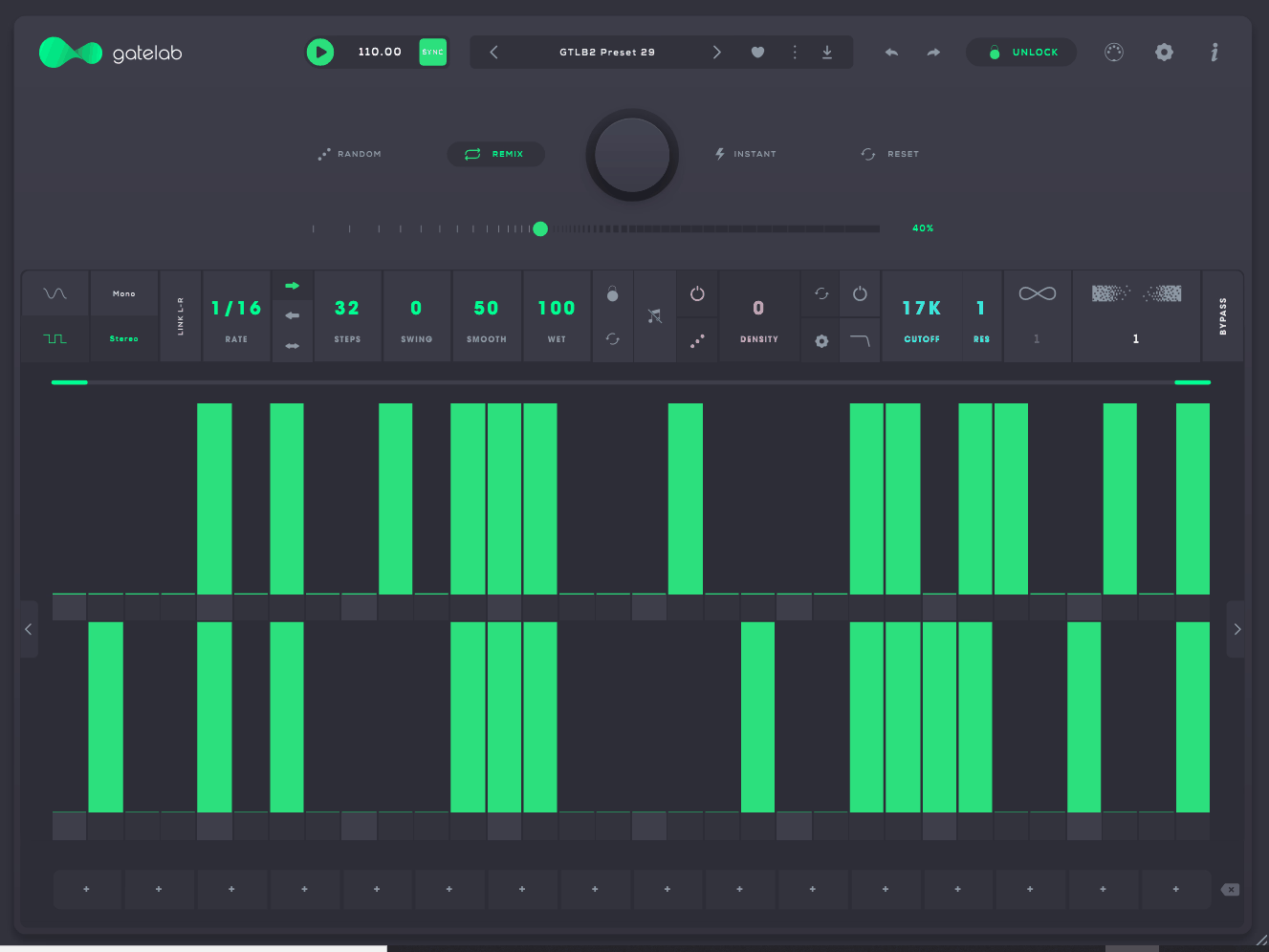
Gate effects are one of the easiest ways to turn a static sound into motion, and I think GateLab 2 makes that process much more flexible than a basic on/off tremolo. GateLab 2 offers 64-step gate sequencing, two sequencing lines, and a Flow mode that lets you manipulate the volume curve directly.
That makes it useful on pads, sustained synths, loops, and other sources where the musical effect comes from controlling the shape of the amplitude over time.
I would treat it as a rhythm-processing tool first and a conventional sequencer second, because its most interesting results come from changing how an existing sound moves.
- New Randomization Algorithms
GateLab 2 introduces fresh randomization logic that can instantly generate new variations of whatever pattern you’ve already programmed, which is a meaningful step up from the original’s more basic shuffle function.
- Density and Style Controls
Dedicated density controls sit alongside switchable Flow or Gate styles, letting you transform a static sound into an evolving rhythmic texture without stacking multiple separate plugins to get there.
- Multimode Filter Section
A new filter section with cutoff and resonance controls turns this into more of a full FX processor rather than a pure volume sequencer, useful for chopping and gating effects that need some tonal shaping baked in as well.
2. HY-SEQ16
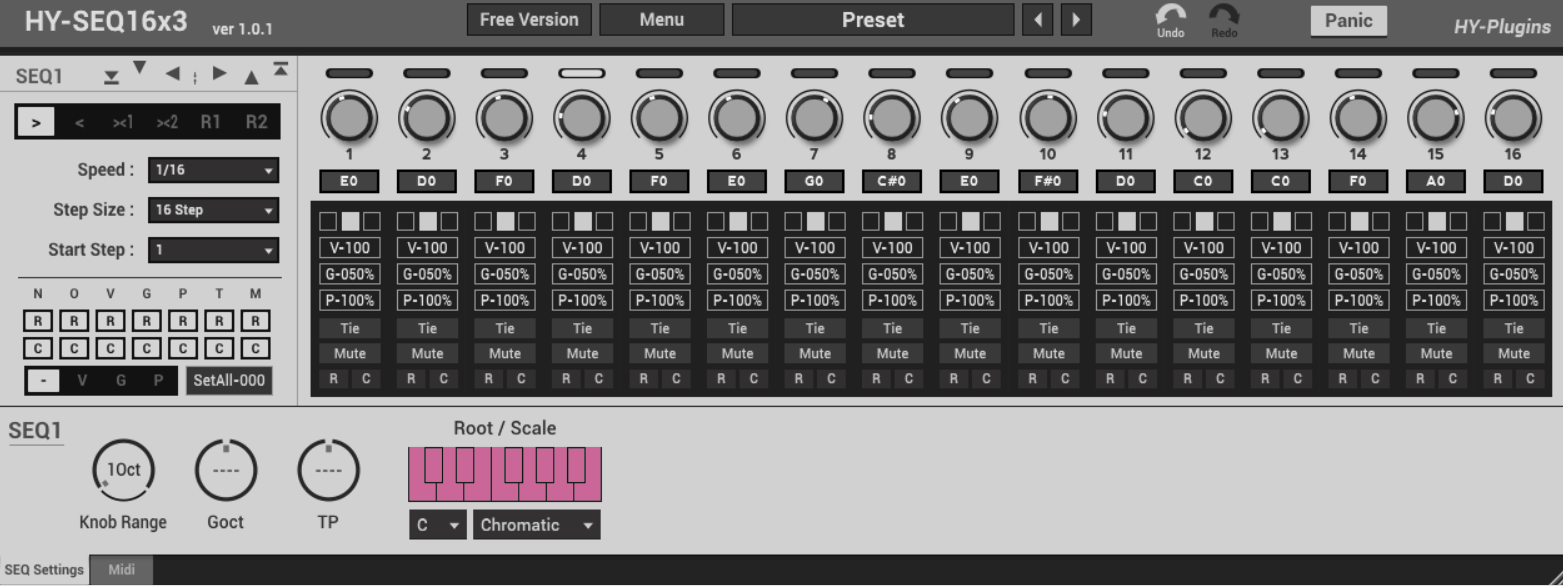
I’ve always thought free step sequencers are most useful when they let you randomize selectively instead of forcing you to throw the whole pattern away. That’s one reason HY-SEQ16 still makes sense as a lightweight option, with each step carrying its own note, velocity, gate, mute, randomize, and probability settings.
The design is deliberately straightforward, which means I can get from a blank sequence to a usable pattern quickly without learning a much larger sequencing architecture.
For experimentation, that simplicity is valuable because I can randomize one parameter, undo it, try another, and keep the musical parts I already like.
- Global and Per-Parameter Randomization
You get a global randomize function for the entire sequence, plus separate randomize buttons dedicated specifically to note values, velocity, gate, and the rest, so you can shake up one parameter without disturbing everything else you’ve already dialed in.
- Custom Scale Selection
Rather than being locked to chromatic note entry, you can choose a custom scale, which keeps randomized results musically usable instead of needing constant manual correction after every randomize pass.
- Duplicate Step Values
A simple duplication option lets you copy a step’s values across the sequence, speeding up pattern building considerably once you’ve found a shape you want to repeat throughout the pattern.
- Resizable Interface and Preset Manager
The plugin window scales freely, and a built-in preset manager makes saving and recalling your favorite sequences straightforward across sessions.
- Undo and Redo
Given how much of the workflow revolves around randomization, having proper undo and redo support matters more here than it would in a plugin built around slower, more deliberate programming, since you can chase happy accidents without fear of losing a good result.
3. Harvest MINI by Harvest Plugins
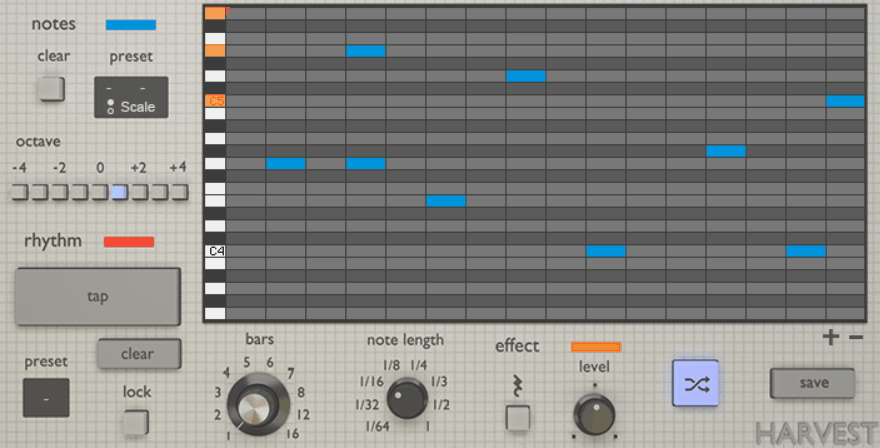
When a generative sequencer is free, the most useful feature can simply be how quickly it gets an idea into your DAW. That is the role Harvest MINI fills, generating melodies, chord progressions, and drum patterns that you can route into another instrument.
I like that you don’t need to understand a complicated generative system before getting something musical. Pick a scale, choose a rhythm, and hit Regenerate to create another variation.
It makes the most sense to me as a composition starter: something that generates raw material I can then edit, rather than a replacement for a deep production sequencer.
- Tap or Randomize Rhythms
Rhythms can be tapped in manually with the mouse for precise control, or randomized entirely when you’d rather let the plugin surprise you with something you wouldn’t have programmed yourself.
- Interactive Piano Roll
Generated notes appear in an interactive piano roll where you can drag individual notes around, giving you a manual editing pass on top of whatever the generator produced, so nothing is locked in until you’re happy with it.
4. HY-MPS2
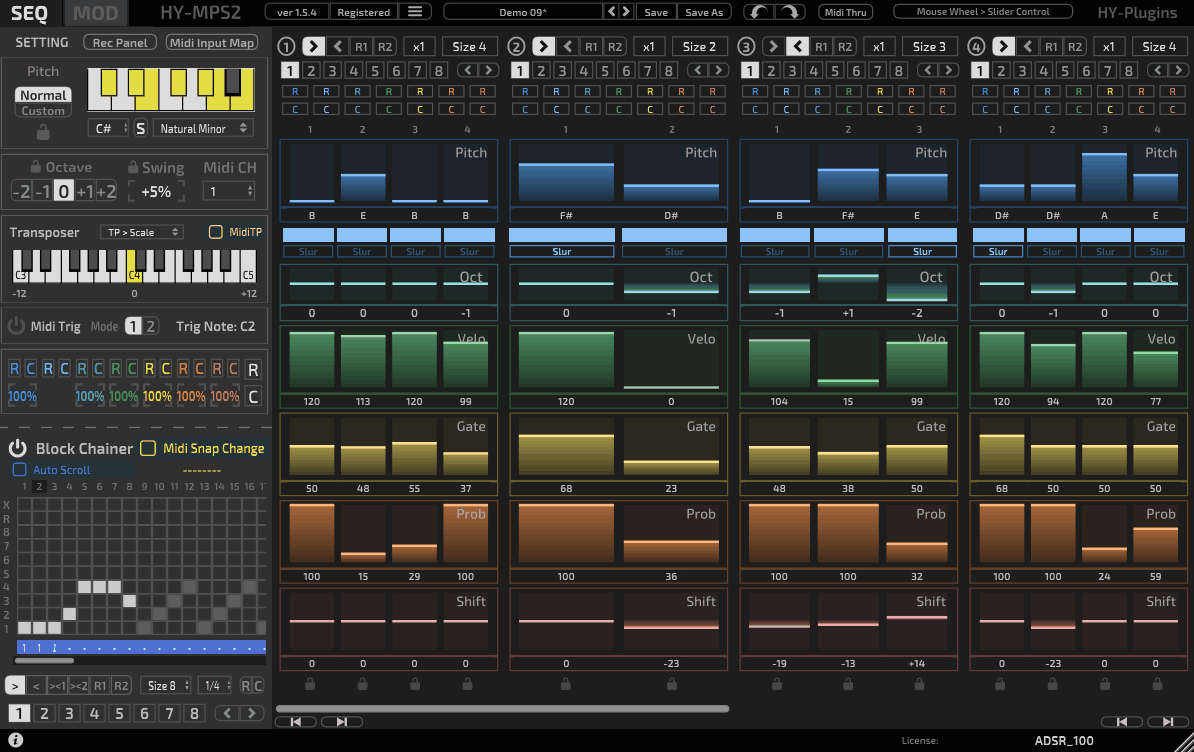
Block-based sequencing has an advantage that conventional step grids don’t always have: you can build several small patterns and then rearrange them into something larger. That’s the approach behind HY-MPS2 free, which gives you three step-sequencer blocks and a 16-step block chainer for deciding how they play.
I find that useful when I want longer phrases without programming one huge pattern from scratch.
Each block can also behave differently, so the variation comes from both the block itself and the order in which the chainer recalls it.
- Independent Direction and Step Size
Each of the three blocks can run its own playback direction and step size independently of the others, so one block might advance forward at a coarse subdivision while another runs backward at a finer one, all within the same combined sequence.
- Quarter Note Block Structure
Each block represents a single quarter note, and the step size you set acts as a divide factor. Setting a step size of four, for instance, turns each step into a sixteenth note, giving you fine control over rhythmic density per block without complicated math.
- Combinable Sequencing
Because the block chainer determines playback order across all three blocks, you can build sequences that feel considerably more varied than a single repeating pattern, all from a genuinely free plugin, especially once you start alternating which block leads at different points in the chain.
5. Monoplugs B-Step Sequencer
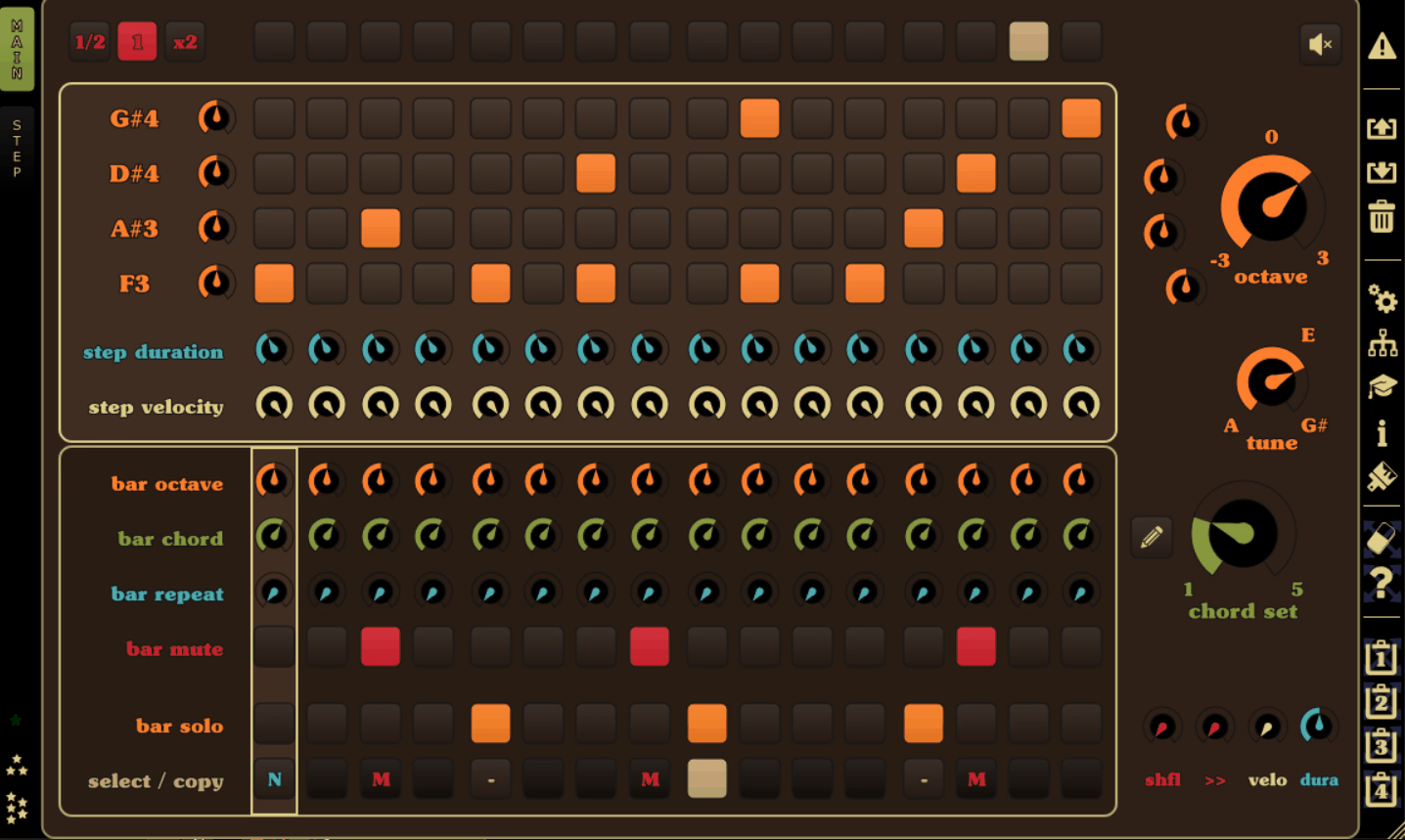
Older freeware can be surprisingly capable, and B-Step Sequencer is one I’d still look at when the goal is to get multiple sequencing jobs into one plugin. Monoplugs B-Step Sequencer covers melodies, basslines, chords, arpeggios, and drum grooves, with up to four independent sequencers.
What stands out to me is how much attention was given to performance features. Multi-touch, pattern chaining, reverse playback, and several MIDI outputs make it feel like something that was designed to be played rather than merely programmed.
That makes it a particularly interesting legacy option for touchscreen-based workflows and live experimentation.
- Chord Programming and Ratcheting
Beyond basic step triggers, you get chord programming, sequencer ratcheting for step repeats, and shuffle and swing controls, all of which push the plugin well past a simple on-off step grid.
- Monophonic and Polyphonic Modes
You can switch between monophonic and polyphonic playback depending on whether you’re sequencing a lead line or a full chord progression, without needing separate instances for each.
- Pattern Auto Chaining and Reverse Playback
Patterns can chain automatically into longer arrangements, and reverse playback lets a sequence run backward for an easy variation on material you’ve already built, doubling your usable content without extra programming.
- Five MIDI Outputs
The plugin includes five MIDI outputs, four of them independent, letting you drive up to five separate hardware or software synths from one instance.
6. Syntler Drumper
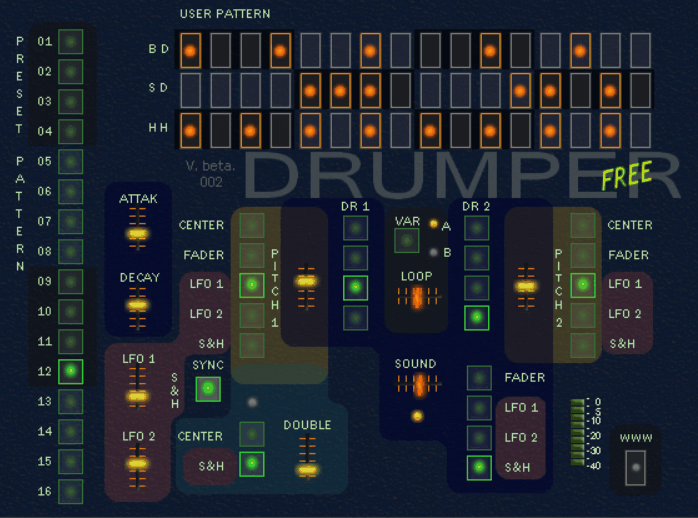
The interesting thing about a morphing sequencer is that it doesn’t ask you to choose between pattern A and pattern B. It lets you live somewhere between them. That’s the core idea behind Syntler Drumper, a free groovebox that runs two internal 16-step sequencers at the same time.
I like that this can create a middle state that you wouldn’t necessarily think to program yourself. Instead of changing patterns abruptly, you can use morphing and density to move gradually between them.
That makes it less of a conventional step sequencer and more of a pattern-performance instrument.
- 774 Editable Patterns
Drumper ships with 774 editable 16-step patterns and 128 presets, giving you a genuinely large starting library to morph between rather than needing to program everything from a blank slate.
- Twenty Factory Drumsets
The plugin includes 20 factory drumsets, and you can also load your own WAV samples, up to 20 across two kits, at 16 or 24-bit depth.
7. HY-ESG by BPB
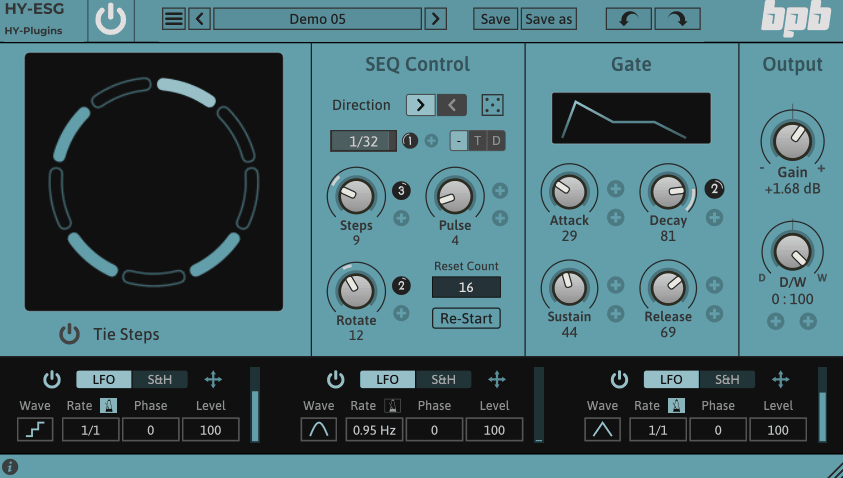
I like Euclidean gating because it can make a familiar effect feel unfamiliar without requiring a complicated interface. HY-ESG, developed by HY-Plugins and released free through Bedroom Producers Blog, takes that idea and replaces the traditional gate grid with a Euclidean sequencer.
Instead of manually deciding which of 16 boxes should be on, you’re setting steps, pulses, duration, and direction, then letting the mathematical distribution determine where the active gates fall.
That makes HY-ESG a particularly neat free pick for trance gates, rhythmic pads, experimental textures, and evolving movement.
- ADSR-Shaped Gate
An onboard ADSR envelope shapes exactly how each triggered step opens and closes, giving you control over the attack and release character of the gating rather than a hard, instant on-off switch.
- Rotatable Euclidean Pattern
You can rotate the Euclidean sequencer itself, shifting where the pulses fall within the pattern without changing the underlying step and pulse count, which opens up a lot of variation from a single core rhythm.
- Three Modulation Units
Three modulation units, each switchable between LFO and Sample-and-Hold modes, can modulate the ADSR envelope or the sequencer’s own parameters, which is where the plugin moves from a simple trance gate into genuinely experimental territory.
Extra: Sinevibes Switch v3
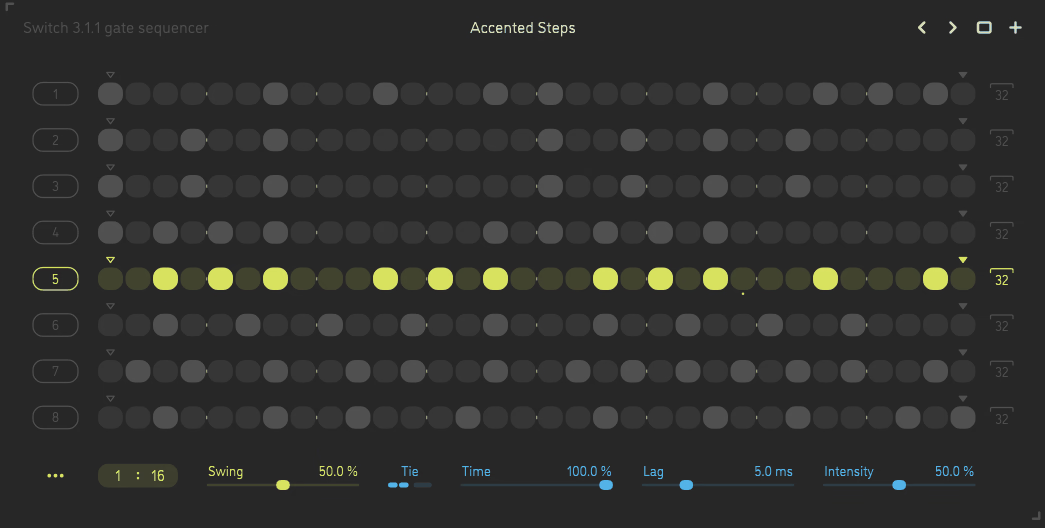
I’d classify Sinevibes Switch v3 as a specialist rhythm effect rather than a general sequencing environment. The plugin takes incoming audio and uses a host-synced pattern of on/off gates to control whether that signal passes through, with enough timing flexibility to make the results considerably more interesting than a basic tremolo.
What I particularly like here is the treatment of positive and negative swing, especially when the pattern length isn’t a conventional even number.
That combination gives Switch v3 a very precise feel, which is useful when you want rhythmic gating that stays musically locked rather than simply chopping audio at regular intervals.
- Eight Patterns, Thirty-Two Steps Each
Switch v3 gives you eight separate gate patterns, each holding up to 32 steps, with an extremely wide range of timing settings for building polymetric or polyrhythmic motion in essentially any time signature.
- Two-Pole Analog-Style Lag Filter
Gate transitions run through a two-pole low-pass filter for smoothing, giving the plugin a snappy but natural-feeling character rather than the harsh, purely digital cut you’d get from an instant switch.
Which Sequencer Plugin Should You Choose?
There isn’t one universal winner here because these plugins are solving very different problems.
For deep polymetric MIDI sequencing, I’d start with 510k POLYLLOP or 510k SEQUND. POLYLLOP puts more emphasis on independent polyphonic voices, while SEQUND is built around the interaction of multiple compact sequencing lanes.
Then, for Euclidean and generative sequencing, I would say ADSR Orbit, HY-RPE2, and ADSR Hexcel are the most distinctive. Orbit gives you a structured generative environment, HY-RPE2 combines conventional and Euclidean sequencing, and Hexcel takes a more visual, rule-based approach.
Next, there isa drum programming. I’d separate the choices by workflow. XO is the obvious fit when sample discovery matters most. Triaz is the deeper choice for polyrhythmic drum sequencing. Playbeat 4 is especially useful when you want continuous variation, while DrumComputer brings synthesis and sequencing into one instrument.
For fast inspiration, I’d point you toward Harvest MINI, particularly when the goal is to generate a usable starting idea quickly and edit it afterward.
In addition, for live performance, I’d look closely at Stepic, HY-RPE2, SEQUND, Replicant 3, and Bloom Mura Masa. They all support performance-oriented workflows, but the right choice depends on whether you’re manipulating MIDI, patterns, samples, or incoming audio.
The important thing is that feature count isn’t the same thing as usefulness. A sequencer with dozens of controls isn’t automatically better than a simpler one that matches the way you naturally build music.
I’ve found that the most successful choice is usually the plugin whose sequencing model matches the kind of variation you actually want to create. If you want patterns that drift against each other, look for independent cycle lengths.
If you want controlled randomness, prioritize probability and modulation. If you’re mainly after drum ideas, sample workflow and pattern variation may matter more than MIDI depth.
That is why I’d treat this roundup less as a rigid ranking and more as a guide to the major sequencing approaches available: polymetric, Euclidean, generative, sample-driven, synth-driven, audio-based, and performance-focused. Once you know which of those workflows matches your own production habits, choosing the right plugin becomes much easier.

Hey, I’m Vil, I started this site to help you find the best audio plugins covering various categories including synths, pianos, strings, and effect tools of all sorts as well. I pick these plugins based on various criteria so it best matches the actual topic.