When you purchase through the links on my site, you support the site at no extra cost to you. Here is how it works.
Noise removal for vocals has been a genuinely difficult problem in mixing and post-production for a long time. Gate-based approaches kill the natural decay of a performance. Broadband noise reduction muddies the vocal character.
Most solutions involve tradeoffs that create new problems while solving old ones. Waves built Clarity VX Pro around a neural network trained specifically on vocal material, and the approach produces results that are meaningfully different from conventional noise reduction in ways that matter practically rather than just technically.
I’ve run it across dialogue editing, music vocal mixing, and podcast production, and the honest assessment is that it earns its reputation on specific material while having clear limits that are worth understanding before you buy.
The neural network approach
Waves Clarity VX Pro uses a deep learning model trained on thousands of hours of vocal recordings to distinguish between voice and non-voice content rather than relying on spectral subtraction or gate-based detection.
The practical difference is significant: spectral subtraction produces the characteristic underwater artifacts that make processed audio sound obviously treated, while the neural network approach removes noise while preserving the natural harmonic content and transient character of the voice.
The model processes audio in real time with low latency, which makes it practical for live streaming, video calls, and tracking sessions rather than purely post-production work. I find the real-time capability genuinely useful on sessions where the noise problem needs solving before recording rather than after, and the low latency means I can use it as an insert on the input chain without introducing monitoring delay that affects the performance.
The Voice Sensitivity control adjusts how aggressively the model distinguishes between voice and background content, and I find this the most important parameter to understand before using the plugin on new material.
At high sensitivity, the model removes more background content but can occasionally affect vocal transients and sibilants on material with unusual spectral characteristics. At lower sensitivity, the noise reduction is more conservative but stays further from the vocal content it’s meant to preserve.
Here’s what the processing approach covers:
- Neural network vocal detection
Rather than spectral subtraction, the model was trained specifically on voice material, which is why the noise removal preserves vocal character instead of introducing the underwater artifacts that broadband processing typically produces.
- Real-time low-latency processing
You can run it as a live insert during tracking and streaming, not just in post-production. I use it on input chains where the noise problem needs solving before recording rather than after, and the latency is low enough that it doesn’t affect monitoring.
- Voice Sensitivity control
The most important parameter to dial in before anything else. I start at 70 to 80 percent on most dialogue and podcast material, which removes enough background content without touching the transients and sibilants that higher sensitivity settings occasionally affect on unusual vocal material.
- Attenuation control
Rather than applying maximum reduction to everything the model detects, this lets you set a precise dB ceiling on how much noise gets removed. I find this essential for avoiding the vocal character changes that aggressive attenuation introduces on material with moderate rather than severe noise floors.
What it handles well
On broadband noise from HVAC systems, fan noise, air conditioning, and room noise, Clarity VX Pro is as effective as anything I’ve used for vocal material at this price point. The neural network model handles these noise types cleanly because they occupy spectral space that’s clearly distinct from the voice, and the separation between voice and noise is unambiguous enough that the model produces clean results without obvious artifacts.
On dialogue editing for film, television, and podcast, the results are consistently usable with minimal adjustment. I set the Voice Sensitivity to around 70 to 80 percent on most dialogue material as a starting point, which produces clean noise removal without touching the natural character of the speech. That starting point suits most broadband noise situations, and I only move away from it when the noise type or the recording conditions require a more specific approach.
On music vocal mixing, the application is more contextual. The neural network removes consistent background noise effectively, but on material with significant low-frequency rumble or very high noise floors, the processing needs more careful sensitivity adjustment to avoid affecting the vocal character at the same time as removing the noise. I’d use it at conservative sensitivity settings on music vocal material and compare the processed and unprocessed signal carefully before committing.
- Dialogue and post-production
The most reliable application and where I find the processing most immediately convincing. The model handles broadband room noise, fan noise, and HVAC noise cleanly on dialogue material, and the results integrate naturally into the final mix without audible processing artifacts on the vocal content.
- Podcast and voice-over
Setting Voice Sensitivity between 70 and 80 percent handles most recording environment noise that podcasters and voice-over artists deal with, and the real-time processing makes it practical as a consistent part of the recording and delivery chain rather than a post-production correction tool.
- Live streaming and broadcasting
The low-latency real-time processing makes it practical for live applications where noise removal needs to happen before the signal reaches the audience. I find it the most directly useful application of the plugin’s real-time capability, and the results are clean enough on most broadband noise types that it functions as a set-and-forget solution once the sensitivity is calibrated to the specific recording environment.
Where it falls short
The neural network model is trained specifically on voice material, which means it works best when the content being processed is clearly a vocal performance or spoken word. On heavily processed vocals, vocals with extreme effects applied, or material where the voice and the background share significant spectral overlap, the model’s detection becomes less reliable and the noise removal introduces more artifact into the processed signal.
On transient noise types including keyboard clicks, mouse clicks, and intermittent mechanical noise, the model performs less consistently than it does on broadband noise. These noise types are temporally unpredictable in ways that the neural detection doesn’t handle as cleanly, and for those applications dedicated de-click processors produce more reliable results.
I also find the attenuation range has a practical ceiling on very high noise floors. When the signal-to-noise ratio is extremely poor, the model produces acceptable results but the vocal character changes enough at the required attenuation levels that the processing becomes audible as an artifact rather than a transparent solution. In those cases, addressing the recording environment is a more reliable fix than expecting any noise removal tool to fully compensate.
Clarity VX Pro vs standard Clarity VX
Waves offers both Clarity VX and Clarity VX Pro, and the distinction is worth understanding before deciding which to buy.
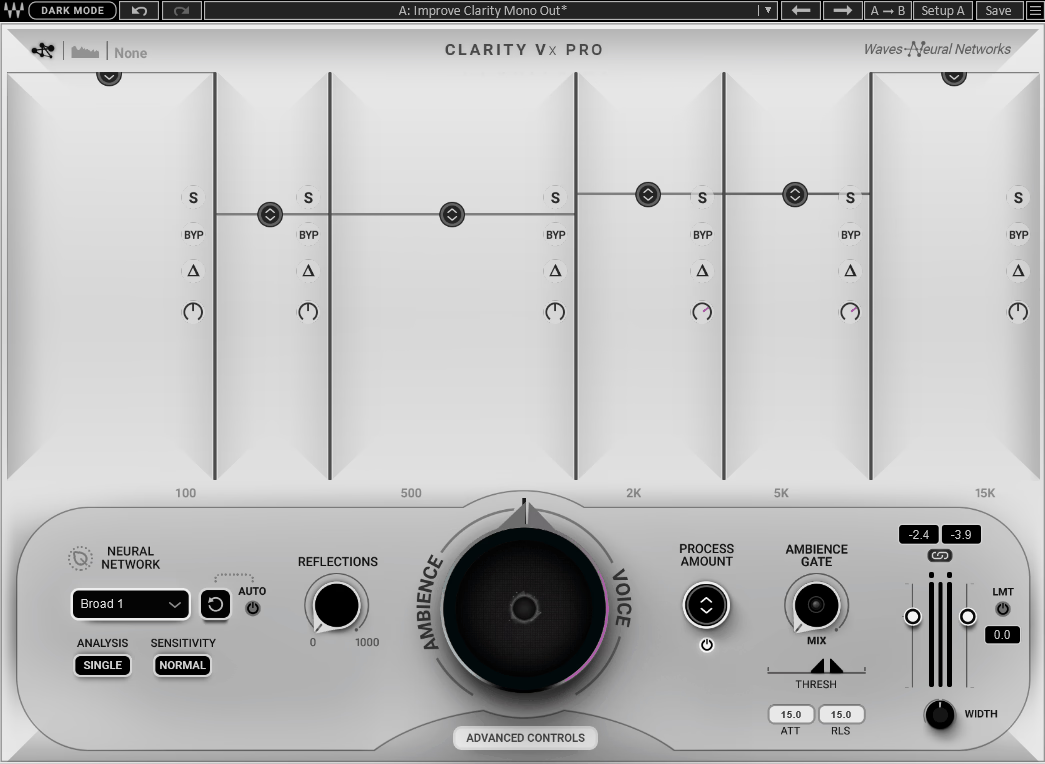
The standard version provides a single-band processing approach with less control over the neural network behavior. The Pro version adds multiband processing across 4 independent bands, per-band sensitivity and attenuation controls, and a more detailed interface for managing how the neural network handles different frequency ranges independently.
I find the multiband control most useful on material where the noise is concentrated in specific frequency ranges rather than distributed broadly across the spectrum. Being able to apply aggressive noise removal in the low-frequency range where rumble is present while using conservative settings in the high-frequency range where sibilant content is more vulnerable to processing artifacts produces cleaner results than a single broadband sensitivity setting on the same material.
For most users working primarily on dialogue, podcast, and broadband noise removal, the standard version covers the most common applications adequately. The Pro version is worth the additional cost specifically if you deal regularly with complex noise situations where per-band control makes a meaningful difference to the result.
Pros:
- Neural network noise detection
The deep learning model trained on vocal material produces noise removal that preserves vocal character in a way that spectral subtraction doesn’t naturally achieve. On broadband noise types, the results are clean and artifact-free at sensitivity settings that remove enough noise to be genuinely useful.
- Real-time low-latency processing
Practical for live streaming, broadcasting, and tracking rather than purely post-production, which extends the usefulness beyond mixing and editing into live and recording applications that conventional noise reduction tools don’t support as cleanly.
- Multiband control in the Pro version
Per-band sensitivity and attenuation across 4 frequency bands gives you precise control over how the neural network handles different frequency ranges independently, which produces cleaner results on material where broadband sensitivity settings compromise the vocal character in specific frequency ranges while removing noise in others.
Cons:
- Less effective on transient noise
Keyboard clicks, mouse clicks, and intermittent mechanical noise are less reliably handled than broadband noise types, and for those applications dedicated de-click processors produce more consistent results than the neural network detection approach.
- Performance on very high noise floors
When the signal-to-noise ratio is extremely poor, the required attenuation level changes the vocal character enough that the processing becomes audible as an artifact. Addressing the recording environment produces more reliable results than expecting any noise removal tool to fully compensate for very high noise floors.
- Pro version cost versus standard
For users working primarily on dialogue and broadband noise removal, the standard version covers most common applications adequately. The Pro version cost is harder to justify unless per-band control makes a regular practical difference in your specific workflow.
Verdict
The neural network approach here solves a specific problem better than most alternatives: removing broadband noise from vocal material without the underwater artifacts that spectral subtraction consistently introduces. Clarity VX Pro is worth the price if dialogue editing, podcast production, and live streaming are regular parts of your workflow, and I find the multiband control in the Pro version genuinely useful on complex noise situations where a single broadband sensitivity setting compromises the vocal character in ways you don’t want.
On the flip side, transient noise, extreme noise floors, and non-vocal content are where the vocal-specific optimization works against you rather than for you. For those applications, more general-purpose noise reduction tools cover the ground more reliably, and the Pro version cost is harder to justify if those are the noise types you deal with most often.

Hey, I’m Vil, I started this site to help you find the best audio plugins covering various categories including synths, pianos, strings, and effect tools of all sorts as well. I pick these plugins based on various criteria so it best matches the actual topic.