When you purchase through the links on my site, you support the site at no extra cost to you. Here is how it works.
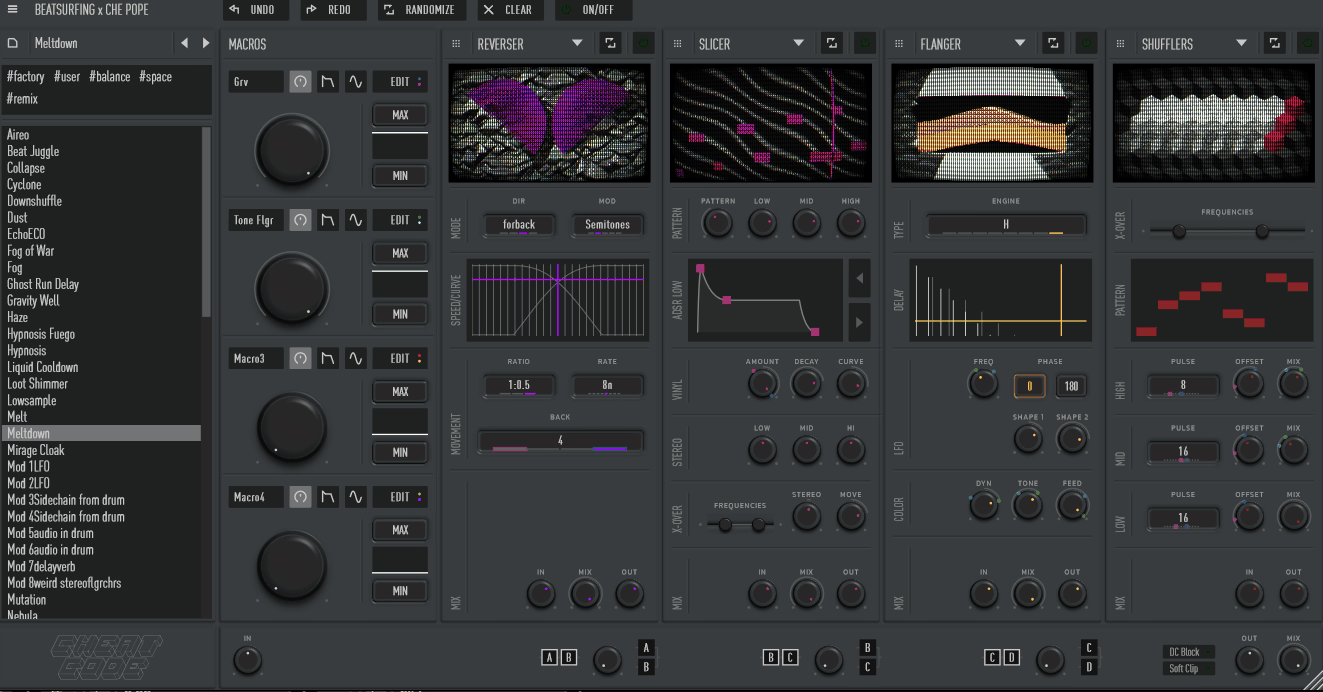
Most multi-effects plugins give you a familiar chain of delays, reverbs, filters, and distortion, then leave you to decide how to make them interesting. CHEat Code puts more emphasis on sound manipulation and performance, with 16 effect modules, four active slots, flexible routing, four macros, and randomization that lets you move between controlled processing and stranger results quickly.
I’ve found it most useful when a sound already works but needs to move, break apart, or change character.
You can build a compact effect chain, reshape how the modules interact, and perform several changes from a few controls, which is often faster than recreating the same movement through separate plugins and automation lanes.
16 Effects, Four Slots
There are 16 effect modules to choose from, but only four can be active at once. I actually like that limitation because it keeps the instrument focused, although you’ll hit it sooner when you’re trying to build a more involved processing chain.
The effects cover a broad range, including granular delays, reverb, chorus, flanger, detune, distortion, sample-rate reduction, slicing, shuffling, and reverse processing. You can move from a subtle stereo treatment to much more destructive sound design without leaving the same plugin.
- Space and time
Reverb, Tap Delay, Sequence Delay, Fractal Delay, Grain Delay, and Bubble Grain give you several ways to stretch, repeat, smear, and reposition the source.
- Modulation and tone
Chorus, Flanger, Detune, Viber, Shaper, DownSampler, and Spin cover stereo movement, pitch variation, saturation, and digital degradation.
- Rhythmic processing
Slicer, Shuffler, and Reverser let you break up, rearrange, or reverse the source, which is useful when a normal delay or filter does not create enough movement.
Routing Is Part of the Sound
Instead of locking you into one fixed signal path, CHEat Code lets you move continuously between serial and parallel routing. That changes how the modules interact, so the routing control can have as much impact on the result as the effect choices themselves.
I might run a Shaper into Fractal Delay for a dense, processed sound, then move toward parallel routing when I want more separation between the original and effected signals. You can automate that routing change as part of a transition, which gives you another way to create movement without adding another processor.
This is particularly useful when the same four effects need to serve different roles during a track. Rather than rebuilding the chain, you can change the signal relationship and get another usable version of the sound.
Macros and Performance Control
Four assignable macros let you turn several plugin parameters into a smaller set of performable controls. You can map multiple parameters to one macro and define how those parameters react, making it possible to reshape an entire patch from one movement.
I like this when a sound needs to evolve during playback rather than sit on one static setting. One macro can increase distortion, widen the stereo field, increase delay, and change another effect at the same time, giving you a coordinated transformation instead of several unrelated moves.
The Performance Widget is useful for more immediate gestures. You can trigger temporary effects and return to the previous state when you release the control, which works well for fills, transitions, and one-off accents during recording or live manipulation.
Randomization and Experimentation
Randomization is more useful here than a simple “randomize everything” button. You can randomize the full setup or work at the module level, so it’s possible to explore variations without throwing away the parts of a patch you already like.
I usually get the basic sound working first, then randomize one area and listen for something worth keeping. The ability to move through variations without committing to every change makes experimentation much less frustrating, especially when the goal is discovery rather than precise reconstruction.
That said, the randomizer changes parameters within the effects you already selected. It does not magically choose a completely new four-module chain for you, so the initial effect selection still matters.
Where I Use It
CHEat Code is most useful when a source needs to become an event rather than simply sound “processed.” Vocals, synths, drums, guitars, basses, and loops all give it enough material to work with, particularly when you want a short transition, rhythmic interruption, or more aggressive texture.
For vocals, I like combining rhythmic processing with delay and reverb so the last syllable breaks apart as the phrase ends. On synths and loops, modulation and granular effects can create movement without adding more notes to the arrangement.
- Transitions
Slicer, Reverser, delay, and degradation effects can create short arrangement changes without requiring a large stack of edited clips.
- Vocal processing
You can turn a phrase into stutters, warped repeats, and moving textures while preserving the original vocal underneath.
- Synths and loops
Granular processing, modulation, and distortion can give static parts more movement and character without rewriting the source.
- Sound design
The less conventional modules are useful when you want a result that would take several standard plugins to recreate.
A Practical Workflow
I would start with two or three modules, not four. Get the main idea working first, then decide whether another effect is actually helping the sound.
Next, change the routing before adding more processing. Moving between serial and parallel paths can create a surprisingly large tonal change, particularly when one module is heavily reshaping the source.
Once the chain is stable, assign macros to the controls you want to perform. I generally keep one macro focused on the main transformation and use another for smaller changes so the controls remain predictable.
- Build the core sound first
Start with two or three effects and make sure the source still has a useful role in the mix.
- Try routing changes
Experiment with the serial/parallel balance before adding another module, because the signal path can change the character dramatically.
- Use macros for movement
Group related parameters under a macro when you want one physical control to reshape several parts of the effect.
- Randomize selectively
Once the patch works, randomize individual sections and keep the changes that improve the sound rather than rebuilding everything.
Where It Falls Short
Four active modules can become restrictive once your processing needs get complicated. The library is much larger than what you can use simultaneously, so there will be sessions where you still need to add another plugin for a fifth or sixth processing stage.
Some of the more unusual effects also take time to understand properly. A basic preset is easy to use, but getting predictable results from granular processing, shuffling, routing changes, and macro assignments requires experimentation, especially when several controls are moving together.
The workflow is also geared toward creative effects rather than detailed mixing. If you need very precise EQ, transparent dynamics, or a highly specialized reverb, you may still get better results from a dedicated processor rather than trying to force CHEat Code into that role.
CPU use is another consideration with heavier patches. One instance is unlikely to be a problem on a modern system, but several complex instances with multiple effects and active modulation can add up, so I would keep an eye on performance in larger sessions.
Pros and Cons
Pros
- Unusual effect selection
The 16-module library gives you more than the usual delay-and-reverb combination, with granular, rhythmic, modulation, degradation, reverse, and spatial effects that open up sound-design options without requiring a long chain of separate plugins.
- Routing can be automated
The serial/parallel control does more than organize the chain. You can use the routing itself as a performance or automation parameter, creating changes in density and separation that would otherwise require additional processing or parallel tracks.
- Macros make complex patches playable
Four assignable macros let you bring multiple parameter changes under a small number of controls, which makes complicated effects easier to perform and easier to automate in a DAW.
- Randomization stays useful
Because you can work at the module level, randomization becomes a way to explore variations without destroying the entire patch. I find that much more practical than generating a completely new effect every time I want an alternative.
- Works on many types of material
You can use it on vocals, synths, drums, guitars, basses, loops, and transitional elements, so the plugin is not tied to one particular production style or source.
Cons
- Four-module limit
Only four effects can be active at once, which means larger chains will still require additional plugins even though the overall library is fairly broad.
- Creative depth takes time
The more unusual modules and routing options are not difficult because the interface is inaccessible; they’re difficult because there are many ways for the same parameters to interact, and repeatable results take practice.
- Not a precision mixing tool
CHEat Code is built around creative processing, so detailed corrective EQ, transparent compression, and specialist spatial processing are better handled elsewhere.
- Complex patches can use more CPU
Heavy combinations of effects and modulation can increase CPU use across multiple instances, which matters when you’re already running a demanding session.
Verdict
The combination of 16 modules, flexible serial/parallel routing, four macros, and selective randomization gives you several ways to turn an ordinary source into a moving, rhythmic, or heavily transformed sound without building every stage separately.
I would especially consider CHEat Code for electronic production, vocal effects, transitions, sound design, and performance-oriented processing, where the ability to manipulate several things together is more important than having one perfectly specialized delay or reverb. You can build a controlled patch, automate the macros, or deliberately introduce variation when the arrangement needs something less predictable.
The four-slot limit and creative focus are the main tradeoffs. If you already have a strong collection of specialist effects and rarely build unusual chains, you may not need another creative multi-effect; if you want a compact environment for experimenting, performing, and reshaping sounds without a lot of routing work, CHEat Code has a much stronger case.

Hey, I’m Vil, I started this site to help you find the best audio plugins covering various categories including synths, pianos, strings, and effect tools of all sorts as well. I pick these plugins based on various criteria so it best matches the actual topic.