When you purchase through the links on my site, you support the site at no extra cost to you. Here is how it works.
A good texture plugin should give you more than a bigger reverb tail. Dawesome LOVE 2 takes incoming audio, breaks it into grains, and lets you reshape those fragments through a flexible effect chain, so a vocal, pad, guitar, synth, or loop can become something much more atmospheric or rhythmic without losing all connection to the original sound.
I use this kind of processing when a part already works but feels too static. You can keep the dry signal present and build a separate layer of movement around it, which makes the plugin useful for sound design as well as more conventional mixing.
- Granular texture engine
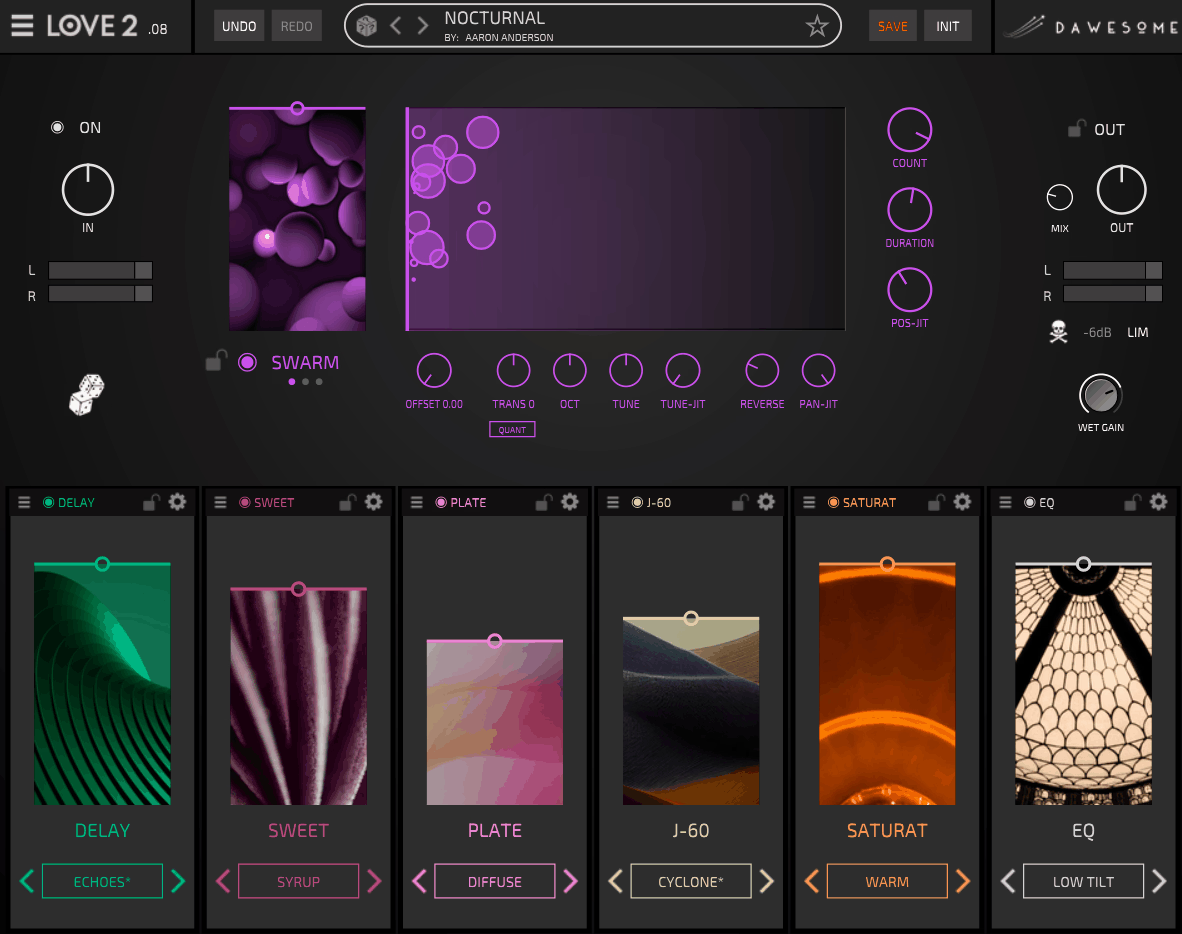
LOVE 2 gives you Swarm, Chop, and Robot granular modes, each approaching the source differently, from smoother grain clouds to more rhythmic and synthetic fragmentation.
- Six-slot effects chain
You can load up to six effects from a library of more than 20 modules and change their order, so the processing can be built around the source rather than following one fixed path.
- Randomization with locks
You can randomize parts of a patch while locking the modules you already like, making experimentation much easier to control.
- Module presets
Each effect has its own presets, so you can change one part of the chain without replacing everything else.
The Granular Engine
Most of the character starts in the granular section. Swarm spreads the source into softer clouds, Chop keeps more of the rhythmic structure, and Robot pushes the material toward shorter, more synthetic fragments, giving you three very different ways to approach the same recording.
I normally start with Swarm on sustained material because it keeps some of the original identity intact. Chop makes more sense when I want the rhythm of a loop or phrase to remain audible, while Robot is useful when the source needs to move further into glitchy or artificial territory.
You also get controls for grain length, grain density, pitch movement, octave shifting, reverse behavior, and stereo variation. That matters because you can decide how tightly the processed sound follows the source instead of accepting one fixed granular character.
Six-Slot Effects Chain
The six-slot chain is where LOVE 2 becomes more flexible than a typical granular effect. You can choose up to six processors and place them in whatever order suits the sound, so filtering before reverb produces a different result from filtering the processed reverb afterward.
The module library covers reverb, delay, filtering, distortion, modulation, micro-looping, granular processing, and dynamics, which gives you enough range for both subtle ambience and more destructive sound design.
I often keep the granular stage fairly simple and use the effects to finish the texture. A small amount of filtering followed by reverb can turn a guitar note into a background layer, while distortion and micro-looping can make the same source much more aggressive.
- Reverb and shimmer
Useful when you want space and sustain around the processed source.
- Delay and modulation
Good for adding movement and stereo width without making the granular effect too obvious.
- Distortion and filtering
Useful for controlling the tone or adding harmonic density and grit.
- Micro-looping and granular effects
These can turn a source into rhythmic fragments and repeating textures rather than simply making it wetter.
Signal Flow
Because you can reorder the effects, the signal path becomes part of the sound. Distortion before reverb gives you a denser, more aggressive space, while processing the reverberated signal can create a much more obviously effected texture.
I usually decide what should remain recognizable before choosing the order. If the original attack matters, I’ll keep more destructive effects later in the chain; when I want the source to dissolve into a pad, I can process it much earlier.
That flexibility can also replace several separate plugin instances. You can keep granular processing, filtering, distortion, delay, and reverb inside one chain and change the order until the texture actually fits the track, rather than building the same idea across several tracks.
Randomization and Presets
Randomization is most useful here when you can keep part of the sound intact. Lock a module you like, randomize the others, and you can explore new combinations without losing the useful part of the patch.
I use that when I know the broad direction but not the exact result. Once something catches my ear, I’ll usually stop randomizing and start adjusting the individual controls so the sound fits the arrangement.
The factory presets are useful for learning the signal flow, but I would not judge the plugin from them alone. The same preset can behave very differently depending on the source, and that is especially true with granular processing.
Where I Use It Most
I get the most value from LOVE 2 when a sound needs a second identity. Vocals, synths, guitars, pads, percussion loops, and field recordings can all become useful texture sources, particularly when the original part is already musically solid but lacks movement.
Vocals work especially well because a single phrase can generate a background layer while the dry vocal stays in front. I also like using sustained synths and guitars because the granular engine has enough material to work with without immediately becoming repetitive.
- Vocals
Turn a phrase into an atmospheric layer, shimmer texture, or processed background part while keeping the original vocal intact.
- Synths and pads
Use the granular engine to create movement and width from a relatively simple sustained source.
- Guitars and field recordings
These can become cinematic beds, drones, and evolving textures without requiring a separate chain for every layer.
- Percussion and loops
Chop and micro-looping can produce rhythmic fragments that retain some of the timing of the original material.
A Practical Workflow
I would start with the dry source and bring in the granular processing gradually. Find the point where the texture starts adding something useful before you introduce more effects, because it is easy to create a sound that is interesting in isolation but too busy for the track.
Once the granular layer works, add one or two effects. I often use a filter to control the spectrum and then choose either reverb or delay for space, adding distortion only when the texture needs more character.
From there, experiment with the order instead of immediately adding another processor. Changing where an existing effect sits can completely change the result, which gives you more variation without making the chain heavier.
- Start with Swarm
Use it when you want a broad, smooth texture that still feels connected to the source.
- Use Chop for rhythm
Switch to Chop when you want clearer rhythmic fragmentation from loops, percussion, or short phrases.
- Try Robot selectively
Robot works when you want the source to become more synthetic, repetitive, or glitch-oriented.
- Move the effects around
Before adding another module, change the order of the existing ones. A different signal path can produce a completely different result.
Pros
- Flexible granular processing
Swarm, Chop, and Robot give you different ways to turn ordinary recordings into moving textures, from smooth clouds to rhythmic and synthetic fragments.
- Six-slot routing
You can choose and reorder up to six effects, making signal flow part of the sound design.
- Controlled randomization
Module locks let you experiment without throwing away the parts of a patch that already work.
- Works across many sources
You can process vocals, guitars, synths, pads, loops, percussion, and field recordings, so the plugin has uses well beyond ambient effects.
Where It Falls Short
LOVE 2 is designed for creative processing rather than precise mixing. You will still want dedicated tools for surgical EQ, detailed compression, transparent limiting, or highly specialized reverb and delay work, because that is not what this plugin is trying to replace.
The source also matters a lot. A sustained vocal, pad, or guitar can give the granular engine plenty of useful material, while a very short or simple sound may need more processing before it becomes interesting.
Once you start using all six slots, the flexibility can also become a trap. I get better results when I decide what the sound needs first rather than filling every available position, because too many layers can quickly remove the character that made the source useful.
Verdict
To sum things up, the plugin is most useful when a normal sound needs to become something else without completely losing its identity. You can take a vocal, guitar, synth, loop, or field recording and turn it into a separate moving layer, then keep enough of the original underneath to maintain a connection to the performance.
I like LOVE 2 the most for ambient, cinematic, electronic, experimental, and texture-heavy production, where creating evolving layers is part of the writing process. The combination of granular modes, reorderable effects, and controlled randomization gives you plenty of ways to explore without needing a separate plugin for every stage.
If your goal is detailed corrective processing, this is more specialized than you need; if you regularly want to turn ordinary sounds into pads, drones, rhythmic textures, or atmospheric layers, the workflow gives you a practical reason to keep it around.

Hey, I’m Vil, I started this site to help you find the best audio plugins covering various categories including synths, pianos, strings, and effect tools of all sorts as well. I pick these plugins based on various criteria so it best matches the actual topic.