When you purchase through the links on my site, you support the site at no extra cost to you. Here is how it works.
Most step sequencers give you a grid, a clock, and a few controls for each step. That works perfectly well for straightforward patterns, but when you want independent timing, evolving sequences, or controlled randomness, you can quickly end up stacking multiple sequencers and automation lanes.
Devicemeister Stepic combines polymetric sequencing, per-step control, probability, randomization, MIDI routing, and eight dedicated modulation sequencers in one instrument. I’ve used this kind of workflow for electronic production and generative ideas, and I especially like it when I want a sequence to keep developing without manually programming every variation.
- Polymetric sequencingDifferent sections of a sequence can use different lengths and timing, so pitch, velocity, duration, and modulation do not have to repeat on the same cycle.
- Controlled variationPer-step probability and 200+ randomization functions let you introduce movement while keeping the musical boundaries under your control.
- More than note sequencingThe eight modulation sequencers can send MIDI CC to software and hardware, so the same rhythmic structure can control filters, effects, wavetable positions, or other MIDI-controllable parameters.
Polymetric freedom
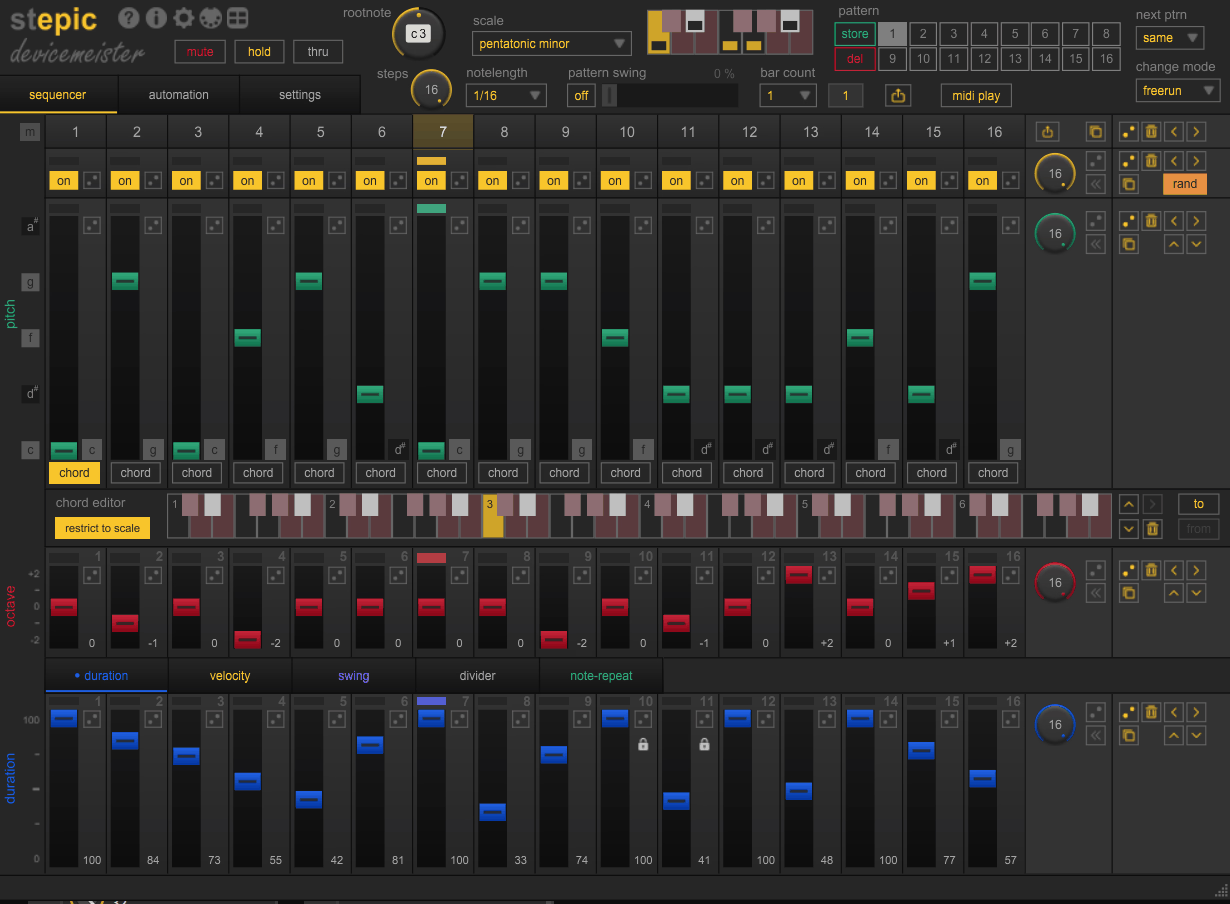
One of the biggest strengths here is that you are not forced to make every part of a sequence repeat at the same length. Pitch, octave, velocity, duration, and modulation sections can have their own sequence lengths, which means a short pattern can evolve for much longer before all of its elements line up again.
I use this kind of setup when a standard 16-step loop starts feeling too predictable. You might have an eight-step pitch pattern, a different duration cycle, and a modulation sequence with another length, creating movement without adding more notes or manually shifting clips around the DAW.
Stepic also supports lane clocks with several timing modes, including step-based, per-bar, per-pattern, note-triggered, and note-gate behavior. That gives you more control over whether a section follows the main clock or responds directly to incoming MIDI.
Per-step control
There is quite a bit more happening at each step than simply “note on” or “note off.” You can work with pitch, octave, velocity, duration, probability, ties, and other sequence values, while the scale system helps keep melodic material inside a chosen key.
That matters when you’re building patterns by ear. I can leave the basic rhythm alone and change velocity or note length to create accents, use probability to remove selected notes occasionally, or use a scale to experiment with melodic variations without constantly correcting notes afterward.
- Pitch and scalesYou can set a root note and scale so that melodic variations stay musically usable, which is particularly helpful when experimenting with randomization.
- Velocity and durationChanging accents and note lengths independently gives a sequence more phrasing without requiring additional automation.
- ProbabilityIndividual notes can have their own probability of playing, which lets you create variation while keeping the underlying pattern recognizable.
- Legato and tiesYou can create connected notes and portamento-style movement, including legato behavior that works polyphonically.
Controlled randomness
Randomization is one of the areas where I’d spend some time rather than simply turning everything up. Stepic includes more than 200 randomization functions, with adjustable ranges for values such as pitch, octave, duration, velocity, and modulation.
The useful distinction is that you can decide what is allowed to change and by how much. For example, I might keep a bass pattern’s pitch mostly fixed while randomizing velocity and occasionally dropping a note through probability. You still get variation, but the sequence retains a recognizable musical identity.
For generative work, that is much more practical than unrestricted randomization. You are defining the boundaries first, then letting the sequence move inside them, which makes the results easier to use in a real arrangement.
- Per-step probabilitySetting probability between 60 and 80 percent on specific steps produces sequences that mostly follow the programmed pattern but introduce natural variation without manual programming. I use this most on melodic lanes where occasional dropped or repeated notes make the sequence feel performed rather than mechanical.
- Lane-level randomizationGenerates new pitch or velocity values within a defined range on each cycle. Combined with per-step probability, this produces generative sequences that stay musically coherent because the randomization operates within musical boundaries you define.
Modulation and MIDI control
Stepic is not limited to generating notes. Its eight modulation sequencers can send MIDI CC values to compatible software and hardware, allowing you to sequence parameters alongside the notes themselves.
I find this particularly useful for synth parameters. A melodic sequence can have its own pitch cycle while a separate modulation sequence controls filter cutoff at a different length, so the tone keeps evolving even when the basic note pattern stays familiar.
You can also use MIDI CC with external hardware, provided your setup supports the routing. That makes the plugin useful as a bridge between DAW-based sequencing and hardware instruments or MIDI-controlled effects, rather than limiting it to software instruments.
Patterns, scenes, and live use
The pattern system lets you store up to 16 patterns and chain them together, with individual patterns reaching up to 16 bars. That gives you considerably more room than a single short loop and makes it possible to build larger sequences inside the plugin before exporting them to your DAW.
For live work, I like the combination of MIDI Play, transpose, chord play, pattern changes, and MIDI mapping. You can use a keyboard to interact with the sequence rather than treating it as something that simply runs in the background.
The workflow is also practical in the studio because you can drag and drop up to 16 bars of MIDI into the DAW, including supported CC automation and other sequence behavior. I use that approach when I have generated something interesting but want to finish the arrangement with conventional clips and automation.
Where I Use It Most
For electronic music, the strongest use case is evolving rhythmic and melodic patterns. I can build a bassline with one sequence length, let duration behave differently, and use modulation to keep the sound moving without turning the arrangement into a mess of automation lanes.
Generative composition is another natural fit. Probability and bounded randomization make it easy to create sequences that change from cycle to cycle while staying close enough to the original idea that I can actually use them in a track.
- Bass and melodic sequencesDifferent sequence lengths are useful for creating patterns that evolve without needing more notes, especially on basses, arpeggios, and repeating synth phrases.
- Generative musicProbability and controlled randomization let you build variation inside clear musical boundaries, which is much easier to manage than completely random note generation.
- Hardware and modular setupsMIDI CC support makes it useful for controlling external instruments and MIDI-compatible hardware, while MIDI routing lets a single sequencer become part of a larger setup.
A Practical Workflow
I would start with a simple eight- or 16-step idea rather than trying to use every feature immediately. Get the rhythm and basic pitch working first, then give one or two sections different lengths so you can hear exactly how the polymetric relationship changes.
Next, add probability to only a few steps. I prefer occasional variation to constant randomness, because the sequence still needs a recognizable center for the listener.
Once that works, introduce a modulation sequencer. A filter cutoff is an easy target, but you can also sequence effect parameters, wavetable position, or other MIDI-controllable values depending on your instrument.
- Build the musical idea firstStart with one useful pattern, then introduce different sequence lengths or randomization only where they solve a specific musical problem.
- Keep randomness boundedLimit the range of pitch, velocity, or duration changes so the sequence can evolve without losing its musical identity.
- Use modulation as a second layerLet the notes establish the rhythm first, then use the modulation sequencers to give the sound movement without adding more notes.
- Export when the idea is finishedOnce you have something worth arranging, drag the MIDI into your DAW and continue editing there rather than forcing the entire composition to live inside the sequencer.
Where It Falls Short
The depth comes with a learning curve. There are enough sequence lengths, clocks, probability settings, modulation options, play orders, and randomization functions to make the first few sessions feel busy, particularly if you’re coming from a basic step sequencer.
I also would not buy it expecting a full DAW-style arrangement system. Although you can store and chain patterns and build sequences well beyond a simple loop, it is still fundamentally a sequencing instrument rather than a replacement for your DAW’s arrangement view.
Interface density can become another issue once you start working with complex patterns. On a large display I can work comfortably, but on a smaller laptop screen, the amount of information competing for attention makes detailed editing less convenient.
Pros and Cons
Pros
- Polymetric sequencingDifferent sections can use independent sequence lengths and timing, creating evolving patterns without manually rebuilding every variation.
- Powerful randomizationWith 200+ randomization functions and adjustable ranges, you can introduce variation without giving up control over the musical result.
- Eight modulation sequencersYou can sequence MIDI CC and plugin parameters alongside notes, which makes Stepic useful for sound design as well as note generation.
- Useful MIDI workflowPattern chaining, MIDI Play, scales, chord play, hardware control, and drag-and-drop MIDI export give you practical ways to move from experimentation into a finished arrangement.
Cons
- Dense workflowThe number of available controls can feel overwhelming at first, and you will get more from the instrument once you learn its basic signal and sequence structure.
- Not an arrangerYou can create long, evolving sequences, but your DAW is still the better place to manage a full song structure.
- Takes time to masterProbability, polymeter, randomization, modulation, and play-order features are powerful, but deliberate use takes practice rather than a single afternoon of experimentation.
Verdict
Well, I would say it makes the most sense when sequencing is more than just programming a four-bar loop. Its combination of independent sequence lengths, probability, controlled randomization, MIDI modulation, and pattern tools gives me a practical way to build sequences that keep changing without losing their musical direction.
I would not choose Stepic for simple sequencing if your DAW already handles everything you need. When you want polymetric patterns, generative variation, external MIDI control, or a sequencer that can become part of the composition itself, though, it offers a much deeper workflow than a basic step grid.
In the end, I’d test it with one bassline or synth sequence and deliberately give the pitch, duration, and modulation different lengths. If that small experiment immediately gives you ideas you would not have programmed manually, Stepic is probably solving a real problem in your workflow; if you prefer predictable, linear sequencing, its extra depth may simply get in your way.

Hey, I’m Vil, I started this site to help you find the best audio plugins covering various categories including synths, pianos, strings, and effect tools of all sorts as well. I pick these plugins based on various criteria so it best matches the actual topic.