When you purchase through the links on my site, you support the site at no extra cost to you. Here is how it works.
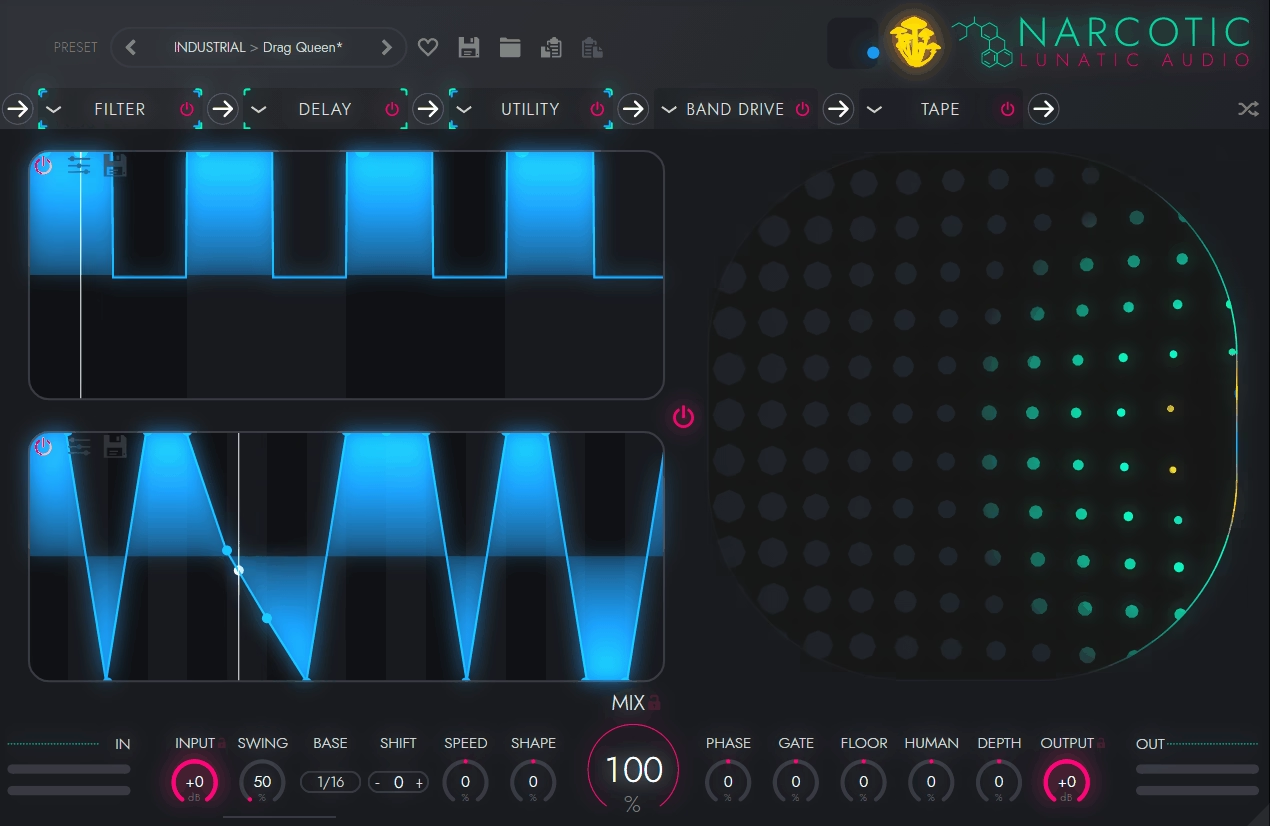
A lot of multi-effects plugins can throw plenty of processing at a sound, but the result often stays fairly static once you move past the presets. Narcotic is built around movement, letting you chain six effects and give individual parameters their own step-sequenced automation, so the processing can become part of the rhythm rather than sitting on top of it.
That setup is particularly useful when you have a sound that already works but feels too predictable. I can take a vocal, synth, drum loop, bass, or pad and make different parts of the effect chain move at different rates, while you still have enough control to keep the result musical instead of completely random.
Lunatic Audio Narcotic gives you 32 built-in effects, with up to six loaded in series at once. The library covers everything from EQ, compression, delay, reverb, chorus, filtering, saturation, and cabinet processing to stutter, glitch, tape, lo-fi, pitch drift, tremolo, rotary-style effects, stereo widening, and more.
What makes that collection more useful than a long effects list is the way you can sequence it. Every editable effect parameter can have its own step sequencer, with between 1 and 64 steps and step durations ranging from 1/64 of a bar to 8 bars, so a filter, delay, distortion, or mix control does not have to follow the same movement as everything else. I find that especially effective on electronic sounds. A short sequence on a filter can create the main groove, while a slower pattern changes delay or distortion underneath it, giving you layered movement without adding another MIDI part.
The sequencers also include Shape, Phase, Gate, Floor, and Humanize controls, along with options to invert, reverse, shuffle, halve, or duplicate a sequence. That gives you practical ways to change the feel of an existing pattern without rebuilding every step from scratch.
- Space and time
Reverb, delay, and other time-based effects let you create movement in depth, repetition, and stereo space.
- Tone and dynamics
EQ, compression, saturation, filtering, and related processors let you shape the tonal and dynamic behavior of the source as the pattern runs.
- Rhythmic processing
Stutter, glitch, tape, and related effects can break up or transform the source rhythmically without requiring separate clips or automation.
XY Pad, global controls and Shroom Magic
The large XY pad gives you another layer of control because you can assign multiple parameters to the X and Y axes and then modulate those axes with two additional step sequencers. That means one patch can have per-parameter sequencing inside the effect chain while a separate X/Y movement changes several parameters together.
I like using the XY section when the sound needs a larger transformation. For example, you could map X to a filter and distortion amount while Y handles delay and stereo width, then let the two axis sequencers create a separate rhythmic relationship from the individual effect patterns.
The global control bar is useful when you want to change the overall behavior of the patch without editing every sequencer. Swing, Shift, Speed, Shape, Phase, Gate, Floor, Humanize, and Depth can be applied across the active sequencers, while input, output, and dry/wet mix stay available in the same area.
Then there is Shroom Magic, which randomly combines elements from existing presets to create a new patch. I would not use it as a substitute for sound design, but it is a practical way to generate a starting point when you know the source needs a change and don’t yet know what kind.
Presets, standalone use & workflow
The preset system works at two levels: you have master presets for complete setups and individual presets inside the effect modules, so you can replace one part of a chain without throwing away everything around it.
For me, that makes the plugin easier to learn because I can load a complete patch, identify what is creating the useful movement, and then rebuild a simpler version around my own source. You can also save and favorite sequencer patches, which becomes handy once you find rhythmic patterns you want to reuse.
Narcotic also runs as a standalone application with configurable audio and MIDI settings, so you can use it outside a DAW for live or performance-oriented setups. I would keep the workflow simple at first. Start with one or two effects, sequence one parameter, then bring in the XY pad or another sequencer only after the first movement is doing something useful.
Where it works best..
Narcotic makes the most sense on electronic drums, basses, synths, vocals, loops, and sustained textures where rhythmic processing can become part of the arrangement. I particularly like it when a repeated part needs more variation without adding extra notes, because the effect movement can provide that change underneath the existing performance.
You can also use it for transitions and sound design. A filter sequenced against a delay, stutter, or pitch effect can turn a short phrase into something that feels more like a composed effect than a static preset.
For more conventional mixing, though, I would be selective. Narcotic is designed around creative transformation, not surgical processing, so a dedicated EQ, compressor, or reverb is usually the better choice when precision matters more than movement. There is also a real learning curve once several sequencers are running at once. The flexibility is useful, but it can become difficult to track which pattern is changing which parameter, especially when you start combining the six effect slots with the XY system.
- Electronic production
I like using the sequencers on synths, basses, and drum loops when the part feels too repetitive. A filter can shift with the groove while delay or distortion changes underneath it, giving you more movement without having to add another musical layer.
- Vocal processing
A single vocal phrase can provide plenty to work with. I often use delay, pitch, filtering, or stutter on the last word or syllable, then blend it back under the dry vocal so the effect adds movement without taking over the performance.
- Transitions and fills
This is where I can push things further. Stutter, tape-style effects, pitch movement, filtering, and delay can turn a short hit or phrase into a proper transition, which saves me from building a separate chain every time a section needs a little more energy.
- Sound design
The larger effect library gives you enough unusual combinations to build textures that would take several separate plugins to recreate.
Workflow
I would start with a source that already has some character and load two effects rather than filling all six slots. Get one parameter moving rhythmically, then listen in the full mix before adding more processing.
Once the basic pattern works, try giving another parameter a different step length. A four-step filter pattern against a seven-step delay or distortion pattern can create movement that keeps changing without requiring a more complicated source. From there, use the XY pad for broader changes and Shroom Magic when you want a controlled dose of unpredictability. I would keep the global Humanize and Swing settings fairly restrained at first, because heavy variation can make a groove lose its center quickly.
Finally, compare the processed signal with the dry source and adjust the Mix control. If the effect is stealing the rhythm or making the source harder to recognize, backing it off usually works better than continuing to add more modules.
Benefits
- Per-parameter step sequencing
Almost any editable effect parameter can have its own independent sequence, so filter, delay, distortion, pitch, and mix movement can all follow different patterns rather than sharing one automation shape.
- 32 effects with six-slot chains
You get a broad creative effects library while still being able to build a six-stage chain, which is enough for detailed sound design without forcing you into multiple plugin instances.
- Deep rhythmic control
Step counts from 1 to 64, flexible timing, Shape, Phase, Gate, Floor, Humanize, reverse, shuffle, and other sequence controls let you make the movement as tight or irregular as the source needs.
- XY modulation system
The XY pad can control multiple parameters at once and has two additional step sequencers, giving you another layer of coordinated movement beyond the individual effect sequencers.
- Standalone operation
You can run it as a standalone application with configurable audio and MIDI settings, which makes it useful for live setups as well as normal DAW sessions.
Drawbacks
- Complexity builds quickly
Once several parameters have independent patterns, the amount of modulation can become difficult to track, particularly when you’re designing a patch instead of tweaking an existing one.
- Creative rather than corrective
The effects are geared toward movement and sound design, so you will still want dedicated tools for precise EQ, transparent compression, and detailed spatial processing.
- Six-slot ceiling
Even with 32 effects available, only six can run in a chain at once, so larger processing setups still require additional plugins or instances.
- Randomization is not a replacement for direction
Shroom Magic can produce useful starting points, but you still need to shape the result around the track rather than expecting random combinations to consistently land where you want them.
Conclusion
Narcotic FX is worth trying when you want effects to behave like part of the composition rather than a fixed chain. The combination of per-parameter sequencing, six effect slots, the XY system, and global timing controls gives you enough freedom to build rhythmic processing that would take considerably more DAW automation to recreate.
I get the most from it on electronic drums, bass, synths, vocals, transitions, and sound-design material, where controlled movement can add variation without changing the underlying part. You can keep the process fairly simple, or build much more elaborate patterns once you understand how the sequencers interact.
The tradeoff is that the same flexibility can make it harder to manage. If you mainly need clean mixing tools, Narcotic is more complicated than necessary; if you want to turn static audio into rhythmic, evolving, or heavily transformed material, the workflow gives you a real reason to keep it in the toolbox.

Hey, I’m Vil, I started this site to help you find the best audio plugins covering various categories including synths, pianos, strings, and effect tools of all sorts as well. I pick these plugins based on various criteria so it best matches the actual topic.